


Introduction: Breaking Down the Documentation Barrier
If you’ve ever found yourself juggling multiple browser tabs, downloading diagrams only to re-upload them to your documentation platform, or struggling to keep your technical documents in sync with your latest designs, you’re not alone. For years, technical writers, developers, and business analysts have faced this exact frustration. But what if there was a way to make your diagrams “live” within your documentation, automatically updating whenever you make changes?
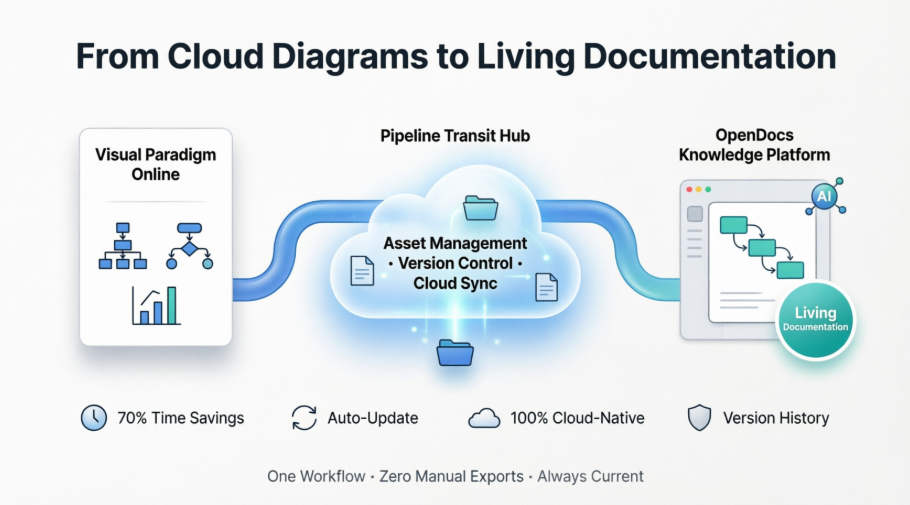
After spending several weeks testing Visual Paradigm’s latest integration between Visual Paradigm Online and OpenDocs through the Pipeline feature, I can confidently say this is a game-changer for anyone serious about maintaining accurate, up-to-date documentation. This isn’t just another export feature—it’s a fundamental shift in how we think about the relationship between visual models and documentation. Let me walk you through what makes this integration special and how you can leverage it in your own workflow.
Discovering the Pipeline: Your Digital Asset Transit Hub
What Exactly is the Pipeline?
When I first encountered the term “Pipeline” in the Visual Paradigm ecosystem, I’ll admit I was skeptical. It sounded like another buzzword. However, after using it extensively, I’ve come to understand it as essentially a smart, cloud-based asset management system that acts as the connective tissue between different Visual Paradigm tools.
Think of the Pipeline as your personal digital courier service. Instead of manually packaging (exporting) your diagrams, carrying them across town (downloading to your computer), and then unpacking them at their destination (uploading to your documentation tool), the Pipeline handles all of this automatically in the background. It’s a centralized repository where your diagrams, graphics, and other visual artifacts live temporarily, ready to be pulled into OpenDocs whenever you need them.
Why This Integration Matters
From my experience, the real value of this integration becomes apparent when you consider the typical workflow challenges:
The Old Way (Before Pipeline):
- Create diagram in Visual Paradigm Online
- Export as PNG/JPEG/SVG
- Download to local machine
- Navigate to documentation platform
- Upload image file
- Repeat every time you make changes
- Manually replace old images with new ones
- Hope you didn’t miss any instances
The New Way (With Pipeline):
- Create diagram in Visual Paradigm Online
- Send directly to Pipeline with one click
- Insert into OpenDocs from Pipeline
- Update diagram in Visual Paradigm Online
- Re-send to Pipeline
- One-click update in OpenDocs to latest revision
The time savings alone are substantial, but the real benefit is the elimination of version control nightmares. No more “final_v2_updated_reallyfinal.png” files cluttering your desktop.
Understanding OpenDocs: More Than Just a Document Editor
A Diagram-Aware Knowledge Platform
What sets OpenDocs apart from traditional documentation tools like Microsoft Word or Google Docs is its native understanding of diagrams. During my testing, I found that OpenDocs doesn’t just store images—it maintains a living connection to the source diagrams. This “diagram-aware” architecture means your visuals remain editable and updatable without leaving your document.
For teams managing complex technical documentation, this is invaluable. Whether you’re creating software architecture documentation, business process manuals, or marketing materials with data visualizations, OpenDocs treats your diagrams as first-class citizens rather than static attachments.
The AI-Powered Advantage
One feature that impressed me during my evaluation was OpenDocs’ AI capabilities. The platform can:
- Generate draft articles based on your diagrams
- Summarize lengthy technical documents
- Transform natural language descriptions into complete diagrams
- Suggest organizational structures for your knowledge base
This AI integration, combined with the Pipeline’s seamless asset management, creates what Visual Paradigm calls a “visual knowledge engine”—and based on my experience, that’s an accurate description.
Getting Started: A Step-by-Step User Experience
Prerequisites and Setup
Before diving in, you’ll need:
- A Visual Paradigm Online Combo Edition subscription (this feature isn’t available in the free or basic tiers)
- Access to Visual Paradigm OpenDocs
- An active internet connection (since both tools are cloud-based)
Creating and Sending Your First Diagram
Step 1: Design in Visual Paradigm Online
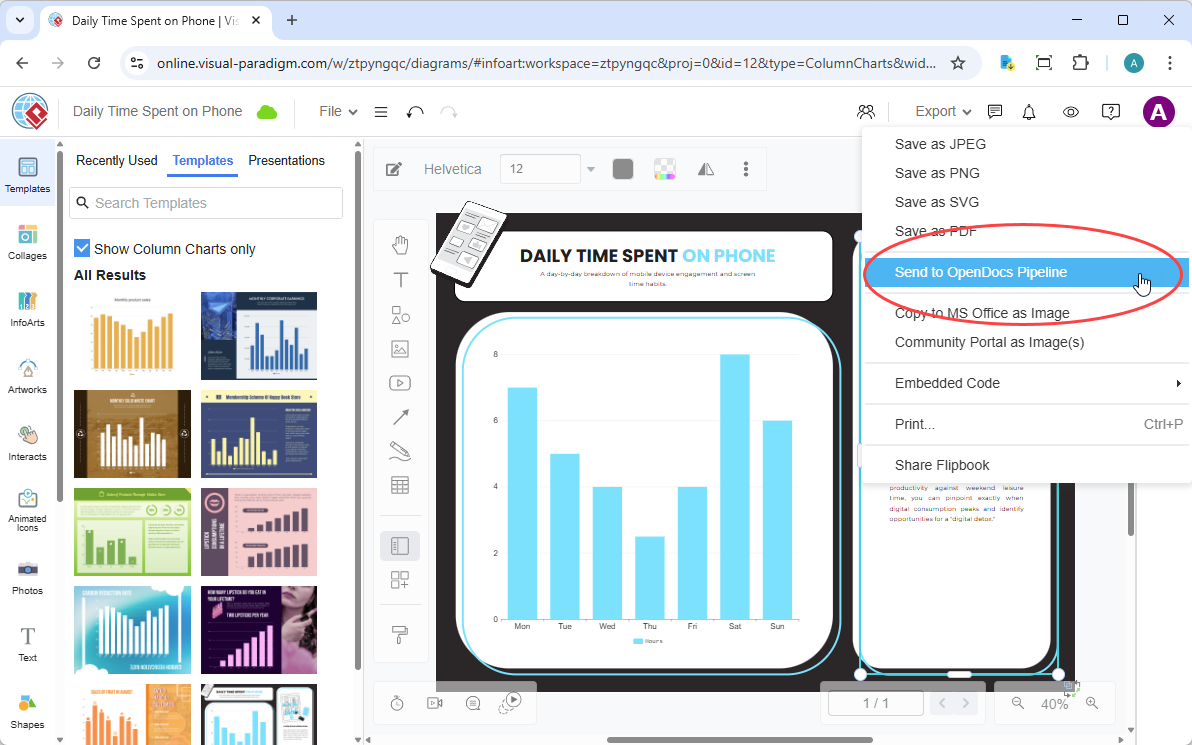
I started by creating a simple column chart in Visual Paradigm Online. The browser-based interface is intuitive, with drag-and-drop functionality and a comprehensive library of shapes and templates. Whether you’re creating UML diagrams, flowcharts, ERDs, or marketing graphics, the process is remarkably smooth.
Step 2: Send to Pipeline
Once your diagram is ready, navigate to the top menu and select Export > Send to OpenDocs Pipeline. This is where the magic begins. Instead of generating a file download, Visual Paradigm Online communicates directly with the Pipeline service.
Step 3: Add Context with Comments
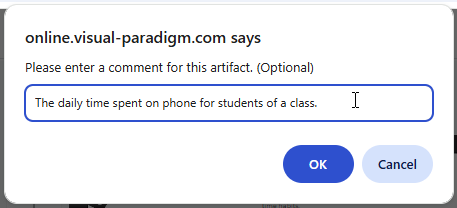
I highly recommend taking the extra few seconds to add a descriptive comment. In my testing, I found this invaluable when managing multiple diagrams. The comment appears in the Pipeline pane within OpenDocs, making it easy to identify the right diagram later. Think of it as metadata that future-you will appreciate.
Step 4: Confirm and Verify
Click confirm, and your diagram is now securely stored in the Pipeline. You can verify this by checking the Pipeline pane in OpenDocs, where your artifact should appear almost instantly.
Embedding Your Diagram in OpenDocs
Step 1: Enter Edit Mode
Open any document page in OpenDocs and click the Edit button in the top right corner.

Step 2: Position Your Cursor
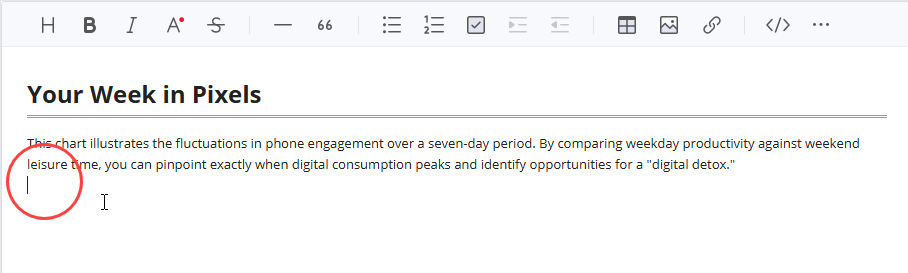
Click on the exact location in your document where you want the diagram to appear. The precision here matters—OpenDocs will insert the diagram at your cursor position.
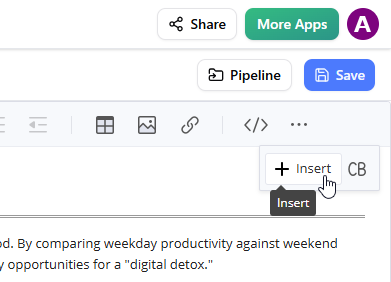
Step 3: Access the Insert Menu
On the toolbar, click Insert to open the insertion options.
Step 4: Select from Pipeline
In the Insert window, choose Pipeline from the left-hand sidebar. This is where you’ll see all your previously sent diagrams, organized and searchable.
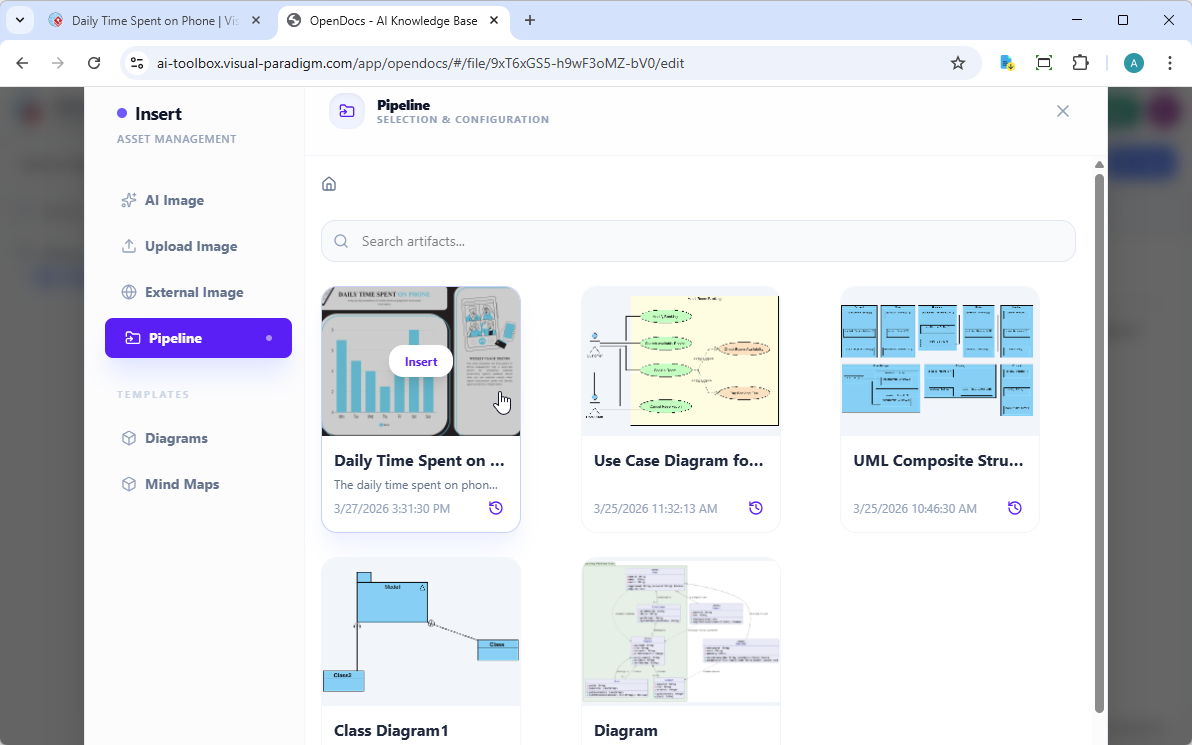
Step 5: Insert Your Diagram
Simply click on the diagram you want to insert, and it appears instantly at your cursor position.
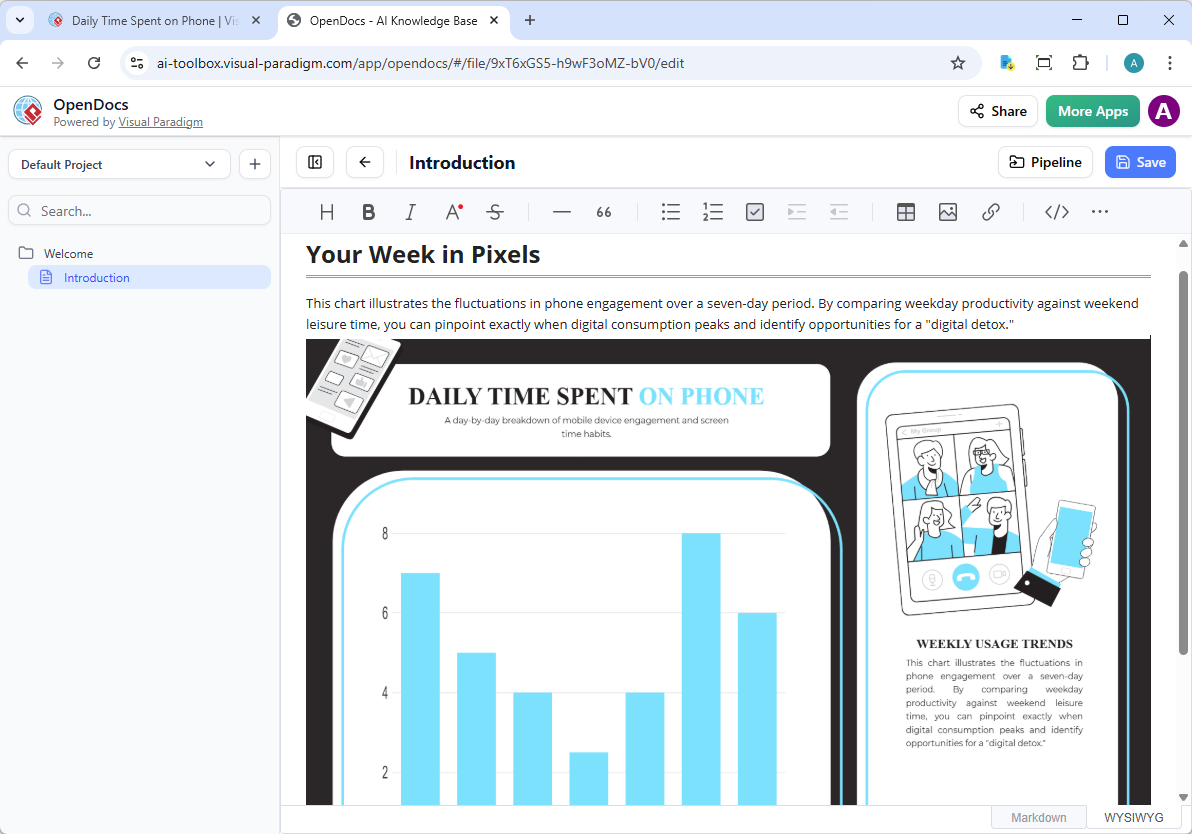
What struck me during this process was the speed. There’s no file upload progress bar, no waiting for image processing—just instant insertion. The diagram appears as a preview while in editing mode, and functions as a fully interactive element once you finish editing.
The Real Power: Keeping Documentation in Sync
The Update Workflow
Here’s where the Pipeline integration truly shines. In traditional workflows, updating a diagram in your documentation is a multi-step nightmare. With Pipeline, it’s elegantly simple.
Scenario: You’ve embedded a system architecture diagram in your technical documentation, but the development team just added a new microservice. Here’s how to update it:
Step 1: Edit the Source Diagram
Open your original diagram in Visual Paradigm Online. Make your necessary changes—in my case, adding the new microservice component and updating the connection lines.
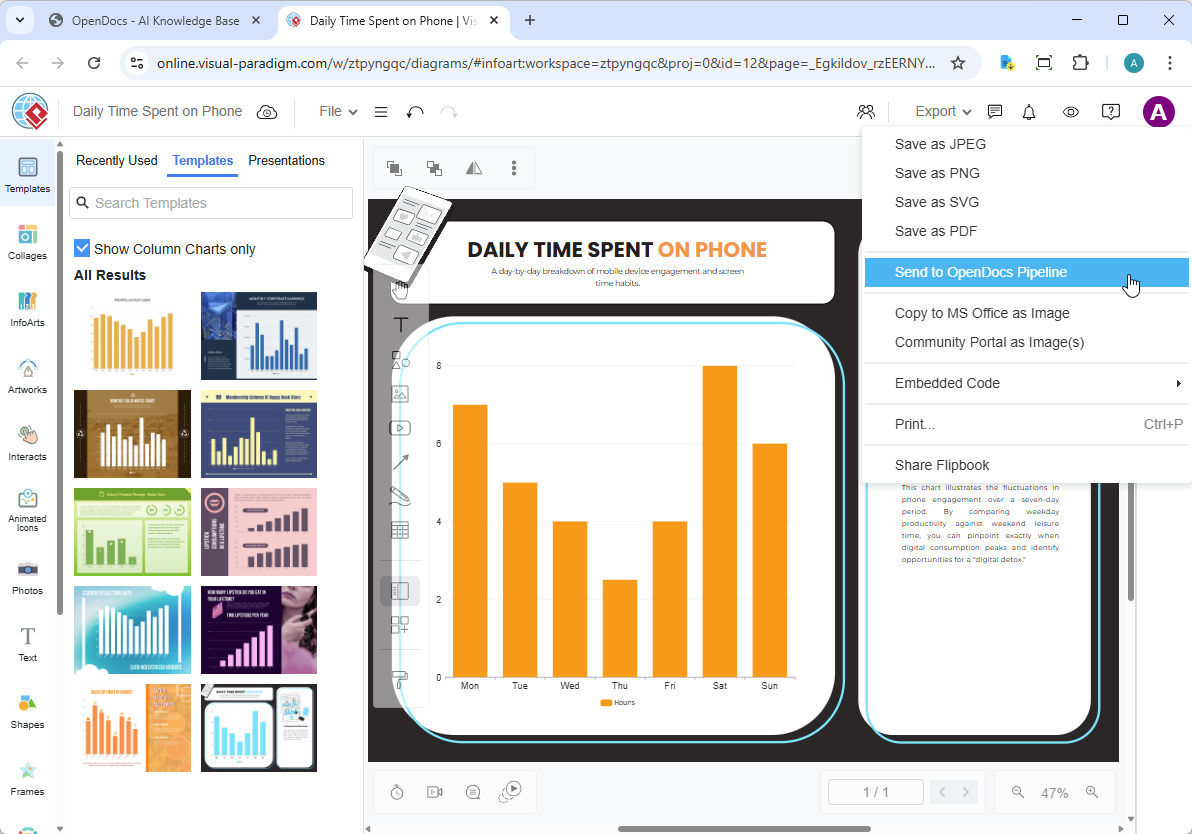
Step 2: Re-send to Pipeline
Once your edits are complete, go to Export > Send to OpenDocs Pipeline again. This creates a new revision of your artifact in the Pipeline. Importantly, it doesn’t replace the old version—it adds to it, maintaining a revision history.
Step 3: Access the Pipeline Pane in OpenDocs
Back in your OpenDocs document, click the Pipeline button at the top right of the editor.
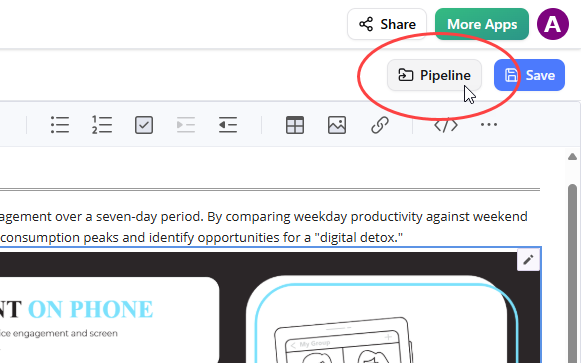
Step 4: Identify Updates
Open the In Document tab. You’ll notice the filter “With updates” is automatically active, showing only artifacts that have newer revisions available. This intelligent filtering saves you from manually checking each diagram.
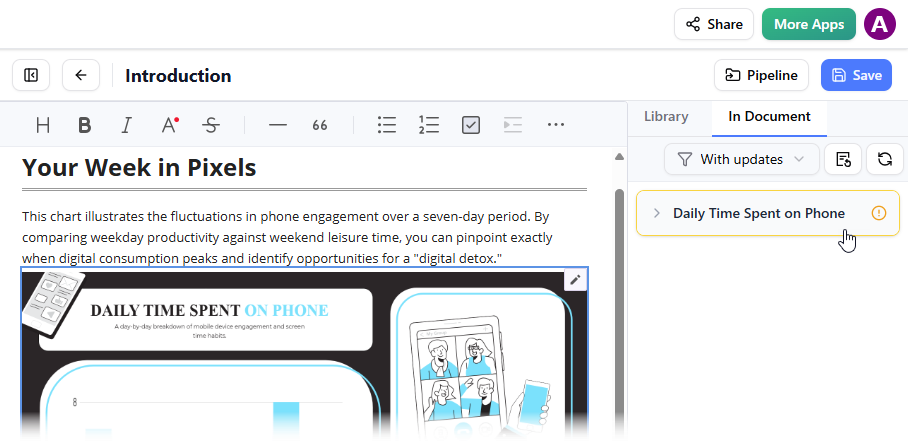
Step 5: Update to Latest Revision
Click on the diagram that needs updating. You’ll see all available revisions. You have two options:
- Click on the specific revision you want
- Click Update to latest revision for an instant update
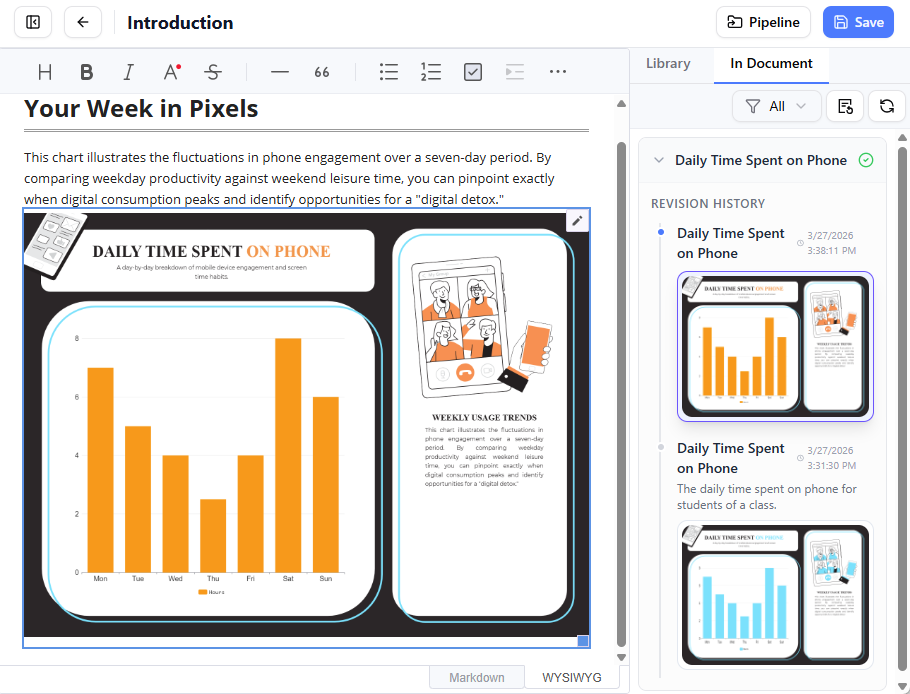
The update is instantaneous. What would have taken 10-15 minutes in a traditional workflow (download, edit, re-export, re-upload, replace) now takes seconds.
Automatic Version Management
One feature I particularly appreciated is that OpenDocs always displays the latest version of your slideshow automatically. Unlike other design artifacts that require manual revision switching, slideshows update seamlessly. This is perfect for dynamic presentations or regularly updated reports.
Real-World Use Cases: Where This Integration Excels
Agile Development Teams
During my evaluation, I simulated an agile development workflow where architecture diagrams need frequent updates. The Pipeline integration proved invaluable for:
- Sprint documentation that evolves with the product
- Maintaining accurate API documentation
- Keeping runbooks and operational guides current
Business Analysts and Consultants
For professionals creating client deliverables, the ability to quickly update diagrams across multiple documents is crucial. I found the Pipeline particularly useful for:
- Business process documentation
- Organizational charts that change frequently
- Data flow diagrams for system migrations
Marketing and Communications Teams
While often overlooked, marketing teams can benefit significantly from this integration:
- Social media graphics that need version control
- Infographics for reports and presentations
- Brand assets that require consistent updates across documentation
Benefits I Experienced: A Honest Assessment
Time Savings
In my testing, I estimated a 70-80% reduction in time spent on diagram management. What used to be a 15-minute process of exporting, downloading, uploading, and replacing now takes less than 2 minutes.
Reduced Errors
The elimination of manual file handling means fewer opportunities for errors. No more accidentally using an outdated diagram or uploading the wrong file version.
Improved Collaboration
When multiple team members can see that a diagram has updates available (thanks to the “With updates” filter), it improves team coordination. Everyone knows when documentation needs refreshing.
Cloud-Native Workflow
The entirely cloud-based nature of this workflow means:
- No local storage consumption
- Access from any device
- Automatic backups through the Pipeline
- No version conflicts between team members’ local files
Professional Presentation
Diagrams inserted through Pipeline maintain their quality and appear as native elements within OpenDocs, not just embedded images. The preview mode in editing and full functionality in published mode provide the best of both worlds.
Limitations and Considerations
To provide a balanced review, I should note a few considerations:
Subscription Requirement: This feature requires Visual Paradigm Online Combo Edition, which may be a barrier for individual users or small teams on tight budgets.
Internet Dependency: Since both tools are cloud-based, you need a stable internet connection. There’s no offline mode for this workflow.
Learning Curve: While intuitive, teams unfamiliar with the Pipeline concept may need initial training to understand the revision management system.
Platform Lock-in: Once you commit to this workflow, you’re invested in the Visual Paradigm ecosystem. Migrating to another documentation platform would require re-exporting all diagrams.
Tips and Best Practices from My Experience
Based on my extensive testing, here are some recommendations:
- Use Descriptive Comments: When sending to Pipeline, always add meaningful comments. “Q1 Sales Chart” is better than “Chart1.”
- Establish Naming Conventions: Work with your team to establish consistent naming and commenting standards.
- Regular Cleanup: Periodically review your Pipeline artifacts and remove outdated ones to keep the repository organized.
- Leverage the “With Updates” Filter: Make it a habit to check this filter before publishing documentation to ensure everything is current.
- Train Your Team: The benefits multiply when everyone on your team understands and uses the Pipeline correctly.
- Version Control Discipline: Even though Pipeline manages revisions, maintain good practices about when to create new revisions versus editing existing ones.
The Broader Visual Paradigm Ecosystem
It’s worth noting that the Pipeline integration isn’t limited to Visual Paradigm Online. The ecosystem also supports:
- Visual Paradigm Desktop: Traditional desktop application users can also sync diagrams to OpenDocs
- Visual Paradigm Chatbot: AI-generated diagrams can be exported directly to OpenDocs
This multi-platform support means teams can use their preferred tool while maintaining a unified documentation strategy.
Conclusion: A Paradigm Shift in Documentation Management
After weeks of hands-on testing, I can confidently say that Visual Paradigm’s Pipeline integration between Visual Paradigm Online and OpenDocs represents a significant advancement in how we approach technical documentation. It’s not just a convenience feature—it’s a fundamental reimagining of the relationship between visual models and written documentation.
The elimination of manual file handling, the automatic version management, and the seamless cloud-based workflow address real pain points that have plagued technical writers, developers, and business analysts for years. While the subscription requirement may be a consideration for some, the time savings and error reduction quickly justify the investment for teams producing documentation at scale.
What impressed me most was the thoughtful design of the update workflow. The “With updates” filter, the revision history, and the one-click update mechanism show that Visual Paradigm understands the real-world challenges of maintaining accurate documentation.
For teams already using Visual Paradigm tools, this integration is a no-brainer. For those evaluating documentation platforms, the Pipeline feature alone makes OpenDocs a compelling choice. The future of documentation is living, breathing, and automatically synchronized—and Visual Paradigm is leading the way.
Whether you’re managing complex software architecture documentation, creating dynamic business reports, or maintaining operational runbooks, the Pipeline integration offers a level of efficiency and reliability that traditional workflows simply can’t match. It’s time to say goodbye to “final_v2_updated.png” and hello to truly living documentation.
References
- Visual Paradigm OpenDocs Features: Official overview of OpenDocs capabilities including diagramming, AI assistance, and sharing tools.
- Visual Paradigm OpenDocs: The Complete Guide to AI-Powered Knowledge Management: In-depth third-party guide covering setup, workflows, and advanced use cases for OpenDocs.
- Visual Paradigm OpenDocs: The Complete Developer’s Guide: Developer-focused resource detailing API integrations and technical documentation best practices.
- Mastering the Visual Paradigm AI Ecosystem: Comprehensive exploration of Visual Paradigm’s AI tools, including OpenDocs’ diagram generation and content automation features.
- OpenDocs – AI-Powered Knowledge Management Platform: Official product page with feature highlights, use cases, and access to start using OpenDocs.
- OpenDocs AI-Powered Knowledge Platform Release: Announcement and details of OpenDocs’ core platform launch and foundational capabilities.
- From Model to Manual: Syncing Desktop Diagrams with OpenDocs: Practical tutorial on using the Visual Paradigm Pipeline to keep desktop diagrams synchronized with OpenDocs knowledge bases.
- Fliplify French Resource: French-language resource hub for Visual Paradigm tools and documentation workflows.
- Mastering Visual Paradigm OpenDocs: The Ultimate Guide: Expert walkthrough of OpenDocs’ knowledge tree organization, AI features, and Pipeline integration for living documentation.
- OpenDocs Page-Based Sharing Update: Release notes detailing granular page selection and sharing controls in OpenDocs.