Enterprise architecture is often described as the blueprint for organizational transformation. However, a persistent challenge exists within many organizations: the disconnect between strategic intent and technical reality. 📉 When business goals are formulated without clear technical pathways, projects stall, costs inflate, and value delivery falters. ArchiMate provides a standardized language to visualize these connections. By focusing on the critical interface between the Business and Application layers, architects can ensure that IT investments directly support operational needs. This guide details the mechanisms, elements, and strategies required to bridge these domains effectively. 🏛️
🔍 The Architecture Gap: Why Connection Matters
The gap between business strategy and application delivery is not merely a communication issue; it is a structural one. Without a formal model, assumptions fill the void. Stakeholders assume the system supports the process, and business leaders assume the process fits the system. Neither assumption is guaranteed. 🧐
- Strategic Misalignment: IT systems may automate outdated processes rather than enabling new ones.
- Hidden Dependencies: Critical business functions may rely on legacy applications that are not documented.
- Change Impact: Modifying a business process without understanding application constraints leads to scope creep.
ArchiMate addresses this by offering a layered approach. The framework separates concerns into the Business, Application, and Technology layers. While each layer has distinct elements, their value lies in the relationships that span across them. Bridging the Business and Application layers is the core activity that ensures traceability from the boardroom to the database. 🔄
🏢 Deep Dive: The Business Layer
The Business layer represents the external face of the organization. It defines what the organization does, how it interacts with the outside world, and how it manages its internal operations. This layer is populated by elements that describe activities, roles, and outcomes. 🎯
Key Business Elements
To build an accurate bridge, one must understand the source of the connection. The Business layer contains specific building blocks:
- Business Actor: Represents a human or organization performing activities. Examples include Customers, Partners, or Employees. 🧑💼
- Business Role: A collection of Business Actors with the same responsibilities. A specific actor fills a role.
- Business Process: A sequence of Business Functions that achieve a specific business goal. This is often the primary driver for IT requirements.
- Business Function: A collection of related Business Processes. Functions describe what the business does, not how it does it.
- Business Service: A representation of a set of capabilities that are directly valuable to the actor. Services are the interface between the business and the actor.
- Business Collaboration: A collection of Roles that work together to achieve a goal.
- Business Node: Represents a place where Business Activities are performed, such as a department or physical location.
Understanding Business Drivers
When modeling the Business layer, it is crucial to distinguish between the what and the how. Functions describe the capability. Processes describe the flow. Services describe the value proposition. Confusing these elements leads to messy models where the Application layer has no clear anchor. 📝
💻 Deep Dive: The Application Layer
The Application layer represents the software systems that support the business. It is the bridge between the abstract business world and the concrete Technology layer (hardware, network). The Application layer focuses on the systems themselves, not the code or infrastructure they run on. 🖥️
Key Application Elements
Similar to the Business layer, the Application layer has specific definitions that must be mapped correctly:
- Application Component: A modular part of an application system. This is the most common unit for mapping business processes. ⚙️
- Application Function: A specific capability provided by an Application Component. It describes what the software does, not the business value.
- Application Service: A representation of a set of capabilities that are directly valuable to the Business layer. This is the critical link.
- Application Interface: A point of interaction between two components or between a component and an external actor.
- Application Collaboration: A collection of Application Interfaces that work together.
- Application Interaction: The sequence of interactions between Application Services and other elements.
The Service-Oriented Perspective
Modern enterprise architecture often leans heavily on Service-Oriented Architecture (SOA) principles. In ArchiMate, the Application Service is the preferred element for crossing layers. It acts as the contract. If a Business Process requires a specific capability, the Application Service provides it. This decouples the business logic from the implementation details. 📡
🔗 The Connection Mechanisms: Relationships
The true power of ArchiMate lies in the relationships. A static list of elements tells a story of inventory, not architecture. Relationships define how elements interact. When bridging Business and Application layers, specific relationship types are required to establish traceability. 🔗
Primary Relationships
Not all relationships are equal. Some are for flow, some for structure, and some for usage. The following are the most critical for bridging layers:
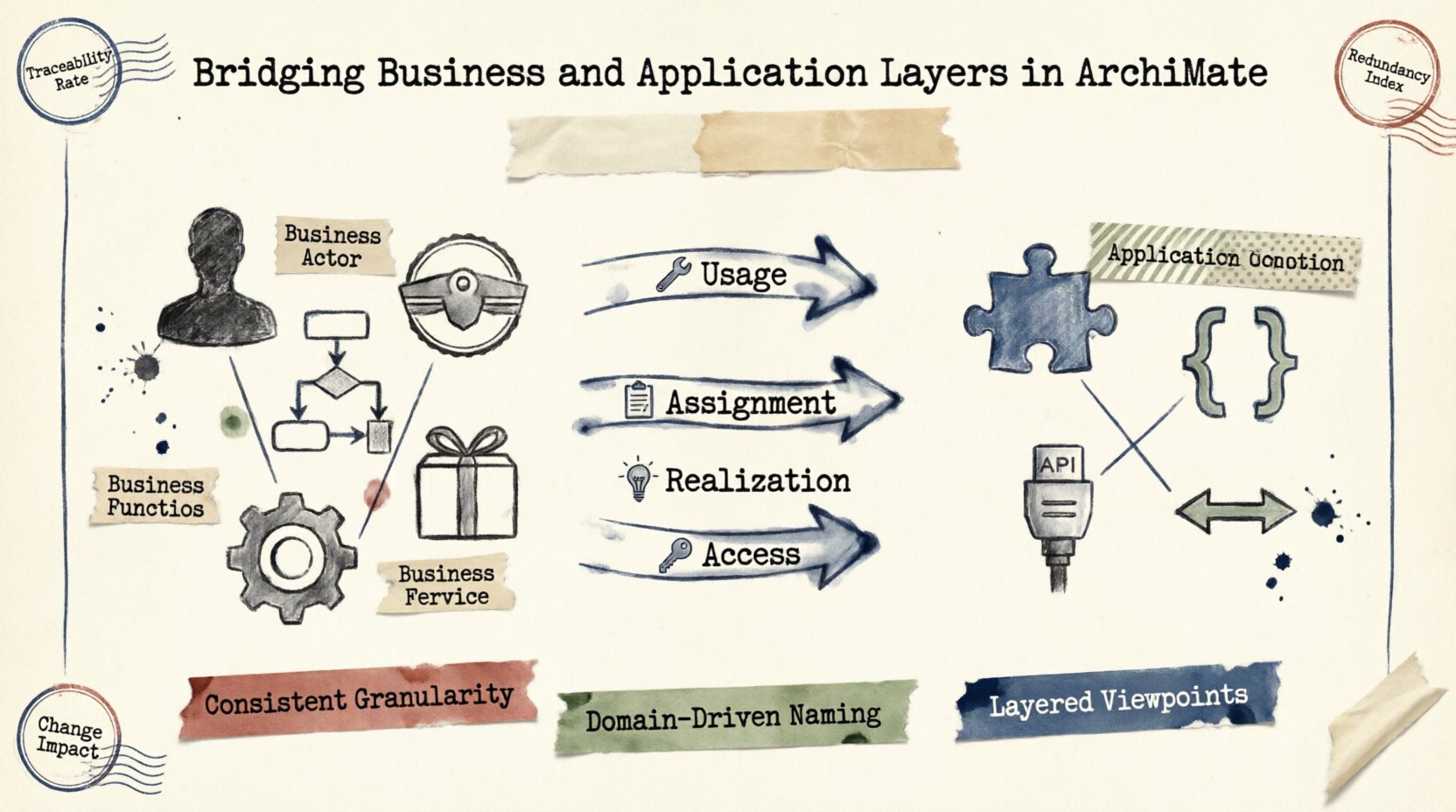
- Usage: Indicates that one element makes use of the functionality of another. For example, a Business Process uses an Application Service. This is the most common mapping. 🛠️
- Access: Indicates that an element can access data managed by another. A Business Role may access an Application Component.
- Realization: Indicates that one element implements another. A Business Process is realized by an Application Component. This implies the component provides the logic.
- Assignment: Indicates that an actor is assigned to perform a function. A Business Actor is assigned to a Business Role, which is then assigned to an Application Service.
Relationship Matrix
| Relationship Type | Source Element | Target Element | Meaning |
|---|---|---|---|
| Usage | Business Process | Application Service | The process relies on this service to function. |
| Assignment | Business Role | Application Service | The role interacts with or uses this service. |
| Realization | Business Function | Application Component | The component provides the capability for the function. |
| Access | Business Actor | Application Interface | The actor interacts with the system through this interface. |
Understanding these distinctions prevents the “spaghetti model” where every element is connected to every other element. Precision is key. 🎯
🛠️ Modeling Best Practices
Creating a model is an exercise in abstraction. Too little detail obscures the problem; too much detail creates noise. To bridge layers successfully, adhere to the following practices.
1. Consistent Granularity
Ensure that the Business Process is modeled at the same level of detail as the Application Component. If the Business Process is a high-level flow, the Application layer should not be granular down to individual microservices unless necessary. Mismatched granularity leads to confusion during stakeholder reviews. 📏
2. Naming Conventions
Names must be consistent across layers. If a Business Process is called “Order Fulfillment,” the Application Service should not be named “OrderMgr_v2.” Use domain-driven naming. This reduces the cognitive load for business stakeholders viewing the architecture. 📚
3. Layered Viewpoints
Do not display every relationship on a single diagram. Use viewpoints. A Business Viewpoint might show Processes and Services. A Technical Viewpoint might show Components and Nodes. A Bridge Viewpoint should explicitly focus on the Usage and Assignment relationships between the two domains. 👁️
4. Avoid the “God Layer”
Do not model Business Actors in the Application layer, or Application Components in the Business layer. This violates the separation of concerns. Keep the layers distinct and connect them via the defined relationships. Mixing layers creates ambiguity about ownership and responsibility. 🚫
⚠️ Common Modeling Challenges
Even with a framework, pitfalls exist. Recognizing these common errors helps maintain model integrity over time.
Challenge 1: The “Black Box” Component
Architects often group all application functionality into a single “Black Box” component to simplify the model. While this works for high-level strategy, it fails when implementing changes. If the Application Component is too abstract, you cannot determine which specific module supports a specific Business Process. Break down components into logical services. 📦
Challenge 2: Direct Technology Links
It is tempting to link a Business Process directly to a Technology Node (e.g., a Server). This skips the Application layer. If you skip the Application layer, you lose the ability to swap technology stacks without rewriting the business model. Always route through Application Components and Services. 🖥️
Challenge 3: Over-Modeling Relationships
Every relationship should serve a purpose. If a Business Process is linked to an Application Service, there must be a business reason. Avoid linking every Process to every Service. This creates noise and makes impact analysis impossible. Focus on the critical paths. 🛣️
📊 Strategic Alignment Metrics
Once the bridge is built, how do you measure its effectiveness? Architecture is not static. It must be audited against organizational performance.
- Traceability Rate: What percentage of Business Processes have a corresponding Application Service? A low rate indicates shadow IT or undocumented systems.
- Redundancy Index: How many Business Processes rely on the same Application Component? High redundancy suggests a risk point; if that component fails, multiple processes are affected.
- Change Impact Scope: When a Business Process changes, how many Application Components must be modified? A high number indicates tight coupling.
- Service Coverage: Does every Application Service support at least one Business Function? Unused services represent technical debt.
These metrics help prioritize architectural improvements. They move the conversation from “we need more diagrams” to “we need to reduce coupling in the Order module.” 📈
🔄 Maintenance and Evolution
A model is only as good as its currency. As the organization evolves, the bridge must be maintained. ArchiMate supports versioning and change management, but the human process is equally important. 🔄
Change Management Workflow
When a new Business Requirement is introduced, follow a structured workflow:
- Identify the Gap: Does the current Application layer support this requirement?
- Map the Element: Create or modify the Application Service/Component.
- Update Relationships: Link the Business Process to the new Application element.
- Validate: Ensure the change does not break existing dependencies.
This workflow ensures that the bridge remains solid as the organization grows. It prevents the model from becoming a museum piece that no one uses. 🏛️
🚀 Real-World Scenario: Retail Transformation
Consider a retail organization moving from in-store sales to omnichannel. 🛍️
- Business Change: The “Order Fulfillment” process now includes “Click and Collect” and “Home Delivery”.
- Application Impact: The existing Inventory System (Application Component) does not support real-time stock visibility across channels.
- Modeling the Bridge: A new Application Service “Inventory Lookup” is created. The “Order Fulfillment” Business Process is updated to use this new Service.
- Technology Impact: The new Service requires a connection to the Warehouse Management System (Technology Layer).
By modeling this explicitly, the IT team understands the dependency. They know that the “Inventory Lookup” Service must be built before the “Order Fulfillment” process can be deployed. This prevents the business from launching a service that cannot be supported. ✅
🧭 Summary of Key Takeaways
Bridging the Business and Application layers is the essence of effective Enterprise Architecture. It transforms abstract strategy into concrete implementation plans. By adhering to the ArchiMate framework, organizations can visualize these connections clearly. 🗺️
- Understand the Layers: Know the difference between Business Functions and Application Functions.
- Use Correct Relationships: Usage and Assignment are your primary tools for bridging.
- Maintain Granularity: Keep levels consistent to avoid confusion.
- Focus on Services: Application Services are the ideal interface for business needs.
- Measure Alignment: Use metrics to track the health of your architecture.
Architecture is not about drawing boxes; it is about ensuring the organization can move forward without breaking its foundation. With a well-maintained bridge, business and IT move in lockstep. 🤝