
Code reviews are a cornerstone of software development, ensuring quality and knowledge sharing. However, they often stall due to cognitive overload. When developers focus solely on line-by-line diffs, the broader architectural picture is lost. This leads to slower decisions, missed architectural concerns, and confusion about how changes ripple through the system. 📉
Introducing a structured visual approach changes this dynamic. The C4 Model provides a standardized way to describe software architecture using a hierarchy of diagrams. By integrating these diagrams into the review workflow, teams can shift focus from syntax to structure. This guide explores how to leverage C4 levels to streamline code review sessions, improve communication, and maintain architectural integrity without relying on specific tools or hype. 🛠️
🏗️ Understanding the C4 Model Hierarchy
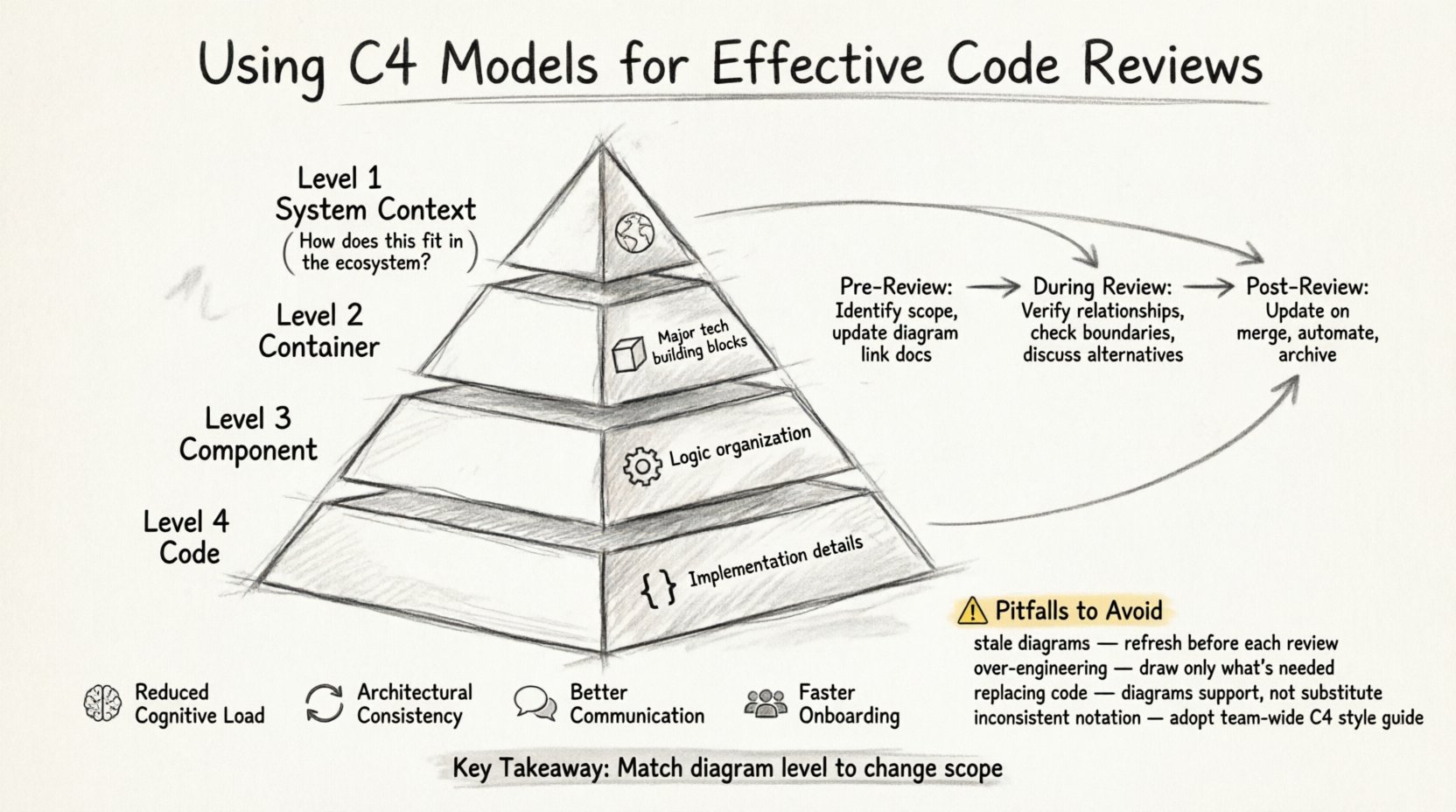
Before integrating diagrams into reviews, it is essential to understand the four levels of abstraction defined by the C4 Model. Each level serves a specific audience and answers different questions. During a code review, knowing which level is relevant prevents unnecessary detail and keeps the discussion focused.
- Level 1: System Context 🌍
This diagram shows the software system as a single box and its users, other systems, and data flows. It answers: “How does this system fit into the larger ecosystem?” In a review, this level helps verify if a change impacts external integrations or user-facing boundaries. - Level 2: Container 📦
Containers represent the high-level building blocks of the system, such as web applications, mobile apps, or microservices. This diagram answers: “What are the major pieces of technology we are using?” During a review, this helps assess if a new service is needed or if an existing container can absorb the change. - Level 3: Component ⚙️
Components are logical groupings within a container. They might be modules, packages, or classes that perform a specific function. This level answers: “How is the logic organized inside this application?” Code reviews often focus here, linking specific classes to their architectural role. - Level 4: Code 💻
This represents the actual code, such as classes, functions, or database schemas. While this is the lowest level, the C4 model typically stops at Component diagrams for documentation, letting the code speak for itself at this stage. However, understanding the code structure is vital for the review process.
🤔 Why C4 Models Improve Code Review Efficiency
Traditional code reviews often suffer from a lack of context. A developer sees a diff but lacks a mental map of where that code fits. The C4 model bridges this gap by providing a visual contract between the proposed change and the existing architecture. Here is why this approach yields better results:
- Reduced Cognitive Load 🧠
Visual diagrams allow reviewers to grasp system topology faster than reading raw code. It is easier to see a connection between two containers than to trace a database query through three layers of abstraction. - Architectural Consistency 🔄
When diagrams are updated alongside code, the documentation stays relevant. Reviewers can check if the implementation matches the design, preventing architectural drift over time. - Better Communication 🗣️
Diagrams act as a common language. Instead of saying “the service talks to the API,” a reviewer can point to a container relationship. This reduces ambiguity and the time spent explaining intent. - Faster Onboarding for Reviewers 👥
New team members can review code more effectively if they have access to the current system context. They can see who is calling whom before diving into the logic.
📋 Integrating C4 into the Review Workflow
Implementing this methodology requires a shift in process, not just a change in tools. The goal is to make diagramming a natural part of the pull request lifecycle. Below is a structured approach to embedding C4 models into your review sessions.
1. Pre-Review Preparation
Before a code review begins, the author should prepare the necessary documentation. This sets the stage for a constructive discussion.
- Identify the Scope: Determine which C4 level is affected. Is this a new container? A new component? Or just internal logic changes?
- Update the Diagram: If the change affects the architecture, update the relevant diagram. Do not update Level 1 if the change is internal to a container. Keep the effort proportional to the change.
- Link the Documentation: Include the link to the diagram in the pull request description. This ensures the reviewer can access the context immediately.
2. During the Review Session
Reviewers should use the diagrams as a map while examining the code. This helps in spotting issues that diffs alone might hide.
- Verify Relationships: Check if the code implements the relationships shown in the diagram. Are the dependencies correct?
- Check Boundaries: Ensure that the code does not violate architectural boundaries. For example, a component in Container A should not directly depend on a component in Container B without a defined API.
- Discuss Alternatives: If the diagram suggests a different structure than the code, discuss why. Was the diagram outdated, or is the implementation a regression?
3. Post-Review Maintenance
The lifecycle of a diagram ends when the code changes again. To maintain value, the diagrams must be kept current.
- Update on Merge: Once the code is merged, verify that the diagram reflects the new state. This ensures the next review starts with accurate information.
- Automate Where Possible: While manual updates ensure accuracy, some teams use tools to generate diagrams from code. If manual, make it a requirement in the Definition of Done.
- Archive Old Versions: Keep track of how the architecture evolved. This helps in understanding why certain design decisions were made in the past.
📊 Comparing C4 Levels for Review Focus
Not every code review requires every level of the C4 model. Knowing when to use which diagram prevents over-engineering the documentation process. The table below outlines the appropriate focus for different types of changes.
| C4 Level | Focus Area | Review Context | When to Use |
|---|---|---|---|
| System Context | External Integrations | High-level impact | Adding a new service or external dependency |
| Container | Service Boundaries | Deployment & Tech Stack | Introducing a new microservice or database |
| Component | Logic Organization | Internal Structure | Refactoring modules or adding new features |
| Code | Implementation Details | Unit Logic | Standard code review (no diagram needed) |
By aligning the diagram level with the change size, teams avoid the burden of maintaining unnecessary documentation while still gaining the benefits of visual context.
⚠️ Common Pitfalls and How to Avoid Them
Adopting a visual approach to code reviews comes with risks. If not managed correctly, the diagrams can become a source of noise rather than clarity. Here are common challenges and practical solutions.
Pitfall 1: Stale Diagrams
Diagrams become useless if they do not match the code. Reviewers may trust a diagram that shows a dependency that no longer exists.
- Solution: Treat diagrams as code. They should be versioned and updated as part of the pull request. If a diagram cannot be updated easily, flag it as a technical debt item.
Pitfall 2: Over-Engineering the Diagram
Creating a complex Level 1 diagram for a simple bug fix wastes time and creates maintenance overhead.
- Solution: Follow the principle of least detail. Only create or update the diagram level that is directly impacted by the change. A bug fix usually only requires a Component level check.
Pitfall 3: Using Diagrams as a Substitute for Code
Some teams rely too heavily on diagrams and stop reading the code entirely. Diagrams are summaries, not replacements.
- Solution: Encourage reviewers to use diagrams for context but always validate the logic in the code. The diagram explains the “what” and “where”, the code explains the “how”.
Pitfall 4: Lack of Standardization
If every developer draws diagrams differently, the review process becomes confusing. One team might use boxes for services, while another uses circles.
- Solution: Adopt a consistent notation standard. Define what shapes mean and what lines represent. This ensures that a diagram drawn by a junior developer is as clear as one drawn by a senior architect.
🔍 Deep Dive: Component-Level Reviews
The Component level is often the sweet spot for code reviews. It sits between the high-level container and the low-level code, providing enough detail to understand logic without getting bogged down in syntax. Here is how to conduct a focused component-level review.
- Identify the Component: Locate the component in the diagram. Is it a new addition or a modification?
- Analyze Responsibilities: Does the component have a single responsibility? Does it violate the separation of concerns?
- Check Inputs and Outputs: What data flows into the component? What does it return? Ensure the diagram matches the function signatures.
- Review Dependencies: Look at the lines connecting the component to others. Are the dependencies necessary? Are they circular?
- Validate Naming: Do the component names in the code match the names in the diagram? Consistency here aids readability.
When the component diagram is accurate, reviewers can spot architectural anti-patterns early. For instance, if a component depends on too many other components, it indicates tight coupling. The diagram makes this visibility immediate.
🚀 Long-Term Benefits of Visual Reviews
Integrating C4 models into code reviews is not just about fixing immediate bugs. It builds a foundation for long-term system health. Over time, these practices yield significant dividends.
- Knowledge Retention 🧠
When diagrams are part of the codebase, knowledge is preserved even if team members leave. New hires can understand the system by reading the diagrams and the associated code. - Reduced Technical Debt 📉
Architectural decisions are made visible. Teams are less likely to introduce quick fixes that break the structure because the impact is visualized before the merge. - Scalability 📈
As the system grows, the diagrams scale with it. A monolithic application can be split into containers, and the diagrams will reflect this evolution, guiding the refactoring process. - Improved Collaboration 🤝
Teams spend less time debating “how does this work” and more time debating “how does this work better”. The shared visual language removes barriers to entry.
🛠️ Practical Steps to Start Today
You do not need a massive overhaul to begin using C4 models. Start small and iterate.
- Start with One Service: Pick one container in your system and document its components. Use this as a pilot for your next few code reviews.
- Define a Standard: Agree on a notation for your team. Use standard shapes for users, systems, and containers.
- Integrate into Templates: Add a section to your pull request template asking for relevant diagram updates if the architecture changes.
- Train the Team: Hold a short session on how to read and update C4 diagrams. Ensure everyone understands the difference between a Container and a Component.
- Review the Diagrams: Make updating the diagrams part of the approval criteria. If the architecture changed, the diagram must change.
📝 Summary of Key Takeaways
Effective code reviews require more than just syntax checking. They require context. The C4 Model provides that context by mapping the software architecture at four distinct levels of abstraction. By aligning the review process with these levels, teams can reduce cognitive load, maintain architectural integrity, and foster better communication.
Key points to remember include:
- Context is King: Use Level 1 and 2 diagrams to understand the system landscape.
- Focus on Components: Level 3 diagrams are the most practical for detailed code reviews.
- Maintain Accuracy: Diagrams must be updated alongside code to remain useful.
- Standardize Notation: Consistency ensures that diagrams are universally understood.
- Balance Detail: Do not over-document. Match the diagram effort to the change scope.
Adopting this approach transforms code reviews from a bottleneck into a strategic asset. It shifts the focus from “does this code compile?” to “does this code fit?”. As your system evolves, these visual artifacts will serve as a reliable source of truth, guiding development and ensuring that the architecture remains robust and understandable. 🏁