


The Challenge of the Perfect Sprint Review
In the world of Agile development, the sprint review (or demonstration) is a pivotal ceremony. It is the moment where code translates into value, and stakeholders witness the tangible progress of the development team. However, facilitating a flawless demonstration is often easier said than done. Disorganized agendas, forgotten logistics, and unclear narratives can quickly turn a showcase of success into a confusing meeting that fails to secure stakeholder buy-in.
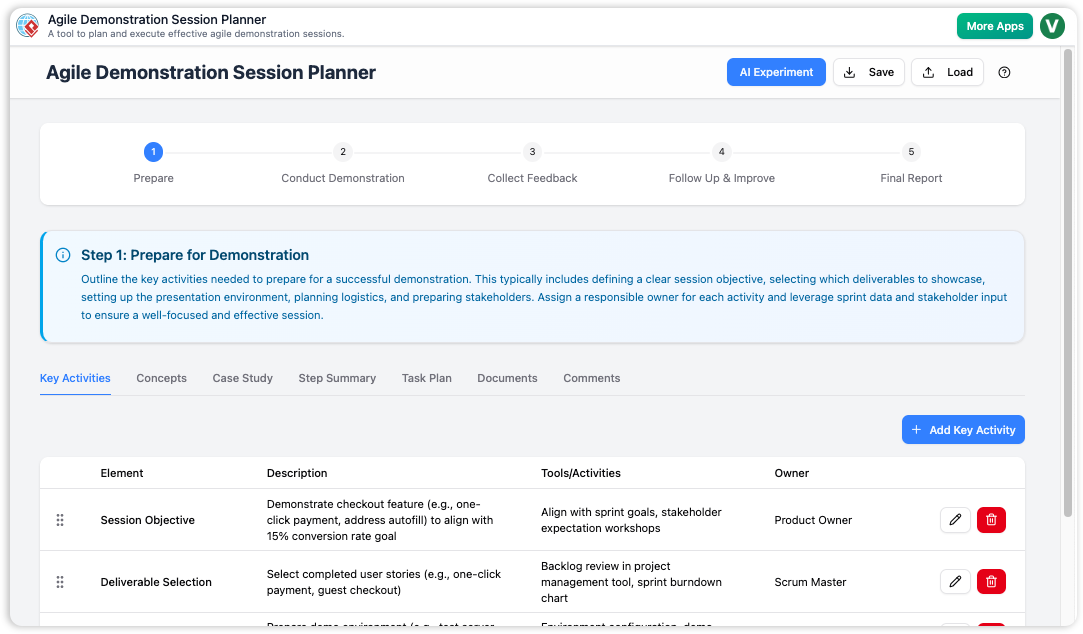
Enter the Agile Demonstration Session Planner. This specialized tool is designed to impose structure on the chaos of sprint preparation. By combining a rigid best-practice framework with generative AI capabilities, it promises to help Product Owners, Scrum Masters, and development teams meticulously plan, document, and execute their demonstration sessions. In this review, we explore the features, workflows, and unique value proposition of this application.
What is the Agile Demonstration Session Planner?
At its core, the Agile Demonstration Session Planner is a web-based utility that guides users through a structured 5-step wizard. Its primary goal is to ensure that no detail is overlooked—from the high-level narrative down to the specific logistical tasks required to set up the demo environment. Unlike generic note-taking apps, this tool is purpose-built for the Agile lifecycle, offering specific fields and workflows tailored to sprint reviews.
One of the standout aspects of the application is its focus on privacy and local control. Rather than relying on cloud storage, the tool saves all session plans as local .json files on the user’s computer. This ensures that sensitive project details remain confidential and fully in the user’s possession, eliminating concerns about data leakage in third-party clouds.
Feature Spotlight: The AI Experiment
The most powerful feature of the planner is arguably the “AI Experiment.” For busy teams, starting a plan from a blank page is daunting. The AI feature acts as an accelerator by generating a comprehensive first draft based on a simple prompt.
How It Works
Users are prompted to enter a project description and a specific demonstration objective (e.g., “Demonstrate the successful completion of the ‘User Profile Update’ and ‘Order History View’ stories“). The integrated AI then populates the entire 4-step planning structure with:
- Agendas and Talking Points: Specific narrative arcs to explain the features.
- Logistical Tasks: Reminders to deploy builds or prepare data.
- Follow-up Actions: Suggested feedback questions to ask stakeholders.
This transforms the planning process from a creative struggle into an editing task, allowing users to focus on refining the strategy rather than building the structure from scratch.
The 5-Step Guided Framework
The application forces a linear, logical progression to planning, ensuring a holistic approach. The wizard is divided into the following steps:
1. Session Definition
This phase focuses on the “Why.” Users define the core goals of the session and align on what success looks like. This prevents the common pitfall of diving into technical details without establishing the business context.
2. Narrative and Content
Here, the focus shifts to the “What.” This step is dedicated to crafting the story. Through the “Findings” tab, users can list key activities and talking points. A drag-and-drop interface allows for easy reordering, helping presenters sequence their demo for maximum impact—for example, showing current pain points before revealing the new solution.
3. Logistics and Roles
Often the most neglected part of a demo, this step ensures the “How” is covered. Who is presenting? Is the staging environment ready? Who is taking notes? The tool provides a dedicated space to assign these roles and list preparation tasks, ensuring the team is technically ready when the meeting starts.
4. Feedback and Follow-up
A demo is useless without feedback. This step encourages planners to pre-define the questions they need answered. It structures the capture of stakeholder input, ensuring that the review leads to actionable items rather than just polite applause.
5. Final Report
The final step consolidates all entered data into a single, comprehensive report. This serves as the script for the session, the agenda for attendees, and an archived record of what was planned.
Organization and Usability
The user interface manages complexity through a multi-tab system. Within each of the planning steps, information is compartmentalized into specific tabs:
- Findings: The core content and activities for the session.
- Task Plan: A to-do list for preparation (e.g., “Prepare demo script”).
- Documents: A place to link relevant designs or technical specs.
- Concepts: Educational concepts that might need to be explained to stakeholders.
This separation is crucial for mental clarity. It distinguishes between what you are showing (Findings) and what you need to do to get ready (Task Plan), preventing the planner’s notes from becoming a disorganized mess.
Who Is This Tool For?
The Agile Demonstration Session Planner is versatile but specifically targets roles heavily involved in stakeholder communication:
- Product Owners & Managers: It helps them craft a compelling narrative that effectively communicates value and secures stakeholder buy-in.
- Scrum Masters: It serves as a checklist to ensure smooth facilitation, covering all logistical bases to avoid technical hiccups.
- Development Teams: It helps developers structure their technical demonstrations, ensuring their hard work is understood by non-technical audiences.
Pros and Cons
Pros
- Structured Workflow: The fixed 5-step process prevents users from skipping critical planning phases.
- Time-Saving AI: Instantly generates a usable draft, acting like a virtual Agile coach.
- Data Privacy: Local save/load means no data is stored on external servers, perfect for strict enterprise environments.
- Comprehensive Reporting: The final output is a ready-to-use run-sheet for the meeting.
Cons
- No Real-Time Collaboration: As a local-first tool, it does not support simultaneous editing by multiple team members.
- No Cloud Autosave: Users must remember to click “Save” to download their JSON file, or risk losing work if the browser closes.
- Fixed Structure: The steps and tabs are rigid; users cannot create custom tabs or alter the fundamental wizard flow.
Conclusion
The Agile Demonstration Session Planner is a valuable utility for any team looking to professionalize their sprint reviews. By separating the planning of content, logistics, and feedback into distinct, managed streams, it ensures that demonstrations are not just shown, but performed effectively. While the lack of cloud collaboration may be a hurdle for some distributed teams, the trade-off for privacy and the power of the AI generation feature makes it a strong contender for Product Owners and Scrum Masters who want to run flawless, high-value demonstrations.