
Visualizing Software Systems Through Intelligent, Multi-Level Diagramming
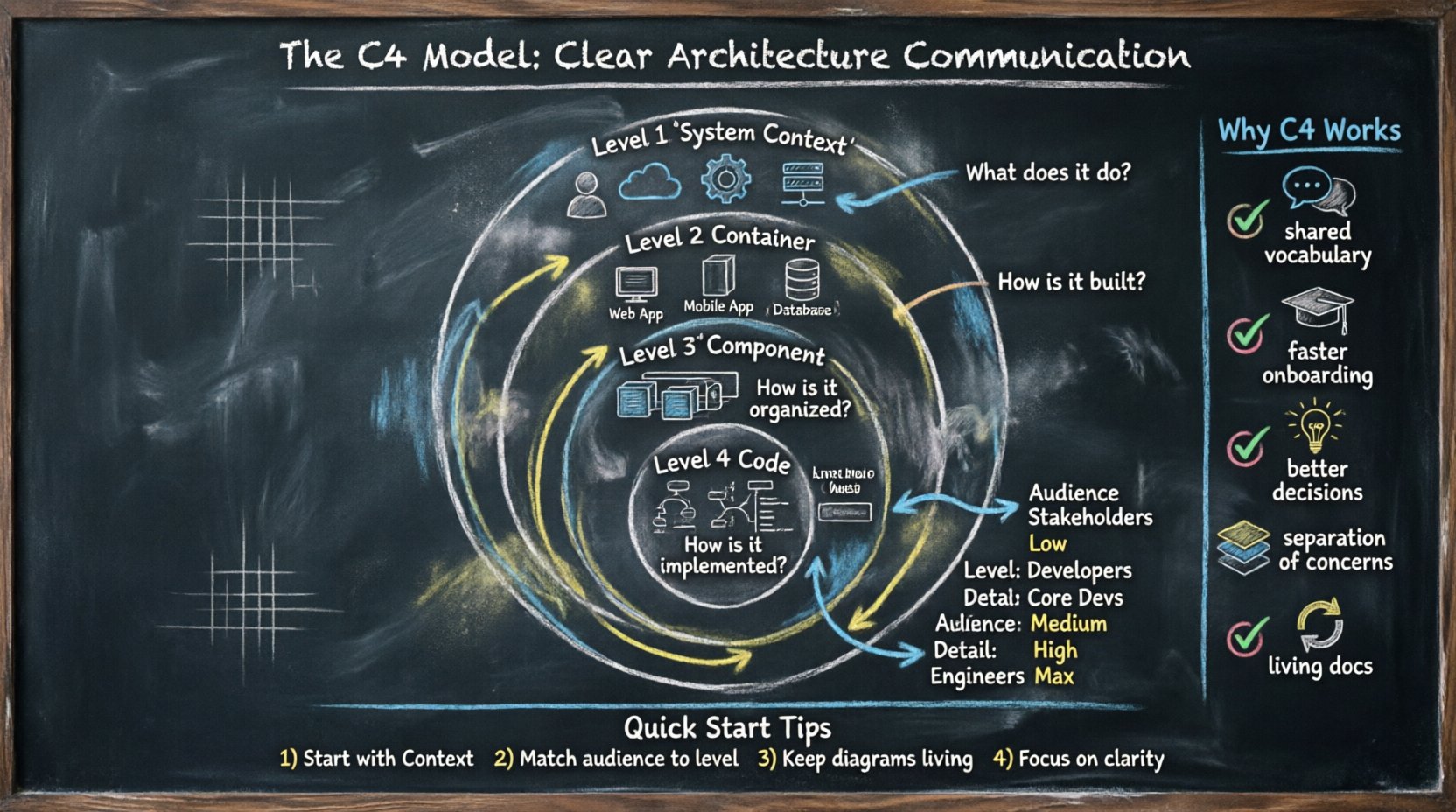
The C4 Model: A “map-based” approach to software architecture that lets teams zoom from continent-level context down to street-level code implementation.
🤔 The Communication Challenge in Software Development
Software architecture is often described as the backbone of a project, yet it remains one of the most misunderstood aspects of development. Teams frequently struggle to align on how different parts of a system connect, what responsibilities each part holds, and how changes ripple through the infrastructure.
Common communication breakdowns include:
| Challenge | Impact |
|---|---|
| Missing Context | Junior developers cannot find documentation explaining why a system was built a certain way |
| Overwhelming Detail | Diagrams showing every class/method overwhelm non-technical stakeholders |
| Outdated Information | “Docs rot” erodes trust when documentation isn’t updated alongside code |
| Inconsistent Notation | Teams using different diagram styles struggle to create a holistic view |
Without a standardized approach, these issues compound. The C4 Model addresses these pain points by enforcing a hierarchy of abstraction—dictating what level of detail is appropriate for specific audiences.
🧩 Understanding the C4 Model: Four Levels of Abstraction
The C4 Model consists of four distinct levels, each representing a different degree of zoom. This hierarchy allows teams to navigate from high-level business context down to specific code structures without losing the narrative thread.
Level 1: System Context Diagram
-
Question: What does the system do, and who uses it?
-
Focus: Boundaries of the system and external interactions
-
Audience: Stakeholders, managers, new hires, business owners
-
Detail Level: Low—only external entities and connections
[User] → [Your System] ← [Payment Gateway]
              ↓
         [Email Service]
Level 2: Container Diagram
-
Question: How is the system built technically?
-
Focus: Deployable units (web apps, mobile apps, databases, microservices)
-
Audience: Developers, system architects, technical leads
-
Detail Level: Medium—technology stack and major component interactions
[Web App] → [API Service] → [Database]
     ↓           ↓
[Mobile App]  [Cache Layer]
Level 3: Component Diagram
-
Question: What are the internal building blocks of this container?
-
Focus: Logical groupings within a container (modules, controllers, services)
-
Audience: Core developers, technical leads, architects
-
Detail Level: High—relationships between internal components
[Order Controller] → [Payment Service] → [Notification Module]
         ↓
[Validation Engine]
Level 4: Code Diagram
-
Question: How is this functionality implemented in code?
-
Focus: Classes, interfaces, methods, entity relationships
-
Audience: Individual contributors working on specific code areas
-
Detail Level: Maximum—implementation details (often auto-generated)
📊 C4 Levels Comparison Table
| Level | Name | Primary Audience | Key Question | Typical Output |
|---|---|---|---|---|
| 1 | System Context | Business & Stakeholders | What does the system do? | High-level boundary diagram |
| 2 | Container | Developers & Architects | How is it built? | Deployable units diagram |
| 3 | Component | Core Developers | How is it organized? | Module/service interaction diagram |
| 4 | Code | Engineers | How is it implemented? | Class/ER diagrams |
📉 Why Traditional Diagrams Fail Collaboration
Before the C4 Model gained traction, teams relied on various ad-hoc diagramming styles. While well-intentioned, these often lacked structure and scalability.
Common Pitfalls of Traditional Approaches:
❌ Too Much Detail Too Soon
Jumping straight into class diagrams confuses business stakeholders who care about value delivery, not variable names.
❌ Too Little Detail for Engineers
High-level diagrams often omit critical technical decisions, leaving engineers guessing about interfaces and data flows.
❌ Lack of Standardization
Without shared vocabulary, one team calls a “service” a “microservice” while another calls it an “API”—semantic drift creates confusion.
❌ Static Snapshots
Static images treated as final products rapidly become obsolete, leading to “docs rot.”
✅ The C4 Solution: Enforces strict separation of concerns, forcing teams to decide what belongs at each level and preventing the “kitchen sink” diagram that tries to show everything at once.
🤖 How Visual Paradigm AI Transforms C4 Modeling
Visual Paradigm has integrated artificial intelligence directly into its C4 modeling ecosystem, dramatically reducing the friction between architectural thinking and visual documentation. [[1]]
🔑 Core AI Capabilities
1. AI-Powered C4 Diagram Generation
Simply describe your system in natural language, and Visual Paradigm’s AI generates professional C4 diagrams across all six supported views: System Context, Containers, Components, Landscape, Dynamic, and Deployment diagrams. [[5]]
User Input: "Generate a C4 Container Diagram for an e-commerce system"
AI Output: Professional diagram showing Web App, Mobile App, API Service,
           Database, Payment Gateway, and their interactions
2. Intelligent Context Analysis
The AI doesn’t just draw boxes—it understands your project’s semantics. By analyzing your system description and problem statement, it infers necessary containers, components, and relationships without manual drag-and-drop. [[3]]
3. Multi-Level Hierarchy Automation
Generate the entire C4 suite from a single description. The AI maintains consistency across levels, ensuring that elements defined at Level 1 properly cascade to Levels 2 and 3. [[8]]
4. PlantUML Integration
All AI-generated diagrams are backed by editable PlantUML code. This means your diagrams are:
-
✅ Version-controllable (text-based)
-
✅ Easily modifiable without redrawing
-
✅ Exportable to multiple formats
-
✅ Integratable with CI/CD pipelines [[10]]
5. AI Chatbot Assistant
Talk to your architecture. Visual Paradigm’s purpose-built AI Chatbot can:
-
Create diagrams from conversational prompts
-
Explain complex architectural relationships
-
Suggest improvements to existing diagrams
-
Generate textual summaries for documentation [[23]]
🎯 Platform Options
| Feature | Visual Paradigm Desktop | Visual Paradigm Online |
|---|---|---|
| Full C4 Modeling (All 6 Types) | ✅ | Limited |
| AI C4 Diagram Generation | ✅ (Integrated) | ✅ (Cloud-based) |
| AI C4 PlantUML Studio | ✅ (Via integration) | ✅ (Native) |
| AI Diagramming Chatbot | ✅ (Via integration) | ✅ (Native) |
| Offline Mode | ✅ | ❌ |
| Real-time Collaboration | Limited | ✅ |
| Zero Installation | ❌ | ✅ |
Desktop users with active maintenance enjoy full access to cloud-based features inside the desktop client. [[1]]
🛠️ Step-by-Step: Creating C4 Diagrams with Visual Paradigm AI
Phase 1: Project Setup & Context Definition
-
Access the AI Tool
-
Online: Navigate to Visual Paradigm Online → Create with AI → Browse AI apps → Search “C4” → Launch AI C4 Studio
-
Desktop: Tools → AI Diagram Generation → Select C4 Model [[8]]
-
-
Define Your Project
Project Name: "Online Food Delivery Platform"

System Context (AI-assisted):
"A platform connecting customers with local restaurants for food delivery,
featuring real-time order tracking, payment processing, and driver dispatch."

Problem Statement:
"Customers need convenient remote ordering; restaurants need streamlined
order management; drivers need efficient route optimization."
Tip: Click “Generate context” to let AI draft initial descriptions, then refine. [[3]]
Phase 2: Generate Core C4 Diagrams
-
Level 1: System Context Diagram
-
Select “System Context” tab → Click “Generate diagram”
-
AI produces PlantUML code (left) + rendered diagram (right)
-
Output shows: Platform centered, surrounded by Customers, Restaurants, Drivers, Payment Gateway, SMS Service
-
-
Level 2: Container Diagram
-
Navigate to “Container” tab → Click “Generate diagram”
-
AI decomposes system into deployable units:
• Customer Web App (React)
• Restaurant Mobile App (Flutter)
• Backend API Service (Node.js)
• Order Database (PostgreSQL)
• Payment Service (Stripe Integration)
• Notification Service (Twilio)
-
-
Level 3: Component Diagram
-
Select “Component” tab → Choose a container (e.g., “Backend API Service”)
-
Click “Generate diagram” to reveal internal components:
• Order Controller • Payment Processor • Driver Matching Engine • Notification Dispatcher • Analytics Module -
Repeat for other containers as needed [[3]]
-
Phase 3: Supplementary Views & Refinement
-
Generate Additional Perspectives
-
Landscape View: Enterprise-level system relationships
-
Dynamic/Sequence View: Runtime interactions for key user stories
-
Deployment View: Infrastructure mapping (AWS, Kubernetes, etc.) [[8]]
-
-
Edit, Export, and Integrate
-
Modify PlantUML code directly for fine-tuning
-
Save to cloud workspace or export as JSON for version control
-
Import into full Visual Paradigm editor for advanced styling
-
Embed diagrams in documentation or presentation decks [[1]]
-
🎬 Visual Workflow Summary
Natural Language Description
          ↓
   AI Context Analysis
          ↓
  C4 Level Selection
          ↓
PlantUML Code Generation
          ↓
  Rendered Diagram Preview
          ↓
   Edit → Save → Share → Iterate
✅ Best Practices for AI-Assisted C4 Modeling
🎯 Audience-First Diagramming
“Don’t show a Level 4 Class Diagram to a Product Manager; use Level 1 or 2 instead.”
| Audience | Recommended C4 Level | Visual Paradigm AI Prompt Example |
|---|---|---|
| Executives | System Context | “Show stakeholders how our payment system integrates with external providers” |
| Product Managers | Context + Containers | “Generate container diagram for our checkout flow” |
| Developers | Containers + Components | “Break down the auth service into components with dependencies” |
| DevOps | Deployment + Dynamic | “Map our microservices to Kubernetes clusters with runtime flows” |
🔄 Keep Diagrams Living
-
Treat C4 diagrams like code: version them, review them, update them
-
Make diagram updates part of your Definition of Done
-
Use Visual Paradigm’s team collaboration features for threaded comments and change tracking [[1]]
🧭 Start High, Zoom In
-
Always begin with System Context to align stakeholders on scope
-
Only drill down to Components when technical decisions require it
-
Reserve Code-level diagrams for complex or critical modules only
🤝 Integrate AI Thoughtfully
-
Use AI for initial generation and rapid prototyping
-
Always validate AI output with domain experts
-
Refine generated diagrams to match team conventions and standards
-
Document AI-assisted decisions in architecture decision records (ADRs)
⚠️ Avoid Common Pitfalls
| Pitfall | Solution |
|---|---|
| Over-Modeling | Limit Code-level diagrams to complex areas; use text for simple logic |
| Ignoring Audience | Tailor views: System Context for business, Components for engineers |
| Static Diagrams | Make updates part of sprint workflows; link diagrams to code changes |
| Tool Fetishism | Focus on communication value, not diagram aesthetics |
📊 Measuring Success: Impact on Team Efficiency
How do you know if AI-assisted C4 modeling is actually helping? Track these qualitative and quantitative indicators:
🔢 Quantitative Metrics
| Metric | Baseline | Target Improvement | How to Measure |
|---|---|---|---|
| Onboarding Time | 4-6 weeks | Reduce by 30-50% | Track time-to-first-meaningful-contribution for new hires |
| Architecture Meeting Duration | 90 mins | Reduce to 45 mins | Calendar analytics + meeting feedback surveys |
| Integration Defect Rate | 15% of bugs | Reduce to <5% | Bug tracking system categorization |
| Documentation Freshness | 40% outdated | >90% current | Audit diagram/code sync quarterly |
💬 Qualitative Indicators
-
Team Sentiment: “Do developers feel more confident making architectural changes?”
-
Stakeholder Clarity: “Can business owners articulate system boundaries after a Context diagram review?”
-
Cross-Team Alignment: “Do frontend/backend teams reference the same Container diagram during planning?”
🔄 Agile Integration Points
| Ceremony | C4 + AI Application |
|---|---|
| Sprint Planning | Use Component diagrams to identify dependencies before task commitment |
| Daily Standups | Reference Container diagrams to clarify integration blockers |
| Retrospectives | Audit diagram accuracy; plan documentation updates as sprint tasks |
| Architecture Reviews | Use AI-generated diagrams as primary discussion artifacts |
🔗 Reference Resources
C4 Model Architecture | AI-Enabled Efficiency | VP Showcase: Visualize software architecture across four levels with AI-enabled efficiency. Explore the C4 model for clear system, container, and component mapping. [[1]]
Visual Paradigm AI C4 Studio: The Comprehensive Guide: Key Concepts – The C4 Model: Created by software architect Simon Brown, the C4 model is a notation-agnostic framework for visualizing software architecture. [[3]]
C4 Diagram Tool & Modeling Software – Visual Paradigm: AI-Aided Architecture. Even on desktop, you aren’t alone. Use our integrated AI to jumpstart your design process and generate C4 diagrams with AI. [[5]]
使用Visual Paradigm 的AI 图表生成器立即生成完整的C4 模型: Visual Paradigm 的AI 图表生成器现已支持完整的C4 模型套件:系统上下文图、容器图、组件图、全景图、动态图和部署图。几秒钟内即可创建详细的架构文档。 [[8]]
C4-PlantUML Studio – Visual Paradigm: Visual Paradigm’s AI-powered C4 PlantUML Studio automatically generates C4 software architecture diagrams from simple text descriptions. [[10]]
AI Diagram Generator | Visual Paradigm: AI generates clean, balanced, and readable diagrams with perfect spacing and alignment, so you can focus on ideas instead of rearranging shapes. [[11]]
The World’s First Purpose-Built AI Assistant for Visual Modeling: It is a first-of-its-kind, native AI co-pilot, deeply integrated into the Visual Paradigm ecosystem and trained extensively on UML, SysML. [[23]]
AI C4 Model Generator – Visual Paradigm Product Updates: Visual Paradigm’s AI Diagram Generator now supports the entire C4 Model suite: System Context, Containers, Components, Landscape, Dynamic. [[18]]
🎯 Key Takeaways for Your Team
✅ Start with the Why: Focus on communication gaps, not just diagramming. AI accelerates documentation but doesn’t replace architectural thinking.
✅ Respect the Hierarchy: Never mix levels of detail in a single view. Use Visual Paradigm’s AI to maintain consistency across C4 levels.
✅ Keep it Living: Update diagrams as part of your development workflow. Leverage PlantUML’s text-based format for easy version control.
✅ Match the Audience: Use System Context for business stakeholders and Components for engineering deep-dives. Let AI help tailor outputs.
✅ Focus on Clarity: Simplicity beats comprehensiveness. Visual Paradigm’s Smart Sweeper and AI layout ensure professional presentation without manual effort.
✅ Validate AI Output: Always review AI-generated diagrams with domain experts. AI is a powerful co-pilot—not an autopilot—for architecture.
💡 Ready to transform your architecture documentation?
Start with a free trial of Visual Paradigm Online for cloud-based AI C4 modeling, or download Visual Paradigm Desktop for enterprise-grade offline capabilities. Both platforms include AI-powered C4 generation to help your team communicate architecture clearly, consistently, and collaboratively.
Last Updated: March 2026 | Compatible with C4 Model v2.0 | Visual Paradigm v18.0+