
Introduction
In the complex world of software architecture, clarity is king. Before a single line of code is written, architects and developers must agree on how a system behaves and how it is built. For decades, the Data Flow Diagram (DFD) was the gold standard for understanding functional movement. However, as software architectures evolved into microservices and cloud-native structures, the C4 Model emerged as the modern champion for structural clarity.
This guide explores the fundamental differences between these two visualization paradigms. We will dissect how DFDs track the “subway routes” of your data, while the C4 Model provides the “Google Maps” zoom-in experience for your software structure. Finally, we will explore how modern tools like Visual Paradigm’s AI ecosystem can bridge the gap, automating the creation of these diagrams to keep your documentation in sync with your reality.
Part 1: Data Flow Diagrams (DFD) – The Subway Map
Core Philosophy: Functional Top-Down Decomposition.
The Data Flow Diagram is a process-oriented approach. It doesn’t care much about where the code lives; it cares about what the code does with the information.
The Logic: Top-Down Decomposition
DFDs rely on a rigid hierarchy that breaks complex functions into smaller, manageable subprocesses.
-
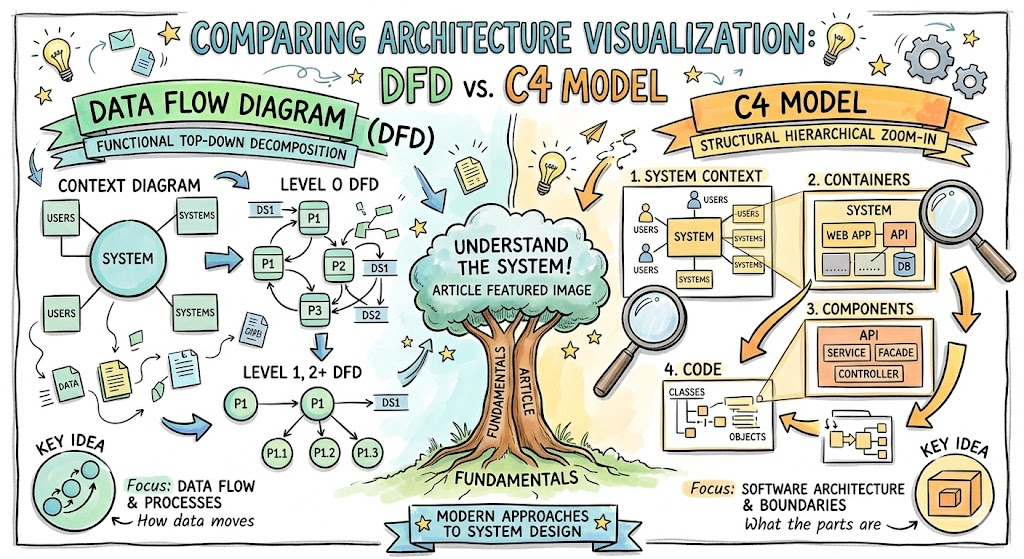
Context Diagram: The highest level. It shows the system as a single black box interacting with external entities (Users, other Systems).
-
Level 0 DFD: The box is opened. We see major processes (P1, P2, P3) and data stores (DS1).
-
Level 1, 2+ DFD: We drill deeper. Process P1 is exploded into sub-processes P1.1, P1.2, and P1.3.
The Analogy: The Subway Map
Think of a DFD like a subway map. You aren’t looking at the tunnels or the trains’ engines; you are tracking the routes. You want to know: “If I put a passenger (Data) at Station A (User), which lines (Processes) do they take to get to Station B (Database)?”
Key Takeaway: Focus on Data Flow & Processes. It answers the question: How does data move?
Part 2: The C4 Model – The Google Maps View
Core Philosophy: Structural Hierarchical Zoom-In.
The C4 Model (Context, Containers, Components, Code) is a system-oriented approach designed for the modern era of software development. It focuses on technical boundaries and the physical hierarchy of the software.
The Logic: Hierarchical Zoom-In
Unlike DFDs which break functions apart, C4 breaks the system structure apart.
-
System Context: The “Continent” view. Shows your system in the center, surrounded by users and external systems.
-
Containers: The “City” view. This is a crucial level often missed in other models. It shows the high-level technical choices: a Web App, a Mobile App, a Microservice API, and a Database.
-
Components: The “Street” view. Zooming inside a container (e.g., the API) to see the logical groupings: Controllers, Services, and Facades.
-
Code: The “Building Plan.” The lowest level, showing classes, objects, and interfaces.
The Analogy: Google Maps
Think of the C4 Model like using Google Maps. You start zoomed out to see the whole country (System Context). You zoom in to see the city layout (Containers). You zoom in further to see the specific streets and buildings (Components). Finally, you look at the blueprints for a specific house (Code).
Key Takeaway: Focus on Software Architecture & Boundaries. It answers the question: What are the parts?
Part 3: Accelerating Design with Visual Paradigm AI
Creating these diagrams manually can be time-consuming and prone to becoming outdated the moment code changes. This is where the Visual Paradigm (VP) ecosystem and its AI capabilities transform the workflow.
1. AI-Driven Diagram Generation
Visual Paradigm’s AI can analyze natural language requirements to generate initial drafts of diagrams.
-
For DFDs: You can input a text description of a business process (e.g., “User submits order, system validates inventory, then ships item”), and VP AI can suggest the initial Context and Level 0 DFD structures, identifying the external entities and data stores automatically.
-
For C4: By analyzing project documentation or even commit messages, the AI can help scaffold the high-level System Context and Container diagrams, ensuring you don’t miss critical external dependencies.
2. Code Engineering and Reverse Engineering
One of the hardest parts of the C4 model is maintaining the “Code” level (Level 4).
-
Visual Paradigm excels here with its Code Engineering features. It can reverse-engineer your actual source code (Java, C#, Python, etc.) to automatically generate the Class diagrams that form the basis of the C4 Code level. This ensures your documentation is never a lie; it is a direct reflection of the codebase.
3. Consistency and Collaboration
The VP ecosystem allows for “Living Documentation.” Because the diagrams are linked to the project data:
-
If you rename a “Container” in the C4 diagram, that change can be propagated to related documentation.
-
Teams can collaborate in real-time, using the visual paradigm to bridge the gap between business analysts (who prefer DFDs) and developers (who prefer C4).
Conclusion
Choosing between a Data Flow Diagram and the C4 Model isn’t about picking a winner; it’s about picking the right lens for the problem at hand.
If you are trying to understand a legacy system’s logic or map out a complex business algorithm, the DFD is your best friend—it tracks the movement of value. However, if you are designing a modern cloud architecture, managing microservices, or onboarding new developers to the codebase, the C4 Model provides the necessary structural clarity.
By leveraging tools like Visual Paradigm, you can stop worrying about drawing boxes and start focusing on designing robust, scalable systems. Whether you are mapping the subway lines of data or zooming into the city streets of your code, the right visualization makes the complex simple.
Reference
- Beginner’s Guide to C4 Model Diagrams: This post provides a step-by-step introduction to creating diagrams across the four levels of abstraction: Context, Containers, Components, and Code. It serves as an essential resource for effectively communicating software architecture.
- C4-PlantUML Studio | AI-Powered C4 Diagram Generator: This feature overview describes an AI-powered tool that automatically generates C4 software architecture diagrams. Users can create these models directly from simple text descriptions.
- Visual Paradigm Full C4 Model Support Release: This announcement highlights the inclusion of comprehensive C4 model support within the platform. It allows architects to manage diagrams at multiple abstraction levels seamlessly.
- Comprehensive Tutorial: Generating and Modifying C4 Component Diagrams with AI Chatbot: This hands-on tutorial demonstrates using a generative AI chatbot to build and refine C4 component diagrams. It uses a real-world car park booking system as a primary case study.
- A Comprehensive Guide to Visual Paradigm’s AI-Powered C4 PlantUML Studio: This guide explains how specialized AI transforms natural language into accurate, layered C4 diagrams. It offers a more reliable alternative to generic AI tools for architectural documentation.
- What is Data Flow Diagram?: This article explains that a DFD graphically represents data flow in a business information system. It details how these diagrams illustrate key processes and data movement.
- How to Create Data Flow Diagram (DFD)?: This tutorial focuses on visually depicting data movement through processes in a system. It is noted as a widely used technique in modern software design.
- Data Flow Diagram Templates: This resource provides templates that visualize how data moves within business information systems. These models specifically show processes and data transfers to aid in system analysis.
- Unlock the Power of Data Flow Diagrams (DFD) with Visual Paradigm: This guide discusses the comprehensive ecosystem provided for DFD modeling. It emphasizes how the platform enables efficient design and team collaboration.
- New Diagram Types Added to AI Diagram Generator: DFD & ERD: This update details the expanded AI support for generating Data Flow Diagrams. It allows users to create information flow analysis models through automated generation.