


Visual Paradigm Online’s AI Translator is a powerful, versatile tool designed to translate text within images quickly and accurately. It offers extensive editing capabilities and customization options, making it an ideal choice for professionals, educators, content creators, and travelers. This guide provides a detailed overview of its key features, unique functionalities, and editing toolset.
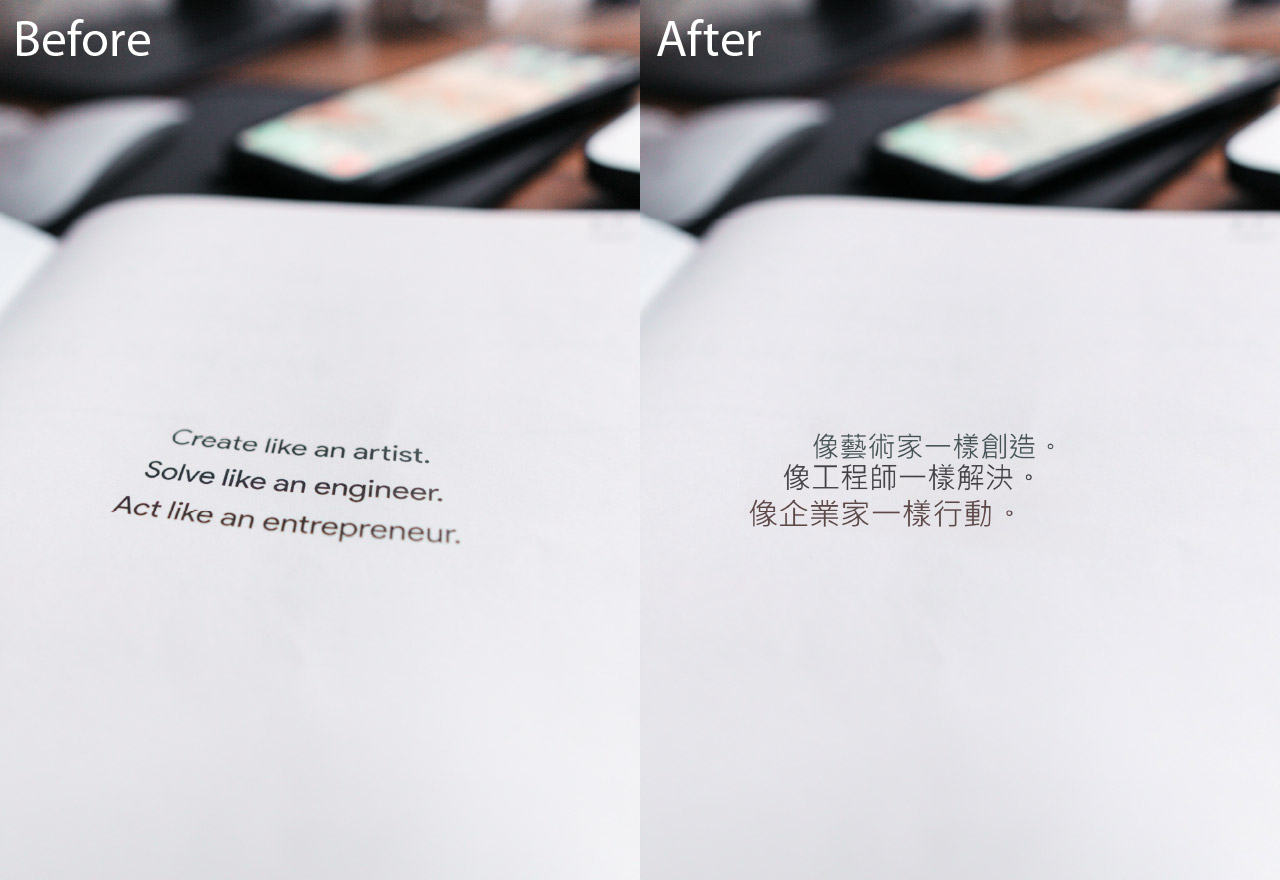
Why Visual Paradigm Online AI Translator Stands Out
High Accuracy and Speed
The AI-powered precision of Visual Paradigm Online’s AI Translator ensures translations are accurate and fast, avoiding common mistranslation errors and delivering results in seconds. This makes it a reliable tool for users who need quick and precise translations.
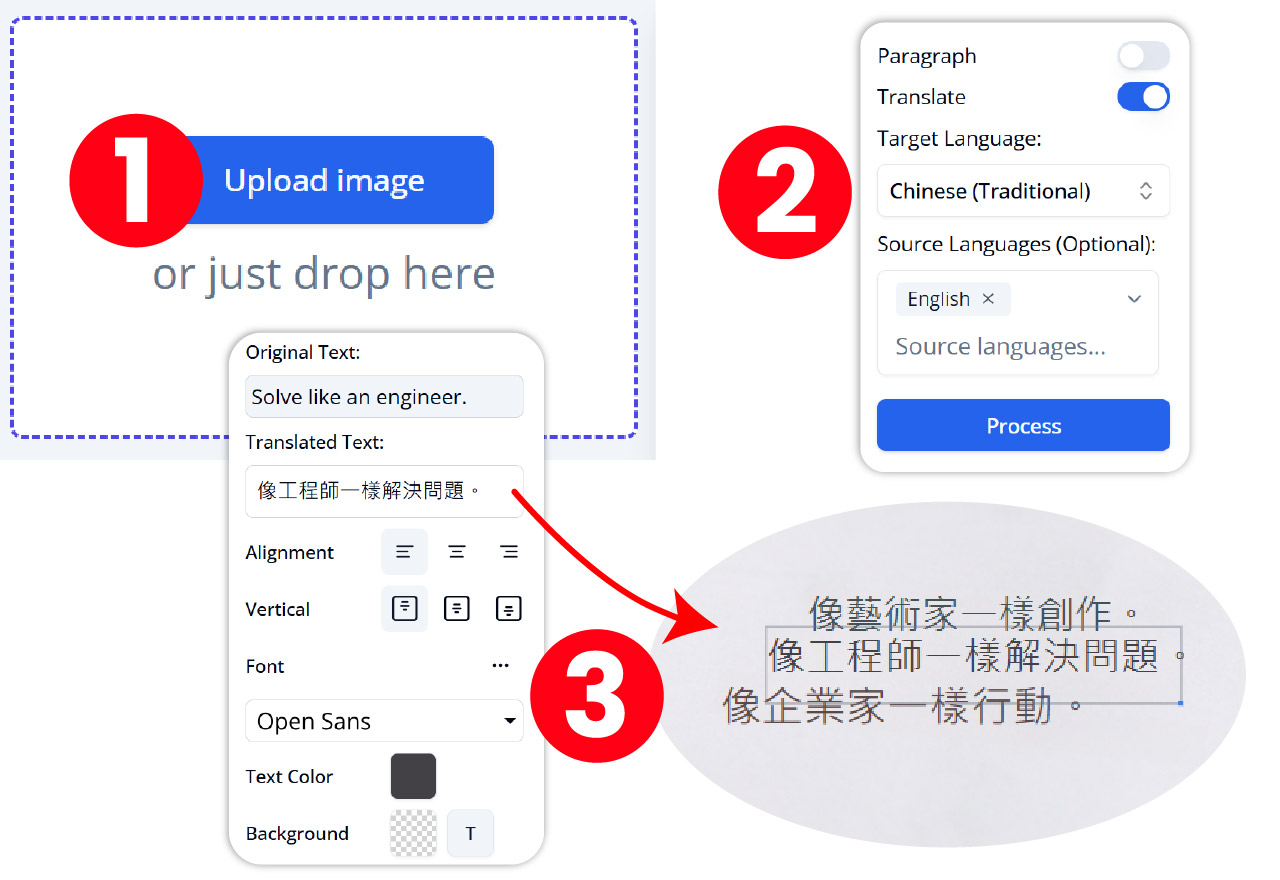
Supports 40+ Languages
Visual Paradigm Online’s AI Translator covers a broad range of languages, making it suitable for global users, from business professionals to travelers and educators. This extensive language support ensures that users can translate text in various languages effortlessly.
Complete Workflow
Beyond simple text extraction and translation, Visual Paradigm Online’s AI Translator offers a full workflow from detection to customization. Users can maintain the original layout or translate by lines or paragraphs, providing flexibility in how the translated text is presented.
Background Restoration
The tool can remove original text and repair the image background seamlessly, preserving the image’s visual integrity after translation. This feature is particularly useful for maintaining the professional appearance of translated images.
User-Friendly Interface
Designed for both professionals and casual users, Visual Paradigm Online’s AI Translator provides an intuitive platform to upload, translate, edit, and export images easily. The user-friendly interface ensures that users can navigate the tool effortlessly.
Feature List and Unique Powerful Features
Instant Image Upload & Translation
Upload images and translate text instantly into over 40 languages with AI image processing. This feature allows users to get quick translations without any hassle.
Text Block Manipulation
Merge or split text blocks to improve readability and layout coherence; rotate and align text blocks horizontally or vertically. This feature ensures that the translated text fits perfectly within the image layout.
Customizable Translation Output
Choose to translate text as full paragraphs or line-by-line; specify source language to enhance accuracy. This customization option allows users to tailor the translation output to their specific needs.
Font and Style Editing
Adjust font family, size, style, and color to match the design and branding needs. This feature enables users to maintain or enhance the original design aesthetics of the image.
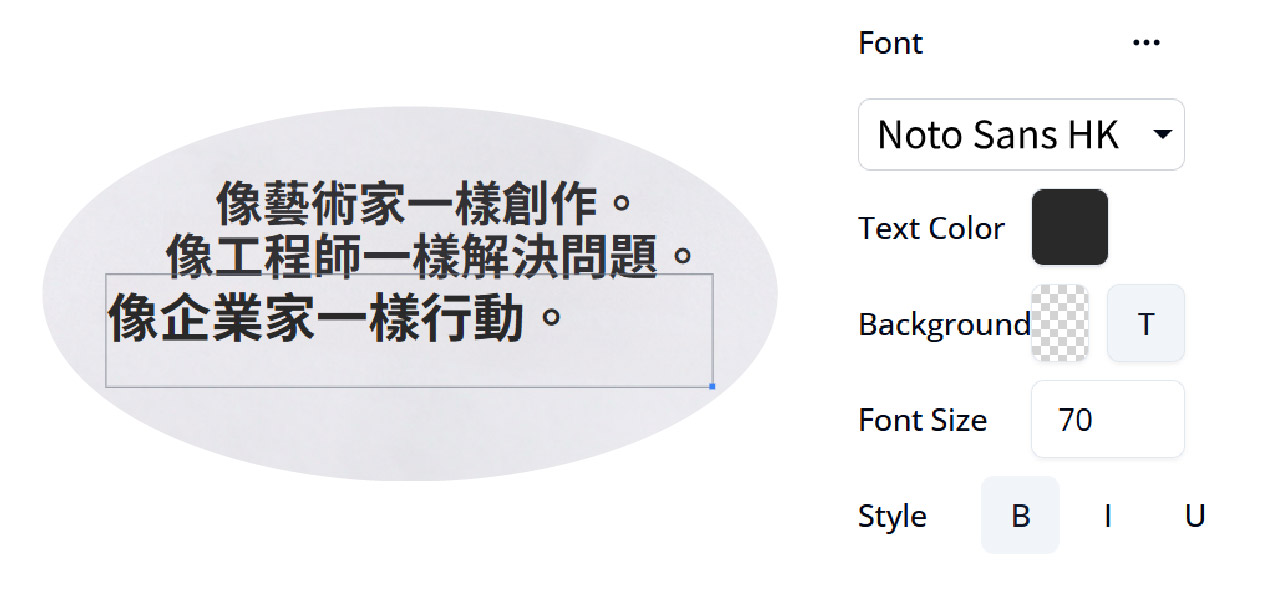
Show/Hide Text Block Bounds
Toggle visibility of text block outlines for precise editing and alignment. This feature helps users ensure that the translated text is accurately placed within the image.
Background Cleanup & Repair
Use AI-powered inpainting tools to remove OCR leftovers and repair image backgrounds for a polished look. This feature ensures that the translated image looks clean and professional.
Draw & Repair Tool
Brush over unwanted elements and repair masked areas to clean up the image after translation. This tool helps users remove any unwanted text remnants and restore the original image elements.
Reveal Original Design Elements
Restore parts of the original image that may have been removed accidentally during translation. This feature ensures that the translated image retains its original design elements.
Export Flexibility
Export translated images in JPG, PNG, or WebP formats, suitable for digital or print use. This export flexibility allows users to use the translated images in various applications.
Editing Capability and Toolset
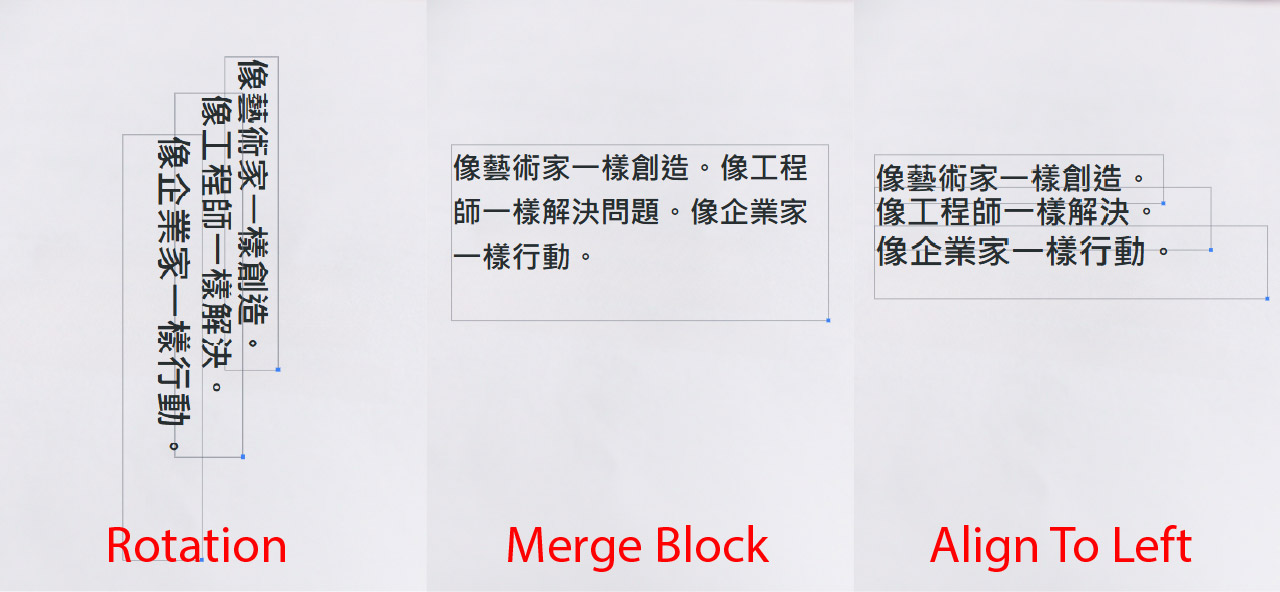
Full Control Over Translated Text
After translation, users can revise, rephrase, or fine-tune the text directly within the image to match tone, purpose, or brand voice. This feature ensures that the translated text meets the user’s specific requirements.
Text Block Editing
Users can select, move, merge, split, rotate, and align text blocks to fit the image layout perfectly, ensuring professional formatting. This feature provides users with the flexibility to adjust the translated text to fit the image layout.
Font Customization
The tool allows detailed font adjustments including family, size, style, and color, enabling users to maintain or enhance the original design aesthetics. This feature ensures that the translated text matches the design and branding needs.
Background and Visual Cleanup
The Draw & Repair tool and Reveal function help clean up unwanted text remnants and restore original image elements, ensuring a clean and natural look post-translation. This feature ensures that the translated image looks polished and professional.
Batch and Selective Editing
Features like Select All/Deselect All text blocks and manual text area selection provide flexibility for batch or precise edits. This feature allows users to make bulk edits or precise adjustments to the translated text.
Summary
Visual Paradigm Online’s AI Translator is a comprehensive AI-powered image translation tool that excels in accuracy, speed, and user control. Its standout features include multi-language support, advanced text block manipulation, customizable font and style editing, and powerful background repair tools. The editing capabilities empower users to perfect translations and maintain the original image’s design integrity, making it ideal for professionals, educators, content creators, and travelers who need seamless multilingual image translation with professional polish.
For more information, visit the Visual Paradigm Online AI Translator page and explore the features and tips and tricks to get the most out of this powerful tool.
Citations
- [1] Merge or Split Handling Multi-Line Text
- [2] Boost Your Productivity with AI Image Translator
- [3] AI Image Translator
- [4] Transform Your Workflow with the Ultimate AI Image Translation Tool
- [5] Imagine Understanding Any Language Instantly with AI Image Translation
- [6] Lost in Translation? Not Anymore
- [7] Move Text Blocks for Perfect Layouts
- [8] Visual Paradigm Online AI Image Translator
- [9] Features of AI Image Translator
- [10] Infographic About Product Brochure
- [11] Comprehensive Analysis of Anifuzion’s AI TTS Feature
- [12] USP Analysis Template
- [13] Recognizing Untranslated Text Manually
- [14] Visual Paradigm Online
- [15] AI Agents and Their Impact on Work
- [16] Recognizing Multi-Lines of Paragraph vs. Separate Text
- [17] Visual Paradigm YouTube Channel
- [18] PMC Article on AI Image Translation
- [19] Vpository Online Office
- [20] YesChat AI
- [21] Translate as Line or Paragraph
- [22] Demo Showcase of AI Image Translator
- [23] NeurIPS 2024 Virtual Papers
- [24] Curtis Tsang LinkedIn
- [25] Visual Paradigm Page
- [26] Visual Paradigm Features
- [27] Visual Paradigm Explainer
- [28] StarUML vs. Visual Paradigm Online Diagrams
- [29] System Modeling Diagrams Guide
- [30] Manual Text Selection
- [31] Visual Paradigm Page
- [32] Clean Up Marks in Image
- [33] What’s New in Visual Paradigm
- [34] Image Background Repair
- [35] Visual Paradigm Pricing
- [36] AI Image Translator Category
- [37] Imagine Understanding Any Language Instantly with AI Image Translation
- [38] Move Text Blocks for Perfect Layouts
- [39] Lost in Translation? Not Anymore
- [40] AI Image Translator
- [41] Step-by-Step Translation Tutorial
- [42] YouTube Video on AI Image Translator
- [43] Transform Your Workflow with the Ultimate AI Image Translation Tool
- [44] YouTube Video on AI Image Translator
- [45] Merge or Split Handling Multi-Line Text