
In modern software development, ensuring adherence to regulations like GDPR, HIPAA, or SOC 2 is no longer optional. It is a fundamental requirement for operation. However, compliance is often treated as a checklist exercise performed by auditors at the end of a project. This approach frequently leads to gaps where architectural decisions do not align with legal requirements. A more effective strategy involves embedding compliance validation directly into the architectural design process.
The C4 model offers a structured way to visualize and document software architecture at different levels of abstraction. By utilizing the Context, Container, and Component diagrams, organizations can map data flows, identify external entities, and verify security controls without getting lost in implementation details. This guide explores how to leverage these diagrammatic boundaries to validate regulatory compliance effectively.
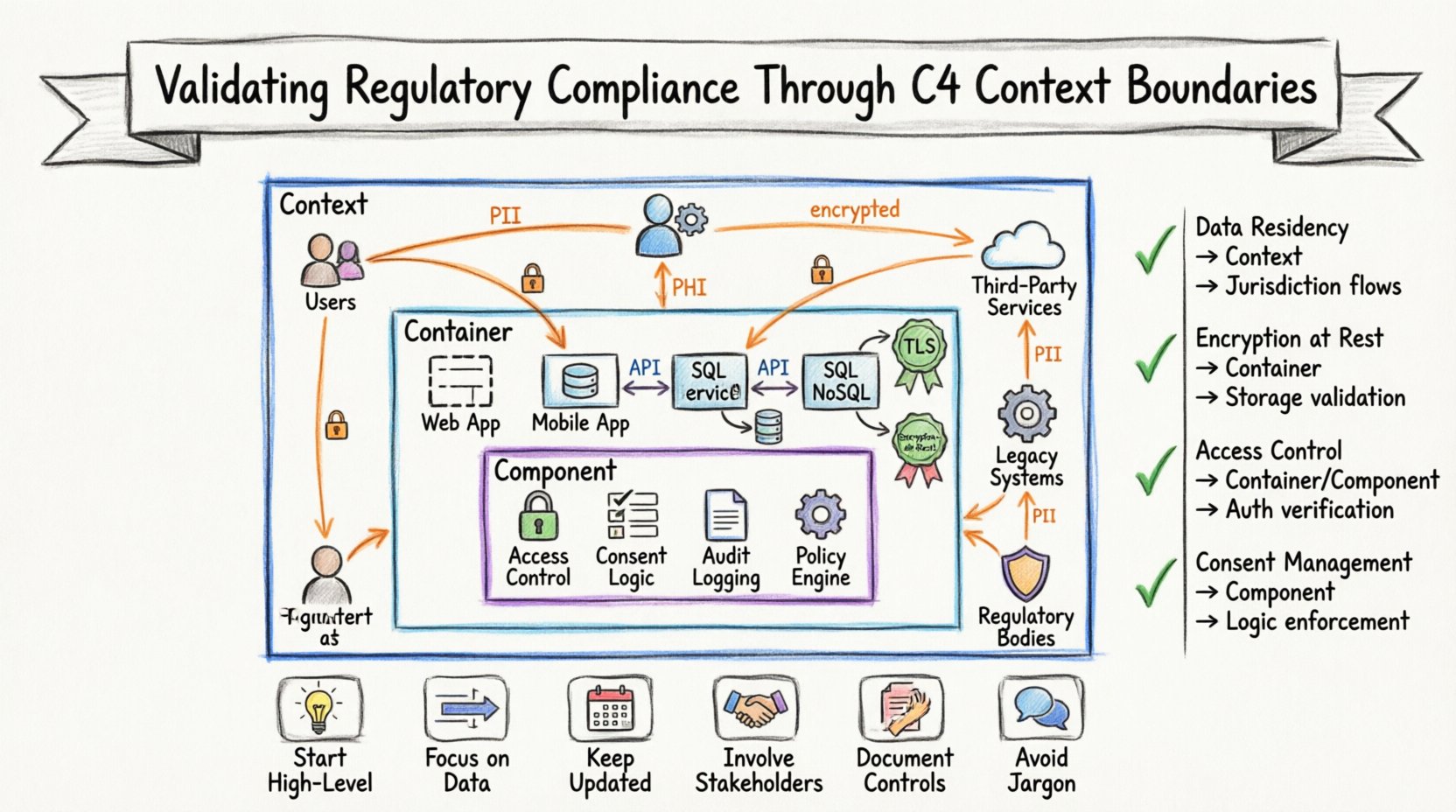
The Intersection of Architecture and Regulation 📜
Regulatory frameworks are inherently concerned with data, access, and system integrity. They dictate how information should be stored, who can access it, and how it must be protected during transmission. When an architecture is documented using the C4 model, these abstract concepts become concrete visual elements.
- Data Flow Visibility: Compliance audits often require proof of where data travels. Context diagrams explicitly show external systems and data flows, making it easier to identify where sensitive information crosses network boundaries.
- Boundary Definition: Regulations often mandate specific controls for “perimeter” security. The C4 model defines clear boundaries between the system and the outside world, providing a visual reference for these control zones.
- Stakeholder Communication: Auditors and legal teams may not understand technical implementation. A context diagram provides a shared language that allows non-technical stakeholders to verify compliance requirements against the system design.
Integrating compliance checks into the creation of C4 diagrams ensures that every architectural decision considers regulatory constraints from the start. This proactive approach reduces technical debt and avoids costly remediation later.
Understanding the C4 Model Layers for Auditors 🧩
To validate compliance effectively, one must understand what information each layer of the C4 model reveals. Each level serves a specific purpose in the audit trail, highlighting different aspects of the system’s behavior and security posture.
1. Context Diagram: The High-Level View 🌍
The Context diagram is the entry point for compliance validation. It represents the entire software system as a single box within its environment. This diagram focuses on:
- External Entities: These are people, systems, or organizations that interact with the software. For compliance, identifying these entities is crucial. For example, under data privacy laws, you must know exactly which third parties receive personal data.
- System Interactions: The arrows between the system and external entities represent data flows. These flows are subject to regulations regarding encryption, consent, and data residency.
- System Purpose: A brief description of what the system does helps auditors understand the scope of the compliance requirements applicable to that specific functionality.
2. Container Diagram: The Component View 🗄️
When the system grows beyond a single executable, the Context diagram is insufficient. The Container diagram breaks the system down into larger building blocks, such as web applications, mobile apps, databases, or microservices. This layer is vital for:
- Data Storage Identification: Compliance regulations often require specific protections for data at rest. Identifying the specific containers responsible for storage allows for targeted control validation.
- Technology Stack Visibility: While specific software names should be avoided in public documentation, knowing the type of technology (e.g., “SQL Database” vs. “NoSQL Cache”) helps assess inherent security capabilities and compliance risks.
- Interface Management: Containers communicate via APIs or protocols. Auditors need to verify that these interfaces adhere to security standards like OAuth or TLS.
3. Component Diagram: The Functional View 🧱
The Component diagram dives deeper into a specific container, showing the internal logic. While less common for high-level compliance, it is useful for:
- Logic Verification: Ensuring that specific business logic required by regulation (e.g., data retention periods) is implemented correctly.
- Access Control: Verifying that internal functions enforce the necessary permissions before allowing access to sensitive operations.
Mapping Compliance Requirements to Diagram Levels 🗺️
Different regulations impact different parts of the architecture. The table below outlines how specific compliance requirements map to the C4 model layers, providing a structured approach for validation.
| Compliance Requirement | C4 Layer | Validation Focus |
|---|---|---|
| Data Residency & Sovereignty | Context | Identify where data leaves the jurisdiction via external entity flows. |
| Data Encryption at Rest | Container | Verify storage containers use approved encryption methods. |
| Third-Party Data Sharing | Context | Map all external systems that receive data from the primary system. |
| Access Control & Authentication | Container/Component | Ensure entry points and internal functions require valid credentials. |
| Audit Logging | Container | Confirm that logging mechanisms exist within relevant containers. |
| Consent Management | Component | Validate that user choice logic is enforced before data processing. |
The Context Diagram as a Compliance Boundary 🌐
The Context diagram is arguably the most important tool for initial compliance validation. It forces the team to define the perimeter of the system. Without a clear definition of what is inside and what is outside, compliance cannot be measured.
Identifying External Entities
In a regulatory audit, the definition of an “External Entity” is critical. This includes:
- End Users: Individuals whose data is being processed. Their consent and rights must be respected.
- Third-Party Services: Cloud providers, payment processors, or analytics tools. Contracts with these entities must align with data processing agreements.
- Legacy Systems: Older systems that may still interact with the new architecture. These often pose significant compliance risks if not properly documented.
- Regulatory Bodies: In some cases, government agencies are external entities that require data reporting.
Analyzing Data Flows
Every arrow in a Context diagram represents a data flow. Each flow must be analyzed for compliance:
- Direction: Is data moving into the system, out of the system, or both? Data leaving the system often triggers stricter regulations.
- Type: What kind of data is moving? Is it PII (Personally Identifiable Information), PHI (Protected Health Information), or financial data?
- Frequency: Is this a real-time stream or a batch transfer? Real-time transfers may require different security controls.
- Encryption: Is the flow encrypted in transit? Compliance standards typically mandate TLS or equivalent protocols for data in motion.
Containers and Data Residency 🗄️
Once the context is established, the Container diagram details where data actually lives. This is where specific technical controls are often mandated.
Storage Controls
Regulations like GDPR and CCPA require organizations to know exactly where personal data is stored. The Container diagram should explicitly label storage containers. This allows auditors to verify:
- Location: Are the storage containers located in regions permitted by law?
- Access: Who has administrative access to these containers?
- Retention: How long is data retained before deletion?
API Security
Modern systems rely heavily on APIs to connect containers. These interfaces are common points of failure for compliance. The diagram helps identify:
- Authentication Mechanisms: Are APIs protected by keys, tokens, or certificates?
- Rate Limiting: Are there controls in place to prevent abuse or denial of service?
- Input Validation: Are APIs configured to reject malicious input to prevent injection attacks?
Auditing the Boundaries 🔍
Once the diagrams are created and maintained, they become part of the evidence package during an audit. However, creating a diagram is not enough; it must be accurate and up-to-date.
Traceability
Auditors look for traceability between requirements and implementation. The C4 model supports this by linking high-level business goals to technical components. For example, a requirement for “Data Minimization” can be traced from the Context diagram (what data is collected) to the Component diagram (how that data is processed).
Evidence Collection
Digital artifacts are powerful evidence. The diagrams themselves serve as proof that the architecture was designed with compliance in mind. To strengthen this:
- Version Control: Keep diagrams in a version-controlled repository. This shows the evolution of the system and how compliance requirements were addressed over time.
- Metadata: Add metadata to the diagrams indicating when they were reviewed and by whom. This demonstrates an active compliance program.
- Annotations: Use notes within the diagrams to highlight specific compliance controls, such as “Encrypted at Rest” or “MFA Required”.
Common Pitfalls in Compliance Documentation 🚫
Even with a solid framework, teams often make mistakes that undermine their compliance efforts. Avoiding these pitfalls is essential for a successful audit.
- Outdated Diagrams: The most common error is allowing diagrams to become stale. If the system changes but the diagrams do not, the documentation is misleading and potentially non-compliant.
- Over-Engineering: Creating Component diagrams for every microservice is unnecessary for high-level compliance. Stick to the Context and Container levels for most audits.
- Ignoring Data Flows: Focusing only on storage and ignoring how data moves between systems can lead to gaps in security.
- Assuming Security: Do not assume a container is secure just because it exists. The diagram must explicitly note the security controls in place.
- Confusing Layers: Mixing Context and Container details can confuse auditors. Keep the layers distinct to maintain clarity.
Maintaining Compliance Over Time 🔄
Compliance is not a one-time event; it is a continuous state. Regulations change, and technology evolves. The C4 model provides a flexible structure that can adapt to these changes.
Change Management
When a new feature is added or an existing one is modified, the diagrams must be updated. This should be part of the standard development workflow. Integrating diagram updates into the pull request process ensures that documentation stays synchronized with code.
Regular Reviews
Schedule periodic reviews of the architecture documentation. These reviews should involve both technical leads and compliance officers. This collaboration ensures that the diagrams reflect current business rules and regulatory expectations.
Automated Checks
Where possible, use automated tools to validate the diagrams against compliance rules. For instance, scripts can scan the diagrams to ensure all external data flows are marked with encryption requirements. This reduces manual effort and human error.
Summary of Best Practices ✅
To successfully validate regulatory compliance using the C4 model, follow these core principles:
- Start High-Level: Begin with the Context diagram to define the system boundary and external interactions.
- Focus on Data: Prioritize mapping data flows and storage locations over implementation details.
- Keep it Updated: Treat diagrams as living documents that must evolve with the system.
- Involve Stakeholders: Ensure legal and compliance teams review the diagrams, not just developers.
- Document Controls: Explicitly annotate security controls within the diagrams to aid auditors.
- Avoid Jargon: Use clear labels and descriptions so that non-technical auditors can understand the architecture.
By embedding compliance validation into the architectural documentation process, organizations can build systems that are secure, compliant, and resilient. The C4 model provides the structure needed to make these complex relationships visible and manageable. It transforms abstract regulatory requirements into concrete architectural decisions, bridging the gap between legal obligations and technical reality.
Ultimately, the goal is not just to pass an audit but to build trust. When stakeholders can see exactly how data is handled and protected through clear, well-maintained diagrams, confidence in the system grows. This transparency is the foundation of a mature compliance program.