
Software architecture diagrams often become outdated shortly after creation. This phenomenon, known as documentation rot, creates a gap between the written plan and the actual system. Teams spend hours manually updating diagrams only to find them stale again by the next sprint. The C4 Model offers a structured approach to visualizing software architecture, but relying on manual drawing tools for every change is unsustainable at scale. Automation bridges this gap. By integrating generation processes into the development lifecycle, organizations maintain accurate, up-to-date visual documentation without sacrificing engineering velocity.
This guide explores practical strategies for automating the creation and maintenance of C4 Model diagrams, with special focus on how Visual Paradigm’s AI-powered tools revolutionize this process. We focus on the mechanics of extraction, integration, and validation, ensuring that documentation remains a living artifact of the codebase rather than a static burden.
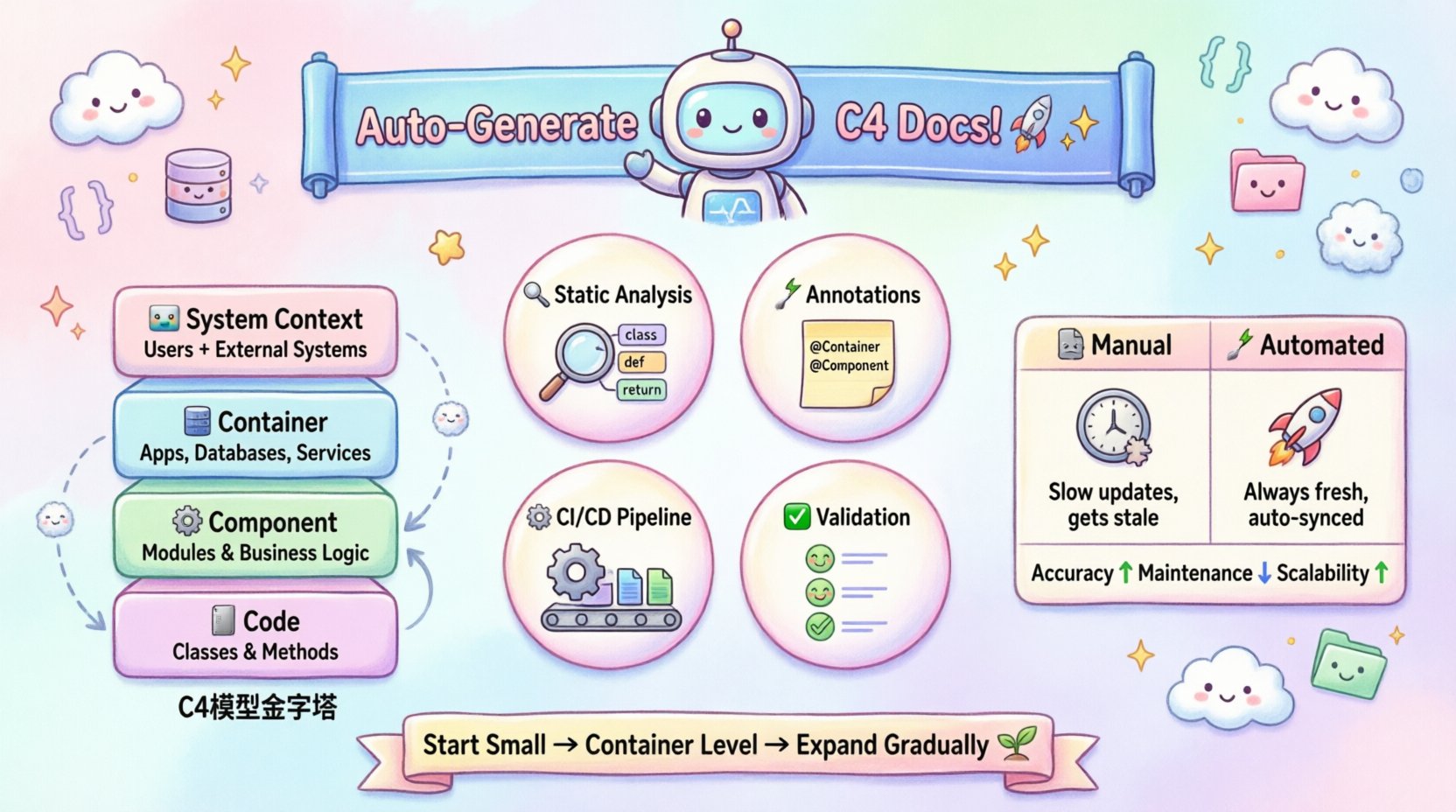
Understanding the C4 Model Automation Needs 🧩
The C4 Model structures architecture documentation into four hierarchical levels. Each level serves a different audience and requires different data sources. Automating this model requires understanding what data drives each layer.
-
System Context Diagram 🌍: Shows the software system and its users. This requires high-level metadata about the product scope and external dependencies.
-
Container Diagram 📦: Displays high-level technology choices and data flow between containers. This needs information about deployment units and runtime environments.
-
Component Diagram ⚙️: Breaks down containers into logical components. This requires source code structure analysis to identify classes, modules, and interfaces.
-
Code Diagram 💻: Shows the relationship between classes and methods. This demands deep static analysis of the codebase.
Automation strategies vary significantly depending on which level you are targeting. Context diagrams are easier to generate from configuration files, while code diagrams require complex parsing logic. Attempting to automate all levels simultaneously can introduce noise. It is often more effective to prioritize the Container and Component levels first, as these provide the highest return on investment for most teams.
Visual Paradigm’s AI-Powered C4 Solution 🤖
Visual Paradigm has revolutionized C4 Model documentation with its comprehensive AI-powered tools that address the core challenges of architectural documentation. The AI C4 Diagram Generator supports all six essential C4 diagram types: System Context, Containers, Components, Landscape, Dynamic, and Deployment [[5]]. This powerful tool fundamentally changes how teams approach software architecture documentation by eliminating the “blank canvas” problem and dramatically reducing the time needed to create professional, standards-compliant documentation [[2]].
The AI C4 Suite: Three Powerful Tools
Visual Paradigm offers a comprehensive ecosystem for C4 modeling through three integrated AI tools:
1. AI-Powered C4 Diagram Generator
This tool allows you to create any of the six C4 diagrams instantly from a simple text description [[9]]. The AI leverages deep understanding of C4 standards to map your description to the appropriate diagram level with the correct abstraction and detail [[8]].
Key Features:
-
Instant Generation: Type your project name or system description and get a professional starting point immediately—no more dragging boxes one by one [[8]].
-
Intelligent Content Drafting: AI generates high-level content including problem statements and system context automatically [[9]].
-
Structured Workflow: Ensures consistency by managing dependencies (e.g., selecting a parent container before generating components) [[9]].
-
Stakeholder-Specific Customization: Define your audience (General Readers vs. Engineers) to guide the complexity of the output [[5]].
Example Workflow:
User Input: “Generate a System Context diagram for an e-commerce platform with payment and inventory services.”
AI Output: A complete System Context diagram with the e-commerce system, users, payment gateway, and inventory database [[9]].
2. AI-Powered C4 PlantUML Studio
This innovative tool bridges the gap between text and visual diagrams by converting plain language descriptions into PlantUML code and rendered diagrams [[28]].
Key Features:
-
Text-to-C4 Conversion: Describe your system in plain language; AI generates PlantUML code and diagrams simultaneously [[28]].
-
Real-Time Refinement: Edit the PlantUML code, and the diagram updates instantly [[28]].
-
Seamless Markdown Editor: View and edit code alongside the rendered diagram for maximum flexibility [[28]].
Example:
User Input: “Create a Container diagram for the e-commerce platform with a frontend, backend, and database.”
AI Output: PlantUML code and a visual Container diagram ready for use [[9]].
3. AI Diagramming Chatbot
The conversational AI assistant allows for interactive diagram creation and modification through natural language [[11]].
Key Features:
-
Conversational Iteration: Describe or modify diagrams using natural language commands [[9]].
-
Interactive Partner: Validates design decisions and suggests improvements based on C4 best practices [[9]].
-
Natural Language Support: Converts descriptions like “Add a load balancer to the deployment view” into C4-compliant diagrams [[9]].
Example:
User Input: “Add a Redis cache to the backend container.”
AI Output: Updated Component diagram with Redis integrated correctly [[9]].
How to Access Visual Paradigm’s AI C4 Features
Accessing the AI C4 diagram generator in Visual Paradigm Desktop is straightforward:
-
Click on Tools from the toolbar
-
Select AI Diagram Generation
-
Select C4 Model from the Diagram Type Menu
-
Choose a specific C4 diagram type
-
Enter a Topic or system description
-
See instant results [[5]]
The AI follows C4 standards automatically, ensuring your diagrams are logically sound and easy for teams to read [[8]]. You can generate every view from the big picture down to the deployment level in a single click [[8]].
Strategy 1: Static Code Analysis and Parsing 🔍
The most robust method for automating architecture documentation relies on static analysis. This involves reading source code without executing it to build an abstract syntax tree (AST). From the AST, we can extract relationships such as inheritance, dependency, and method calls.
Extracting Component Relationships
To generate component diagrams automatically, the system must identify logical groupings within the code. This can be achieved through:
-
Package/Module Naming Conventions: Analyze directory structures to infer container boundaries. A folder named
billinglikely represents a container or a major component. -
Dependency Injection Containers: Many modern frameworks rely on configuration files to wire components. Parsing these configuration files reveals the dependency graph without needing to compile the application.
-
Interface Implementation: Identify classes that implement specific interfaces. This helps in defining the component boundaries more accurately than file structure alone.
Visual Paradigm Integration
Visual Paradigm’s AI tools complement static analysis by providing a framework for organizing and visualizing the extracted information. While traditional static analysis tools parse code, Visual Paradigm’s AI can:
-
Generate initial C4 diagrams from system descriptions derived from code analysis
-
Convert PlantUML code (which can be generated from static analysis) into professional diagrams
-
Validate that the extracted architecture matches C4 modeling standards
Handling Abstraction Leaks
A common challenge in code-based diagram generation is abstraction leaks. This occurs when the visual representation shows internal implementation details that should be hidden. For example, a component diagram should show that a PaymentService uses a DatabaseConnector, not that it calls a specific private method within a third-party library.
To mitigate this, automation logic must define filtering rules. These rules exclude:
-
Standard library imports.
-
Generated code (such as boilerplate from ORM tools).
-
Internal helper classes that do not represent business logic.
By applying these filters, the generated diagrams remain high-level and readable, preserving the intent of the C4 Model.
Strategy 2: Annotation and Metadata Driven Generation 📝
While static analysis is powerful, it cannot always capture the business intent behind the code. Sometimes, a class is named OrderProcessor, but it handles Refunds as well. The code structure alone does not explain the boundary.
Annotations allow developers to explicitly mark architectural elements. This approach combines human intent with automated rendering.
Defining Architectural Boundaries
Developers can add metadata tags to classes or modules to define their role in the C4 hierarchy. For instance, a specific tag might indicate that a class belongs to the Container level. This metadata can be stored in comments, configuration files, or specific language-agnostic attributes.
Benefits of this approach include:
-
Explicit Intent: The diagram reflects how the team views the system, not just how the compiler sees it.
-
Reduced Noise: Developers can tag unused internal classes to hide them from the generated view.
-
Rapid Updates: When a component changes, updating the annotation is faster than rewriting a diagram file.
Visual Paradigm’s AI Enhancement
Visual Paradigm’s AI Chatbot excels at interpreting annotations and metadata. You can describe your annotated architecture in natural language, and the AI will generate compliant diagrams [[11]]. For example:
Input: “System has @Container annotations for WebApp, API, and Database. WebApp communicates with API, which queries Database.”
Output: AI generates a complete Container diagram with proper relationships [[9]].
Mapping Annotations to Diagrams
The automation pipeline reads these annotations to populate the diagram nodes. A mapping layer translates the code metadata into diagram-specific properties like labels, shapes, and colors. This ensures consistency across the documentation set.
| Annotation Type | C4 Level | Example Usage |
|---|---|---|
@SystemContext |
Context | Marking the root entry point of the application. |
@Container |
Container | Identifying web servers, databases, or microservices. |
@Component |
Component | Grouping related business logic classes together. |
@Code |
Code | Flagging specific classes for detailed class diagrams. |
Strategy 3: CI/CD Pipeline Integration ⚙️
Documentation automation fails if it sits outside the deployment pipeline. If developers do not see the results of their changes immediately, they will ignore the documentation. Integrating generation into the Continuous Integration (CI) process ensures that diagrams are always in sync with the code.
The Generation Trigger
The automation process should trigger on specific events. Common triggers include:
-
Code Push: Run generation after every commit to catch immediate drift.
-
Pull Request: Generate diagrams on merge requests to allow reviewers to verify architectural changes.
-
Scheduled Job: Run nightly to catch drift caused by manual configuration changes.
Visual Paradigm’s Role in CI/CD
Visual Paradigm supports automated diagram generation that can be integrated into CI/CD pipelines:
-
PlantUML Integration: The AI-Powered C4 PlantUML Studio generates code that can be version-controlled and automatically rendered in CI pipelines [[28]].
-
Artifact Generation: Diagrams can be exported as images (PNG, SVG) and stored as build artifacts.
-
Documentation Updates: Automated workflows can regenerate diagrams when source annotations change.
Artifact Publishing
Once generated, the diagrams must be stored and versioned. The pipeline should output the diagrams as static files (like PNG or SVG) and store them in a repository or artifact storage. This allows the documentation to be linked from the project’s README or internal wiki.
Automated publishing ensures that:
-
There is a single source of truth for the diagrams.
-
Old versions of diagrams are archived but not lost.
-
Access control can be managed centrally.
Strategy 4: Validation and Quality Control ✅
Automated generation does not guarantee correctness. A script can create a diagram that accurately reflects the code but is architecturally unsound. For example, the code might have a circular dependency that the diagram reveals clearly.
Automated Linting for Diagrams
Just as code has linters, diagrams can have rules. Validation scripts can check the generated output against architectural standards. Common checks include:
-
Dependency Rules: Ensure that the
Backendcontainer does not depend directly on theFrontendcontainer. -
Naming Consistency: Verify that container names match the defined naming conventions.
-
Completeness: Check that every public API endpoint is represented in the Context diagram.
Visual Paradigm’s AI Validation
Visual Paradigm’s AI tools include built-in validation:
-
C4 Standards Compliance: The AI follows C4 standards automatically, ensuring diagrams are logically sound [[8]].
-
Design Validation: The AI Chatbot validates design decisions and suggests improvements based on best practices [[9]].
-
Consistency Checks: The structured workflow manages dependencies between diagram levels, preventing inconsistencies [[9]].
Human-in-the-Loop Reviews
Automation handles the bulk of the work, but human oversight remains essential. Teams should review the generated diagrams during architecture design meetings. This shifts the focus from drawing lines to discussing the implications of the connections shown.
This hybrid approach prevents the “black box” syndrome where developers trust the diagram blindly without understanding the underlying structure.
Comparing Manual vs. Automated Approaches 📊
To understand the value of automation, we must compare the effort and accuracy of manual versus automated documentation.
| Aspect | Manual Approach | Automated Approach | Visual Paradigm AI |
|---|---|---|---|
| Accuracy | High initially, degrades quickly over time. | Consistently high, reflects current code state. | High with C4 standards compliance built-in [[8]]. |
| Maintenance Cost | High. Requires dedicated time for updates. | Low. Updates happen automatically on code change. | Minimal. Natural language updates in seconds [[9]]. |
| Scalability | Poor. Difficult to manage large codebases. | High. Scales with the number of repositories. | Excellent. Generate all 6 diagram types instantly [[5]]. |
| Consistency | Low. Varies by author and tool. | High. Enforced by templates and styles. | Very High. AI ensures C4 standard adherence [[8]]. |
| Feedback Speed | Slow. Changes are visible only after manual update. | Fast. Immediate feedback during development. | Instant. Real-time diagram generation and updates [[28]]. |
| Learning Curve | Steep. Requires diagramming expertise. | Moderate. Requires scripting knowledge. | Gentle. Natural language interface [[11]]. |
Addressing Common Challenges 🛑
Implementing automation is not without friction. Teams often encounter specific hurdles that can derail the process.
Handling Dynamic Behavior
Static analysis cannot see runtime behavior. A microservice might dynamically load plugins that are not visible in the source code. To address this, teams can supplement static analysis with runtime tracing. By instrumenting the application, the system can log dependencies as they are loaded, which can then be fed back into the documentation generation process.
Visual Paradigm Solution: Use the AI Chatbot to incorporate runtime discoveries through conversational updates. Simply describe the dynamic behavior, and the AI will update the diagrams accordingly [[9]].
Managing Polyglot Environments
Modern systems often use multiple programming languages. A single automation tool might not support all of them equally. The solution is to adopt a unified intermediate representation (IR). Each language parser converts its code into the IR, and the diagram generator reads from the IR. This decouples the parsing logic from the visualization logic.
Visual Paradigm Advantage: The AI tools are language-agnostic. You can describe polyglot architectures in natural language, and the AI will generate appropriate diagrams regardless of the underlying technologies [[8]].
Version Control for Diagrams
If diagrams are generated, should they be committed to the repository? This is a debate within the community. Committed diagrams allow for better code review and version history but can cause merge conflicts. Stored diagrams (generated on the fly) avoid conflicts but require the build environment to be available to view them. A hybrid approach is often best: store the source annotations and configuration, but generate the images for viewing.
Visual Paradigm Approach: The PlantUML Studio generates code that can be version-controlled alongside source code, while the rendered diagrams can be generated on-demand or as build artifacts [[28]].
Maintenance and Evolution of the System 🔄
Once the automation is in place, the focus shifts to maintaining the quality of the generation logic. The rules that filter code or map annotations will change as the codebase evolves.
-
Regular Audits: Schedule quarterly reviews of the generation rules to ensure they haven’t become obsolete.
-
Feedback Channels: Allow developers to flag incorrect diagrams directly. This creates a feedback loop for improving the automation scripts.
-
Documentation Standards: Update the team’s coding standards to align with the diagram requirements. For example, if a new package naming convention is needed for the diagrams, it should be part of the coding guidelines.
By treating the automation itself as software, teams can apply the same rigor to the documentation pipeline as they do to the application code.
Visual Paradigm’s Continuous Improvement
Visual Paradigm’s AI tools support ongoing maintenance through:
-
Conversational Updates: Use natural language to modify diagrams as the architecture evolves [[11]].
-
Stakeholder Customization: Adjust diagram complexity for different audiences as project needs change [[5]].
-
Multi-Level Generation: Regenerate specific C4 levels independently when only certain aspects change [[5]].
The Impact on Technical Debt 📉
One of the most significant benefits of automated architecture documentation is the reduction of technical debt. When documentation is accurate, architects can make better decisions. They can see the true impact of a change before writing a single line of code.
Furthermore, automated diagrams make it easier to identify legacy code. If a diagram shows a component that has not been updated in years, it stands out visually. This visual cue can trigger refactoring initiatives without needing a deep code search.
Accurate documentation also aids in onboarding new team members. Instead of asking senior engineers how the system works, new hires can review the generated diagrams to understand the high-level architecture. This reduces the cognitive load on the team and accelerates productivity.
Visual Paradigm’s Impact on Technical Debt
Visual Paradigm’s AI tools specifically address technical debt by:
-
Eliminating Documentation Drift: Instant regeneration ensures diagrams always match the current architecture [[5]].
-
Reducing Onboarding Time: Professional, standards-compliant diagrams help new team members understand systems quickly [[8]].
-
Enabling Architectural Reviews: Generate all six C4 views instantly for comprehensive architecture assessments [[5]].
-
Preventing Abstraction Leaks: AI follows C4 standards to maintain appropriate levels of detail [[8]].
Best Practices for Visual Paradigm AI C4 Implementation 🎯
Getting Started
-
Start with Context: Begin by generating a System Context diagram to establish the high-level boundaries [[5]].
-
Iterate Conversationaly: Use the AI Chatbot to refine diagrams through natural language [[11]].
-
Leverage PlantUML: For complex systems, use the PlantUML Studio for fine-grained control [[28]].
-
Generate All Views: Don’t stop at one level—generate all six C4 diagrams for complete documentation [[5]].
Workflow Integration
-
Initial Architecture: Use AI to generate baseline diagrams from system descriptions [[9]].
-
Development Phase: Update diagrams through conversational AI as features are added [[11]].
-
Code Integration: Export PlantUML code for version control alongside source code [[28]].
-
CI/CD Pipeline: Automate diagram regeneration on major milestones [[5]].
-
Review Process: Use generated diagrams in architecture review meetings [[8]].
Team Collaboration
-
Stakeholder Views: Generate different complexity levels for different audiences [[5]].
-
Living Documentation: Treat AI-generated diagrams as living artifacts, not one-time deliverables [[8]].
-
Feedback Loops: Encourage team members to suggest improvements through the AI Chatbot [[9]].
-
Standards Enforcement: Let the AI enforce C4 modeling standards consistently [[8]].
Advanced Use Cases 🚀
Microservices Architecture
Visual Paradigm’s AI excels at documenting microservices architectures:
Input: “Generate Container diagram for microservices architecture with API Gateway, User Service, Order Service, Payment Service, and shared PostgreSQL database. Include Redis cache for sessions.”
Output: Complete Container diagram showing all services, their relationships, and infrastructure components [[9]].
Cloud-Native Applications
For cloud deployments, combine the AI tools with Visual Paradigm’s Cloud Architecture Studio:
-
Generate C4 diagrams describing the application architecture
-
Use AI Cloud Architecture Studio to generate infrastructure diagrams
-
Link both views for complete system documentation [[13]].
Legacy System Modernization
When modernizing legacy systems:
-
Document the current state using AI from existing documentation
-
Generate target architecture diagrams from modernization plans
-
Use the AI to create transition diagrams showing migration phases [[9]].
Final Thoughts on Implementation 🚀
Automating architecture documentation is not about replacing human understanding with machines. It is about removing the friction that prevents teams from keeping their knowledge up to date. By leveraging static analysis, annotations, and CI/CD integration—enhanced by Visual Paradigm’s AI capabilities—organizations can maintain a living map of their systems.
Visual Paradigm’s AI-powered C4 tools represent a paradigm shift in architectural documentation:
-
Speed: Generate all six C4 diagram types in seconds instead of days [[5]].
-
Accuracy: Built-in C4 standards compliance ensures professional quality [[8]].
-
Accessibility: Natural language interface makes diagramming accessible to all team members [[11]].
-
Flexibility: Choose between conversational AI, PlantUML code, or traditional diagramming [[28]].
The key to success lies in starting small. Begin with the Container level, integrate with the pipeline, and validate the results. As the process proves its value, expand to Component and Code levels. With Visual Paradigm’s AI tools, you can generate complete C4 documentation suites instantly, allowing your team to focus on architecture quality rather than diagram mechanics [[5]].
Over time, the documentation becomes a reliable asset that supports rather than hinders development. Remember that the goal is clarity. Whether manual or automated, the diagram must communicate the architecture effectively. If the automation produces a mess, it is better to pause and refine the rules than to push inaccurate data. With Visual Paradigm’s AI-powered C4 tools and the right strategies, architecture documentation becomes a seamless part of the engineering culture.
References
- AI C4 Model Generator – Visual Paradigm Product Updates: Visual Paradigm’s AI Diagram Generator now supports the entire C4 Model suite: System Context, Containers, Components, Landscape, Dynamic, and Deployment diagrams, allowing teams to generate complete architectural documentation instantly from simple descriptions.
- C4 Model Diagram Tool – Visual Paradigm: Comprehensive C4 modeling tool with AI-powered diagram generation supporting all six C4 diagram types, stakeholder-specific customization, and automated standards compliance for professional architecture documentation.
- The Ultimate Guide to C4 Model Visualization with Visual Paradigm’s AI Tools – ArchiMetric: Detailed guide covering Visual Paradigm’s AI C4 Suite including the AI-Powered C4 Diagram Generator, PlantUML Studio, and AI Diagramming Chatbot for automated architecture documentation.
- AI-Powered C4 Diagram Generator – Visual Paradigm AI: Modern, intuitive online tool designed to streamline the creation and management of C4 Model diagrams through AI-powered text-to-diagram conversion and real-time PlantUML editing.
- AI Chatbot – Visual Paradigm: Instant AI diagram generation for visual modeling including UML, SysML, C4, ArchiMate, Mind Maps, and business strategy frameworks from simple text prompts with conversational interface.
- AI Cloud Architecture Studio: AI AWS & Azure Diagram Generator – Visual Paradigm: Revolutionary cloud infrastructure planning tool with intelligent, AI-powered diagram generation for AWS and Azure architectures that complements C4 modeling.
- C4 Model Architecture | AI-Enabled Efficiency | VP Showcase: Visualize software architecture across four levels with AI-enabled efficiency, exploring the C4 model for clear system, container, and component mapping with automated generation capabilities.
- Online C4 Model Software – Visual Paradigm: Visual Paradigm’s online C4 Model software makes C4 Model creation fast and straightforward with all C4 Model symbols and AI-powered generation features.