Read this post in: de_DEen_USes_ESfr_FRid_IDpl_PLpt_PTru_RUvizh_CNzh_TW

Online Bookstore Architecture: Streamlining Design with DB Modeler AI

Let’s be honest: designing a database from scratch can sometimes feel like trying to solve a Rubik’s cube in a dark room. You start with a vague idea of “selling things online,” and suddenly you’re drowning in primary keys, many-to-many relationships, and the haunting specter of data redundancy. But what if you had a brilliant architect sitting right next to you, turning your scattered thoughts into a professional-grade schema? Enter the best AI-powered database modeling tool on the market: DB Modeler AI. This isn’t just a digital napkin for drawing boxes; it is a full-throttle, 7-step engine designed to take you from a simple “Project Name” to a fully functional, tested, and normalized database schema without the usual migraine.

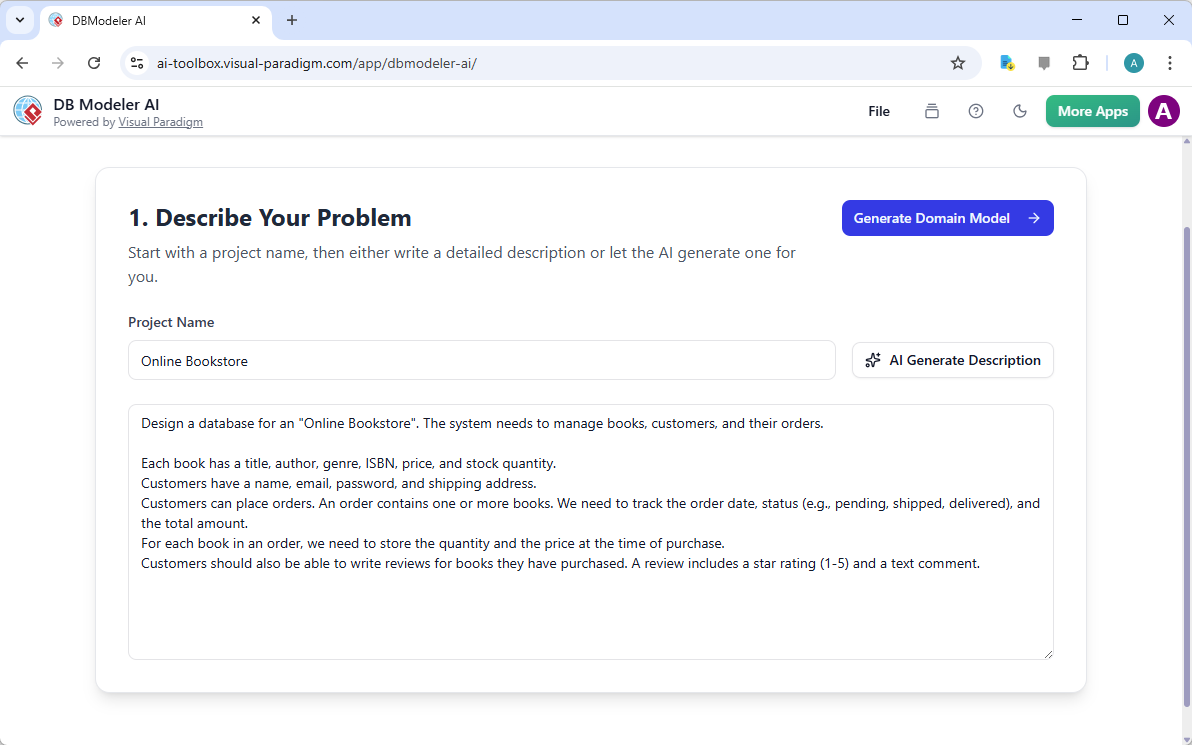
In the first step of this journey, the DB Modeler AI asks you to simply describe your problem. As seen in the provided screenshot, we’ve taken the classic “Online Bookstore” challenge. Instead of agonizing over every detail, you can let the AI draft a comprehensive problem statement that covers everything from book genres and ISBNs to customer reviews and order statuses. It’s like having a mind-reading assistant who knows exactly what a modern e-commerce system needs before you’ve even finished your first cup of coffee!

This is a screenshot of Visual Paradigm's AI-Powered database design app: DB Modeler AI, captured under step 1, which seek us

Why Settle for a Drawing Tool When You Can Have a Brain?

Most online database design software options out there are basically just fancy versions of Microsoft Paint. They give you a canvas and a few shapes, then wish you good luck. DB Modeler AI flips the script by providing an AI-powered design workflow that actually understands the logic behind your data. It doesn’t just draw; it thinks. After you’ve defined your bookstore problem, the tool leaps into action, generating a conceptual Domain Class Diagram. This provides a high-level view of your business entities—like Customers, Books, and Orders—without getting bogged down in technical database jargon yet.

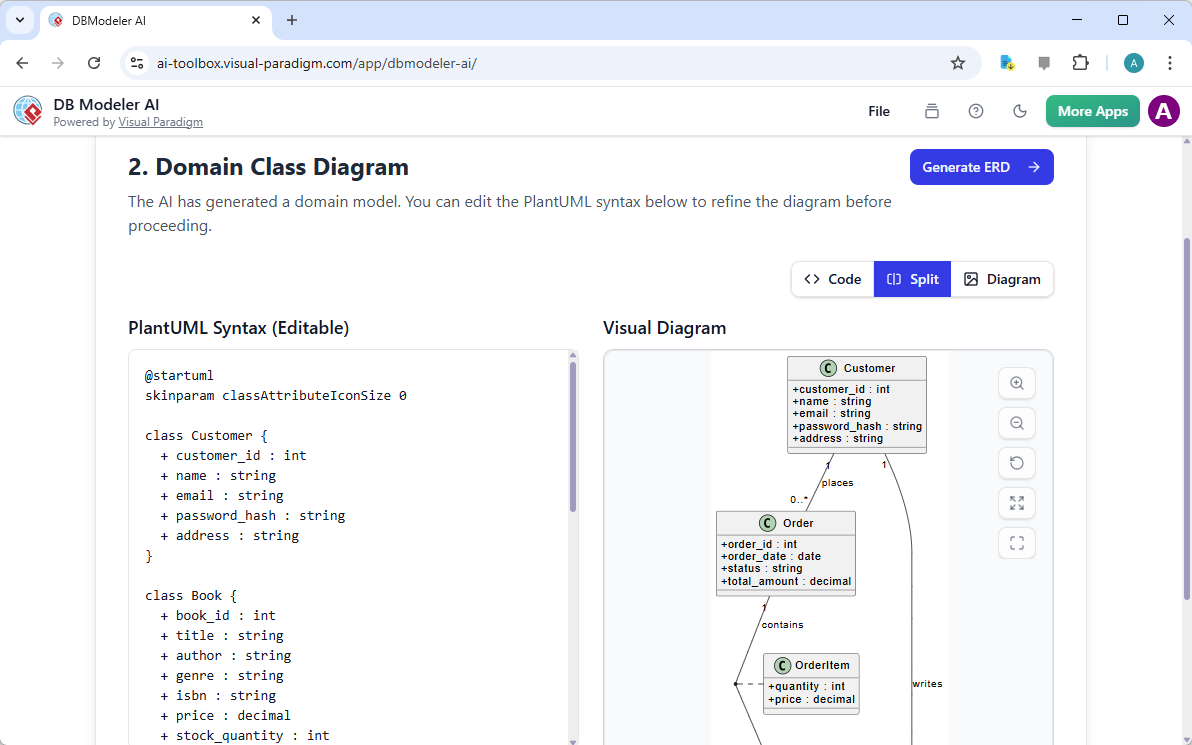
As we move into Step 2, you can see how the AI transforms that bookstore description into a clear visual representation. It identifies the core classes and how they interact, providing a solid foundation before a single line of SQL is ever written. This professional AI-powered DB modeler even allows you to tweak the PlantUML syntax directly, giving you total control while the AI handles the heavy lifting of visual organization. It’s the perfect blend of automation and manual precision.

This is a screenshot of Visual Paradigm's AI-Powered database design app, for step 2. It shows the AI-generated class diagram

From Concept to Logic: The ERD Transformation

How do we move from “ideas” to “implementation”? In traditional workflows, this is where most projects stall. You have to manually translate classes into entities, map out foreign keys, and ensure your relationships aren’t a tangled mess of spaghetti. DB Modeler AI automates this transition. By moving to Step 3, the tool generates a detailed Entity-Relationship Diagram (ERD). Unlike its competitors, this easy-to-use database modeler ensures that the transition is logical and documented, keeping your project’s history intact as it evolves.

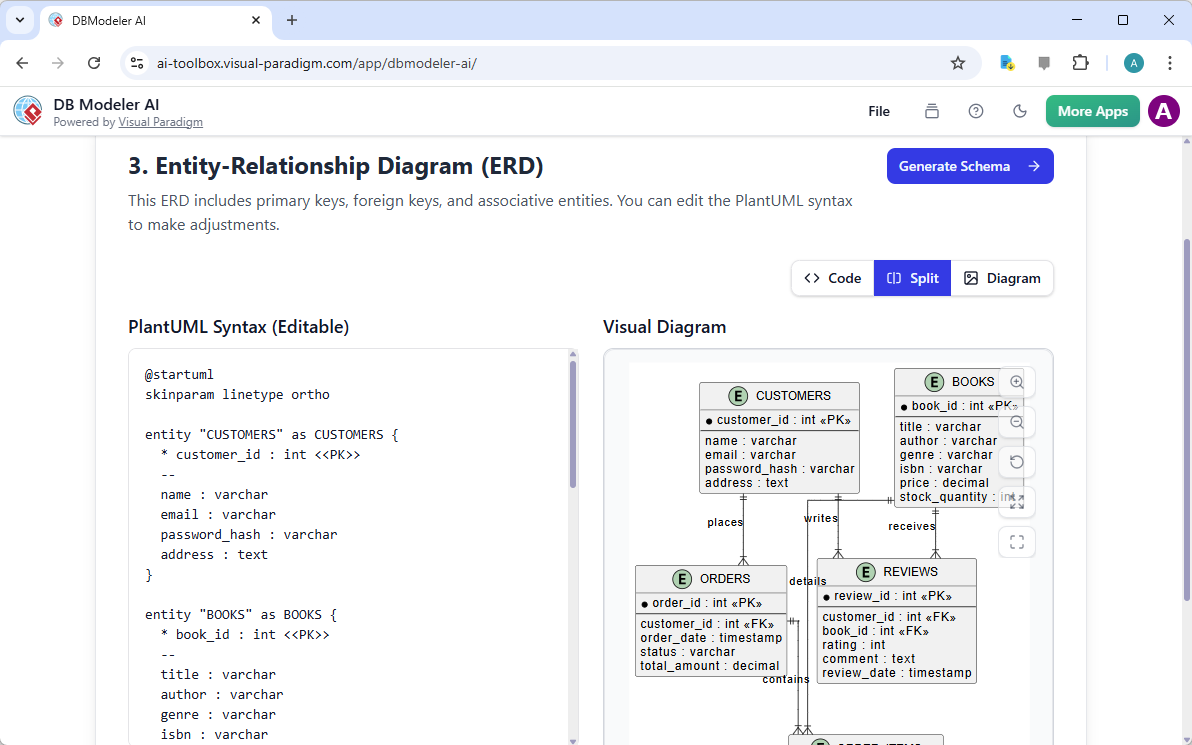
In the ERD view, the bookstore’s structure becomes even more robust. You can see the specific attributes for each entity, such as the ‘order_date’ in the ORDERS table or the ‘price’ in the BOOKS table. It’s a comprehensive project management experience where the AI ensures no critical link—like the one between a Customer and their Reviews—is ever forgotten. This level of detail is usually reserved for expensive, enterprise-level software, but here it’s just another step in the wizard.

This is a screenshot of Visual Paradigm's AI-Powered database design app, for step 3. It shows the AI-generated ERD, based on

Quick Summary: Why DB Modeler AI Rules the Market

  • End-to-End Automation: Moves from a text description to a final report in seven logical steps.

  • Intelligent ERD Generation: Automatically maps primary and foreign keys based on your domain model.

  • Normalization Expertise: Guides you through 1NF, 2NF, and 3NF to ensure data integrity and zero redundancy.

  • Zero-Resource Testing: The Playground feature lets you test SQL queries without setting up a local server.

  • Cloud & Local Flexibility: Save to the cloud for collaboration or export to JSON for total privacy.

Does It Actually Write the Code? (Spoiler: Yes!)

One of the biggest pain points for software developers and students alike is writing the initial Data Definition Language (DDL) scripts. One typo in a `CREATE TABLE` statement can cause hours of debugging. DB Modeler AI removes this hurdle entirely. Once your ERD is confirmed in Step 3, the AI generates the initial SQL schema for you in Step 4. It uses best practices for data types, constraints, and naming conventions, giving you a robust database schema that is ready for PostgreSQL or other relational systems.

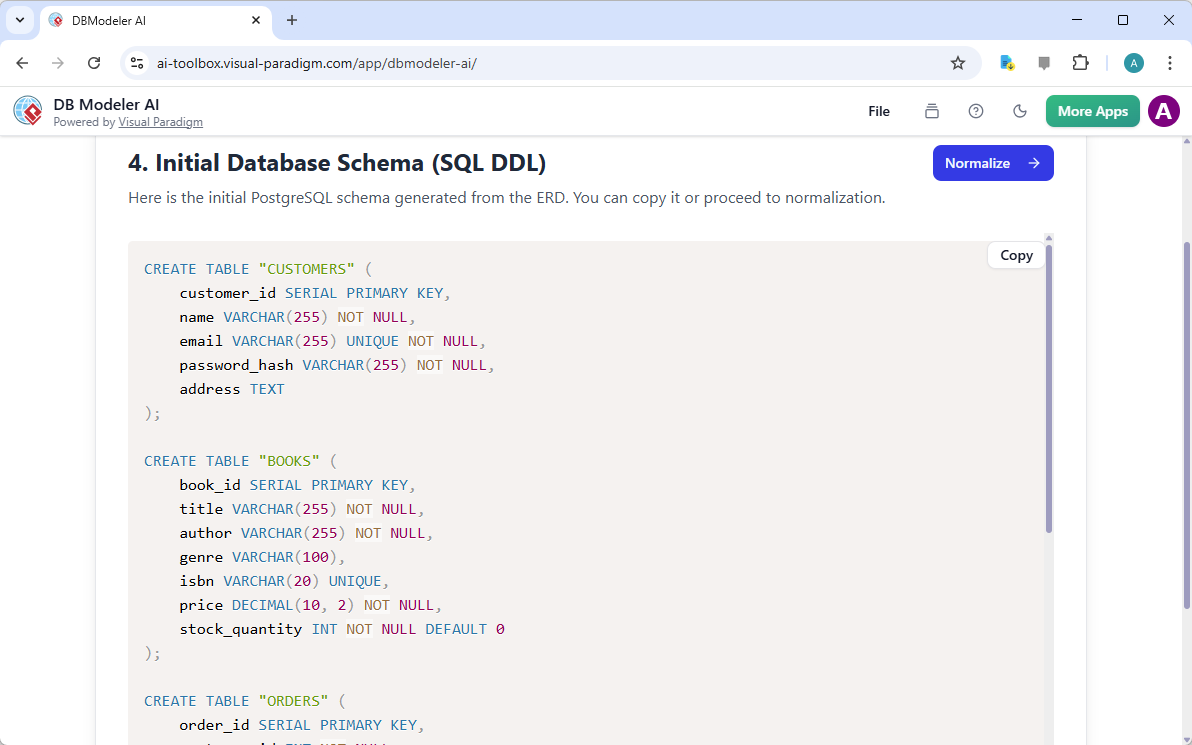
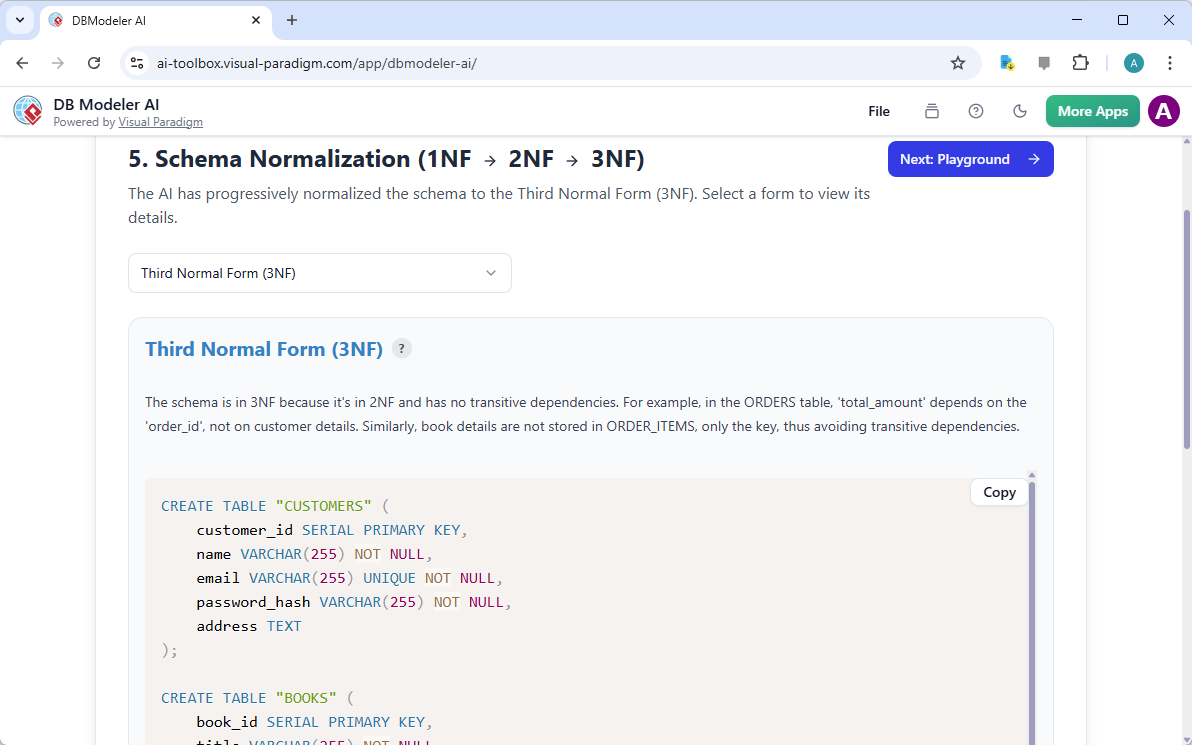
In this view, you can see the beautifully formatted SQL for our bookstore. The tool handles everything from `SERIAL PRIMARY KEY` designations to `UNIQUE` constraints on emails. It’s not just “code generation”; it’s “smart code generation.” You can copy this schema directly into your development environment or—better yet—proceed to the next step to ensure it’s as efficient as possible. This is where the tool truly shines compared to generic AI chatbots that often hallucinate inconsistent table structures.

This is a screenshot of Visual Paradigm's AI-Powered database design app, for step 4. It shows the AI-generated database sche

The Normalization Nightmare: Solved!

If the term “Third Normal Form (3NF)” makes you break out in a cold sweat, you aren’t alone. Normalization is critical for building maintainable databases, but it can be incredibly tedious to verify manually. Step 5 of the DB Modeler AI workflow is dedicated entirely to normalization assistance. The AI reviews your schema and progressively refines it through the first, second, and third normal forms, explaining the logic as it goes. It’s like having a database professor on call 24/7!

As shown in the normalization review, the tool ensures that transitive dependencies are removed. For instance, it ensures that ‘total_amount’ in the ORDERS table is handled correctly and that book details aren’t redundantly stored in every order item record. This step guarantees that your bookstore database won’t just work—it will scale. This focus on design best practices is what makes this the best database modeling app for those who care about long-term code quality.

This is a screenshot of Visual Paradigm's AI-Powered database design app, for step 5. It allows the user to review the DDL in

The Competitive Edge: A Sandbox You Can Actually Play In

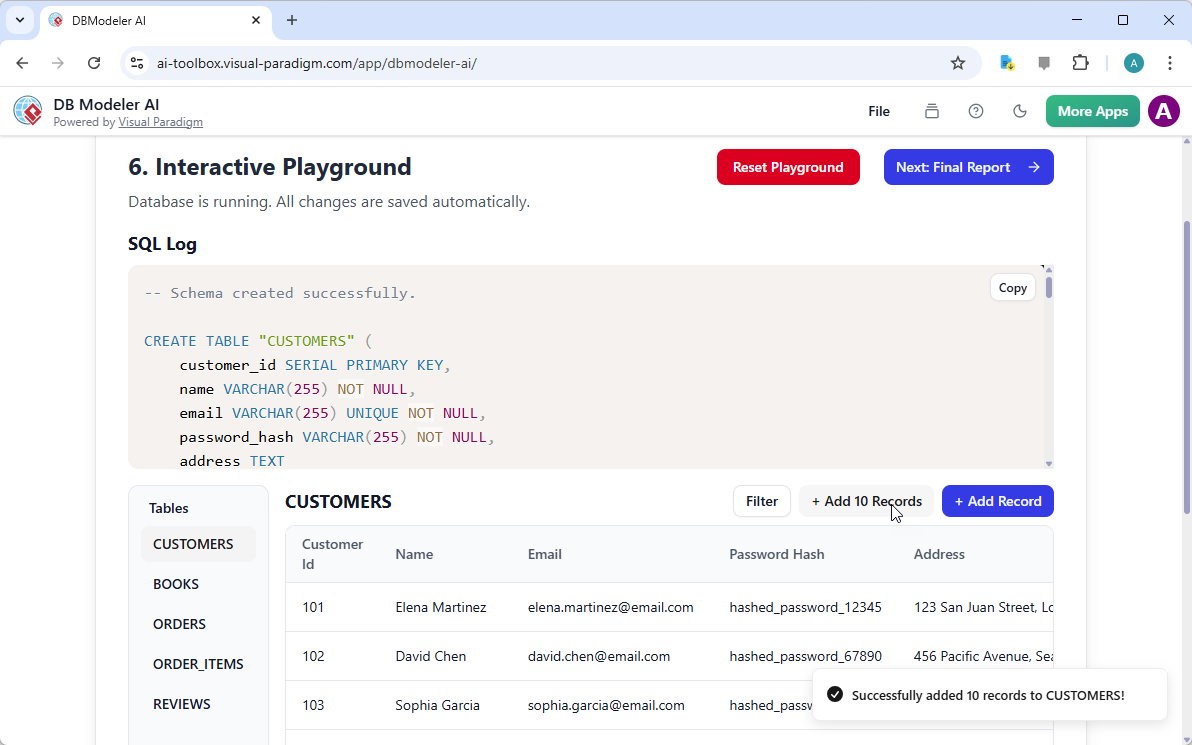
Here is where DB Modeler AI leaves every other tool in the dust. Usually, after you finish a design, you have to export it, set up a local database instance, and hope you didn’t miss anything. With the Interactive Schema Playground in Step 6, you can “taste” your results immediately. The tool sets up a simulated database environment based on your schema, allowing you to perform CRUD (Create, Read, Update, Delete) operations right there in your browser. No investment, no setup, just pure validation.

As you can see in the playground screenshot, we can instantly add 10 sample records to the CUSTOMERS table for our bookstore. The tool even outputs the related SQL statements for each operation, providing an interactive learning experience that is second to none. If you notice a flaw in how data is being retrieved or updated, you can simply hop back to a previous step, make a change, and regenerate. It’s a sandbox that turns the theoretical into the practical in seconds.

This is a screenshot of Visual Paradigm's AI-Powered database design app, for step 6. It is a playground set up with the DDL

Wrapping Up the Masterpiece

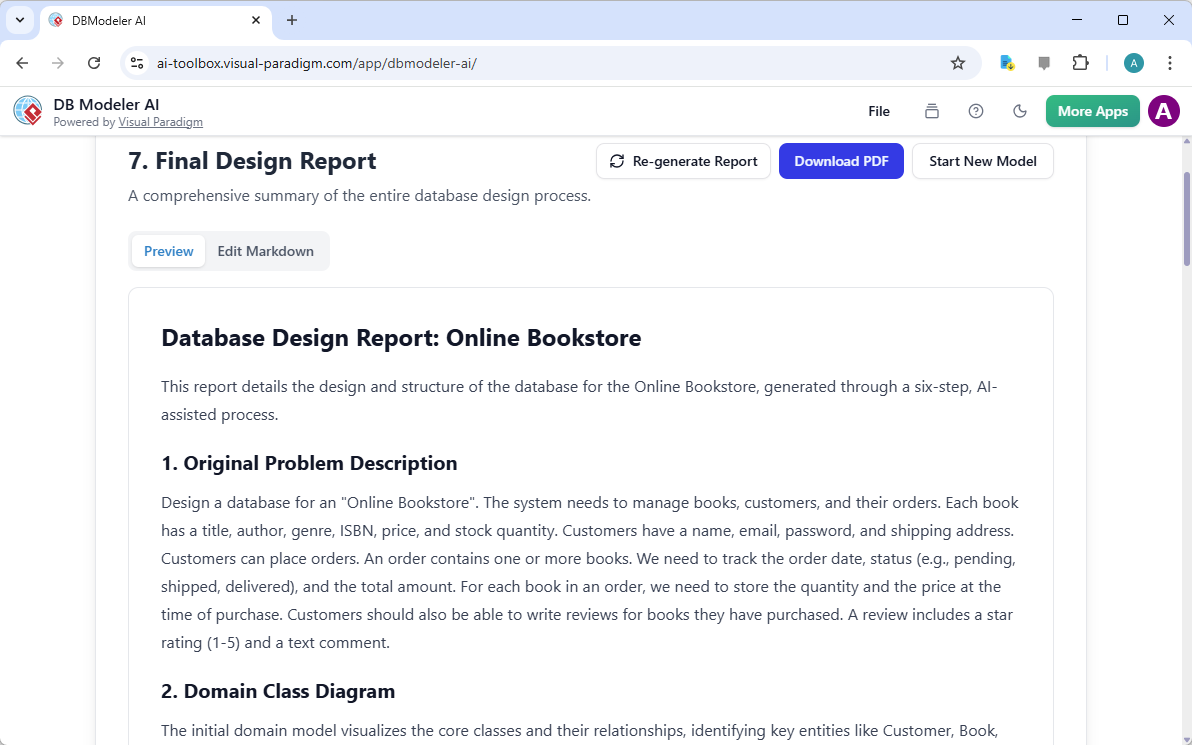
Every great design deserves a great presentation. The final step of the process is the AI Final Design Report. This isn’t just a “save” button; it’s a comprehensive summary of your entire journey. It includes the original problem description, the diagrams you’ve generated, and the final normalized schema. For project managers and business analysts, this is the ultimate tool for communicating the underlying data structure to stakeholders without needing a three-hour meeting.

The final report acts as a blueprint for your application development. It’s clean, professional, and ready to be downloaded as a PDF or saved to the cloud. Whether you are a student learning the ropes or a veteran DBA looking to accelerate database design, this tool provides a structured, logical path to success. By the time you hit “Download PDF,” you aren’t just looking at a diagram—you’re looking at a battle-tested architecture ready for implementation.

This is a screenshot of Visual Paradigm's AI-Powered database design app, for step 7, the final step. It shows the report gen

Stop Drawing, Start Modeling Today!

Why spend hours struggling with manual diagrams and broken SQL scripts when you could be using the professional AI-powered DB Modeler AI? Whether you’re building the next great online bookstore or a complex enterprise system, Visual Paradigm Online provides the tools you need to succeed with confidence and speed. This 7-step guided process demystifies the world of database design and gives you a playground to ensure perfection.

Ready to transform your ideas into a robust database schema? Don’t just take our word for it—experience the future of database modeling yourself!

Try it now: Explore DB Modeler AI
Learn more about the features: DB Modeler AI Official Guide

Related Links

Database design involves utilizing Entity-Relationship Diagrams (ERD) and data modeling techniques to construct scalable, robust database architectures that align with business requirements. Modern platforms have significantly enhanced this process by integrating AI-driven tools such as DBModeler AI, which automates schema generation, database normalization, and SQL testing.

  1. Database Design with ERD Tools – Visual Paradigm Guide: A comprehensive resource for building scalable databases using data modeling best practices and schema design.

  2. What is an Entity-Relationship Diagram (ERD)?: An introductory guide explaining the core components and the essential role of ERDs in system development.

  3. DBModeler AI: Intelligent Database Modeling Tool: An overview of an AI-driven tool used for rapid database design, generating ER diagrams, and creating testable environments.

  4. How to Model a Relational Database with ERD: A practical tutorial that walks users through the process from conceptual design to full implementation.

  5. Visual Paradigm ERD Tool – Complete Database Solution: A detailed look at a professional toolset used by architects to model, visualize, and generate databases efficiently.

  6. Database Design Tutorial with Visual Paradigm: A comprehensive guide to leveraging visual modeling tools for robust database design and development.

  7. Reverse Engineering Database to ERD: A step-by-step manual on transforming existing databases into visual models for documentation and analysis.

  8. Streamlining ER Modeling from Concept to Implementation: An article focused on simplifying the transition from conceptual modeling to final database deployment.

  9. How to Create Database Specifications: A guide for developing precise technical specifications to ensure consistency across the development lifecycle.

  10. AI-Powered JSON-to-CRUD Table Generator: A specialized tool that uses AI to automatically generate dynamic CRUD tables and data structures from JSON inputs.

Loading

Signing-in 3 seconds...

Signing-up 3 seconds...