
Now Reading: Animating a Medical Reception Scene with AniFuzion
-
01
Animating a Medical Reception Scene with AniFuzion


Animating a Medical Reception Scene with AniFuzion
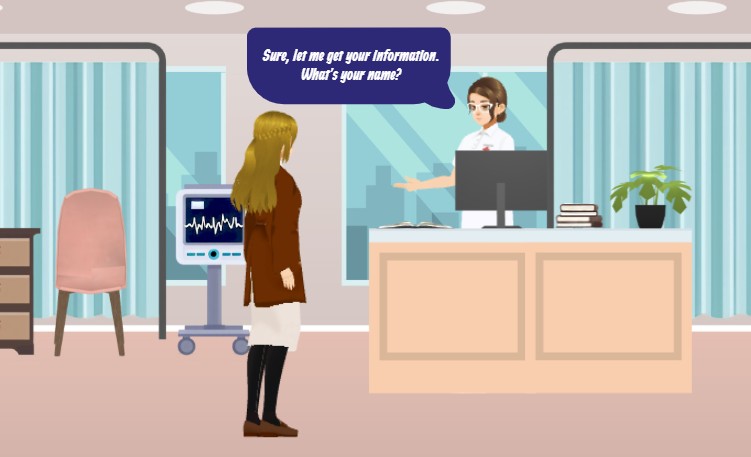
Imagine creating a dynamic, engaging video for a healthcare training module or patient education campaign in minutes, without needing a studio or a team of animators. That’s the power of Visual Paradigm’s Animation Maker, also known as AniFuzion. This online tool is designed to make professional-quality 2D and 3D animation accessible to everyone. The image above showcases a perfect example: a lifelike medical reception scene, complete with a patient interacting with a receptionist, a medical monitor, and a professional office environment. This is not a static image; it’s a fully animated sequence created using AniFuzion’s intuitive interface. With its drag-and-drop functionality, vast 3D character library, and AI-powered features, AniFuzion transforms complex animation tasks into simple, visual workflows, allowing you to bring your ideas to life with stunning visuals and dynamic storytelling.
Why AniFuzion is the Best Tool for Creating Professional Animations
Creating compelling visual content for education, marketing, or internal communications is no longer a daunting task. AniFuzion, the powerful animation software within Visual Paradigm Online, empowers users to produce high-impact animations quickly and easily. Its user-friendly design, built around a drag-and-drop interface, allows you to build scenes like the one shown in the image by simply dragging characters, props, and backgrounds onto a canvas. This intuitive approach eliminates the need for complex software or years of training, making it ideal for educators, marketers, and business professionals. The core benefit is democratizing animation, putting the power of visual storytelling into the hands of anyone, regardless of their technical background.
Key Features That Bring Your Vision to Life
Behind the simple interface lies a powerful suite of tools that make AniFuzion a standout choice. The extensive 3D character library allows you to quickly select and customize characters for your scene. In the medical reception example, you can choose a receptionist character, customize their appearance, and then apply pre-built actions like “gesturing” or “talking” to make them feel alive. The pre-built actions and motion library with over 2,000 dynamic movements ensures your characters move naturally without complex keyframing. For the dialogue in the scene, AniFuzion’s AI Text-to-Speech (TTS) feature generates high-quality voiceovers from your script, and its automatic lipsync ensures the character’s mouth movements perfectly match the spoken words, adding a layer of realism that would be difficult to achieve manually.
Enhance your scene further with shape effects and animation presets. You can apply dynamic effects like fades, bounces, or transitions to text, shapes, and objects to draw attention to key elements. The ready-to-use scenes, props, and templates library provides a wealth of backgrounds, furniture, and other environmental elements, allowing you to build a detailed medical office setting rapidly. The ability to export as MP4 or create interactive flipbooks means you can share your final product as a video or a web-based interactive experience, perfect for presentations, social media, or online training.
How to Create Your First Animation in AniFuzion
Getting started with AniFuzion is a straightforward process, even for complete beginners. The workflow is designed to be intuitive and efficient. To replicate the medical reception scene shown in the image, you would begin by creating a new project and selecting a suitable template or starting with a blank canvas. Next, you’d drag a receptionist character from the library onto the canvas and customize their look. Then, you’d select a character action, such as “talking,” and apply it to the timeline. To add the dialogue, you would input your script into the AI TTS panel, choose a voice, and the tool would generate the audio with automatic lipsync. You’d then add a patient character, a medical monitor, and other props to complete the scene. Finally, you’d preview the animation, make any necessary adjustments to timing, and export the final video.
Core Workflows for Different Needs
While creating a simple scene is easy, AniFuzion supports a variety of workflows to meet different creative goals. For a quick explainer video, you can use a template and focus on the character and script. For more complex projects, you can rig and customize a 3D character to create a unique figure for personalized storytelling. You can also build an animated flipbook for interactive presentations, where users can “flip” through pages of your animation. To enhance a video, you can add text and shape animations to highlight key points. After creating your animation, you can analyze and refine it by reviewing the timeline, checking sync, and testing on different devices to ensure a polished final product.
Quick Summary: Key Takeaways
-
Easy-to-Use Tool: AniFuzion’s drag-and-drop interface and intuitive design make animation accessible to everyone, even beginners.
-
Professional Results: Create stunning 2D and 3D animations, including text effects and character movements, without advanced skills.
-
AI-Powered Features: Leverage AI for text-to-speech and automatic lipsync to create realistic, professional voiceovers.
-
Extensive Libraries: Access a vast collection of 3D characters, pre-built actions, and scene templates to speed up creation.
-
Flexible Export: Share your work as an MP4 video or an interactive flipbook for easy distribution.
Try AniFuzion Today and unlock your creativity. Create your first animation in minutes and see the difference a powerful, easy-to-use animation tool can make. Start your project now.
Visual Reference:
Related Links
-
2D Animation Maker – Create Animated Videos Online: An easy-to-use online tool for creating 2D animations without coding, perfect for educators, marketers, and content creators.
-
How to Create PowerPoint Like Animation Slides on the… – AniFuzion: Creating animated PowerPoint presentations has never been easier, thanks to tools like Visual Paradigm Online’s AniFuzion. This online 2D animation maker allows you to bring your…
-
Bring Your Ideas to Life with Visual Paradigm Anifuzion 3D Video Maker: Anifuzion is a web-based 3D animation tool that enables users to create immersive 3D videos and animations without requiring advanced technical skills.
-
AniFuzion: The Online Ultimate Animation Maker – Content Posts: Visual Paradigm Online’s AniFuzion stands out as a leading animation video tool due to its comprehensive feature set, which caters to a wide range of users, from beginners to experienced animators.
-
Introducing Visual Paradigm’s AniFuzion: The Ultimate Animated Video Maker – Cybermedian: Part of the Visual Paradigm Online Platform, AniFuzion offers a unique blend of 2D and 3D animation techniques , making it an all-in-one solution for creating dynamic and engaging content1.
-
AniFuzion: Online Animation Maker: Visual Paradigm Online. Start creating stunning 2D and 3D animations. Explore customizable character families and intuitive tools to bring … Character Families · Storytelling Video Maker · Restaurant Owners · Tutorials
-
Comprehensive Guide to Creating Animated Content for Flipbooks with Visual Paradigm Online’s Flipbook Maker: This guide details the process of generating animated flipbook content using the flipbook maker feature in Visual Paradigm Online.
-
3D Video Maker – Visual Paradigm: Create eye-catching 3D videos that stand out for visual storytelling, presentations, or creative projects, Without needing of advanced software, you can customize scenes with 3D characters, 3D props, motions in a dynamic and engaging way.
-
Online 3D video maker – Visual Paradigm: Create stunning 3D videos effortlessly with Visual Paradigm ‘s intuitive and powerful animation tools.
-
2D Animation Maker – Create Expressive 2D Character – Visual Paradigm: Bring stories to life with vibrant 2D animations using VP Online. This tool offers easy-to-use features for animating 2D characters, scenes, and effects, …