


Database performance is often invisible until it becomes a critical bottleneck. When users experience lag, timeouts, or unresponsive interfaces, the root cause frequently lies beneath the surface of the application layer. It resides in the architecture of the data itself. The blueprint that governs how data is structured, related, and stored is the Entity Relationship Diagram (ERD). A well-crafted ERD ensures data integrity and efficient retrieval. Conversely, a flawed diagram introduces latency that no amount of application-level caching can fully resolve.
This guide provides a deep dive into troubleshooting slow queries by analyzing the underlying schema design. We will explore how structural decisions within the ERD directly influence query execution plans, I/O operations, and overall system responsiveness. By understanding the mechanics of relational design, you can diagnose performance issues at their source rather than treating symptoms.
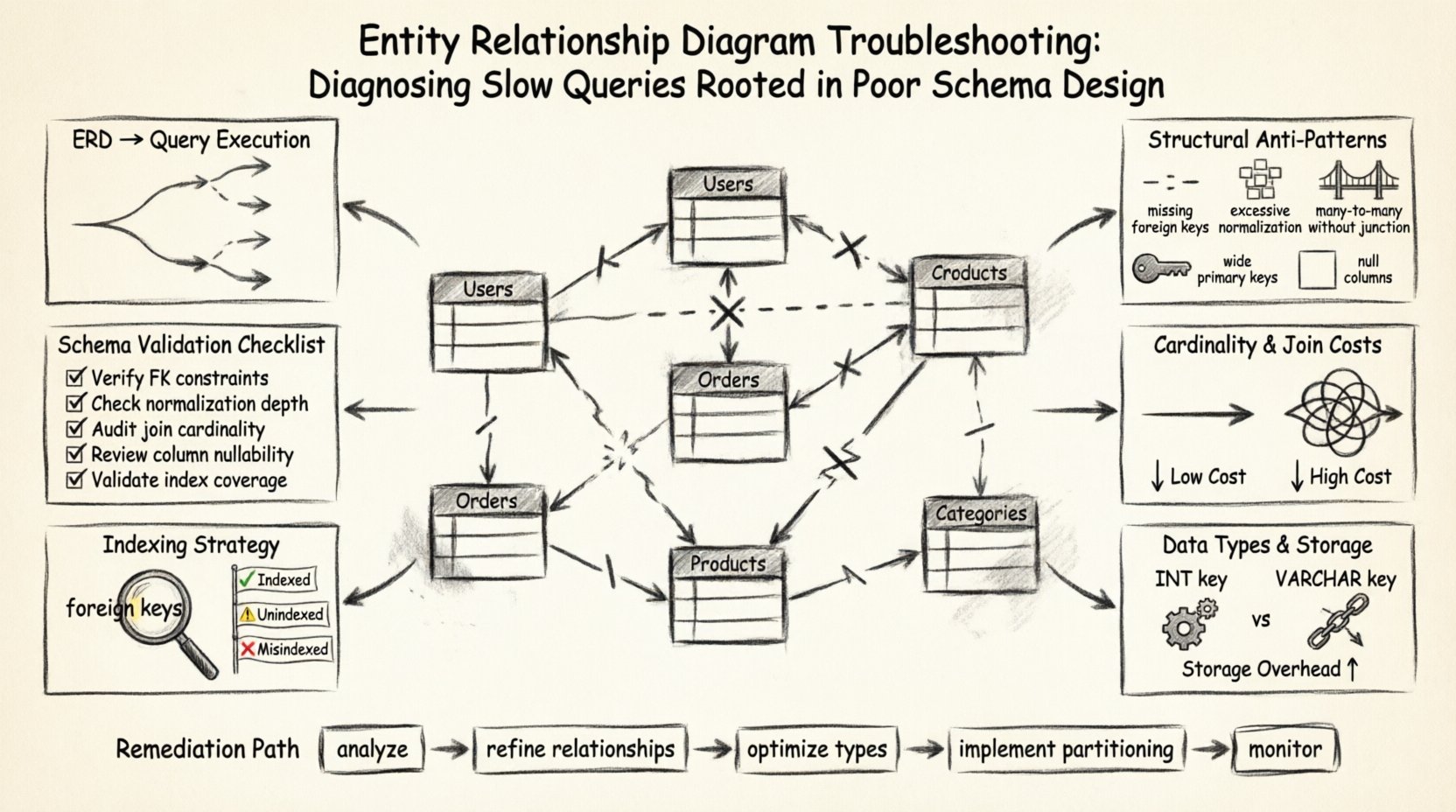
🏗️ The Foundation: How ERDs Influence Query Execution
Before diagnosing a problem, it is essential to understand the relationship between the visual representation of data and the physical execution of commands. An ERD is not merely a diagram for documentation; it is a set of rules that the database engine must enforce. Every line drawn between tables, every constraint defined, and every data type specified dictates how the storage engine reads and writes information.
When a query is submitted, the database optimizer analyzes the request against the schema metadata. If the schema is ambiguous or inefficient, the optimizer may choose a suboptimal path. This often manifests as a full table scan instead of an index seek, or a nested loop join that multiplies processing time exponentially.
Key areas where the ERD impacts performance include:
- Join Complexity: The number of relationships defined determines the number of joins required to retrieve related data.
- Data Integrity Constraints: Foreign keys and unique constraints add overhead to write operations but can optimize read operations.
- Normalization Levels: The degree to which data is split across tables affects the volume of data scanned during retrieval.
- Indexing Strategy: The schema design dictates where indexes can logically be placed to support common query patterns.
🔍 Identifying Structural Anti-Patterns
Many performance issues stem from patterns that were acceptable during the initial design phase but become liabilities as data volume grows. These anti-patterns often appear subtle in the diagram but cause significant friction in the query engine. Below is a breakdown of common structural flaws and their direct impact on speed.
| Anti-Pattern | Visual Indicator in ERD | Performance Impact |
|---|---|---|
| Missing Foreign Keys | Lines connecting tables without constraint definitions. | Allows orphaned records, forcing complex queries to filter invalid data manually. |
| Excessive Normalization | High number of tables with single-column relationships. | Requires excessive joins to reconstruct a single logical entity, increasing CPU usage. |
| Many-to-Many Without Junction | Direct many-to-many relationship lines between two entities. | Database engines typically require a bridge table; missing this leads to inefficient workarounds. |
| Wide Primary Keys | Composite keys with multiple large columns. | Increases the size of all indexes referencing this key, slowing down lookups. |
| Null-Filled Columns | Attributes marked as nullable without logical reason. | Can prevent index usage or reduce index selectivity, leading to full scans. |
🔗 Relationship Cardinality and Join Costs
Cardinality defines how many instances of one entity relate to instances of another. This is the most critical aspect of the ERD regarding query performance. Incorrect cardinality definitions force the system to process more rows than necessary to satisfy a query.
When troubleshooting slow queries, you must verify that the relationships in the diagram match the logical requirements of the application. If a relationship is defined as Many-to-Many when it should be One-to-Many, the query engine will prepare for a join across a junction table that may not exist or may be populated inefficiently.
Common Cardinality Issues
- Undefined Cardinality: If the diagram does not specify if a relationship is mandatory or optional, the query optimizer may assume the worst-case scenario, adding extra checks for null values.
- Recursive Relationships: Self-referencing tables (e.g., an Employee table referencing itself for a Manager) can cause deep nesting in queries. Without proper indexing on the self-referencing column, these queries become exponentially slower.
- Circular Dependencies: Complex webs of relationships where Table A links to B, B links to C, and C links back to A. This structure makes traversing the data graph difficult for the engine, often resulting in temporary tables being created in memory.
To mitigate these issues, ensure the ERD clearly distinguishes between optional and mandatory links. Mandatory links allow the optimizer to skip null checks, which improves execution speed. Optional links require additional logic to handle cases where the relationship does not exist.
📏 Data Types and Storage Efficiency
The choice of data types within the schema definition has a profound effect on storage size and comparison speed. A query that compares two columns of different types often triggers implicit conversions. These conversions prevent the use of indexes and force the engine to process every row.
Storage Implications
When the schema uses a generic data type for all columns, such as a large text field for short codes, it consumes more disk space and memory. This reduces the effective size of the buffer pool, meaning fewer hot data pages can be kept in memory. Consequently, the system must read more data from the slower disk subsystem.
Comparison Performance
Integer comparisons are significantly faster than string comparisons. If the ERD defines a foreign key as a string (e.g., VARCHAR) instead of an integer (e.g., INT), the join operation must compare character by character rather than using binary numeric comparison. This adds CPU cycles to every row processed.
- Use Fixed-Length Types: For fields like country codes or status flags, use fixed-length strings. Variable-length strings introduce overhead to calculate length on every read.
- Avoid Large Text in Keys: Never use a text-heavy column as a primary or foreign key. This bloats every index that references it.
- Match Parent and Child Types: Ensure the data type in the child table exactly matches the parent table. Even a slight difference (e.g., INT vs BIGINT) can force a conversion during joins.
🔑 Indexing Visibility and Strategy
An ERD is the visual representation of the logical structure, but it should also inform the physical indexing strategy. While indexes are often added after the schema is built, the design phase should anticipate where they are needed. A query that filters by a column that is not indexed is a primary indicator of a design gap.
Indexing Opportunities in the ERD
When reviewing the diagram for performance bottlenecks, look for columns that are frequently used in search conditions or joins.
- Foreign Keys: These should almost always be indexed. If a query joins Table A to Table B on a foreign key, and the key in Table B is not indexed, the engine must scan the entire Table B for every row in Table A.
- Status Flags: Columns that define the state of a record (e.g., Is_Active, Order_Status) are often used in WHERE clauses. If these are not indexed, filtering becomes a full table scan.
- Date Ranges: Tables with audit trails or transaction logs often query by date. The date column should be indexed to allow for efficient range scans.
It is crucial to balance the number of indexes against write performance. Every index adds overhead to INSERT, UPDATE, and DELETE operations. However, a poorly indexed read-heavy schema will cause system latency that outweighs the write cost. The ERD helps visualize which tables are read-heavy (e.g., lookup tables) versus write-heavy (e.g., transaction logs), guiding the indexing decision.
🚫 The Join Pathology
One of the most common sources of slow queries is the join path. This refers to the sequence in which the database engine connects tables to fulfill a request. A poorly designed schema can force the engine into a path that is logically correct but computationally expensive.
Cartesian Products
If the schema lacks proper constraints or if the query logic does not specify join conditions correctly, the engine may produce a Cartesian product. This occurs when every row in Table A is combined with every row in Table B. The result set grows exponentially, and the query may time out or consume all available memory.
In the ERD, this often happens when a Many-to-Many relationship is not properly mediated by a junction table, or when the junction table is missing necessary foreign key constraints.
Subquery vs. Join
The schema design influences whether a query can be executed as a simple join or requires a subquery. Subqueries often execute the inner query once for every row of the outer query, leading to quadratic time complexity. A normalized schema that allows for direct joins is generally preferred over denormalized structures that force subqueries.
✅ Schema Validation Checklist
To systematically troubleshoot slow queries based on the ERD, perform a structured review. This checklist ensures you examine every critical component of the design.
1. Review Foreign Key Constraints
- Are all foreign keys explicitly defined in the diagram?
- Do they include cascading rules that might cause unintended data movement?
- Is the data type on both sides of the relationship identical?
2. Analyze Join Frequency
- Identify tables that are joined together most frequently in application logic.
- Are these tables adjacent in the diagram, or does the path require traversing multiple intermediate tables?
- Can any of these intermediate tables be consolidated to reduce join depth?
3. Check Nullability
- Are columns that are never null explicitly marked as NOT NULL?
- Does the schema allow NULLs on columns that are part of an index?
4. Verify Data Types
- Are numeric fields using the smallest appropriate size (e.g., TINYINT vs BIGINT)?
- Are text fields using the correct length to avoid truncation or excess storage?
5. Assess Index Coverage
- Do the primary keys and foreign keys have indexes?
- Are frequently filtered columns indexed?
- Is there a composite index for common multi-column queries?
🛠️ Practical Steps for Remediation
Once the ERD has been analyzed and issues identified, the next phase is remediation. This involves modifying the schema to align with performance requirements without sacrificing data integrity.
Refine Relationships: If the ERD shows overly complex relationships, consider simplifying them. This might mean introducing denormalization in specific, read-heavy areas to reduce the need for joins. For example, storing a cached count of related items in the parent table can eliminate the need to join and count every time.
Optimize Data Types: Change data types to more efficient alternatives. If a date is only stored for the day, use a date-only type rather than a datetime with time. If an ID is numeric, ensure it is not stored as a string.
Implement Partitioning: For very large tables, the ERD might need to reflect a partitioning strategy. While partitioning is often a physical implementation detail, the logical design should account for how data is grouped. Partitioning by date or region can allow the engine to scan only relevant segments of the data.
🔎 Final Considerations
Performance troubleshooting is an iterative process. The ERD serves as the central artifact in this process. By treating the diagram as a living document that reflects both logical structure and physical performance constraints, you can maintain a database system that remains responsive as data grows.
Remember that no single design fits all scenarios. A schema optimized for high-frequency writes may perform differently than one optimized for complex analytical queries. The goal is to align the schema design with the specific access patterns of your application. Regularly review the ERD against actual query performance metrics to catch drift early.
By focusing on the structural integrity of the data model, you eliminate the root causes of latency. This approach is more sustainable than applying patches to the application layer. A solid schema foundation ensures that the system can scale, adapt, and perform reliably over time.
Continue to monitor query execution plans after making changes. Visualizing the execution plan can confirm that the optimizer is utilizing the new indexes and constraints correctly. This feedback loop completes the troubleshooting cycle, ensuring that the theoretical improvements in the ERD translate to tangible performance gains in the live environment.