Now Reading: Designing Google Cloud CI/CD Pipelines: An AI Cloud Architecture Studio Showcase
-
01
Designing Google Cloud CI/CD Pipelines: An AI Cloud Architecture Studio Showcase


Designing Google Cloud CI/CD Pipelines: An AI Cloud Architecture Studio Showcase
Imagine the start of a new project. You have a vision for a robust, microservices-based application, but the path from concept to a concrete technical plan feels overwhelming. The complexities of Kubernetes, the intricacies of automated deployments, and the strict requirements for security can cause “Blank Canvas Paralysis” for even the most seasoned developers. This is where the AI Cloud Architecture Studio steps in to alleviate the pressure. By transforming simple natural language into professional, comprehensive infrastructure designs, this AI-powered cloud design tool acts as your soothing partner in the chaotic world of system architecture.
In this article, we will explore how you can rapidly visualize complex workflows—specifically a Google Cloud (GCP) CI/CD pipeline—without spending days dragging and dropping boxes manually. We’ll look at a real-world example generated by the tool to understand how it automates best practices for scalability and security.
Quick Summary: Key Takeaways
-
Instant Visualization: Convert text prompts like “Deploy a microservices pipeline” into detailed diagrams in seconds.
-
Automated Best Practices: The AI automatically includes essential components like Autoscaling, Security Layers, and Observability tools.
-
Visual Paradigm Integration: Seamlessly edit and refine your cloud infrastructure diagrams with an intelligent interface.
-
Risk Mitigation: Identify potential blind spots in your architecture before writing a single line of code.
Visualizing the Complexity of Microservices
When we talk about modern cloud architecture, we rarely mean a single server running an application. We are talking about ecosystems. Designing a production-ready environment requires weaving together orchestration, security, and continuous delivery. For many teams, the challenge isn’t building the app; it’s designing the house it lives in.
Take a look at the image below. This isn’t just a sketch; it is a fully realized GCP architecture diagram generated by the AI Cloud Architecture Studio. The user simply requested a “high-availability CI/CD pipeline for a microservices application on Google,” and the system responded with a logical, interconnected blueprint. You can see the central “GKE Multi-Zone Cluster” handling the core workload, surrounded by essential support structures that a human might accidentally overlook during a brainstorming session.
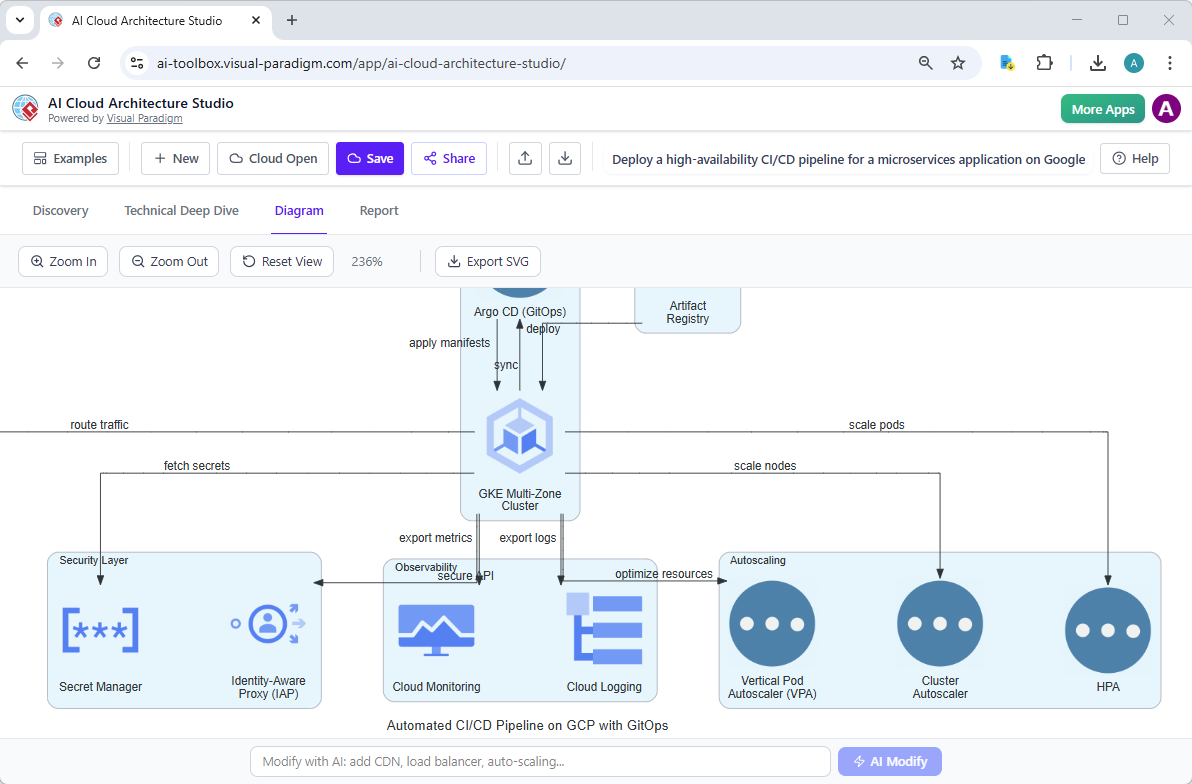
In this visual, the AI has intelligently incorporated Argo CD for GitOps workflows, ensuring that deployment synchronization is handled correctly—a standard best practice for modern Kubernetes environments. Notice the dedicated “Autoscaling” group on the right, featuring Vertical Pod Autoscalers (VPA) and Horizontal Pod Autoscalers (HPA). This demonstrates that the tool understands the need for dynamic resource management, ensuring your application can breathe during traffic spikes without you having to manually configure every node in the design phase.
From “What If” to “Here Is How”
The beauty of this online architecture designer lies in its ability to translate intent into technical reality. Usually, creating a diagram like the one above involves navigating complex service catalogs in AWS, Azure, or Google Cloud. You would need to know exactly which icon represents “Secret Manager” or “Cloud Logging.”
With AI Cloud Architecture Studio, the workflow is far more gentle and intuitive. You start in the “Discovery” phase by describing your goal in plain English. The AI then acts as a proactive partner, conducting a “Technical Deep Dive.” It might ask, “Do you require strict isolation for your microservices?” or “Is sub-second latency a priority?” These clarification questions ensure that the final output isn’t just a generic template, but a tailored solution that fits your specific business needs, whether you are building a low-cost MVP or an enterprise-grade banking system.
Security and Observability by Default
One of the most reassuring aspects of using this professional diagramming software is the automated inclusion of governance layers. In our example image, notice the “Security Layer” on the left, housing the Secret Manager and Identity-Aware Proxy (IAP). A manual drafter might forget these components in a rush, leading to “hidden requirements” that surface expensively later in development.
Similarly, the “Observability” block with Cloud Monitoring and Cloud Logging is automatically wired into the cluster. This visual confirmation gives stakeholders peace of mind, knowing that the system is designed to be monitored and secured from Day 1. It transforms the diagram from a simple picture into a strategic technical asset that aligns product managers, security officers, and developers instantly.
Iterating at the Speed of Thought
Designs are rarely perfect on the first try, and that is okay. The collaborative nature of system design often leads to “What if?” questions during meetings. In traditional workflows, a requested change meant the architect had to go back to their desk and redraw the schematic.
Here, you can modify the infrastructure using the AI Modify feature. If a stakeholder looks at the Google Cloud diagram and asks, “What if we add a global load balancer?”, you simply type that request into the prompt bar. The AI understands the context and redraws the connections instantly. This capability keeps the momentum of your meetings high and ensures that everyone leaves the room with a shared understanding of the architecture.
Conclusion
Navigating the complexities of cloud infrastructure doesn’t have to be a solitary or stressful experience. With tools like Visual Paradigm’s AI Cloud Architecture Studio, you have an intelligent companion ready to handle the heavy lifting of design and documentation. By converting natural language into precise, best-practice diagrams, you can focus on building great software rather than wrestling with drawing tools.
Whether you are a startup founder sketching an idea or a seasoned architect documenting a multi-cloud strategy, this tool ensures your vision is clear, secure, and ready for implementation.
Ready to transform your ideas into technical reality?
Start designing your cloud infrastructure today: Try AI Cloud Architecture Studio Now.