


Imagine a world where your e-commerce business is a well-oiled machine, delivering orders with pinpoint accuracy and lightning speed. The Lean Six Sigma DMAIC Framework Tool from Visual Paradigm makes this vision a reality, turning complex process improvement into a simple, guided journey. This tool is an AI-powered app that helps you systematically tackle inefficiencies, like the one shown in the images, where a company named VelocityCart E-Commerce Solutions is struggling with order fulfillment errors and delays. The tool guides you through the five core phases of DMAIC—Define, Measure, Analyze, Improve, and Control—using AI to generate a comprehensive project plan based on your specific business context. With just a few inputs, you can get a full project draft in minutes, allowing you to focus on validation and execution. It’s like having a Lean Six Sigma expert on your team, helping you streamline operations and boost customer satisfaction.
-
AI-Powered Project Generation: The tool uses your business details to generate a complete DMAIC project plan.
-
Structured 6-Step Workflow: A guided process ensures a logical and thorough approach to process improvement.
-
Interactive Dynamic Tables: Easily input and manage project data with editable tables for each phase.
-
Local Project Save/Load: Your data is saved locally, ensuring privacy and allowing you to resume work later.
-
Professional Final Report: A consolidated report provides a clear, actionable plan for your team.
How the AI-Powered DMAIC Tool Works: A Step-by-Step Walkthrough
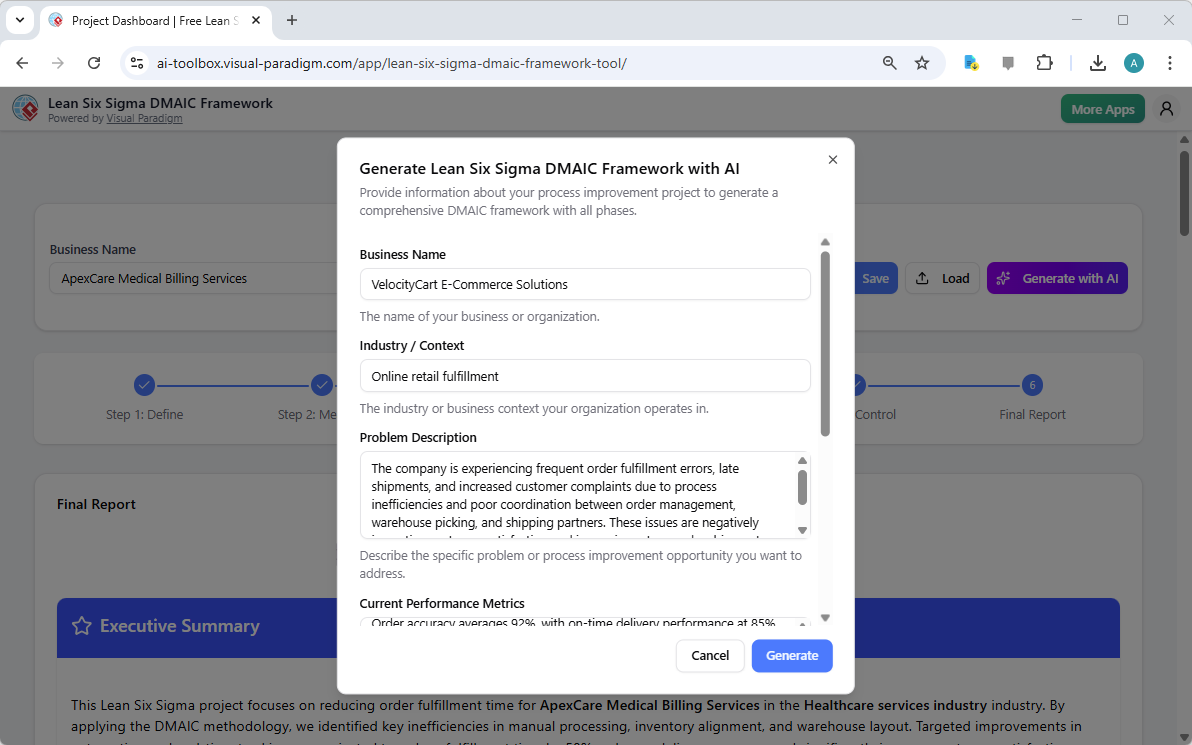
Let’s dive into the specific workflow demonstrated in the images, showing how this AI-powered Lean Six Sigma DMAIC Framework Tool can transform a complex business problem into a clear, actionable plan. The journey begins with a simple setup. Image 1 shows the initial screen where you provide your business context. You enter your company name, industry, and a detailed problem description. In this example, VelocityCart E-Commerce Solutions is facing frequent order errors and late shipments, with a current order accuracy of 92% and a 3.8-day fulfillment cycle. The AI uses this information to generate a full project plan, which is the first major benefit of this tool.
Step 1: Define – Setting the Foundation
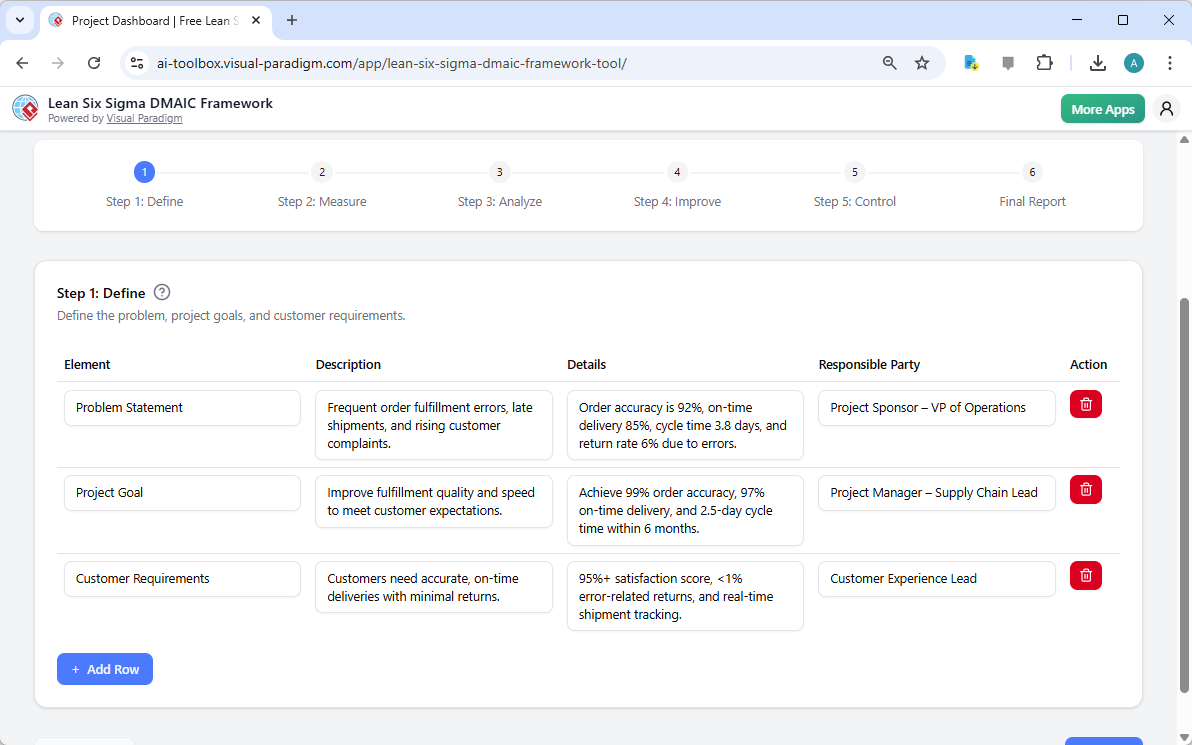
After the AI generates the initial data, the tool guides you through the first phase: Define. Image 2 displays the “Step 1: Define” screen. Here, the AI has populated the project with a clear problem statement, a measurable project goal, and a list of customer requirements. The tool helps you articulate the core issues, such as “frequent order fulfillment errors” and “late shipments,” and sets the stage for a data-driven approach. This phase is crucial for aligning your team and stakeholders on the project’s purpose and scope. The interactive table allows you to easily edit or add details, ensuring your project is grounded in your specific business reality.
Step 2: Measure – Establishing the Baseline
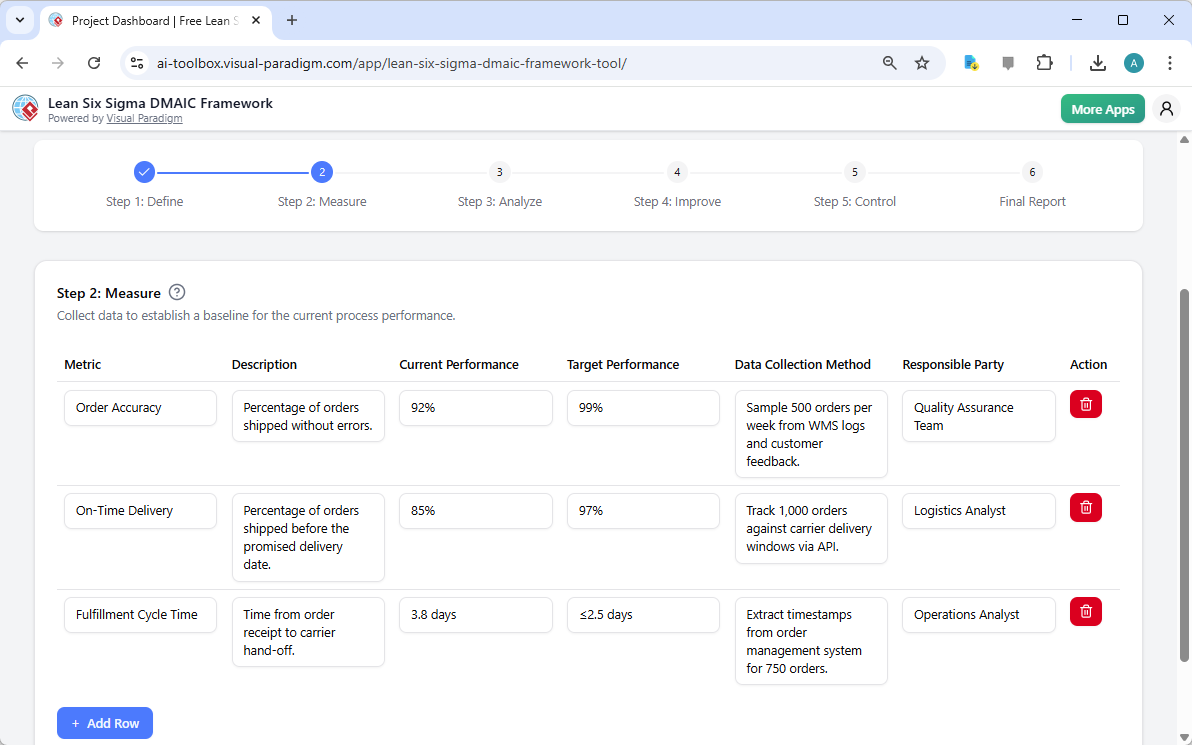
Next, the process moves to Measure. Image 3 shows the “Step 2: Measure” screen. This phase is all about quantifying the current state of your process. The tool helps you define key performance indicators (KPIs) like Order Accuracy, On-Time Delivery, and Fulfillment Cycle Time. It sets clear targets for improvement, such as aiming for 99% accuracy and a 2.5-day cycle time. The AI suggests practical data collection methods, like sampling orders from WMS logs or tracking API data from carriers. This step is vital for establishing a solid baseline against which you can measure your future improvements.
Step 3: Analyze – Uncovering the Root Causes
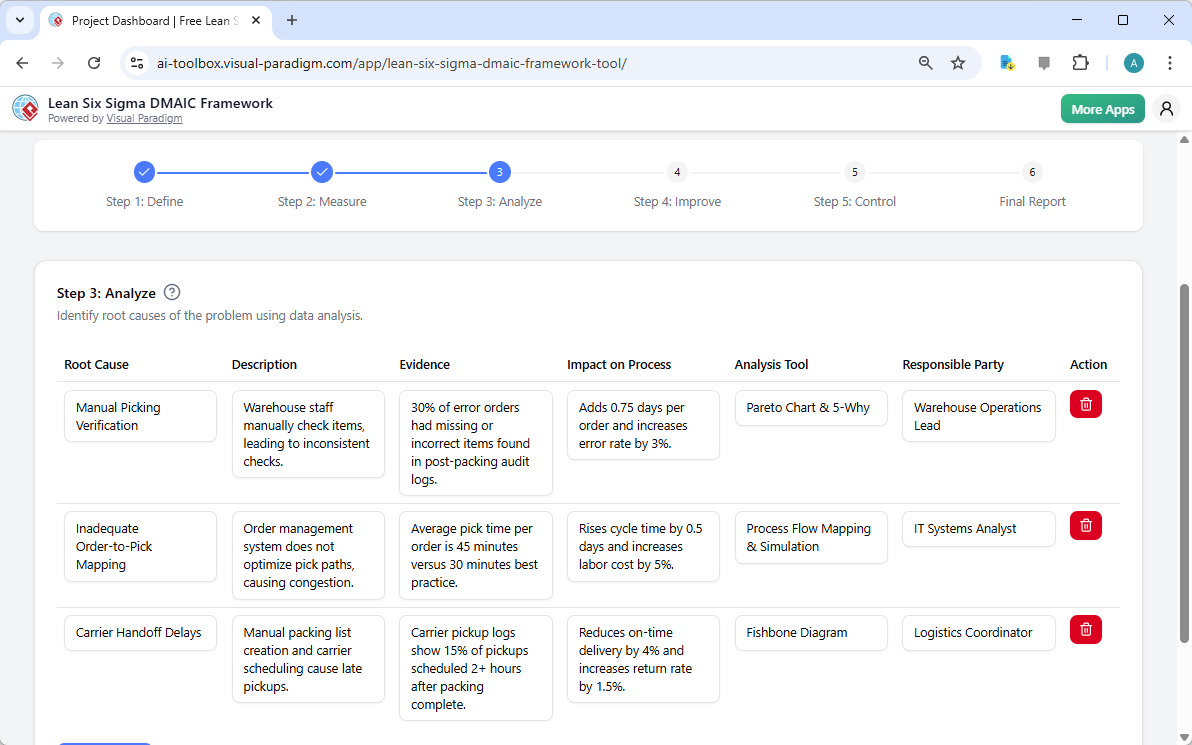
With a baseline established, the tool guides you to the Analyze phase. Image 4 illustrates the “Step 3: Analyze” screen. This is where you dig deep to find the root causes of your problems. The AI-generated table lists potential root causes, such as “Manual Picking Verification” and “Inadequate Order-to-Pick Mapping.” For each cause, it provides a description, evidence (like “30% of error orders had missing items”), and the impact on the process. The tool also suggests analysis tools like a Pareto Chart and 5-Why analysis, helping you prioritize the most impactful issues. This structured approach ensures you don’t just fix symptoms but address the fundamental problems.
Step 4: Improve – Implementing Solutions
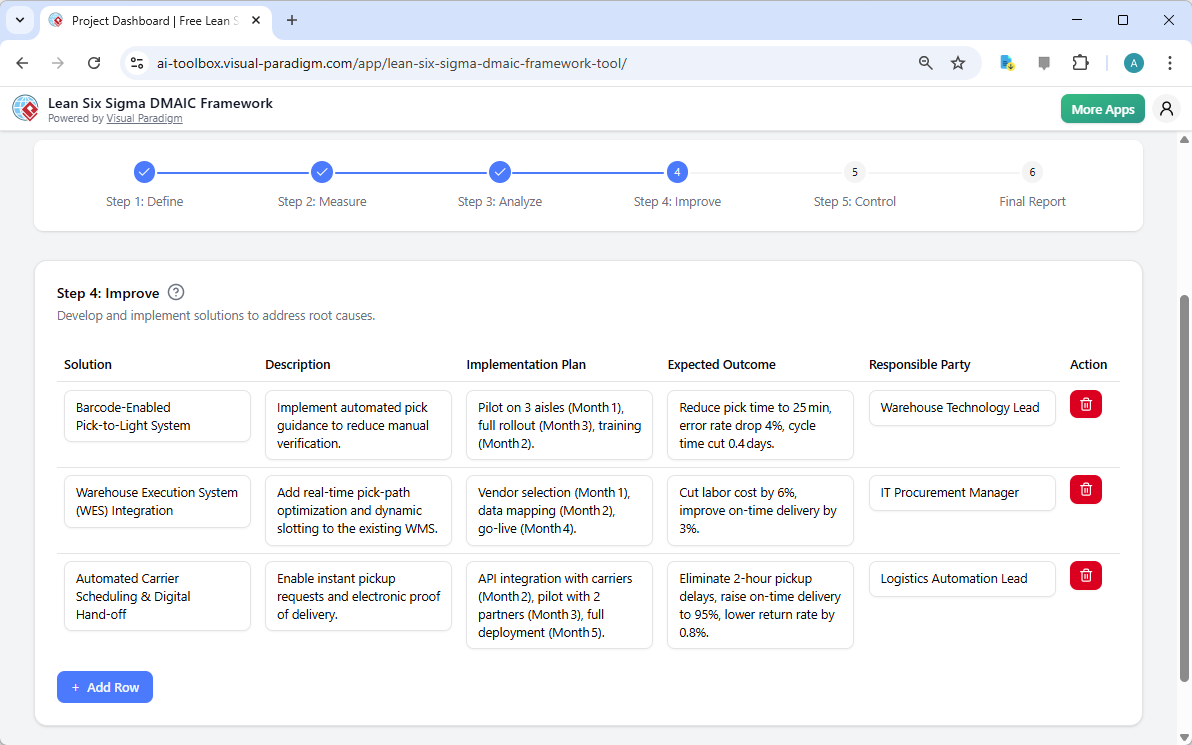
Now it’s time to develop and implement solutions. Image 5 shows the “Step 4: Improve” screen. The AI suggests actionable solutions, such as a “Barcode-Enabled Pick-to-Light System” or a “Warehouse Execution System (WES) Integration.” For each solution, it outlines a description, an implementation plan with a timeline, and the expected outcome. For instance, it might project a reduction in pick time to 25 minutes and a drop in error rate by 4%. This phase turns your analysis into a concrete action plan, providing a clear roadmap for your team to follow.
Step 5: Control – Sustaining the Gains
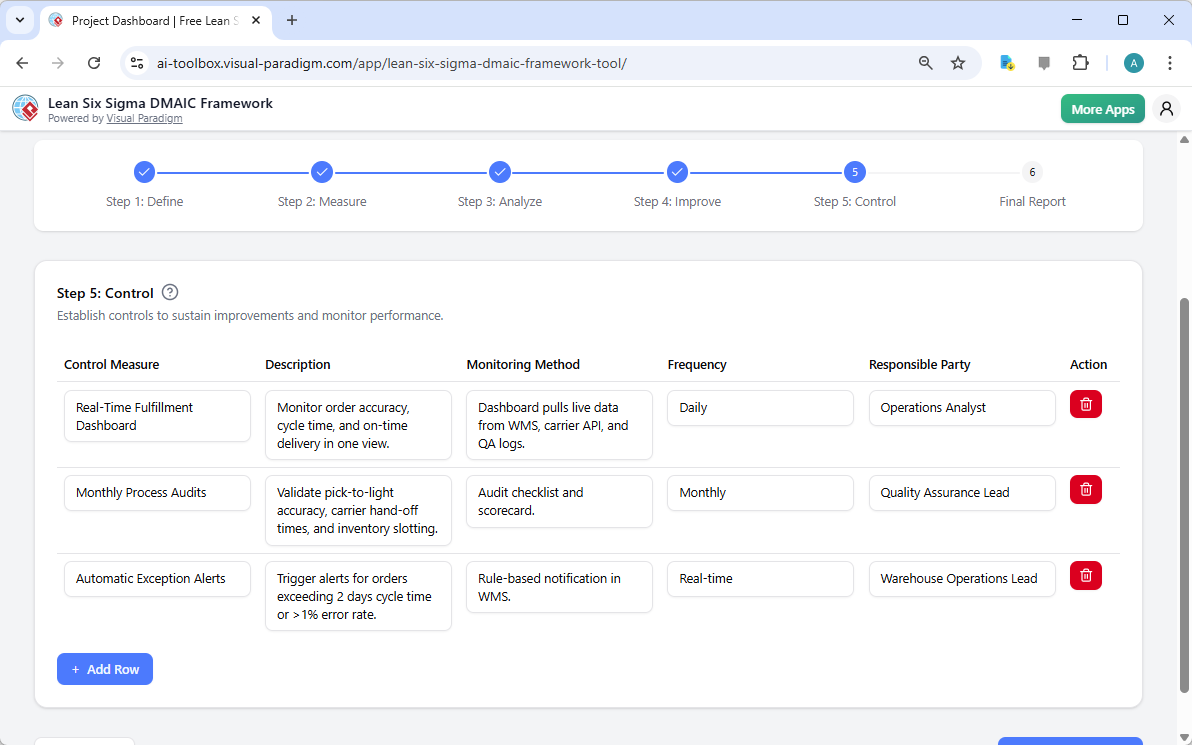
The final phase is Control, which focuses on making the improvements permanent. Image 6 displays the “Step 5: Control” screen. The tool helps you establish control measures to monitor the process and prevent regression. It suggests solutions like a “Real-Time Fulfillment Dashboard” and “Monthly Process Audits.” It also defines monitoring methods and frequency, such as daily checks by an Operations Analyst or monthly audits by the Quality Assurance Lead. This ensures that the gains achieved are not temporary but become part of your standard operating procedures.
Step 6: Final Report – Your Professional Summary
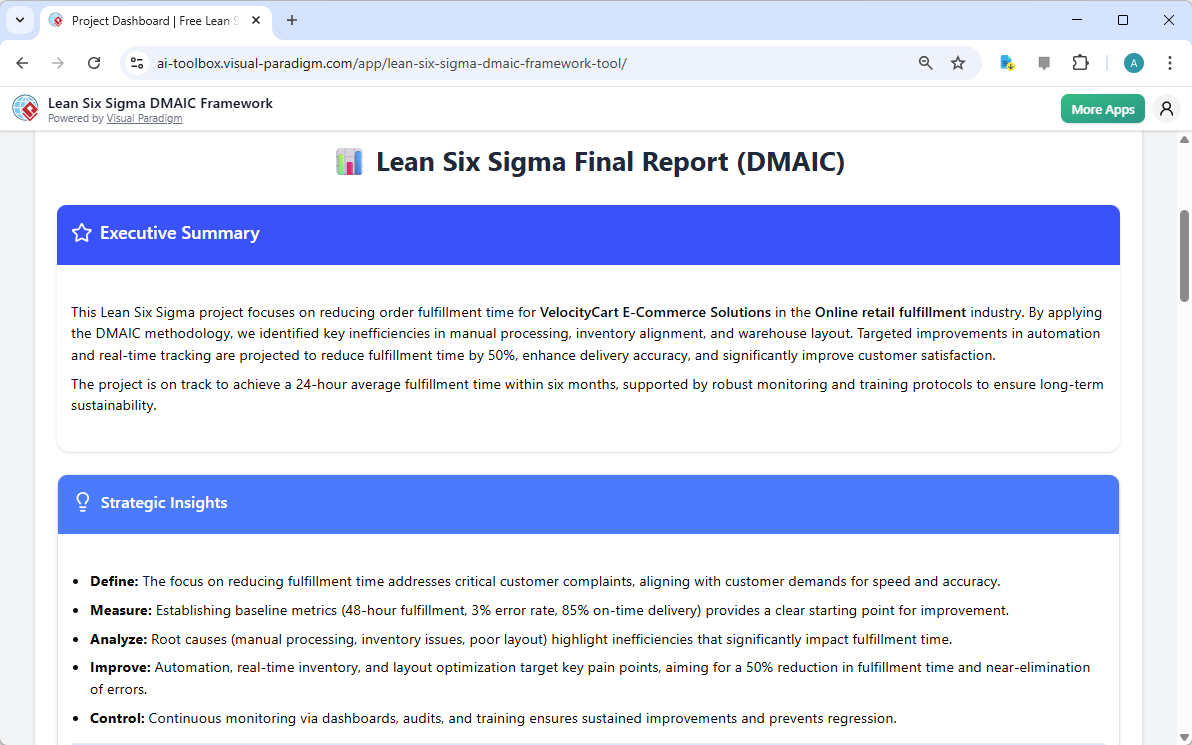
The journey culminates in the “Final Report.” Image 7 shows the consolidated output. This is where all the information from the previous five steps is compiled into a single, professional document. The report includes an Executive Summary that provides a high-level overview of the project’s goals, findings, and projected outcomes. It also features a “Strategic Insights” section that breaks down the key learnings from each phase. This report is the perfect deliverable for a project review meeting, allowing you to share your work with stakeholders and get buy-in for the next steps.
Why This Tool is a Game-Changer for Process Improvement
The Lean Six Sigma DMAIC Framework Tool from Visual Paradigm is more than just a software application; it’s a strategic partner in your continuous improvement journey. By leveraging AI, it dramatically accelerates the initial planning phase, allowing you to generate a comprehensive project plan in minutes. This saves countless hours of manual work and ensures your project is structured and data-driven from the very beginning. The tool’s user-friendly interface, with its dynamic tables and guided workflow, makes it accessible to both seasoned Lean Six Sigma practitioners and those new to the methodology. It’s a powerful way to standardize your improvement efforts and ensure that every project follows a rigorous, proven process. The ability to save your project locally ensures that your sensitive business data remains private and secure, giving you full control over your information. Whether you’re a process improvement specialist, a project manager, or an operations leader, this tool provides the structure and intelligence you need to drive real, measurable results.
Ready to transform your business processes? Try the AI-Powered Lean Six Sigma DMAIC Framework Tool today and see how it can accelerate your improvement projects. Click here to start your project now.
Related Links
Lean Six Sigma is a rigorous, data-driven methodology that combines lean principles—focused on eliminating waste—with Six Sigma techniques designed to reduce process variation and defects. The DMAIC framework serves as the structural foundation for this approach, guiding teams through five distinct phases: Define, Measure, Analyze, Improve, and Control. To support these phases, practitioners utilize specialized visual tools such as Value Stream Mapping (VSM) to identify bottlenecks and Fishbone (Ishikawa) diagrams paired with the 5 Whys to perform deep-dive root cause analysis. Modern software solutions now offer automated toolsets to manage these processes, providing a centralized repository for modeling, performance metrics, and standardized quality management templates.
-
Visual Paradigm’s Lean Six Sigma DMAIC Framework Tool: A dedicated feature set designed to support process modeling, analysis, and structured improvement using the full DMAIC lifecycle.
-
Six Sigma Process: A Step-by-Step Guide: An overview of the methodology covering core phases, key tools, and practical approaches for driving quality in business operations.
-
Lean Six Sigma Process Improvement Guide with Visual Paradigm: A guide on implementing Lean Six Sigma methodologies to optimize workflows and systematically reduce defects.
-
How to Use Value Stream Mapping in Six Sigma Projects: Explains how VSM supports the DMAIC cycle by revealing bottlenecks and enabling data-driven process improvements.
-
Six Sigma Quality Management Diagram Templates: A collection of pre-built templates for visualizing essential tools like Pareto charts, control charts, and Fishbone diagrams.
-
Fishbone Diagram and 5 Whys – Root Cause Analysis Guide: Details the combination of Fishbone diagrams with the 5 Whys technique to enhance the “Analyze” phase of process improvement.
-
Step-by-Step Guide to Creating a Fishbone Diagram: A practical tutorial on building Ishikawa diagrams to identify root causes in processes, projects, or systems.
-
Cause and Effect Analysis Toolkit: A comprehensive resource including best practices and templates for performing systematic cause-and-effect investigations.
-
Value Stream Mapping Software for Lean Improvement: Cloud-based tools that allow teams to visualize and optimize workflows for lean manufacturing and operational efficiency.
-
Process Improvement Toolset and Analysis: A data-driven suite for identifying inefficiencies and enhancing business performance through detailed process analysis.