


Introduction
In today’s fast-paced software development landscape, the ability to rapidly translate conceptual ideas into structured, visual models is a critical competitive advantage. Traditionally, creating professional Entity-Relationship Diagrams (ERDs) required significant manual effort—selecting shapes, applying notation standards, routing connections, and ensuring logical consistency. This process could take hours or even days, diverting valuable time from core analysis and design work.
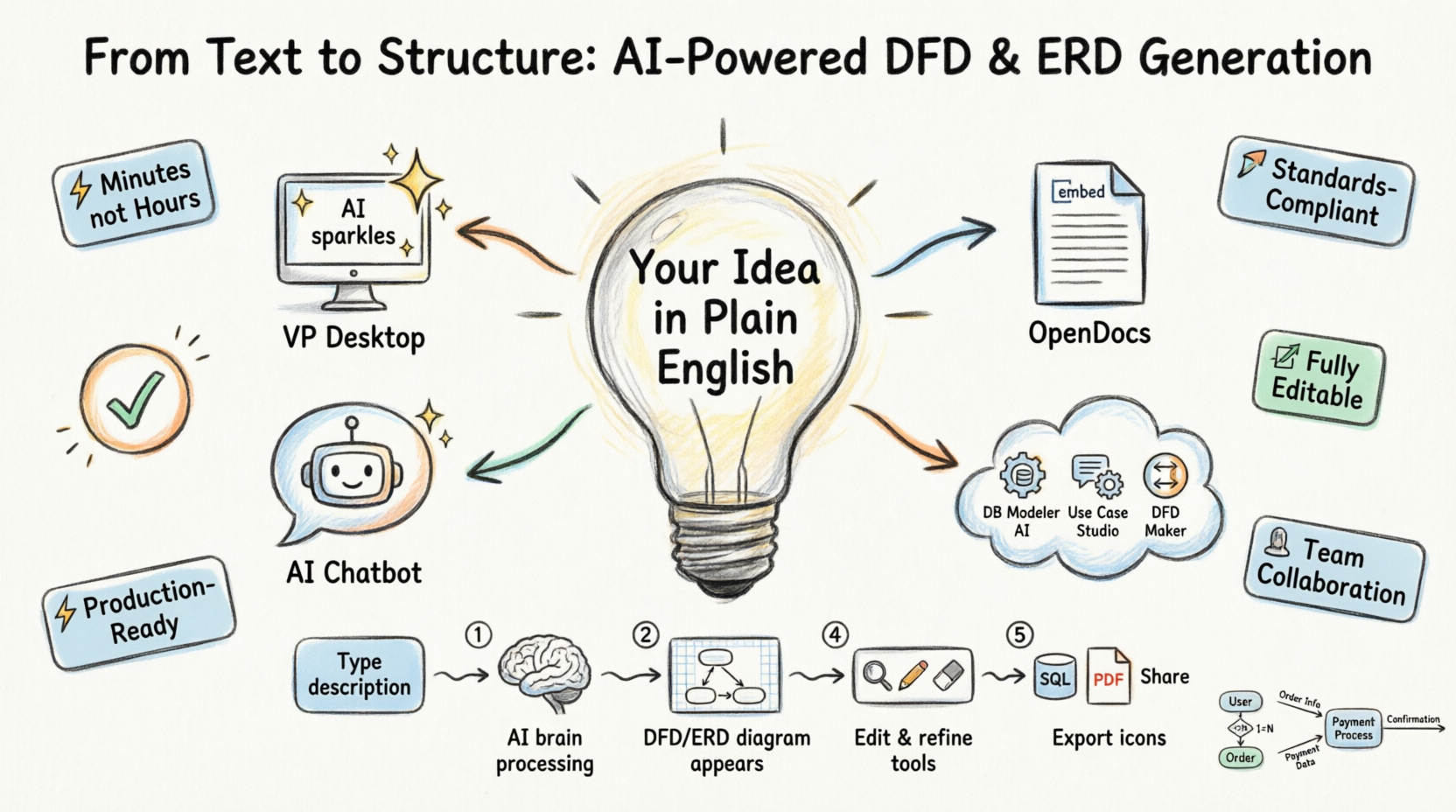
Visual Paradigm’s AI-powered diagram generation ecosystem transforms this workflow entirely. By leveraging advanced natural language processing, the platform enables users to describe a system, process, or data model in plain English and instantly generate accurate, editable, standards-compliant diagrams. [[2]] Whether you’re a business analyst mapping information flows, a developer designing a database schema, or a student learning system modeling concepts, Visual Paradigm’s AI tools dramatically reduce the barrier between idea and implementation. This comprehensive guide explores how Visual Paradigm’s integrated AI ecosystem—from desktop applications to cloud-based studios—streamlines the creation of DFDs and ERDs, empowering teams to move from text to professional schema in minutes, not hours.
The Visual Paradigm AI Ecosystem: Four Platforms, One Seamless Workflow
Visual Paradigm doesn’t offer a single AI tool—it delivers a cohesive ecosystem designed to support every stage of the modeling lifecycle. Each platform serves a distinct purpose while maintaining full interoperability, ensuring your diagrams remain editable, traceable, and production-ready across contexts.
🖥️ VP Desktop: Enterprise-Grade AI Modeling with Full Control
Visual Paradigm Desktop serves as the flagship platform for professional modelers requiring precision, scalability, and deep integration capabilities. Its AI Diagram Generator supports an expanded library of diagram types, including multiple DFD notations (Gane-Sarson, Yourdon & Coad, Yourdon DeMarco) and Chen Notation ERDs. [[2]]
Key capabilities include:
-
Instant Generation: Input a natural language description (e.g., “Model data flows for an online food ordering system”) and receive a fully structured, professionally laid-out diagram in seconds. [[21]]
-
Standards Compliance: Choose from industry-standard notation styles while the AI maintains logical integrity and proper symbol usage.
-
Native Editability: Generated diagrams open directly in Visual Paradigm’s robust editor, allowing you to decompose processes, adjust cardinalities, add constraints, or link to requirements and code artifacts.
-
Advanced Export & Integration: Generate SQL scripts from ERDs, produce technical documentation, or export diagrams in PNG, SVG, or PDF formats for stakeholder presentations.
Workflow Example:
-
Navigate to Tools > AI Diagram Generation
-
Select Data Flow Diagram or Entity Relationship Diagram from the dropdown
-
Enter your system description in plain language
-
Click OK and watch the AI construct your diagram
-
Refine, annotate, or integrate the model using Visual Paradigm’s full suite of modeling tools [[2]]
📄 OpenDocs: Embed Live, Editable Diagrams in Collaborative Documentation
Not all diagrams exist in isolation. OpenDocs bridges the gap between modeling and communication by enabling you to embed dynamic, AI-generated DFDs and ERDs directly into living documents, wikis, and knowledge bases.
Why this matters:
-
No More Static Screenshots: Embedded diagrams remain interactive and editable. Team members can zoom, comment, or modify relationships inline without leaving the document.
-
Always Current: When requirements evolve, update the diagram once and changes propagate across all linked documentation.
-
Seamless AI Integration: Use the Create with AI button within the OpenDocs editor to generate or refine diagrams without switching applications. [[5]]
Practical Use Case:
A product manager documents a new feature specification in OpenDocs. Using the built-in AI tool, they generate a Level-1 DFD illustrating data flows between user interfaces, backend services, and external APIs. Developers can then click into the diagram to explore process details or export SQL schema snippets—all within the same collaborative document.
🌐 Web Apps: Guided, Specialized AI Studios for Targeted Workflows
Visual Paradigm offers purpose-built web applications that combine AI intelligence with guided, step-by-step workflows for specific modeling tasks:
🔹 DB Modeler AI: End-to-End Database Design
This dedicated 7-step studio transforms high-level business descriptions into normalized, production-ready database schemas. [[12]] The workflow progresses logically:
-
Describe your business domain in natural language
-
AI generates a Domain Class Diagram
-
Automatically derives an ERD with entities, attributes, and relationships
-
Suggests normalization improvements
-
Produces initial SQL schema code
-
Provides an interactive SQL playground for testing
-
Exports ready-to-deploy database scripts
🔹 Use Case Modeling Studio: From Requirements to Data Models
Bridge behavioral requirements and persistent data structures by generating Class Diagrams from use case descriptions, then automatically deriving corresponding ERDs. This ensures traceability between functional specifications and database design.
🔹 AI Data Flow Diagram Maker: Instant Process Visualization
Describe any system’s information flow—such as “How customer orders move through an e-commerce platform”—and receive a professional DFD with correctly identified external entities, processes, data stores, and flows. Supports multiple notation standards and full post-generation editing. [[21]]
💬 AI Visual Modeling Chatbot: Conversational Diagram Creation
For rapid prototyping or quick clarifications, Visual Paradigm’s AI Chatbot enables conversational diagram generation. Simply describe your modeling need in a chat interface, and the AI responds with a generated diagram, refinement suggestions, or explanatory guidance—all within a natural dialogue flow.
Why Visual Paradigm’s AI Approach Delivers Superior Results
While many tools offer basic AI diagram generation, Visual Paradigm distinguishes itself through depth, flexibility, and ecosystem integration:
✅ Comprehensive Notation Support: Generate DFDs in Gane-Sarson, Yourdon & Coad, or Yourdon DeMarco styles; create ERDs using Chen notation—all with AI-assisted symbol placement and relationship inference. [[2]]
✅ True Editability, Not Just Images: Every AI-generated diagram is a native Visual Paradigm model, not a static graphic. Refine layouts, decompose processes, add constraints, or link to other artifacts without losing context.
✅ End-to-End Traceability: Connect your DFDs and ERDs to requirements documents, use cases, class diagrams, or source code. Changes propagate intelligently across linked artifacts, maintaining consistency throughout the development lifecycle.
✅ Team Collaboration Ready: Share diagrams via cloud workspaces, manage versions, assign review tasks, and gather feedback—all within Visual Paradigm’s collaborative environment.
✅ Production-Ready Outputs: Beyond visualization, generate executable SQL scripts from ERDs, export technical documentation, or integrate models into CI/CD pipelines.
✅ Learning Curve Minimized: Intuitive interfaces and guided workflows make professional-grade modeling accessible to analysts, developers, and students alike—without sacrificing power for experts.
Getting Started: Your First AI-Generated Diagram in 5 Minutes
-
Choose Your Platform:
-
For enterprise modeling: Download Visual Paradigm Desktop
-
For collaborative documentation: Use OpenDocs
-
For guided database design: Try DB Modeler AI
-
For quick prototypes: Access the AI Chatbot
-
-
Describe Your System:
Write a clear, concise description in natural language. Example:
“Create a Data Flow Diagram for a library management system showing how book checkouts, returns, and member registrations flow between patrons, librarians, and the catalog database.” -
Select Diagram Type & Notation:
Choose DFD or ERD, then pick your preferred notation style (e.g., Gane-Sarson for DFDs, Chen for ERDs). -
Generate & Review:
Click Generate. The AI analyzes your description, identifies key components (entities, processes, flows, relationships), and constructs a professionally laid-out diagram. -
Refine & Deploy:
Use Visual Paradigm’s editor to adjust layouts, add details, or decompose processes. Export to PDF for presentations, generate SQL for database implementation, or embed the live diagram in team documentation.
Conclusion: Redefining the Speed and Accessibility of Professional Modeling
Visual Paradigm’s AI-powered ecosystem represents a paradigm shift in how teams approach system analysis and database design. By transforming natural language descriptions into accurate, editable, standards-compliant DFDs and ERDs in seconds, the platform eliminates the traditional bottleneck of manual diagram creation. [[6]] More importantly, it does so without compromising on professionalism, traceability, or integration capabilities—ensuring that speed never comes at the expense of quality.
Whether you’re rapidly prototyping a new feature, documenting an existing system, teaching modeling concepts, or designing a production database schema, Visual Paradigm provides the tools to work smarter, collaborate more effectively, and deliver higher-quality outcomes. The future of visual modeling isn’t just about drawing diagrams—it’s about intelligently translating ideas into actionable, implementable structures. With Visual Paradigm’s AI ecosystem, that future is available today.
Ready to accelerate your modeling workflow? Explore Visual Paradigm’s free edition to experience AI-powered diagram generation firsthand, or dive into DB Modeler AI for end-to-end database design. Your next professional DFD or ERD is just a description away.
Reference List
- Visual Paradigm ERD Tool – Create Entity-Relationship Diagrams Online: This web-based tool enables intuitive drag-and-drop design of database schemas for efficient data modeling within a collaborative environment.
- New Diagram Types Added to AI Diagram Generator: DFD & ERD: This release announcement details the expanded capabilities of the AI generator, which now includes support for the automated creation of Entity Relationship Diagrams.
- What is an Entity-Relationship Diagram (ERD)? – Visual Paradigm Guide: An introductory resource explaining the fundamental components and the significance of ERDs in modern database design.
- Database Design with ERD Tools – Visual Paradigm Guide: This guide assists users in building scalable, robust databases using professional ERD tools and established data modeling best practices.
- Reverse Engineering Database to ERD in Visual Paradigm: A technical guide that walks users through the process of transforming an existing database back into a visual ERD for better documentation and analysis.
- How to Model a Relational Database with ERD – Visual Paradigm Tutorial: A practical, step-by-step tutorial covering everything from conceptual data design to final implementation using ERD models.
- Streamlining Entity-Relationship Modeling with Visual Paradigm: This article explores how to simplify the design and implementation of ER models from initial concept to final database deployment.
- Why Visual Paradigm Online is Ideal for ERD Design in Development Teams: A case study highlighting why this platform is suited for real-time, collaborative ERD design within agile software development teams.
- Visual Paradigm’s AI Diagram Generator Expands Instant Creation Capabilities: A resource detailing how the AI diagram generator now supports the instant creation of ERDs and other models to streamline information flow analysis.
- Chen Notation ERD Editor – Advanced Entity-Relationship Modeling: A specialized editor that supports Chen notation, enabling precise modeling of entities, attributes, relationships, and cardinality
Related posts:
 Mastering Database Design: A Complete Guide to Visual Paradigm’s AI-Powered ERD Tools
 Comprehensive Guide to AI-Powered Database Modeling with Visual Paradigm: From Requirements to Production-Ready Schema
 Comprehensive Guide to Visual Paradigm’s AI-Powered, All-in-One Platform for Software Development
 The C4 Model: Visualizing Software Architecture Like “Google Maps for Code”