


To make it visible, we use diagrams. The problem? Most diagrams are either too high-level to be useful or too detailed to be understood.
Enter the C4 Model. Created by Simon Brown, the C4 Model is a hierarchical framework for visualizing software architecture. It breaks down a system into four levels of abstraction: Context, Containers, Components, and Code.
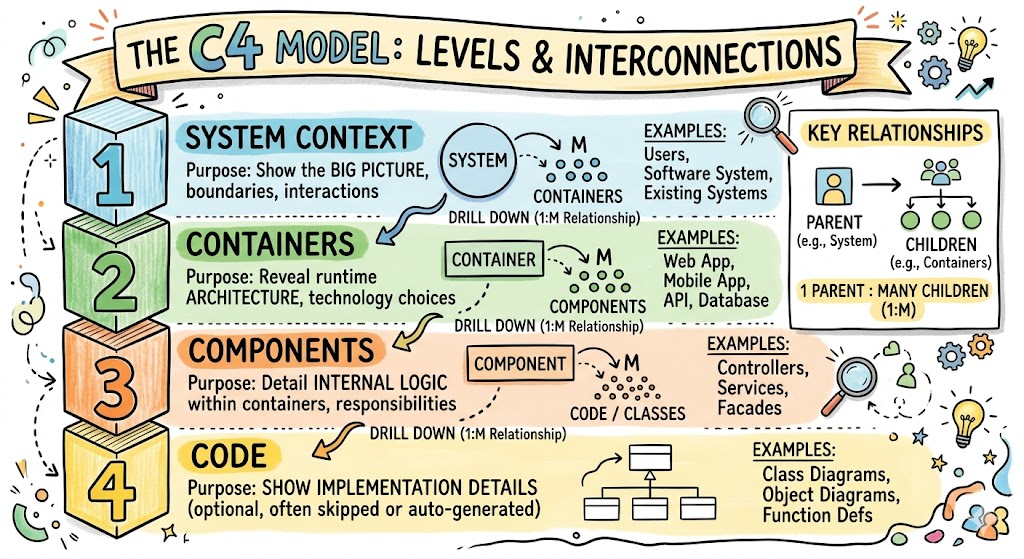
This article explains how these levels interconnect, the nature of their relationships (1:1, 1:M, or Drill-Down), and why this structure is critical for effective communication.
The Core Concept: Hierarchical Abstraction
The fundamental principle of the C4 Model is abstraction. It is designed to function like Google Maps.
- When you look at a map of the world, you see continents (Context).
- When you zoom in, you see countries and cities (Containers).
- Zoom further, and you see streets and buildings (Components).
- Zoom all the way in, and you see the individual bricks (Code).
The interconnection between these levels is not a lateral peer-to-peer relationship; it is a Parent-Child Decomposition.
The Relationship Between Levels: 1:M (One-to-Many)
To answer the specific question regarding relationship cardinality: The relationship between C4 levels is 1-to-Many (1:M) Decomposition.
- 1 System is composed of Many Containers.
- 1 Container is composed of Many Components.
- 1 Component is implemented by Many Code Structures (Classes/Interfaces).
It is not a 1:1 relationship. You do not draw a new diagram for every single class. Instead, you group classes into a component, group components into a container, and group containers into a system.
The navigation method between these levels is a Drill-Down. A stakeholder should be able to look at a “Container” box in Level 1 and “drill down” into Level 2 to see what is inside that specific box.
The Four Levels: Structure and Purpose
Here is how each level is structured and how it connects to the next.
Level 1: System Context Diagram
- What it is: The highest level of abstraction. It shows your software system as a single box in the center.
- Key Elements: Your System, Human Users, and External Systems (e.g., Payment Gateway, Email Provider).
- Purpose: To explain the “Why” and “Who.” It is suitable for non-technical stakeholders.
- Connection to Next Level: The central “System Box” here is the parent of the entire Level 2 diagram.
Level 2: Container Diagram
- What it is: Zooming into the System Box from Level 1.
- Key Elements: “Containers” in C4 do not mean Docker containers. They mean runtime containers. Examples: Web Application, Mobile App, Microservice, Database, File System.
- Purpose: To show the high-level technology choices and how data flows between major parts of the system.
- Connection to Next Level: Each “Container Box” here becomes the boundary for a Level 3 diagram.
Level 3: Component Diagram
- What it is: Zooming into a specific Container from Level 2.
- Key Elements: Logical groupings of functionality. Examples: Controller, Service, Repository, Module.
- Purpose: To show how a specific application is structured internally. This is for developers and architects.
- Connection to Next Level: Each “Component” is implemented by the code in Level 4.
Level 4: Code Diagram (Optional)
- What it is: Zooming into a Component.
- Key Elements: Classes, Interfaces, Functions, Database Tables.
- Purpose: Detailed design.
- Note: This level is rarely drawn manually. It is usually generated automatically by IDE plugins (like IntelliJ or Visual Studio) because code changes too frequently to maintain manual diagrams.
Concrete Example: An E-Commerce Platform
To visualize the interconnection, let’s trace an E-Commerce System through the levels.
Level 1 (Context)
- Diagram: Shows one box called “E-Commerce System.”
- Relationships:
Customer-> (uses) ->E-Commerce SystemE-Commerce System-> (sends payment to) ->Stripe API
- Drill Down: We decide to open up the “E-Commerce System” box.
Level 2 (Containers)
- Diagram: The boundary is now the “E-Commerce System.” Inside, we see:
Web Application(React/Node)Database(PostgreSQL)Email Service(Python)
- Relationships:
Web Application-> (reads/writes) ->DatabaseWeb Application-> (sends request) ->Email Service
- Interconnection Check: The
Web Applicationbox here is a Child of theE-Commerce Systemfrom Level 1. - Drill Down: We decide to open up the
Web Applicationbox.
Level 3 (Components)
- Diagram: The boundary is now the
Web Application. Inside, we see:Login ControllerOrder ServiceProduct Repository
- Relationships:
Login Controller-> (uses) ->Order ServiceOrder Service-> (uses) ->Product Repository
- Interconnection Check: The
Order Servicecomponent here is a Child of theWeb Applicationcontainer from Level 2.
Level 4 (Code)
- Diagram: Generated from the IDE for the
Order Service. - Elements:
OrderController.java,OrderService.java,OrderEntity.java. - Interconnection Check: These classes collectively implement the
Order Servicecomponent from Level 3.
Key Concepts of Interconnection
To maintain integrity between levels, you must adhere to three key rules:
1. Consistency of Naming
If you name a box “Mobile App” in Level 1, it must be named “Mobile App” in Level 2. If you rename it to “iOS Client” in Level 2, you break the mental model for the reader. The drill-down must feel seamless.
2. Boundary Integrity
The relationships crossing the boundary of a parent must be accounted for in the child.
- Example: If Level 1 shows the
Systemtalking toStripe, Level 2 must show which Container talks toStripe. You cannot lose external connections as you drill down.
3. Granularity Management
- Level 1 hides technology. (Don’t say “Java”, say “System”).
- Level 2 reveals technology. (Say “Java Spring Boot App”).
- Level 3 reveals logic. (Say “Authentication Module”).
- Mixing levels is the most common error. Do not show a Class (Level 4) on a Context Diagram (Level 1).
What is the Purpose of This Structure?
Why not just draw one giant diagram with everything on it?
1. Managing Cognitive Load
Human brains can only process a limited amount of information at once. A diagram with 50 boxes is unreadable. The C4 model splits those 50 boxes across four diagrams, each showing only 5–7 key elements relevant to that specific audience.
2. Audience Segmentation
- CEO/Product Owner: Only needs to see Level 1. They care about users and external dependencies, not which database you use.
- DevOps/Infrastructure: Needs to see Level 2. They care about servers, databases, and network boundaries.
- Developers: Need to see Level 3. They care about how the code is organized logically.
3. Living Documentation
Because the levels are decoupled, you can update Level 3 (Component) when you refactor code without needing to redraw Level 1 (Context). This makes the documentation sustainable over time.
Summary of Relationships
|
Relationship Type
|
Description
|
Example
|
|---|---|---|
|
Vertical (Between Levels)
|
Decomposition (1:M)
|
One System contains Many Containers.
|
|
Navigation
|
Drill-Down
|
Clicking a Container in L1 leads to L2.
|
|
Horizontal (Within Level)
|
Communication/Dependency
|
Container A sends data to Container B.
|
|
Implementation
|
Realization
|
Code (L4) implements Component (L3).
|
Conclusion
The C4 Model is not just about drawing boxes; it is about structuring thoughts. The interconnection between levels is a hierarchical drill-down, moving from a 1:Many decomposition. By strictly separating Context, Containers, Components, and Code, you ensure that every diagram has a specific purpose and a specific audience.
When you respect the boundaries between these levels, you transform architecture diagrams from confusing spaghetti charts into a navigable map of your software landscape.
Reference and Tool
- C4 Diagram Tool by Visual Paradigm – Visualize Software Architecture with Ease: This resource highlights a tool that enables software architects to create clear, scalable, and maintainable system diagrams using the C4 modeling technique.
- Ultimate Guide to C4 Model Visualization Using Visual Paradigm’s AI Tools: This guide explains how to leverage artificial intelligence to automate and enhance the visualization of the C4 model for smarter architecture design.
- Leveraging Visual Paradigm’s AI C4 Studio for Streamlined Architecture Documentation: An exploration of the AI-enhanced C4 Studio, which allows teams to create clean, scalable, and highly maintainable software architecture documentation.
- Beginner’s Guide to C4 Model Diagrams: A step-by-step tutorial designed to help beginners create C4 model diagrams across all four levels of abstraction: Context, Containers, Components, and Code.
- The Ultimate Guide to C4-PlantUML Studio: Revolutionizing Software Architecture Design: This article discusses the integration of AI-driven automation with PlantUML’s flexibility to streamline the software architecture design process.
- A Comprehensive Guide to Visual Paradigm’s AI-Powered C4 PlantUML Studio: A detailed guide explaining how this specialized studio transforms natural language into accurate, layered C4 diagrams.
- C4-PlantUML Studio: AI-Powered C4 Diagram Generator: This feature overview describes an AI tool that automatically generates C4 software architecture diagrams directly from simple text descriptions.
- Comprehensive Tutorial: Generating and Modifying C4 Component Diagrams with AI Chatbot: A hands-on tutorial demonstrating how to use an AI-powered chatbot to generate and refine C4 component diagrams through a real-world case study.
- Visual Paradigm Full C4 Model Support Release: An official announcement regarding the inclusion of comprehensive C4 model support for managing architecture diagrams at multiple abstraction levels within the platform.
- C4 Model AI Generator: Automating Diagrams for DevOps and Cloud Teams: This article discusses how conversational AI prompts automate the full C4 modeling lifecycle, ensuring consistency and speed for technical teams.
Related posts:
 The C4 Model: Visualizing Software Architecture Like “Google Maps for Code”
 The Complete Guide to the C4 Model: Visualizing Software Architecture with Clarity and Purpose
 Comprehensive Guide to Modeling Event-Driven Architectures with C4 Model
 Mastering Authentication Flow Visualization: A Comprehensive C4 Component Diagram Guide for Secure Architecture Documentation