


Introduction
In today’s rapidly evolving software landscape, maintaining accurate, accessible, and up-to-date architecture documentation has become a critical challenge for development teams. Traditional documentation methods often fall short—they become outdated quickly, remain inaccessible to key stakeholders, or require specialized knowledge to interpret. The solution lies in combining the structured clarity of the C4 Model with a self-service architecture knowledge base approach, enhanced by modern AI-powered tooling.
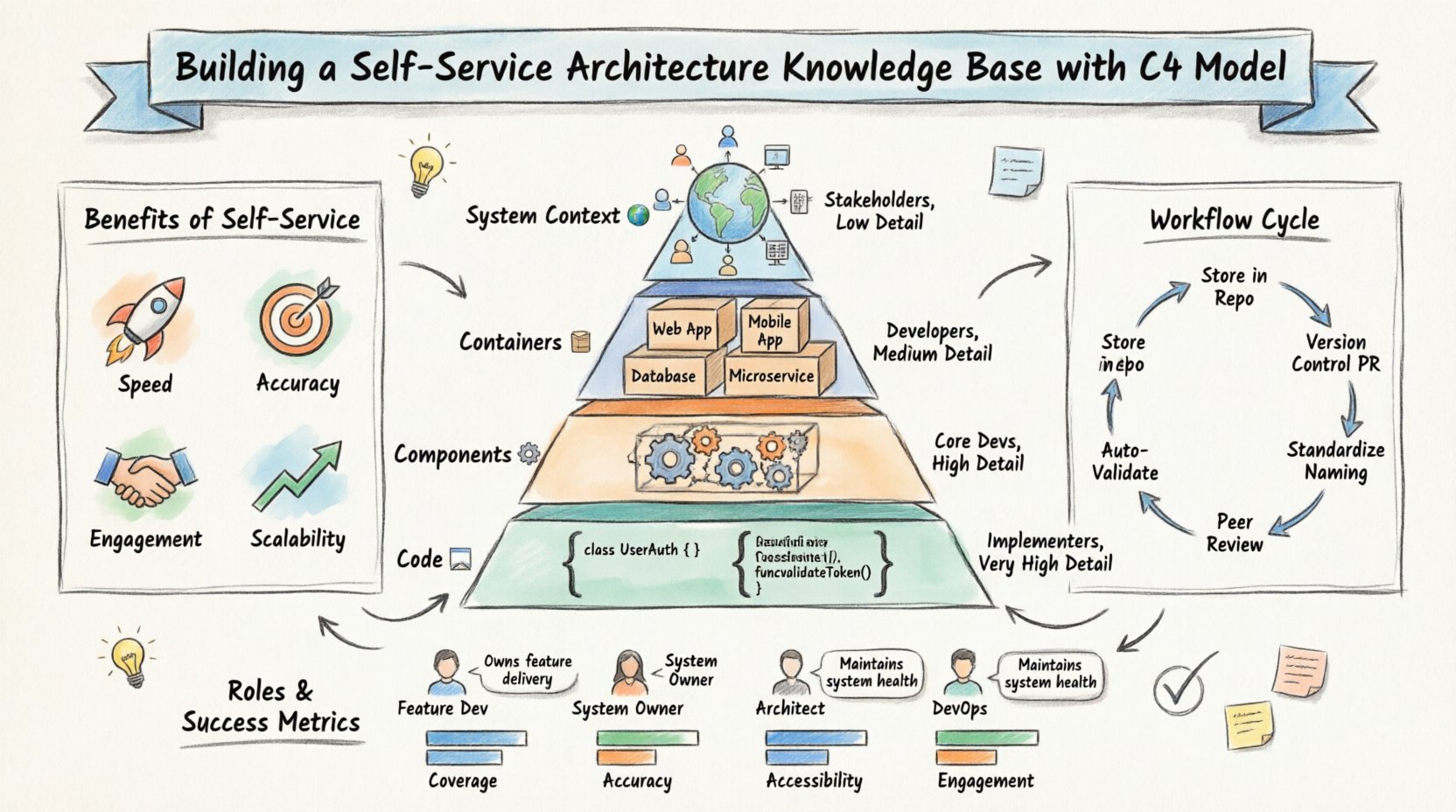
This comprehensive guide explores how organizations can bridge the gap between high-level business objectives and granular technical implementation through a living, breathing documentation system. By treating architecture documentation as code and leveraging AI-enhanced visualization tools, teams can create a sustainable knowledge ecosystem that scales with their organization while maintaining accuracy and engagement across all technical levels.
1. Understanding the C4 Model Pyramid
At the heart of effective architecture documentation lies the C4 Model, a framework that provides four distinct levels of abstraction, each serving different audiences and purposes. This hierarchical approach ensures that the right information reaches the right people at the right level of detail.
Level 1: System Context
Audience: Stakeholders, Business Leaders, Product Owners
Detail Level: Low
Focus: The big picture—how your system fits into the broader ecosystem
The System Context diagram answers fundamental questions: What problem does this system solve? Who uses it? What other systems does it interact with? At this level, you’re not concerned with technology choices or implementation details. Instead, you’re mapping the relationships between people (actors) and software systems, creating a shared understanding that aligns technical and non-technical stakeholders.
Level 2: Containers
Audience: Developers, Solution Architects
Detail Level: Medium
Focus: High-level technology choices and application boundaries
Containers represent runnable/executable units—web applications, mobile apps, databases, microservices, or file systems. This level reveals the high-level shape of the architecture and the distribution of responsibilities across different technologies. It’s where you make critical decisions about whether to use a monolith or microservices, which databases to employ, and how different applications communicate.
Level 3: Components
Audience: Core Developers, Technical Leads
Detail Level: High
Focus: Internal structure and logical grouping within containers
Components break down containers into smaller, more manageable pieces. These are logical groupings of related functionality—modules, services, or libraries that work together to deliver the container’s responsibilities. At this level, you’re defining clear boundaries, interfaces, and dependencies between different parts of your system, enabling teams to work independently while maintaining system coherence.
Level 4: Code
Audience: Implementers, Developers
Detail Level: Very High
Focus: Implementation details, classes, functions, and data structures
The Code level represents the actual implementation—classes, interfaces, functions, and database schemas. While the C4 Model doesn’t require you to document every single class, this level is crucial for understanding complex algorithms, critical business logic, or intricate data relationships. It serves as the bridge between architectural intent and actual code.
2. The Value Proposition: Why Self-Service Architecture Matters
Transitioning to a self-service architecture knowledge base isn’t just about better documentation—it’s about fundamentally changing how teams interact with architectural knowledge. Here are the four pillars that make this approach transformative:
Speed: Accelerating Decision-Making and Onboarding
Traditional documentation processes create bottlenecks. When only a select few can create or update architecture diagrams, teams wait days or weeks for critical information. A self-service model democratizes this capability, enabling developers to document their work as they build it. New team members can onboard faster by exploring interactive, up-to-date diagrams rather than deciphering outdated wikis or relying on tribal knowledge.
Accuracy: Eliminating Documentation Drift
The greatest enemy of architecture documentation is drift—the gradual divergence between what’s documented and what’s actually built. By integrating documentation into the development workflow (treating it as code), you ensure that architectural changes are reviewed, versioned, and deployed alongside feature code. This creates a single source of truth that evolves with your system.
Engagement: Empowering Teams to Own Their Architecture
When developers can easily create and maintain documentation, they become active participants in shaping the architectural narrative rather than passive consumers. This ownership leads to better-designed systems, as the act of documenting forces clarity of thought and reveals hidden complexities or inconsistencies.
Scalability: Growing Without Bottlenecks
As organizations scale, the number of systems, services, and teams grows exponentially. A centralized documentation team cannot keep pace. A self-service model, supported by standardized tools and workflows, allows documentation to scale organically with your organization, maintaining quality and consistency without creating bottlenecks.
3. The Workflow Cycle: Architecture as Code
To maintain a living knowledge base, architecture documentation must follow principles borrowed from modern software development practices. This CI/CD-inspired workflow ensures quality, consistency, and continuous improvement.
Step 1: Store in Repository
All architecture diagrams and definitions live in version control (typically Git), alongside or near the code they describe. This could be:
-
C4-PlantUML text files
-
JSON/YAML model definitions
-
Markdown files with embedded diagrams
-
Proprietary format files from visualization tools
Key Principle: Documentation is code, and code is documentation.
Step 2: Version Control via Pull Requests
Changes to architecture are proposed through Pull Requests (PRs), just like code changes. This creates:
-
An audit trail of architectural decisions
-
A forum for discussion and refinement
-
A mechanism for enforcing standards before changes merge
Step 3: Standardize Naming Conventions
Consistency is crucial for discoverability and comprehension. Establish and enforce naming standards for:
-
Systems and containers
-
Components and modules
-
Relationships and dependencies
-
Tags and metadata
Automation can validate naming conventions before merge, preventing inconsistencies from entering the knowledge base.
Step 4: Peer Review
Architecture changes require review from multiple perspectives:
-
Technical peers verify implementation feasibility
-
Architects ensure alignment with broader strategy
-
System owners confirm impact on their domains
-
Security/compliance teams validate adherence to standards
Step 5: Auto-Validation
Automated checks ensure quality and consistency:
-
Schema validation (does the diagram follow C4 rules?)
-
Link validation (do referenced systems/components exist?)
-
Completeness checks (are all required fields populated?)
-
Style enforcement (are naming conventions followed?)
-
Dependency analysis (are there circular dependencies?)
Step 6: Publish to Self-Service Portal
Once merged, changes automatically deploy to a central knowledge portal where stakeholders can:
-
Browse interactive diagrams
-
Search across the architecture
-
Understand dependencies and impacts
-
Export documentation for presentations or audits
4. Roles and Success Metrics
Different roles contribute to and benefit from the architecture knowledge base in different ways. Understanding these perspectives helps tailor the system to maximize value for each stakeholder group.
Feature Developer
Primary Contribution: Creating and updating documentation for new features
Success Metric: Coverage
Goal: Ensure every feature, service, or component they build is documented at appropriate C4 levels
Key Activities:
-
Creating Component and Code level diagrams for new features
-
Updating Container diagrams when introducing new services
-
Linking documentation to code repositories
-
Participating in peer reviews of architecture changes
System Owner
Primary Contribution: Maintaining accuracy of their domain
Success Metric: Accuracy
Goal: Ensure documentation reflects the current state of production systems
Key Activities:
-
Reviewing and approving architecture changes in their domain
-
Conducting periodic audits to identify documentation drift
-
Decommissioning documentation for retired systems
-
Validating that diagrams match deployment configurations
Architect
Primary Contribution: Defining standards and ensuring coherence
Success Metric: Accessibility
Goal: Make architectural knowledge easy to find, understand, and apply
Key Activities:
-
Establishing C4 modeling standards and conventions
-
Creating templates and examples for common patterns
-
Ensuring cross-system dependencies are clearly documented
-
Maintaining System Context diagrams that show the big picture
-
Curating the knowledge base for discoverability
DevOps Engineer
Primary Contribution: Integrating documentation into pipelines
Success Metric: Engagement
Goal: Maximize adoption and utilization of the knowledge base
Key Activities:
-
Automating documentation generation from code/deployments
-
Integrating validation checks into CI/CD pipelines
-
Monitoring usage metrics and identifying adoption barriers
-
Ensuring documentation is available in deployment environments
-
Creating feedback loops between operations and architecture
5. Practical Implementation: Documenting a User Authentication Feature
Let’s walk through a concrete example of how this framework applies to a real-world scenario: implementing a new user authentication feature.
Context Level (System Context Diagram)
What to Document:
-
Actors: End Users, Administrators, Third-party Identity Providers
-
Systems: Your Application, Identity Management System, External OAuth Providers
-
Relationships: Users authenticate through your application, which delegates to the Identity System
Key Questions Answered:
-
Who needs to log in?
-
What systems are involved in authentication?
-
What external dependencies exist (e.g., Google OAuth, Azure AD)?
Container Level (Container Diagram)
What to Document:
-
Mobile App: iOS and Android applications
-
Web Application: React/Angular frontend
-
Auth Microservice: Dedicated authentication service
-
User Database: PostgreSQL storing user credentials
-
Token Cache: Redis for session management
Key Questions Answered:
-
What technologies handle authentication?
-
How do different applications communicate with the auth service?
-
Where are credentials and tokens stored?
Component Level (Component Diagram)
What to Document:
Inside the Auth Microservice:
-
JWT Validator: Verifies token signatures and expiration
-
Password Hasher: Implements bcrypt/argon2 for credential storage
-
OAuth Client: Handles third-party authentication flows
-
Rate Limiter: Prevents brute-force attacks
-
Audit Logger: Records authentication events for compliance
Key Questions Answered:
-
How is authentication actually implemented?
-
What are the internal boundaries and responsibilities?
-
How do components interact to deliver authentication?
Code Level (Code Diagram)
What to Document:
class UserAuth {
    private UserRepository userRepository;
    private TokenService tokenService;

    public AuthResponse authenticate(Credentials creds) {
        User user = userRepository.findByEmail(creds.email);
        if (passwordHasher.verify(creds.password, user.hash)) {
            return tokenService.generateJWT(user);
        }
        throw new AuthenticationException();
    }

    public boolean validateToken(String token) {
        return jwtValidator.verifySignature(token)
            && !tokenService.isExpired(token)
            && !tokenService.isRevoked(token);
    }
}
Key Questions Answered:
-
What are the critical algorithms and data structures?
-
How are security concerns addressed in code?
-
What are the key interfaces and contracts?
Workflow in Action
-
Developer creates C4 diagrams at all levels as part of the feature branch
-
Pull Request includes both code changes and documentation updates
-
Automated Validation checks that diagrams follow C4 conventions and naming standards
-
Peer Review from another developer verifies technical accuracy
-
Architect Review ensures alignment with security standards and overall architecture
-
System Owner (Identity Platform team) approves changes affecting authentication
-
Merge triggers automatic deployment to the knowledge base portal
-
Documentation is now live and searchable for all teams
6. Accelerating C4 Modeling with Visual Paradigm’s AI Ecosystem
While the C4 Model provides the framework and self-service principles establish the workflow, modern AI-powered tools dramatically reduce the friction of creating and maintaining architecture documentation. Visual Paradigm’s AI-enhanced ecosystem transforms what could be a tedious manual process into an intelligent, automated experience.
AI-Powered Diagram Generation from Natural Language
One of the most significant barriers to architecture documentation is the initial effort required to create diagrams. Visual Paradigm’s AI C4 Model Generator eliminates this friction by allowing architects and developers to describe their systems in plain language.
How It Works:
Instead of manually dragging and dropping shapes, you simply describe your architecture:
“We have a mobile app that connects to a web API, which uses a microservice for authentication and a PostgreSQL database for user storage. The system integrates with Google OAuth for third-party login.”
The AI analyzes this description and automatically generates:
-
Properly structured C4 diagrams at all four levels
-
Correct relationships and dependencies
-
Appropriate technology icons and styling
-
Consistent naming conventions
This capability is particularly powerful for:
-
Rapid prototyping of new system designs
-
Onboarding new team members who can describe what they understand
-
Documentation sprints where teams need to catch up on existing systems
-
Stakeholder communication where non-technical users can describe requirements
C4-PlantUML Studio: Code-First Architecture Documentation
For teams that prefer infrastructure-as-code approaches, Visual Paradigm’s C4-PlantUML Studio combines the flexibility of PlantUML’s text-based diagramming with AI-powered automation.
Key Advantages:
-
Version Control Friendly: Text-based diagrams merge cleanly in Git
-
Automation Ready: Generate diagrams programmatically from code analysis
-
AI Enhancement: Natural language descriptions convert to PlantUML syntax
-
Consistency Enforcement: Templates and patterns ensure uniform styling
Use Case: A DevOps team can write a script that analyzes their Kubernetes manifests and automatically generates Container-level C4 diagrams showing all microservices, databases, and external integrations.
AI Chatbot for Iterative Diagram Refinement
Architecture is rarely perfect on the first attempt. Visual Paradigm’s AI Chatbot enables conversational refinement of C4 diagrams, making the iterative design process natural and efficient.
Example Interaction:
User: "Add a caching layer between the web app and database"
AI: "Added Redis cache container. Should it be positioned as a sidecar or
     standalone service?"

User: "Standalone, with the web app checking cache first"
AI: "Updated diagram with cache-aside pattern. Added cache miss flow
     from Redis to PostgreSQL."

User: "What about cache invalidation?"
AI: "Good point. I've added an event bus component for cache invalidation
     messages. Would you like me to create a Component diagram showing
     the invalidation logic?"
This conversational approach:
-
Reduces cognitive load by handling tedious diagram updates
-
Surfaces best practices through AI suggestions
-
Maintains consistency across multiple diagram levels
-
Educates junior architects through interactive guidance
Comprehensive C4 Model Support Across All Levels
Visual Paradigm provides full C4 Model support, ensuring seamless transitions between abstraction levels. Unlike tools that focus on just one or two levels, Visual Paradigm maintains the connections between Context, Containers, Components, and Code, creating a cohesive navigation experience.
Key Features:
-
Drill-Down Navigation: Click any element to navigate to its detailed view at the next level
-
Impact Analysis: See how changes at one level affect other levels
-
Consistency Validation: Ensure elements at lower levels align with higher-level abstractions
-
Multi-View Management: Organize diagrams by system, team, or domain
AI-Driven Architecture Documentation for DevOps and Cloud Teams
Modern cloud-native architectures introduce unique documentation challenges: dynamic scaling, ephemeral containers, service meshes, and complex dependency graphs. Visual Paradigm’s AI tools for DevOps and Cloud address these challenges specifically.
Capabilities:
-
Infrastructure-as-Code Analysis: Parse Terraform, CloudFormation, or ARM templates to auto-generate Container diagrams
-
Kubernetes Integration: Visualize cluster topology, namespaces, and service relationships
-
Microservice Discovery: Automatically detect and document service dependencies from service mesh configurations
-
Compliance Documentation: Generate architecture diagrams that satisfy audit and compliance requirements
Real-World Impact: A cloud migration team can point the AI at their AWS account, and it will generate comprehensive C4 diagrams showing all resources, their relationships, and security boundaries—documenting in hours what would take weeks manually.
Streamlined Collaboration and Review Workflows
Visual Paradigm’s ecosystem integrates seamlessly with the self-service workflow described earlier, providing:
-
Git Integration: Store diagrams in repositories with full version history
-
Pull Request Previews: Automatically generate diagram previews in PR descriptions
-
Team Workspaces: Collaborate in real-time on architecture designs
-
Export Flexibility: Generate PDFs, PNGs, or interactive HTML for different audiences
The Visual Paradigm Advantage: From Description to Documentation in Minutes
The combination of AI-powered generation, natural language understanding, and comprehensive C4 Model support transforms architecture documentation from a burdensome obligation into a strategic asset. Teams can:
-
Describe their system in plain language
-
Generate professional C4 diagrams automatically
-
Refine through conversational AI assistance
-
Validate against standards and best practices
-
Publish to a self-service knowledge base
-
Maintain through automated updates from code and infrastructure
This end-to-end automation doesn’t replace human judgment—it amplifies it. Architects spend less time drawing boxes and arrows, and more time thinking about system design, trade-offs, and strategic alignment.
7. Getting Started: Your Implementation Roadmap
Ready to implement a self-service architecture knowledge base? Here’s a practical roadmap to guide your journey:
Phase 1: Foundation (Weeks 1-2)
-
Select Tools: Choose your C4 modeling tool (Visual Paradigm recommended for AI capabilities)
-
Define Standards: Establish naming conventions, diagram templates, and quality gates
-
Identify Champions: Select 2-3 teams to pilot the approach
-
Set Up Infrastructure: Configure Git repositories, CI/CD pipelines, and validation scripts
Phase 2: Pilot (Weeks 3-6)
-
Document Critical Systems: Have pilot teams create C4 diagrams for their most important services
-
Establish Workflows: Test the PR review process, validation checks, and publishing pipeline
-
Gather Feedback: Interview participants about pain points and opportunities
-
Measure Baseline: Track current documentation coverage and accuracy
Phase 3: Scale (Weeks 7-12)
-
Expand to Additional Teams: Roll out to 3-5 more teams, incorporating lessons learned
-
Automate Generation: Implement AI-powered diagram generation where possible
-
Create Training Materials: Develop guides, examples, and video tutorials
-
Integrate with Onboarding: Make architecture documentation part of new hire training
Phase 4: Optimize (Ongoing)
-
Monitor Metrics: Track coverage, accuracy, accessibility, and engagement
-
Refine Processes: Continuously improve based on feedback and usage patterns
-
Expand Automation: Increase AI assistance for diagram generation and validation
-
Share Success: Celebrate wins and showcase the value of the knowledge base
Conclusion
Building a self-service architecture knowledge base using the C4 Model represents more than a documentation initiative—it’s a cultural shift toward transparency, collaboration, and continuous improvement. By providing the right framework (C4 Model), establishing the right workflow (architecture as code), and leveraging the right tools (AI-powered platforms like Visual Paradigm), organizations can transform architecture documentation from a static artifact into a dynamic, living system that grows and evolves with their technology.
The benefits compound over time: faster onboarding, better decision-making, reduced technical debt, and improved system reliability. But perhaps most importantly, a self-service architecture knowledge base democratizes architectural understanding, ensuring that everyone—from new developers to executive stakeholders—has access to the information they need to contribute to the organization’s success.
The journey begins with a single diagram. Whether you’re documenting a legacy system, designing a new microservice, or migrating to the cloud, the combination of C4 Model rigor and AI-powered tooling makes it easier than ever to create documentation that people actually want to use. Start small, iterate quickly, and watch as your architecture knowledge base becomes one of your organization’s most valuable assets.
References
- C4 Diagram Tool by Visual Paradigm – Visualize Software Architecture with Ease: This resource highlights a tool that enables software architects to create clear, scalable, and maintainable system diagrams using the C4 modeling technique.
- Ultimate Guide to C4 Model Visualization Using Visual Paradigm’s AI Tools: This guide explains how to leverage artificial intelligence to automate and enhance the visualization of the C4 model for smarter architecture design.
- Leveraging Visual Paradigm’s AI C4 Studio for Streamlined Architecture Documentation: An exploration of the AI-enhanced C4 Studio, which allows teams to create clean, scalable, and highly maintainable software architecture documentation.
- Beginner’s Guide to C4 Model Diagrams: A step-by-step tutorial designed to help beginners create C4 model diagrams across all four levels of abstraction: Context, Containers, Components, and Code.
- The Ultimate Guide to C4-PlantUML Studio: Revolutionizing Software Architecture Design: This article discusses the integration of AI-driven automation with PlantUML’s flexibility to streamline the software architecture design process.
- A Comprehensive Guide to Visual Paradigm’s AI-Powered C4 PlantUML Studio: A detailed guide explaining how this specialized studio transforms natural language into accurate, layered C4 diagrams.
- C4-PlantUML Studio: AI-Powered C4 Diagram Generator: This feature overview describes an AI tool that automatically generates C4 software architecture diagrams directly from simple text descriptions.
- Comprehensive Tutorial: Generating and Modifying C4 Component Diagrams with AI Chatbot: A hands-on tutorial demonstrating how to use an AI-powered chatbot to generate and refine C4 component diagrams through a real-world case study.
- Visual Paradigm Full C4 Model Support Release: An official announcement regarding the inclusion of comprehensive C4 model support for managing architecture diagrams at multiple abstraction levels within the platform.
- C4 Model AI Generator: Automating Diagrams for DevOps and Cloud Teams: This article discusses how conversational AI prompts automate the full C4 modeling lifecycle, ensuring consistency and speed for technical teams.
Related posts:
 The C4 Model: Visualizing Software Architecture Like “Google Maps for Code”
 The Complete Guide to the C4 Model: Visualizing Software Architecture with Clarity and Purpose
 Comprehensive Guide to Modeling Event-Driven Architectures with C4 Model
 Mastering Authentication Flow Visualization: A Comprehensive C4 Component Diagram Guide for Secure Architecture Documentation