
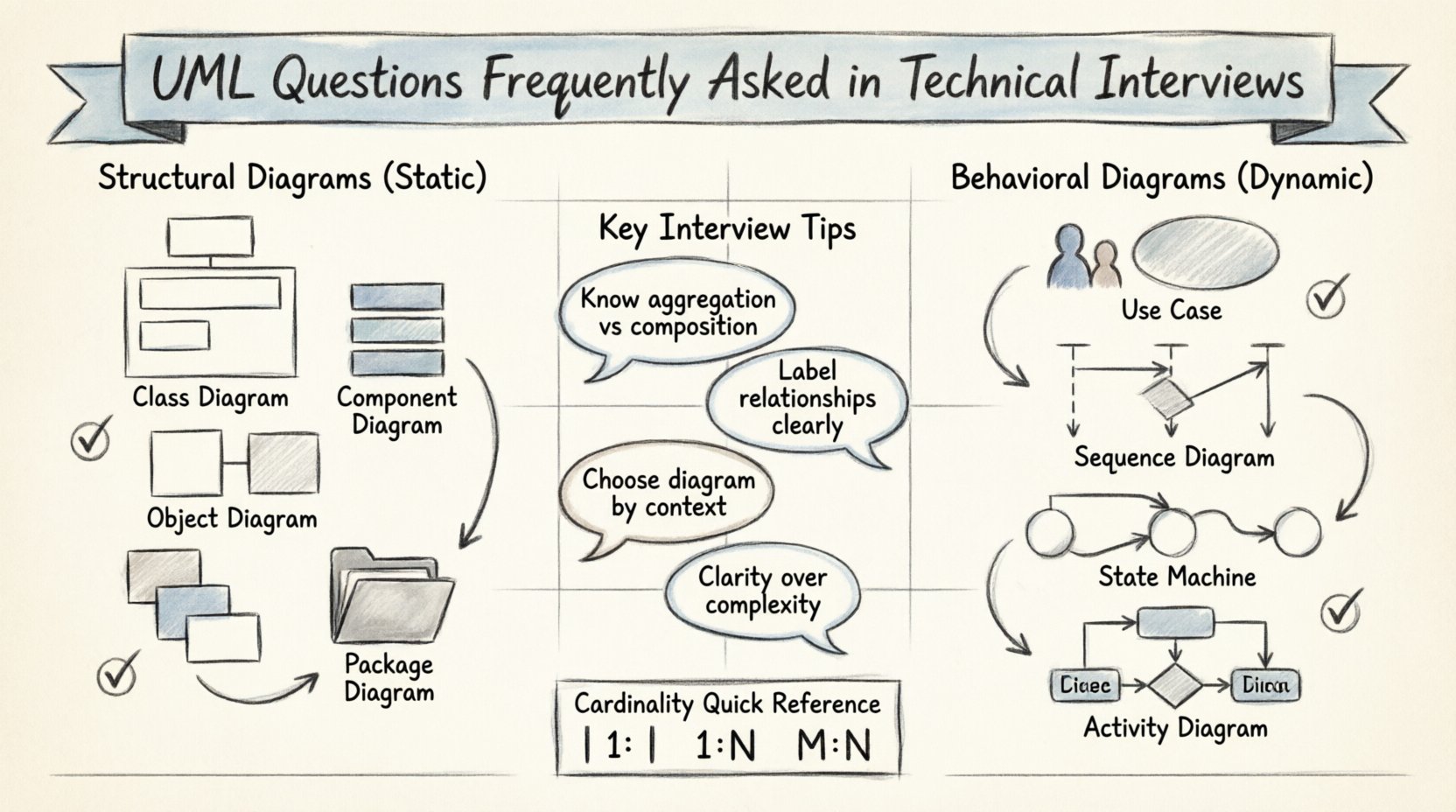
💡 Key Takeaways
Understand the Difference: Distinguish clearly between structural diagrams (static) and behavioral diagrams (dynamic) during discussions.
Focus on Relationships: Be prepared to explain the nuances between aggregation, composition, and association in class diagrams.
Context Matters: Know which diagram fits a specific scenario, such as using Sequence diagrams for interaction flows versus State diagrams for lifecycle changes.
Keep it Simple: Interviewers value clarity over complexity; a well-labeled diagram is better than a cluttered one.
Unified Modeling Language (UML) remains a cornerstone of software architecture discussions. In technical interviews, particularly for roles involving system design or backend engineering, proficiency in UML demonstrates the ability to communicate complex structures clearly. Interviewers use these questions to assess not just your drawing skills, but your understanding of software patterns, relationships, and system behavior. This guide covers the essential concepts, diagram types, and common questions you might encounter.
Understanding the Scope of UML 🧩
Before diving into specific questions, it is vital to understand that UML is not a programming language but a standardized modeling language. It provides a visual way to specify, construct, and document the artifacts of a software system. When answering questions about UML, focus on the “why” behind the choice of diagram. Why choose a class diagram over a component diagram? Why use a sequence diagram for this specific requirement?
Interviewers often look for candidates who can map real-world requirements to abstract models. They want to see that you understand the separation of concerns, the lifecycle of objects, and the interactions between different parts of a system. Mastery of this visual language allows you to translate business logic into technical specifications effectively.
Structural Diagrams: The Static View 🏗️
Structural diagrams describe the static aspects of a system. They represent the physical or conceptual building blocks that make up the architecture. In an interview, you might be asked to draw these from scratch or explain their purpose.
1. Class Diagram
This is the most common structural diagram. It shows classes, attributes, operations, and relationships. A frequent question involves identifying the correct relationship type between two classes.
Association: A general link between objects (e.g., a Student enrolls in a Course).
Aggregation: A “has-a” relationship where the lifecycle is independent (e.g., a Department has Professors; if the Department closes, Professors may still exist).
Composition: A stronger form of aggregation where the lifecycle is dependent (e.g., a House has Rooms; if the House is demolished, the Rooms cease to exist).
2. Component Diagram
This diagram depicts the high-level organization of software components. It is useful for showing how the system is built from modules, libraries, or executables. Interviewers might ask how this differs from a Class diagram. The distinction lies in granularity; Class diagrams focus on code structure, while Component diagrams focus on system architecture and deployment units.
3. Object Diagram
Object diagrams show a snapshot of the system at a specific point in time. They are instances of class diagrams. You may be asked when to use an Object diagram versus a Class diagram. The answer lies in debugging or validating specific runtime states. Class diagrams define the blueprint; Object diagrams show the actual data flow at a moment.
4. Package Diagram
Used to organize elements into groups. It helps manage complexity by grouping related classes or components. Questions here often revolve around namespace management and dependency reduction.
Comparison of Structural Diagrams
Diagram Type | Focus | Common Interview Question |
|---|---|---|
Class Diagram | Static structure, attributes, methods | “How do you model a many-to-many relationship?” |
Component Diagram | System architecture, modules | “How do components communicate with each other?” |
Object Diagram | Runtime instances | “Show the state of the system at time T.” |
Package Diagram | Grouping and dependencies | “How do you reduce coupling in your packages?” |
Behavioral Diagrams: The Dynamic View 🔄
Behavioral diagrams describe how the system behaves over time. They capture the flow of control and data. These are often more critical in interviews because they reveal how you think about processes and state changes.
1. Use Case Diagram
Use Case diagrams model the interaction between actors and the system. They focus on functionality from the user’s perspective. A common question is, “Who is an actor?”. An actor is anyone or anything outside the system that interacts with it, including humans and other systems. You might be asked to identify boundary cases or edge cases in a Use Case scenario.
2. Sequence Diagram
This is a high-frequency topic in technical interviews. It shows how objects interact in a specific scenario over time. Questions often involve:
Message Passing: Understanding synchronous vs. asynchronous messages.
Object Lifelines: Knowing when an object is created and when it is destroyed.
Activation Bars: Representing the period during which an object is performing an action.
Interviewers may ask you to draw a sequence diagram for a login flow or a payment transaction. Clarity in the order of operations is key.
3. Communication Diagram
Similar to a Sequence diagram but focuses on the structural organization of objects rather than time. It is less common in interviews but good to know. It emphasizes the links between objects rather than the timing of messages.
4. State Machine Diagram
This diagram shows the states an object goes through during its lifecycle. It is essential for systems with complex state logic, such as a vending machine or a traffic light. Interviewers might ask, “What happens if an invalid event occurs in state X?”. This tests your understanding of state transitions and guards.
5. Activity Diagram
Similar to a flowchart, this diagram models the flow of control from activity to activity. It is useful for business processes or algorithm logic. A common question involves distinguishing between a State Machine and an Activity diagram. State Machines focus on the state of a single object; Activity diagrams focus on the flow of actions.
Common Scenario-Based Questions 💬
Interviews often move beyond definitions to scenarios. You might be given a problem statement and asked to model it.
Scenario 1: E-Commerce Order System
Question: “Design a diagram for an order system where a user can place multiple orders, and each order contains multiple items.”
Expected Answer: A Class Diagram showing User, Order, and Item. Relationships would be one-to-many between User and Order, and one-to-many between Order and Item. You should explain the cardinality constraints clearly.
Scenario 2: User Authentication Flow
Question: “Draw the interaction sequence for a user logging in with a token.”
Expected Answer: A Sequence Diagram. Actors: User, Frontend, Backend, Database. Messages: Request, Validate, Query, Respond. Highlight where the token is generated and where it is validated.
Scenario 3: State Changes
Question: “How does a document change status from Draft to Published?”
Expected Answer: A State Machine Diagram. States: Draft, Review, Published, Archived. Transitions: Submit for Review, Approve, Reject, Archive. Ensure you mention the conditions for transitions (e.g., Admin Approval).
Best Practices for UML in Interviews 🎨
While knowledge of diagrams is crucial, how you present them matters. Here are tips to ensure your diagrams make a positive impression.
Label Everything: Never leave a line without a name. Relationships like associations should have verbs (e.g., “owns”, “uses”).
Keep it Clean: Avoid crossing lines where possible. Use sub-packages if the diagram becomes too crowded.
Standard Notations: Use standard UML symbols for arrows, diamonds, and inheritance lines. Deviating from standards can cause confusion.
Explain Your Choices: Don’t just draw. Explain why you chose a specific diagram type for the problem at hand. This shows architectural reasoning.
Focus on the Core: Do not try to model every single attribute. Focus on the relationships and behaviors that drive the system’s logic.
Relationships and Cardinality 📏
Understanding cardinality is often a make-or-break moment in a UML interview. Cardinality defines how many instances of one class relate to one instance of another.
1:1 (One-to-One): One instance of Class A relates to one instance of Class B (e.g., a Person has one Passport).
1:N (One-to-Many): One instance of Class A relates to many instances of Class B (e.g., a Department has many Employees).
M:N (Many-to-Many): Many instances of Class A relate to many instances of Class B (e.g., Students and Courses). This often requires an associative class to resolve in implementation.
Interviewers may ask how you handle a Many-to-Many relationship in a database or code. The answer usually involves creating a bridge or junction table in the relational model, which corresponds to an associative class in the UML model.
Final Thoughts on UML Proficiency 🚀
UML is a tool for communication, not an end goal. In interviews, your ability to articulate the design using these diagrams is more important than the aesthetic perfection of the drawing. Focus on clarity, accuracy, and logical flow. When you can explain the “why” behind a design decision using UML, you demonstrate a level of technical maturity that sets you apart.
Remember, the goal is to show you can translate abstract requirements into concrete structures. Practice drawing these diagrams by hand or with basic tools to build muscle memory. Understanding the lifecycle of a system, the relationships between components, and the flow of data will serve you well in any system design role.
By preparing for these specific questions and understanding the nuances of each diagram type, you position yourself as a candidate who values structure and clarity. Good luck with your interviews.