
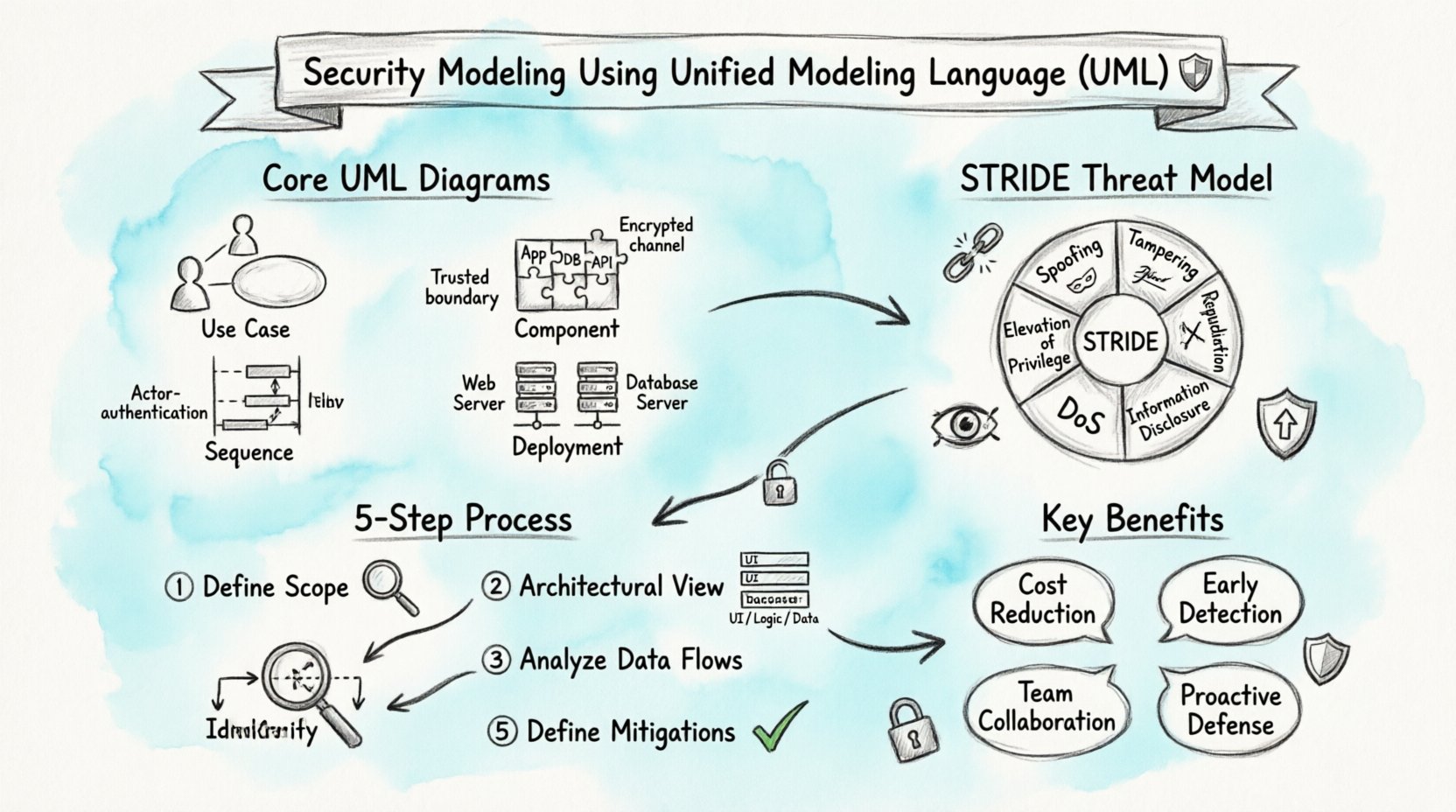
💡 Key Takeaways
- Visualizing Threats: UML diagrams provide a standardized way to identify potential security vulnerabilities before implementation begins.
- Threat Modeling Integration: Techniques like STRIDE can be mapped directly onto UML Use Case and Sequence diagrams for effective risk analysis.
- Communication Tool: These models serve as a common language between developers, architects, and security analysts to align on protection strategies.
- Proactive Defense: Early modeling reduces the cost of fixing security issues compared to addressing them during testing or production.
Designing secure systems requires more than just writing robust code; it demands a structured approach to understanding how data flows and where risks originate. Unified Modeling Language (UML) offers a standardized visual framework that can be adapted to address these security concerns. By integrating security considerations into the modeling phase, teams can identify weaknesses early in the lifecycle.
🔍 Why Security Modeling Matters
Security is often treated as an afterthought, added only after the core functionality is built. This reactive approach leads to higher costs and increased risk. Security modeling flips this dynamic. It shifts the focus to proactive identification of threats. When architects visualize the system using UML, they create a map of interactions. This map highlights where data is stored, processed, and transmitted.
Without a visual model, security requirements can become abstract. Developers might miss edge cases, and stakeholders might overlook specific data flows. UML diagrams bridge this gap. They translate complex logic into recognizable patterns. This clarity allows security teams to review designs before a single line of code is written.
📐 Core UML Diagrams for Security
Not all UML diagrams are equally useful for security analysis. Certain types provide better visibility into threats and data flows. Understanding which diagrams to prioritize is essential for an effective modeling process.
1. Use Case Diagrams 🎯
Use Case diagrams define the interactions between actors and the system. In a security context, they help identify who is accessing the system and for what purpose. This is the foundation for access control policies.
- Actors: Define users, external systems, or services. Each actor should be categorized by their trust level.
- Functions: List specific actions the system performs. Security reviews can flag sensitive functions that require extra protection.
- Relationships: Note extensions and inclusions. These often reveal optional security checks or mandatory authentication steps.
2. Sequence Diagrams 🔄
Sequence diagrams show how objects interact over time. They are critical for understanding data flow and message exchange. Security analysts use these to spot where data might be exposed in transit.
Key considerations include:
- Authentication Points: Where does the system verify identity?
- Data Encryption: Are sensitive messages encrypted before transmission?
- Session Management: How are sessions initiated and terminated?
3. Component Diagrams 🧩
Component diagrams illustrate the physical or logical parts of a system. They help define boundaries and interfaces. Security boundaries are often defined at the component level. For instance, a public-facing web server should be separated from a private database server.
4. Deployment Diagrams 🖥️
Deployment diagrams map software to hardware. They reveal the physical topology of the system. This is vital for network security. If two components that handle different trust levels are hosted on the same server, a risk exists.
🛡️ Integrating Threat Modeling
Threat modeling is the process of identifying potential security threats. Combining this with UML creates a powerful method for system design. The goal is to understand what can go wrong and how to prevent it.
The STRIDE Model
STRIDE is a common categorization for threats. It stands for Spoofing, Tampering, Repudiation, Information Disclosure, Denial of Service, and Elevation of Privilege. Each category can be mapped to specific UML elements.
| Threat Category | UML Focus Area | Security Question |
|---|---|---|
| Spoofing | Actors / Authentication | Can the actor be trusted? |
| Tampering | Data Stores / Interfaces | Can data be modified without authorization? |
| Repudiation | Logging / Audit Trails | Can actions be traced back to an actor? |
| Information Disclosure | Communication Flows | Is sensitive data protected in transit? |
| Denial of Service | System Capacity | Can the system handle high load? |
| Elevation of Privilege | Access Control | Can a user gain higher permissions? |
🚦 Steps to Implement Security Modeling
Implementing security modeling requires a disciplined approach. It is not a one-time task but an iterative process integrated into development.
Step 1: Define the Scope 🌍
Start by defining what is being modeled. A complex system should be broken down into manageable components. Identify the critical assets. These are the data or functions that, if compromised, would cause the most damage.
Step 2: Create the Architectural View 🏗️
Draw the high-level architecture. Use Component and Deployment diagrams to establish boundaries. Clearly mark the trust zones. A trust zone represents a boundary where security policies change. For example, the transition from the internet to an internal network is a critical trust boundary.
Step 3: Analyze Data Flows 🌊
Use Sequence and Activity diagrams to trace data movement. Follow the data from input to storage and back to output. Look for places where data is exposed. Check if encryption is applied at these points. Verify that sensitive data is not logged in plain text.
Step 4: Identify Threats ⚠️
Apply the STRIDE methodology to the diagrams. Go through each element and ask the relevant security questions. Document the findings. Some threats may be mitigated by design changes, while others may require specific controls.
Step 5: Define Mitigations 🛠️
For each identified threat, define a mitigation. This might involve adding an authentication check, encrypting a database column, or isolating a service. Update the diagrams to reflect these changes. This ensures the design evolves with the security requirements.
🔒 Security Concerns in Specific Diagrams
Different diagrams highlight different security risks. Being aware of these nuances helps in conducting a thorough review.
Class Diagrams and Data Integrity
Class diagrams define the structure of the system. They show attributes and methods. In this context, look for attributes that store sensitive information. Ensure that methods handling this data enforce access controls. Public attributes in a security context are often a red flag.
State Machine Diagrams and Validation
State machine diagrams show how an object changes state. This is useful for understanding session security. For example, a login state should transition only after successful authentication. Ensure there are no “happy paths” that bypass security checks.
Interaction Overview Diagrams
These diagrams combine multiple interaction types. They are useful for complex workflows. Security reviews should focus on error handling. What happens if an authentication fails? The flow should not reveal sensitive information to the attacker.
📊 Benefits of Early Detection
Integrating security into the modeling phase offers tangible benefits. The most significant is cost reduction. Fixing a vulnerability in the design phase is significantly cheaper than fixing it in production. It also reduces the time spent on rework.
Furthermore, it improves communication. Security teams can review models without needing deep knowledge of the implementation code. Developers can understand security requirements visually. This shared understanding reduces friction during the build phase.
🤝 Collaboration Between Teams
Security modeling is a collaborative effort. It requires input from architects, developers, and security analysts. Architects provide the structural view. Developers provide the implementation details. Security analysts provide the threat perspective.
Regular review sessions are essential. During these sessions, the diagrams are walked through. Questions are asked. Risks are debated. This ensures that the final design is robust. It also builds a culture where security is everyone’s responsibility.
⚙️ Best Practices for UML Security
- Keep it Simple: Complex diagrams are hard to analyze. Simplify the model to focus on security-critical paths.
- Use Standard Conventions: Stick to standard UML notation. This ensures that all team members understand the diagrams.
- Version Control: Treat diagrams like code. Use version control to track changes. This helps in auditing security modifications.
- Automate Where Possible: Use tools that can validate diagrams against security rules. Automation reduces human error.
- Iterate: Security modeling is not a one-off task. Update the models as the system evolves.
🔗 Common Pitfalls to Avoid
Even with a structured approach, pitfalls exist. One common mistake is focusing only on the happy path. Security analysis must also consider the error paths and edge cases. Another mistake is ignoring third-party components. External libraries and services introduce risks that must be modeled and managed.
Additionally, do not treat security modeling as a box-ticking exercise. It requires genuine engagement with the material. If the diagrams are inaccurate, the analysis will be flawed. Ensure that the models reflect the actual system design.
📝 Final Thoughts
Security modeling using UML is a practical method for building secure systems. It brings clarity to complex designs and highlights risks early. By following a structured approach and using the right diagrams, teams can build robust defenses. The effort invested in modeling pays off in reduced risk and lower maintenance costs. As systems become more interconnected, the need for rigorous design analysis grows. UML provides the tools to meet this challenge effectively.