
The C4 model has become the standard for visualizing software architecture, offering a clear hierarchy from Context to Container, Component, and Code. However, the rise of serverless computing introduces unique challenges to this static modeling framework. Serverless functions are ephemeral, event-driven, and often managed by cloud providers, making their representation within a structured diagram non-trivial. This guide details how to accurately model serverless architectures using the C4 principles without relying on specific vendor tools. 📚
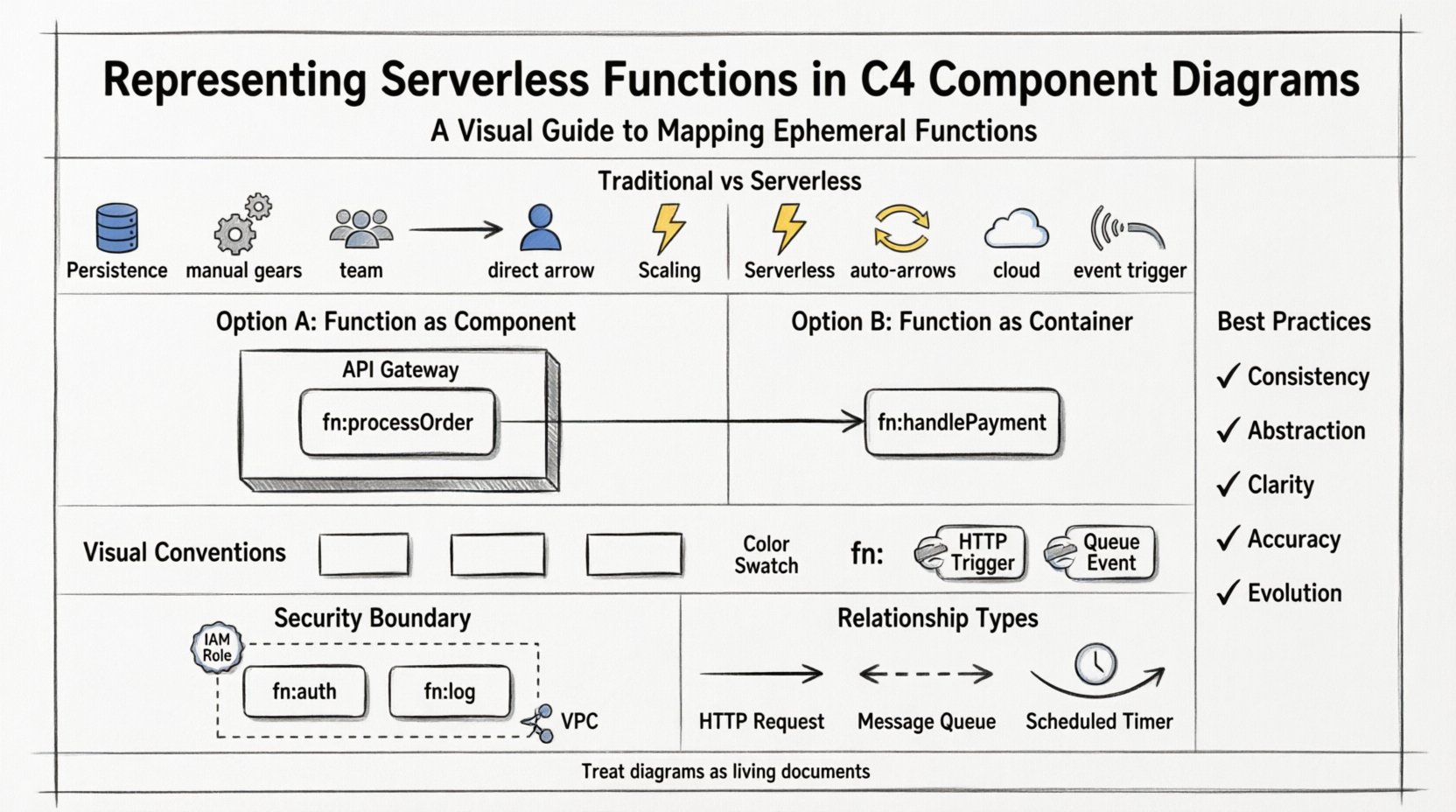
Understanding the Friction: C4 vs. Serverless 🤔
The C4 model was designed with traditional application structures in mind. It assumes a certain level of persistence and state within containers. Serverless functions, by contrast, are designed to be stateless and scale on demand. When you attempt to map a function to a C4 component, questions arise regarding boundaries, lifecycle, and ownership. Without clear guidelines, diagrams can become cluttered or misleading, obscuring the actual flow of data and control. We must adapt the model to reflect the dynamic nature of modern cloud infrastructure. 🌥️
To bridge this gap, we must understand the fundamental differences:
- Persistence: Traditional containers often maintain state in memory. Serverless functions do not. They are destroyed after execution.
- Scaling: Containers scale via orchestration (like Kubernetes). Serverless scales automatically with event volume.
- Ownership: Containers are often managed by the development team. Serverless runtimes are managed by the cloud provider.
- Entry Points: APIs are often the trigger for serverless, not direct user interaction with a persistent process.
Mapping Serverless to the C4 Hierarchy 🗺️
Where do serverless functions sit within the C4 hierarchy? The answer depends on the granularity required for the audience. There is no single correct answer, but there are best practices to maintain clarity. 🛠️
Option 1: Serverless as a Component ⚙️
This is the most common approach. You treat the serverless function as a Component inside a Container. The Container represents the logical service or API Gateway that routes traffic to the function. This separation is crucial because it distinguishes the entry point (the gateway) from the logic execution (the function).
- Container: The API Gateway or Load Balancer that accepts HTTP requests.
- Component: The specific serverless function that processes the request.
- Benefit: Clearly separates concerns of routing from business logic.
Option 2: Serverless as a Container 📦
In some cases, a single function acts as the entire entry point for a microservice. If the function handles the API logic and data access directly, it can be modeled as a Container. This is often used for smaller, self-contained services where the overhead of defining a separate Gateway container is unnecessary.
- Container: The serverless function itself.
- Boundary: The function handles its own input validation and output formatting.
- Benefit: Simplifies diagrams for small-scale serverless applications.
Comparison Table: Placement Strategies 📊
| Strategy | Best Use Case | Complexity | Clarity |
|---|---|---|---|
| Function as Component | Mature microservices with distinct gateways | Medium | High |
| Function as Container | Simple, single-purpose functions | Low | Medium |
| Multiple Functions as Components | Complex workflows with orchestration | High | High |
Visual Conventions for Serverless 🎨
Consistency in visual representation helps stakeholders quickly identify serverless elements. While the C4 model does not mandate specific icons, adopting conventions improves readability. Use standard component shapes but add visual cues to denote serverless characteristics.
Iconography and Styling
- Shape: Use the standard component rectangle (rounded or square).
- Color Coding: Assign a specific color (e.g., light gray or a specific accent) to all serverless components to differentiate them from persistent containers.
- Labels: Prefix function names with
fn:orfunc:to indicate their ephemeral nature. - Annotations: Add text indicating the runtime environment or trigger type (e.g., “HTTP Trigger”, “Queue Event”).
Indicating Ephemeral Nature
Since serverless functions are destroyed after execution, you might use dashed lines or specific border styles to imply this. However, standard solid lines are often preferred for clarity regarding logical dependencies. The key is to document the lifecycle in the diagram notes rather than relying solely on line styles.
Modeling Relationships and Dependencies 🔗
Understanding how serverless functions interact with other parts of the system is vital. The relationships in C4 diagrams represent data flow and dependency, not just network connectivity.
Trigger Relationships
Serverless functions are typically event-driven. You must represent the source of these events clearly.
- HTTP Requests: Connect an API Gateway container to the function component using a “Request” relationship.
- Message Queues: If a function consumes messages from a queue, draw a relationship from the Queue Container to the Function Component.
- Timers: For scheduled tasks, indicate a “Schedule” relationship from a Scheduler Container.
Data Flow Considerations
Serverless functions often process data without storing it long-term. Ensure your diagram reflects this stateless nature.
- Temporary State: If data is held in memory during execution, do not model it as a database component.
- Persistent Storage: Connect the function to external storage services (like object storage or databases) explicitly. Do not assume the function owns the data.
- Output: Clearly show where the result of the function goes (e.g., a response to a client or a message to another queue).
Security and Boundaries 🔒
Security is often overlooked in high-level architecture diagrams, but it is critical for serverless. Identity and access management (IAM) play a larger role here than in traditional containerized apps.
Defining Security Boundaries
Each serverless function should have a defined security boundary. In your diagram, group functions that share the same IAM roles or network policies together. This helps in auditing and understanding permission sprawl.
- Grouping: Use a “System Context” or “Container” boundary to group functions by security domain.
- Permissions: Annotate components with the level of access required (e.g., “Read-Only”, “Admin Access”).
- Network: Indicate if a function runs within a Virtual Private Cloud (VPC) or publicly accessible.
Authentication and Authorization
Diagram the flow of authentication tokens. Does the function validate the token itself, or does it rely on the API Gateway? This distinction affects where the security logic resides in your architecture.
Common Pitfalls and Challenges ⚠️
Modeling serverless architectures comes with specific challenges that can lead to inaccurate diagrams if not addressed.
Over-Modeling Details
It is easy to get lost in the details of every function. If you have hundreds of small functions, do not model each one individually in a Component diagram. Aggregate them into logical groups or higher-level components.
- Rule of Thumb: If a component is too small to have its own distinct behavior, merge it with its parent.
- Abstraction: Use a “Service” component to represent a group of related functions.
Ignoring Cold Starts
While not strictly a visual element, the concept of “cold starts” (latency when initializing a function) affects the architecture. You might want to annotate components where latency is critical. This informs decisions about provisioned concurrency or caching layers.
Assuming Synchronous Execution
Many serverless functions are asynchronous. Do not model them as if they always return a direct HTTP response. Use different relationship types (e.g., “Fire and Forget” or “Event”) to denote asynchronous flows.
Documentation and Maintenance 📝
A C4 diagram is only as good as its accuracy over time. Serverless architectures change frequently. To maintain the diagrams:
- Version Control: Store your diagrams alongside your infrastructure code.
- Automation: Use tools that can generate diagrams from code definitions where possible.
- Review Cycles: Update diagrams during sprint retrospectives or architectural reviews.
- Tags: Use tags in the diagram to indicate the date of the last review.
Advanced Scenarios: Orchestration and State 🔄
Complex serverless applications often involve orchestration. You might use a workflow engine to manage a series of functions. How does this fit into C4?
Workflow Engines
Model the workflow engine as a Container. The individual steps within the workflow are Components. This separates the control logic (the workflow) from the execution logic (the functions).
- Container: Workflow Orchestrator.
- Component: Step Function A, Step Function B.
- Relationship: “Triggers” or “Coordinates”.
State Management
If your serverless application requires state, it must be external. Do not imply state exists within the function. Explicitly connect the function to a database or cache component. This reinforces the stateless pattern in the visual model.
Best Practices Summary ✅
To ensure your C4 diagrams remain effective for serverless architectures, adhere to these core principles:
- Consistency: Use the same visual style for all serverless components.
- Abstraction: Do not model every single function if it adds noise.
- Clarity: Clearly distinguish between triggers, logic, and storage.
- Accuracy: Reflect the actual deployment boundaries and permissions.
- Evolution: Treat diagrams as living documents that evolve with the code.
Final Thoughts on Architecture Visualization 🌟
Representing serverless functions within the C4 model requires a shift in mindset. You are not just drawing boxes; you are mapping dynamic behaviors to static representations. By following these guidelines, you create diagrams that serve as effective communication tools for developers, architects, and stakeholders. The goal is not just to document what exists, but to clarify how the system behaves under load, during failures, and across different environments. A well-drawn C4 diagram for serverless architecture reduces ambiguity and accelerates decision-making. 🚀
Remember, the value of the diagram lies in the understanding it provides, not the complexity of the drawing. Keep it simple, keep it accurate, and keep it updated. This approach ensures your architecture remains understandable as the technology landscape evolves. 🛠️