
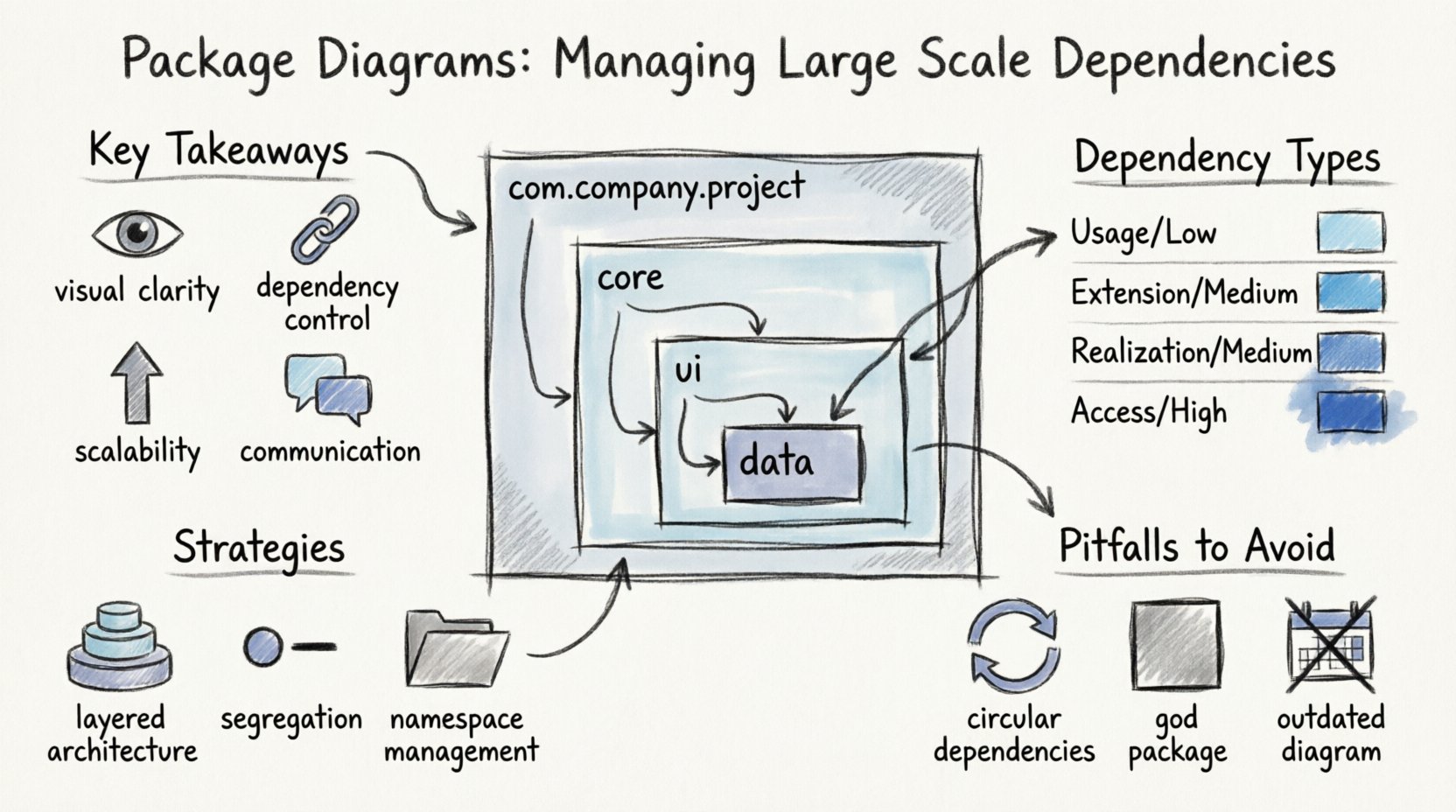
💡 Key Takeaways
- Visual Clarity: Package diagrams organize complex systems into manageable logical units, reducing cognitive load.
- Dependency Control: Explicitly mapping dependencies helps prevent circular references and tight coupling.
- Scalability: Proper naming and grouping strategies allow architectures to grow without becoming unmanageable.
- Communication: These diagrams serve as a shared language for stakeholders to understand system boundaries.
As software systems grow in complexity, the relationships between components become increasingly difficult to track. A monolithic structure quickly evolves into a tangled web of connections that hinders maintenance and deployment. This is where Package Diagrams in the Unified Modeling Language (UML) prove essential. They provide a high-level view of the system architecture, focusing on the organization of elements into groups or packages. By defining clear boundaries and interactions, developers can maintain order amidst complexity.
Managing dependencies at scale is not merely about drawing lines between boxes. It involves strategic planning, strict adherence to architectural principles, and continuous refinement. This guide explores how to utilize package diagrams effectively to control coupling, enhance cohesion, and ensure the long-term health of large-scale applications.
Understanding the Package Concept 📦
In the context of UML, a package is a namespace that organizes related elements. It acts as a logical container for classes, interfaces, and other packages. Unlike physical directories on a file system, UML packages are semantic groupings. They represent modules, subsystems, or layers within the software.
When managing large-scale dependencies, the package serves as the primary unit of abstraction. Instead of worrying about individual class relationships, architects focus on how these logical groups interact. This shift in perspective is crucial for scalability.
Why Packages Matter
- Encapsulation: Packages hide internal implementation details from other parts of the system.
- Naming: They provide a hierarchical naming structure that prevents naming conflicts.
- Visibility: They define which elements are public and which remain private to the package.
- Decoupling: They enforce boundaries that reduce the risk of changes in one area affecting another.
The Challenge of Large Scale Dependencies 🌐
In small projects, dependencies are often intuitive. Developers can see the entire codebase without needing a map. However, as the number of classes and features increases, the cognitive overhead becomes unsustainable. Without proper management, dependencies can spiral into a state known as spaghetti architecture.
Large-scale systems require explicit dependency management. Relying on implicit connections leads to fragile code. A change in a core service might unexpectedly break functionality in a distant module. Package diagrams help visualize these connections, making the invisible visible.
Types of Dependencies
Understanding the nature of the relationship between packages is the first step toward control. The following table outlines common dependency types and their implications.
| Dependency Type | Description | Risk Level |
|---|---|---|
| Usage | One package uses the public interface of another. | Low |
| Extension | A package extends the functionality of another via inheritance. | Medium |
| Realization | Implementation of an interface defined in another package. | Medium |
| Access | Detailed access to internal elements of another package. | High |
High-risk dependencies should be minimized. The goal is to keep the architecture stable so that modifications propagate slowly and predictably.
Strategies for Managing Dependencies 🛡️
Creating a package diagram is an iterative process. It requires discipline to maintain the boundaries defined during the design phase. Several strategies exist to manage these relationships effectively.
1. Layered Architecture
Organizing packages into layers is a classic pattern. Each layer has a specific responsibility, such as presentation, business logic, or data access. Dependencies typically flow in one direction: from the top layer to the bottom layer. The data access layer should not know about the presentation layer.
This approach prevents circular dependencies. If Layer A depends on Layer B, Layer B cannot depend on Layer A. Package diagrams make violations of this rule immediately apparent.
2. Interface Segregation
Not all packages need to know everything about other packages. By defining interfaces within packages, you can restrict what is visible to the outside world. This is a form of dependency inversion. Instead of depending on concrete implementations, packages depend on abstractions.
When drawing the diagram, represent these interfaces clearly. Use dashed lines or specific stereotypes to denote abstract dependencies. This reduces the coupling strength.
3. Namespace Management
Clear naming conventions are vital for large systems. Package names should reflect the domain or functionality they contain. Avoid generic names like “Lib” or “Utils” unless the purpose is universally understood.
Use a hierarchy that mirrors the business domain. For example, com.company.project.core versus com.company.project.ui. This helps developers navigate the codebase and understand where to place new components.
Visualizing Relationships Effectively 📊
The power of a package diagram lies in its visual clarity. If the diagram is too dense, it fails to serve its purpose. Use lines to represent dependencies, and arrows to indicate direction.
Best Practices for Drawing
- Minimize Crossings: Arrange packages so that dependency lines do not cross unnecessarily. This improves readability.
- Group Related Elements: Keep related packages close together on the canvas.
- Use Stereotypes: Label arrows with keywords like <<import>> or <<extend>> to clarify the relationship type.
- Focus on High Level: Do not include every single class. If a package contains 50 classes, represent the package as a single node.
A cluttered diagram suggests a cluttered architecture. If you find yourself struggling to draw the connections, it may be time to refactor the underlying code.
Common Pitfalls to Avoid ⚠️
Even with good intentions, teams often fall into traps that undermine the value of package diagrams. Recognizing these pitfalls early can save significant time and effort.
Circular Dependencies
A circular dependency occurs when Package A depends on Package B, and Package B depends on Package A. This creates a cycle that can lead to initialization errors and tight coupling. While some frameworks handle this, it is generally considered a design flaw.
Package diagrams are excellent for detecting cycles. If you see a loop in your drawing, you must refactor. Introduce an intermediary package or an interface to break the cycle.
God Packages
Avoid creating packages that contain too many unrelated elements. A “God Package” becomes a dumping ground for classes that do not fit elsewhere. This violates the Single Responsibility Principle.
Refactor large packages into smaller, more focused ones. If a package requires a separate diagram to explain itself, it is likely too large.
Ignoring Change
Software is never static. Requirements change, and new features are added. A package diagram created at the start of a project may become obsolete quickly.
Treat the diagram as a living document. Update it as the architecture evolves. If the diagram no longer matches the code, it loses its value as a communication tool.
Maintenance and Evolution 🔄
Maintaining a large-scale system requires ongoing attention to dependencies. Automated tools can help track these relationships, but human oversight is still necessary.
Refactoring with Diagrams
When planning a refactoring effort, use the package diagram as a baseline. Identify which packages will be affected by the change. Calculate the impact radius. If a change in one package ripples through ten others, the risk is high.
This analysis helps in prioritizing refactoring tasks. Focus on areas with high coupling and low cohesion. Improving these areas yields the greatest return on investment.
Documentation Integration
Integrate package diagrams into your project documentation. They should be part of the onboarding process for new developers. A new team member should be able to understand the system structure by reviewing the diagrams.
Ensure the diagrams are accessible and up to date. Version control them alongside the code if possible. This ensures that the documentation history matches the code history.
Conclusion on Architectural Health 🏥
Managing dependencies is an ongoing discipline. There is no final state where a system is perfectly decoupled. However, by using package diagrams to visualize and constrain relationships, teams can maintain a healthy architecture.
The effort spent on designing clear package structures pays dividends in maintainability. It reduces the fear of change and empowers developers to modify the system with confidence. In the end, the goal is not just to draw boxes and lines, but to create a system that adapts to the needs of the business without breaking.
Remember that tools facilitate this process, but the principles remain constant. Keep boundaries clear, minimize coupling, and prioritize clarity. These practices form the foundation of robust software engineering.