
Introduction
In today’s fast-paced software development landscape, clear requirements aren’t just helpful—they’re essential for project success. While use case diagrams provide a valuable visual overview of system functionality, they represent only the tip of the iceberg. The real power lies in detailed use case specifications: structured textual descriptions that capture the nuanced interactions between actors and systems, define success criteria, and anticipate edge cases before code is ever written.
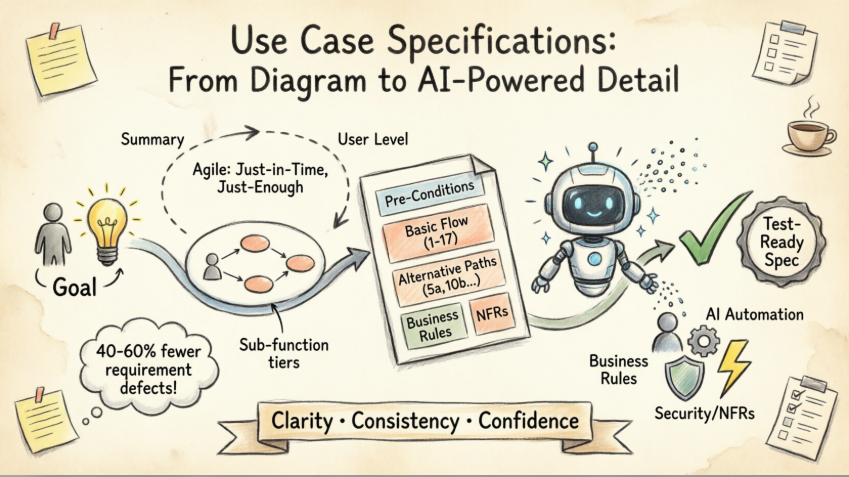
This comprehensive guide explores everything you need to know about crafting professional-grade use case specifications—from foundational concepts to advanced AI-powered workflows. Whether you’re a business analyst refining requirements, a product manager aligning stakeholders, or a developer seeking clarity on expected behavior, you’ll discover practical templates, agile methodologies, and cutting-edge tools that transform ambiguous ideas into actionable, testable specifications. Let’s dive into how modern teams can leverage both timeless best practices and intelligent automation to elevate their requirements engineering.
What Is a Use Case Specification?
A use case specification is a structured textual document that elaborates on a use case diagram by detailing the step-by-step interactions, conditions, and outcomes associated with a specific user goal. While diagrams show what functionality exists, specifications explain how that functionality behaves under various circumstances.
The specification process is inherently iterative:
-
Initial pass: A brief description of the normal flow—what happens when everything goes right
-
Analysis phase: Expanded steps with added detail, decision points, and data requirements
-
Refinement stage: Inclusion of exceptional flows, error handling, and edge cases
-
Finalization: Adoption of a standardized template for consistency across the project

💡 Product Insight: Teams that invest in thorough use case specifications report 40-60% fewer requirement-related defects during testing phases, according to industry benchmarks.
Use Case vs. Use Case Specification: Understanding the Distinction
It’s critical to distinguish between the concept of a use case and its specification:
| Aspect | Use Case | Use Case Specification |
|---|---|---|
| Format | Visual diagram or high-level task description | Structured textual document |
| Purpose | Identify business goals and actor interactions | Define precise system behavior and requirements |
| Audience | Stakeholders, architects, product owners | Developers, testers, QA engineers, analysts |
| Detail Level | Conceptual, outcome-focused | Tactical, step-by-step, condition-aware |
A single use case task may manifest in three forms:
-
Interactive: Actor-system dialogues (e.g., user logging into a web app)
-
Manual: Human-performed sequences (e.g., approving a loan application)
-
Automated: System-to-system processes (e.g., nightly data synchronization)
Key Characteristics of Effective Use Cases
Well-structured use cases share five foundational traits that ensure clarity and implementability:

✅ Single, Clear Goal: Each use case addresses one business objective (e.g., “Withdraw Cash,” not “Manage Account”)
✅ Defined Start and End Points: Unambiguous triggers and success/failure conclusions
✅ Multiple Execution Paths: Accommodates varied user choices, system states, and environmental conditions
✅ Explicit Alternative Flows: Documents what happens when assumptions fail (e.g., invalid credentials, network timeout)
✅ Business Rule Integration: Embeds constraints, policies, and validation logic directly into the flow
Real-World Example: Customer Pays Bill

Paths that achieve the goal:
-
Telephone payment via IVR
-
Online payment via web portal
-
In-person payment at branch
-
Mail-in check payment
-
Automated bank transfer
Paths that do NOT achieve the goal:
-
Credit card declined due to insufficient funds
-
Payment processor timeout
-
Invalid account number entered
-
System maintenance window blocking transactions
🎯 Product Tip: Map each alternative path to a specific test case during QA planning to ensure comprehensive coverage.
The Agile Use Case Approach: Just-in-Time, Just-Enough
Modern agile teams avoid “big upfront specification” by evolving use cases incrementally. Visual Paradigm supports three specification tiers aligned with agile principles:

| Level | Name | Purpose | When to Use |
|---|---|---|---|
| I | Summary | High-level overview of system capabilities | Early discovery, roadmap planning, stakeholder alignment |
| II | User Level | Task-focused descriptions of user-system interactions | Sprint planning, user story refinement, UX design |
| III | Sub-function | Detailed steps for complex sub-operations | Technical design, integration specs, compliance documentation |
Agile Best Practices:
-
✨ Start with Level I for epics; drill down to Level II for user stories
-
✨ Specify Level III details only for high-risk or complex flows
-
✨ Revisit and refine specifications during backlog grooming
-
✨ Link specifications directly to acceptance criteria and test cases
⚡ Efficiency Hack: Stop detailing when the specification is “just enough” for the development team to implement confidently—no more, no less.
Anatomy of a Detailed Use Case Specification
A professional-grade specification follows a consistent template that captures all critical dimensions of system behavior:
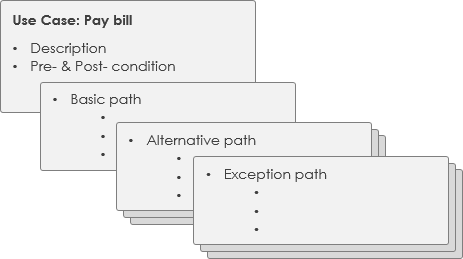
Core Components:
-
Metadata: Name, actors, priority, status, version
-
Pre/Post Conditions: System state requirements before and after execution
-
Basic Flow: Step-by-step “happy path” sequence
-
Alternative Flows: Numbered exceptions branching from base steps (e.g., 5a, 5b)
-
Business Rules: Constraints, validations, and policy references
-
Non-Functional Requirements: Performance, security, accessibility, and usability criteria
-
Assumptions & Open Issues: Contextual notes for future resolution
🚀 Product Features Review: Visual Paradigm’s AI-Powered Use Case Ecosystem
Visual Paradigm transforms use case specification from a manual documentation chore into an intelligent, collaborative workflow. Here’s how their AI ecosystem delivers tangible value:
🌐 Multi-Platform AI Support
| Platform | Key Capability | Best For |
|---|---|---|
| VP Desktop | Generate structured specs linked directly to UML diagrams | Enterprise teams needing traceability |
| AI Chatbot | Narrate requirements conversationally; receive draft specs instantly | Rapid prototyping and brainstorming |
| OpenDocs | Collaborative specification pages with version control | Distributed teams and stakeholder reviews |
🛠️ Specialized AI Tools Breakdown
📝 Description Generator
→ Input: Problem domain or user story
→ Output: Markdown-ready spec with flows, pre/post-conditions, business rules
→ Value: Cuts documentation time by 70%; ensures consistency across specs
🏗️ Modeling Studio
→ Input: System scope and actor definitions
→ Output: AI-guided workflow from high-level model to detailed descriptions
→ Value: Ideal for teams new to use case modeling; reduces onboarding time
🔄 Text-to-Behavior Bridge
→ Input: Textual flow description
→ Output: AI-generated Activity Diagrams + validation reports
→ Value: Bridges analysis and design; catches logic gaps early
🚀 Development Assistant
→ Input: Single problem statement
→ Output: Prioritized specs, Gherkin scenarios, test-ready acceptance criteria
→ Value: Accelerates handoff from BA to dev; supports BDD workflows
📑 Spec Report Generator
→ Input: Visual use case model
→ Output: Structured Markdown documentation package
→ Value: Automates compliance documentation; keeps specs synchronized with diagrams
🔍 Reviewer Verdict: Visual Paradigm’s AI tools excel at reducing repetitive documentation work while improving specification quality. The tight integration between diagrams, text, and AI assistance creates a cohesive requirements ecosystem—particularly valuable for regulated industries or complex enterprise systems. Minor learning curve for advanced features, but excellent onboarding resources mitigate this.
Learn More:
AI Use Case Guide | Full AI Ecosystem Overview
Practical Template: ATM Withdraw Cash Example
Adopting a standardized template ensures consistency and completeness. Below is a professional-grade specification using the widely respected Alistair Cockburn format:
| Use Case Specification | |
|---|---|
| Use Case Name | Withdraw Cash |
| Actor(s) | Customer (primary), Banking System (secondary) |
| Summary Description | Allows any bank customer to withdraw cash from their bank account via ATM |
| Priority | Must Have |
| Status | Medium Level of Details |
| Pre-Condition | • Customer possesses valid bank card • ATM is online and operational |
| Post-Condition(s) | • Customer receives cash (and optional receipt) • Account debited; transaction logged in banking system |
| Basic Path | 1. Customer inserts card into ATM 2. ATM validates card format and issuer 3. ATM prompts for PIN 4. Customer enters PIN 5. ATM verifies PIN against banking system 6. ATM displays service menu 7. Customer selects “Withdraw” 8. ATM presents amount options 9. Customer selects or enters amount 10. ATM checks cash hopper availability 11. ATM verifies customer withdrawal limits 12. ATM confirms sufficient account balance 13. ATM debits account and logs transaction 14. ATM returns card 15. Customer retrieves card 16. ATM dispenses cash 17. Customer collects cash |
| Alternative Paths | • 2a: Invalid card format → Eject card, display error • 2b: Card inserted upside down → Prompt for reinsertion • 5a: Stolen card detected → Retain card, alert security • 5b: Invalid PIN (3 retries) → Lock card, notify bank • 10a: Insufficient cash in hopper → Offer lower denominations or cancel • 11a: Withdrawal exceeds daily limit → Display limit, prompt for lower amount • 12a: Insufficient funds → Decline transaction, display balance • 14a: Card not retrieved → Retain after timeout, log incident • 16a: Cash dispensing failure → Reverse transaction, alert maintenance • 17a: Customer doesn’t collect cash → Retain cash, reverse transaction after timeout |
| Business Rules | • B1: PIN must be 4-6 numeric digits • B2: Max 3 PIN attempts before lockout • B3: Service menu must include Withdraw, Balance, Transfer • B4: Amount options: $20, $40, $60, $100, Other • B5: Daily withdrawal limit: $500 • B6: Card must be retrieved before cash dispense (security policy) |
| Non-Functional Requirements | • NF1: End-to-end transaction ≤ 45 seconds • NF2: PIN entry masked; no visual/audio feedback on correctness • NF3: 30-second timeout for card/cash collection • NF4: Support English, Spanish, French interfaces • NF5: Audio guidance and tactile keypad for accessibility |
Best Practices & Implementation Tips
✅ Start Simple, Iterate Smart: Begin with Level I specs for discovery; deepen detail only where risk or complexity warrants it.
✅ Name Alternative Flows Clearly: Use step-number references (e.g., “7a: User cancels transaction”) for easy traceability.
✅ Embed Business Rules Early: Don’t treat rules as an afterthought—integrate validations directly into flow steps.
✅ Link to Test Cases: Each alternative path should map to at least one negative or edge-case test.
✅ Maintain Living Documentation: Treat specs as version-controlled artifacts that evolve with the product.
✅ Leverage AI Wisely: Use AI tools to draft and structure content, but always apply human judgment for business context and edge-case validation.
✅ Collaborate Cross-Functionally: Include developers, QA, and UX designers in specification reviews to catch gaps early.
Conclusion
Use case specifications remain one of the most powerful yet underutilized artifacts in modern software development. When crafted with clarity, structure, and the right tooling, they become living contracts between business needs and technical implementation—reducing ambiguity, accelerating development, and improving product quality.
The evolution from static diagrams to AI-enhanced, collaborative specifications represents a paradigm shift. Tools like Visual Paradigm’s ecosystem don’t just automate documentation; they elevate the entire requirements discipline by making thoroughness scalable and consistency achievable. By embracing the “just-in-time, just-enough” agile mindset while leveraging intelligent automation, teams can produce specifications that are both comprehensive and adaptable.
Whether you’re documenting a simple user task or orchestrating a complex enterprise workflow, remember: the goal isn’t perfect documentation—it’s actionable clarity. Start with a clear template, iterate with purpose, and let AI handle the heavy lifting so your team can focus on what matters most: delivering exceptional user value.
References
- What Is a Use Case Diagram? – A Complete Guide to UML Modeling
- AI-Powered Use Case Description Generator
- Documenting Use Cases in Visual Paradigm: User Guide
- Producing Use Case Descriptions in Visual Paradigm
- Step-by-Step Use Case Diagram Tutorial – From Beginner to Pro
- AI-Powered Use Case Diagram Refinement Tool
- All You Need to Know About Use Case Modeling
- Revolutionizing Use Case Elaboration with Visual Paradigm AI
- Use Case Diagram Gallery – Templates & Examples
- Mastering Use Case Scenario Documentation in Visual Paradigm