
Mastering the Visual Paradigm Pipeline: Building a VP AI Ecosystem for Single Source of Truth
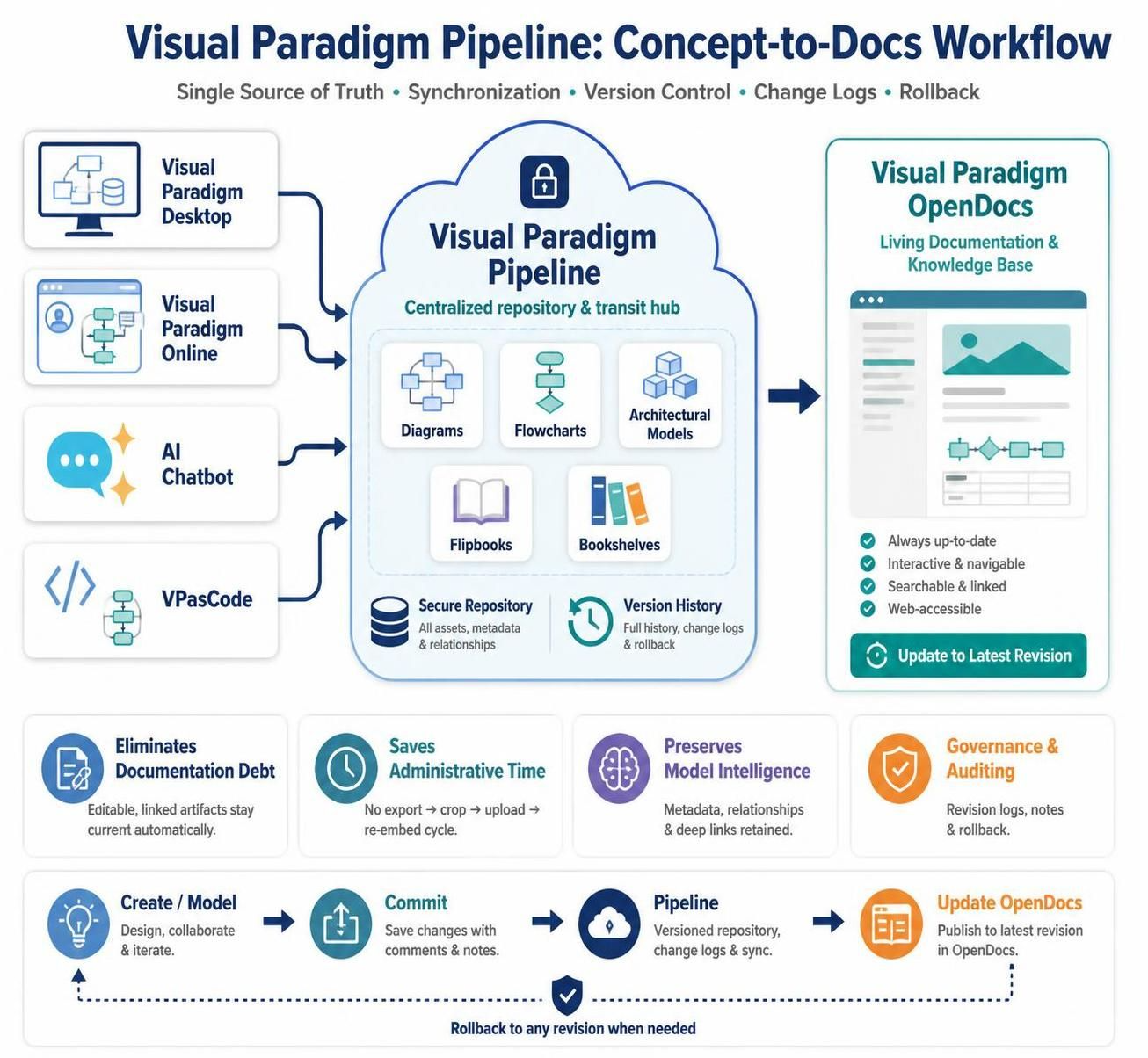
In modern software development and enterprise architecture, the gap between modeling tools and documentation is often where efficiency is lost. This tutorial explores the architecture of the Visual Paradigm Pipeline, a centralized connection layer designed to synchronize diagramming tools with the Visual Paradigm OpenDocs platform. By understanding this ecosystem, teams can transition from managing static image files to maintaining a living, version-controlled source of truth.
1. The Core Architecture: A Three-Layer Ecosystem
The Visual Paradigm Pipeline functions as a transit and management hub. It is best understood as a three-layer system that facilitates the flow of information from creation to consumption.
The Generation Layer (Input)
This layer is where the visual assets are originally created or generated. The Pipeline aggregates inputs from multiple distinct sources, ensuring that whether a user is designing complex enterprise models or drafting simple flowcharts, the workflow remains consistent.
- Visual Paradigm Desktop: The primary tool for advanced modeling, including UML, BPMN, ERD, and database design.
- Visual Paradigm Online: A browser-based environment for collaborative diagramming.
- AI Chatbot: A generative interface that converts natural language descriptions into structured visual models.
- VPasCode: A code-oriented approach allowing users to define diagrams via text-based languages like PlantUML, Mermaid, or Graphviz.
The Pipeline Layer (Management)
This is the engine of the system. It acts as a centralized repository and transit hub. When a user commits an asset from the Generation Layer, the Pipeline performs critical housekeeping tasks:
- Centralized Storage: Assets are stored in a shared cloud repository, eliminating local file silos.
- Revision Management: The system records every change, creating a history of revisions that allows users to compare states or roll back to previous versions.
- Relationship Tracking: It maintains the metadata link between the visual artifact and its source model.
The Documentation Layer (Output)
The final destination is Visual Paradigm OpenDocs. Unlike traditional documentation where images are “baked in” as static pixels, the Pipeline allows OpenDocs to embed visual assets as managed elements. This means the documentation remains dynamic; if the source diagram changes, the documentation can detect the update and prompt the author to apply the new revision.
2. The Workflow: From Concept to Living Documentation
The standard workflow within this ecosystem replaces the manual “Export, Upload, Replace” cycle with an automated, managed connection.
- Create / Model: A user creates or updates a diagram in Desktop, Online, or via AI/Code.
- Commit: The user commits the changes to the Pipeline. This step saves the changes with comments and notes, effectively creating a new revision.
- Pipeline Sync: The asset is stored in the versioned repository. The system generates a unique reference and updates the change log.
- Update OpenDocs: The documentation in OpenDocs references this managed asset. If a newer revision exists, the system flags the document for an update.
- Rollback (Optional): If a new revision causes issues, the pipeline allows teams to revert to any previous version instantly.
3. Solving the “Static Image” Problem
Traditional documentation workflows suffer from “Documentation Debt.” When a team creates a diagram, exports it as a PNG, and uploads it to a wiki, the link to the source file is severed. If the diagram changes later, the team must manually export the new version and hunt down every instance of the old image to replace it.
The Visual Paradigm Pipeline solves this by treating diagrams as Managed Assets. Instead of a PNG file, the document contains a reference to the model. This ensures:
- Synchronization: The documentation stays up-to-date automatically.
- Intelligence Preservation: Metadata, relationships, and deep links are retained.
- Single Source of Truth: There is no ambiguity about which version of a diagram is authoritative.
4. Key Concepts Defined
Managed Asset
A visual artifact (such as a UML sequence diagram, a BPMN process, or an ArchiMate model) that is stored through the Pipeline rather than uploaded manually. These assets carry their own identity, history, and relationships to documents.
Revision
A saved version of an asset. A new revision is created whenever a user commits changes. Revision history enables teams to see what changed, who made the update, and to restore earlier versions if necessary.
Live Documentation
Documentation that contains visuals connected to their managed source assets. This allows authors to decide when to apply newer revisions, ensuring that the documentation is always current but under the author’s control.
Conclusion
The Visual Paradigm Pipeline represents a shift from static documentation to a dynamic, model-driven approach. By centralizing the storage and management of visual assets, it bridges the gap between the complexity of enterprise modeling and the simplicity of living documentation, ensuring that your architectural knowledge is always accurate and accessible.