
Mastering Sequence Diagrams with VPasCode: Automating ATM Logic
In the realm of software architecture, few artifacts are as critical for defining system behavior as the Sequence Diagram. It captures the dynamic interactions between actors and system components over time. However, manually drawing these diagrams in traditional GUI tools can be tedious, often leading to structural inconsistencies. VPasCode revolutionizes this process by treating diagrams as code, allowing developers to define complex logic using text-based syntax like PlantUML, Mermaid, and Graphviz.
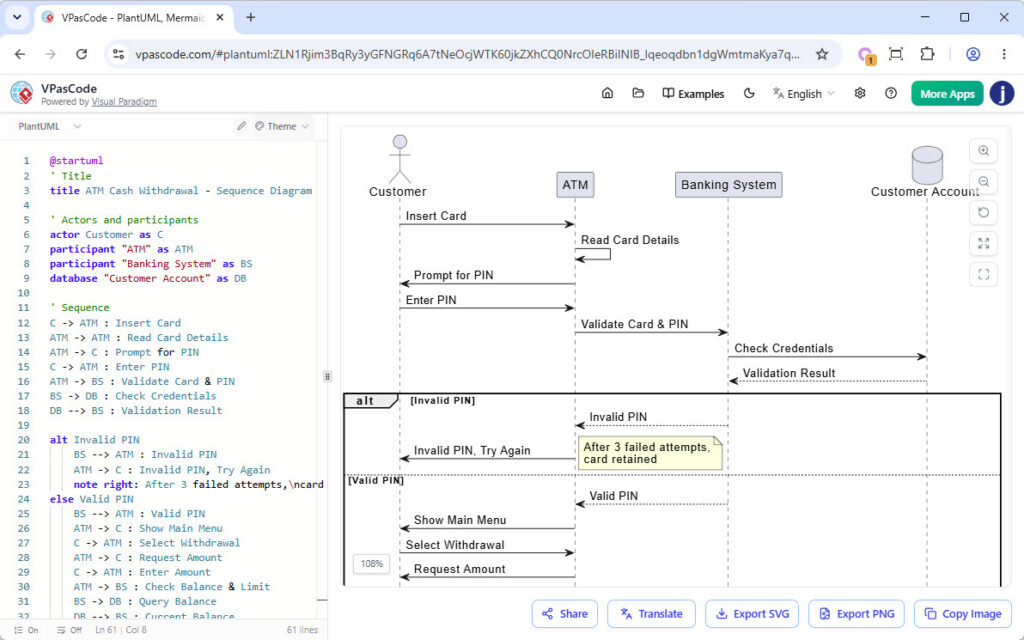
This tutorial explores the system architecture behind a classic ATM Cash Withdrawal scenario. We will dissect the provided PlantUML source code to understand how VPasCode renders actors, lifelines, and conditional logic blocks into a professional-grade visual representation.
1. Defining the System Participants
The foundation of any sequence diagram is the declaration of its participants. In the context of an ATM system, we must define the human actor, the hardware interface, the backend processing system, and the data storage.
In the VPasCode editor, this is achieved using the actor and participant directives. The code snippet below demonstrates how we map these logical entities to visual symbols:
@startuml
title ATM Cash Withdrawal - Sequence Diagram

' Actors and participants
actor Customer as C
participant "ATM" as ATM
participant "Banking System" as BS
database "Customer Account" as DB- Actor: Represents an external entity interacting with the system (e.g., the Customer).
- Participant: Represents a system component or object (e.g., the ATM interface or the Banking Server).
- Database: A specific stereotype for persistent storage (e.g., the Customer’s account details).
2. The Synchronous Communication Flow
Once participants are defined, the diagram establishes the initial flow of control. Sequence diagrams primarily rely on solid arrows to represent synchronous messages, where the sender waits for a response before continuing.
The interaction begins with the Customer inserting a card. VPasCode renders this as a horizontal arrow between the lifelines of the Customer and the ATM.
' Sequence
C -> ATM : Insert Card
ATM -> BS : Read Card Details
BS -> ATM : Prompt for PIN
ATM -> C : Enter PIN
Notice the chaining of messages. After the ATM receives the card, it immediately delegates the task to the Banking System to validate the card details. The Banking System then prompts the ATM to ask the user for a PIN, creating a seamless round-trip interaction.
3. Handling Conditional Logic with Alt and Else
Real-world software rarely follows a straight line. It must handle errors, retries, and alternative paths. In VPasCode, we use the alt (alternative) and else keywords to structure these conditional blocks visually.
The code below illustrates the validation logic. The alt block creates a decision diamond, splitting the flow into an “Invalid PIN” path and an “Else” (Valid PIN) path.
alt Invalid PIN
  BS -> ATM : Validate Card & PIN
  DB -> BS : Check Credentials
  BS -> ATM : Invalid PIN, Try Again
  note right: After 3 failed attempts, card retained
else Valid PIN
  BS -> ATM : Show Main Menu
  ATM -> C : Select Withdrawal
  C -> ATM : Enter Amount
  ATM -> BS : Check Balance & Limit
  BS -> DB : Query Balance
Key Technical Concepts:
- Validation Loop: The
altblock effectively simulates a loop where the user keeps trying until the condition (Valid PIN) is met. - Notes: The
note rightcommand adds a sticky note to the diagram, providing context about business rules (e.g., card retention) without cluttering the main logic. - Else Branch: The
elsekeyword automatically triggers the alternative flow once the initial condition is false.
4. Visualizing Asynchronous Returns
Not all messages require an immediate response. When a system sends a signal and does not wait for a reply, we use dashed arrows. In the code, this is represented by -->.
BS -> DB : Check Credentials
DB -->> BS : Validation Result
Here, the Banking System queries the database. The return of the “Validation Result” is depicted as a dashed arrow, indicating an asynchronous response or a query result that does not block the immediate flow of the requestor in the same way a synchronous call does.
Conclusion
By using VPasCode, the translation of complex logic like “ATM Cash Withdrawal” becomes a streamlined, text-driven process. You no longer need to drag and drop boxes to define relationships; you simply write the code. This approach ensures that your diagrams remain synchronized with your actual system specifications, reducing documentation drift and enhancing clarity for all stakeholders.