
Mastering Concept-to-Docs with Visual Paradigm Pipeline & VP AI Ecosystem
In the modern software development lifecycle, a significant gap often exists between the technical models created by architects and the living documentation consumed by stakeholders. Historically, this has led to “documentation debt,” where diagrams become outdated the moment they are exported as static images. However, the introduction of the Visual Paradigm Pipeline integrated with the VP Ecosystem has fundamentally changed this dynamic.
This tutorial provides a comprehensive walkthrough of the Concept-to-Docs workflow. We will explore how to leverage the secure artifact repository to maintain a single source of truth, ensuring that your documentation remains synchronized with your models automatically.
1. The Architecture: Model, Pipeline, and Document
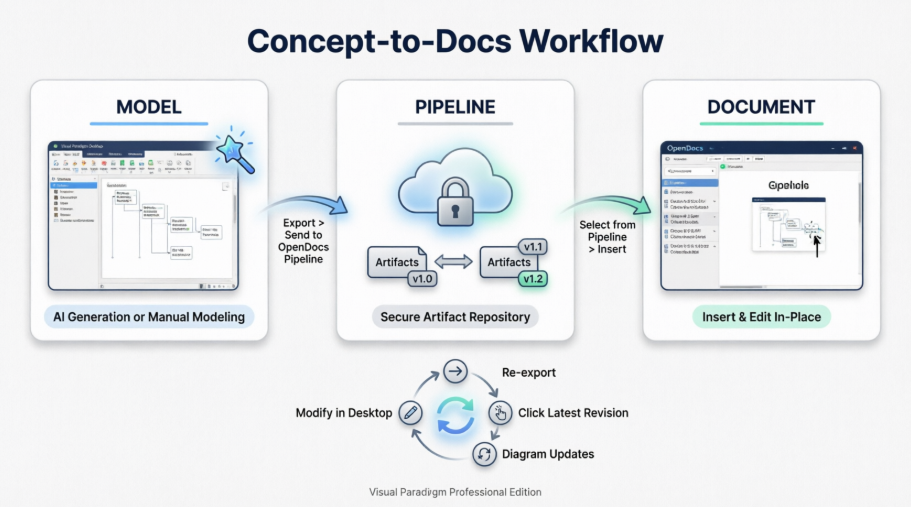
The workflow described in the diagram represents a shift from static file management to a dynamic, cloud-based pipeline architecture. This system is designed to handle the full lifecycle of a diagram, from creation to version control and final presentation.
- Model (The Source): This phase represents the creation point within Visual Paradigm Desktop. Whether you are using AI generation to draft a system structure or manually refining a complex UML diagram, the model is the “Source of Truth.”
- Pipeline (The Hub): Acting as the bridge, the Pipeline is a secure cloud repository. It is not merely a storage location; it is a version control system for your visual artifacts. It manages the synchronization between the desktop environment and the documentation platform.
- Document (The Output): This is where the workflow delivers value. OpenDocs serves as the presentation layer. It allows you to consume the diagrams not as static JPEGs, but as live, interactive, or updatable components within a knowledge management environment.
2. Step-by-Step: Executing the Workflow
To implement this workflow effectively, you must understand the data flow and the specific commands required to move artifacts through the system.
Step 1: Export to the Pipeline
Once your modeling is complete in the Visual Paradigm Desktop, you do not simply save the file locally. You must “push” the artifact to the cloud.
The Process:
- Identify the diagram or project artifact you wish to share.
- Select the Export option, specifically targeting the OpenDocs Pipeline.
- This action uploads the artifact to the secure cloud repository, creating a specific version (e.g., v1.0) that is now accessible to the ecosystem.
Step 2: The Secure Artifact Repository
The central cloud icon in the diagram represents the Secure Artifact Repository. This is the critical component that enables versioning.
Unlike a simple file share, the Pipeline tracks revisions. As seen in the diagram, artifacts move from v1.0 to v1.2. This ensures that if a team member updates a model in OpenDocs or Desktop, the system maintains a history of changes, preventing data loss and allowing for rollback if necessary.
Step 3: Select and Insert in OpenDocs
The final step is integrating the model into your documentation. You do not need to manually download and re-upload files.
The Process:
- Navigate to your page within OpenDocs.
- Select Pipeline > Insert.
- Choose the diagram artifact from the repository.
- Once inserted, the diagram is “live.” It is no longer a static image but a connected component.
3. The Feedback Loop: Maintaining Synchronization
The most powerful feature of this architecture is the ability to modify the model and have those changes reflected in the documentation without losing context.
The cycle at the bottom of the diagram illustrates this continuous improvement loop:
- Modify in Desktop: Make changes to the source model in Visual Paradigm Desktop.
- Diagram Updates: The system detects the change and prepares the artifact for a new version.
- Click Latest Revision: In OpenDocs, you trigger a refresh to fetch the new state.
- Re-export: The artifact is pushed back to the pipeline, updating the version number (e.g., from v1.1 to v1.2) and refreshing the view in the document.
This ensures that the “living documentation” actually stays alive, evolving in lockstep with the system it describes.
Conclusion
By utilizing the Visual Paradigm Pipeline, you transition from a fragmented workflow of exporting images and managing file versions manually to a streamlined, professional architecture. This integration empowers enterprise architects and developers to maintain high-fidelity documentation that serves as a true asset to the organization.