
Mastering Complex Order Flows: A Visual Paradigm Guide to UML Sequence Diagrams
In the world of software architecture, clarity is king. When designing systems where business logic branches based on specific conditions—such as user status, payment methods, or subscription levels—static diagrams often fall short. This is where the UML Sequence Diagram shines, particularly when utilizing advanced interaction fragments.
In this tutorial, we will walk through a sophisticated “Place Order Scenario” modeled using Visual Paradigm. We will break down how to handle loops, conditional logic (Alternative and Optional fragments), and optional notifications within a single, cohesive diagram. By the end, you will understand how to model complex business rules without cluttering your documentation with multiple disjointed diagrams.
Understanding the Actors and Participants
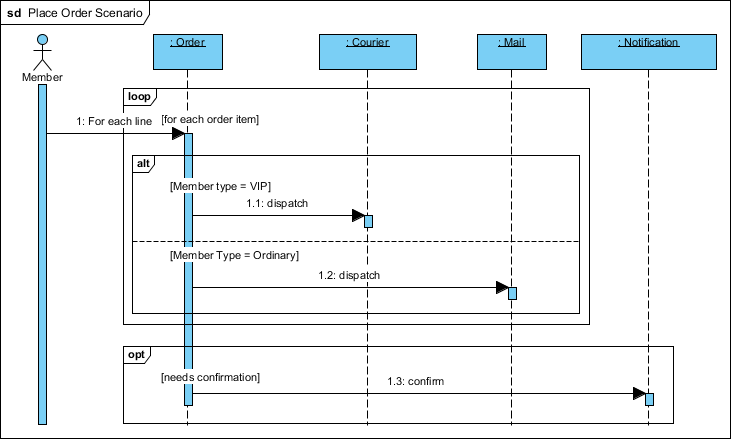
Before diving into the logic, let’s identify the participants (lifelines) involved in this system architecture. Each vertical dashed line represents an object or actor that participates in the sequence of events.
- Member (Actor): Represented by the stick figure, this is the external user initiating the action. They trigger the order process.
- :Order: The central controller object. It handles the logic of the order, managing items and determining the next steps.
- :Courier: Represents the logistics service specifically for expedited shipping.
- :Mail: Represents the standard postal service for regular shipping.
- :Notification: A service responsible for sending communication (like emails) to the user.
Step 1: Handling Repetition with the ‘Loop’ Fragment
Real-world orders rarely contain just a single item. To model this, our diagram employs a Loop fragment. In Visual Paradigm, this is the topmost frame surrounding the initial interaction.
The label loop indicates that the enclosed actions are repeated. Inside the loop, we see the condition [for each order item]. This tells the reader that the subsequent logic—processing the order and dispatching the item—happens iteratively for every single product added to the cart.
Step 2: Branching Logic with ‘Alt’ Fragments
The complexity increases when delivery methods depend on user status. This is where the Alt (Alternative) fragment comes into play. The diagram splits into two distinct paths based on the Member Status.
The VIP Path
If the member’s status is VIP, the system follows the upper path. The condition is defined as [Member type = VIP]. The interaction flow shows the :Order object sending a message 1.1: dispatch to the :Courier lifeline. This represents the premium service level.
The Ordinary Path
Conversely, the lower path is guarded by the condition [Member Type = Ordinary]. If this condition is met, the :Order sends the dispatch message to the :Mail lifeline instead. This models the standard shipping logic.
Step 3: Managing Optional Interactions with ‘Opt’ Fragments
Not every process step is mandatory. In many e-commerce systems, sending a confirmation email is a preference-based action. The diagram utilizes an Opt (Optional) fragment to handle this.
Inside the opt frame, we see the condition [needs confirmation]. This implies that if the user has opted in (or if the system determines confirmation is required), the :Order object sends a 1.3: confirm message to the :Notification service. If the condition is false, this entire block is skipped, keeping the process streamlined.
Why Combine Fragments?
You might wonder why we don’t create separate diagrams for VIP users, Ordinary users, and those who want emails. The answer lies in efficiency and maintainability. By using combined fragments within a single diagram, Visual Paradigm allows us to document the entire system logic in one view.
This approach prevents “diagram sprawl,” where a single feature might require five different diagrams to cover all permutations. It keeps the documentation concise, comprehensive, and easier for developers to read during the implementation phase.
Conclusion
By mastering these UML Sequence Diagram elements—Loops, Alternatives, and Optional fragments—you can create robust system models that accurately reflect the nuances of modern business logic. Whether you are a student learning software design or a professional architect documenting a system, Visual Paradigm provides the tools to visualize these complex flows effectively.