
Mastering Business Logic in UML: A Deep Dive into the Order Processing Sequence Diagram
In the world of software architecture, requirements often come in the form of vague narratives. “Process the order,” a manager might say. But what does that actually mean? Does every order get shipped? Do VIP customers get special treatment? How do we handle notifications? These questions are the domain of Business Logic Application.
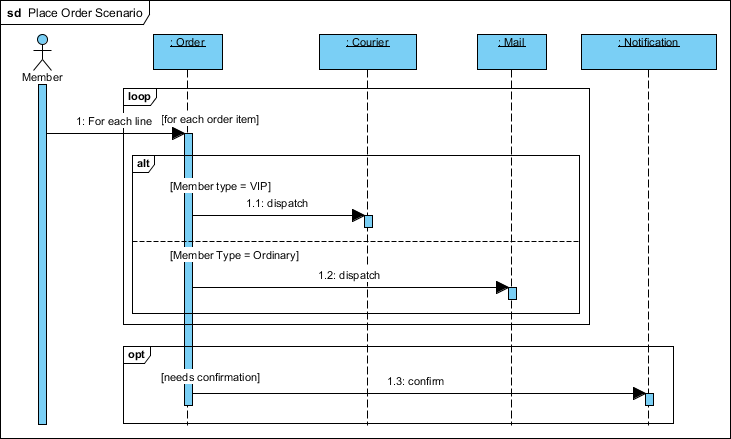
This tutorial will guide you through the Place Order Scenario sequence diagram. We will deconstruct how Visual Paradigm handles complex conditional logic using loops, alt (alternative), and opt (optional) fragments. By the end, you will understand how to transform a simple business requirement into a precise technical blueprint.
1. The System Actors and Components
Before we dive into the logic, let’s identify the players on the stage. This sequence diagram models an interaction between a human user and several backend services.
- :Member (The Actor): Represented by the stick figure on the left, this is the user initiating the transaction.
- :Order (The Controller): The central object responsible for managing the order logic. It acts as the orchestrator, receiving the initial request and routing it.
- :Courier & :Mail (The Fulfillment Services): These are the backend systems that handle physical delivery. They represent the branching paths of the logic.
- :Notification (The Feedback Service): A passive service that sends alerts or confirmations to the user.
2. Deconstructing the Business Logic Flow
The diagram illustrates a multi-layered logic structure. We can break this down into three distinct phases: Iteration, Conditional Dispatching, and Optional Notification.
Phase A: The Iteration (Loop Fragment)
Real-world orders rarely contain just a single item. They are collections of line items. The diagram captures this reality using a Loop fragment.
- The :Member sends a request to the :Order component.
- The :Order component initiates a loop frame.
- Inside the loop, the guard condition
[for each order item]is defined. - This signifies that the subsequent logic (dispatching and billing) is not a one-time event, but a repetitive process that runs once for every single line item in the cart.
Phase B: Conditional Dispatching (Alt Fragment)
Once the system has an item to process, it must decide how to get it to the customer. This is where the Alternative (alt) fragment shines. It allows us to model “If-Then-Else” logic visually.
Inside the loop, the :Order component checks the membership tier of the user. The diagram splits into two distinct branches:
- Branch A (VIP): If the guard condition
[Member type = VIP]is met, the system dispatches the item via the :Courier service (Message 1.1). This likely represents an express shipping protocol. - Branch B (Ordinary): If the guard condition
[Member Type = Ordinary]is met, the system dispatches the item via the :Mail service (Message 1.2). This represents standard shipping.
Key Takeaway: The vertical dashed line separating these branches represents the decision point. The system evaluates the condition; only the matching path is executed.
Phase C: Optional Notification (Opt Fragment)
Not every scenario requires a follow-up action. The diagram models this uncertainty using an Opt (Optional) fragment.
- This block wraps the logic for sending a confirmation message.
- The guard condition
[needs confirmation]sits at the top of the frame. - If this condition evaluates to true, the :Order component sends message 1.3: confirm to the :Notification service.
- If false, the system simply skips this step entirely, continuing execution without the overhead of a notification.
3. Synthesis: Why This Structure Matters
This diagram is a perfect example of effective UML modeling. It moves beyond simple “Box A talks to Box B” interactions and captures the decision-making intelligence of the system.
By utilizing Visual Paradigm’s support for loop, alt, and opt combined fragments, we have transformed vague requirements into precise technical specifications. We know exactly:
- When the dispatch logic runs (inside the loop).
- Which service gets called based on user data (the alt condition).
- Whether a notification is sent (the opt condition).
Best Practices for Documentation
When documenting complex workflows like this one, always remember these three golden rules:
- Be Explicit with Guards: Never leave a condition implied. Always write
[Condition]clearly in the fragment headers. In our example, explicitly stating[Member type = VIP]prevents ambiguity during development. - Nesting Matters: Notice how the
altandoptfragments sit inside or adjacent to theloop. This hierarchy tells the developer exactly when the logic applies. The dispatch decision happens for every item, but the notification decision happens once per order. - Keep it Readable: If a diagram becomes too crowded with nested fragments, consider breaking it down into separate diagrams or using “Interaction Uses” to reference sub-processes.
By following this guide, you can ensure your sequence diagrams serve as accurate blueprints for development, reducing ambiguity and preventing logic errors before a single line of code is written.
Tooling: Visual Paradigm
To model these complex interactions efficiently, we utilized Visual Paradigm, a comprehensive UML modeling tool. Its support for combined fragments allows developers to visualize nested logic structures without cluttering the interface. Whether you are mapping out payment gateways or HR onboarding flows, Visual Paradigm provides the necessary framework to turn abstract business rules into executable system designs.