
Mastering Complex Business Logic: BPMN Order Processing Workflows
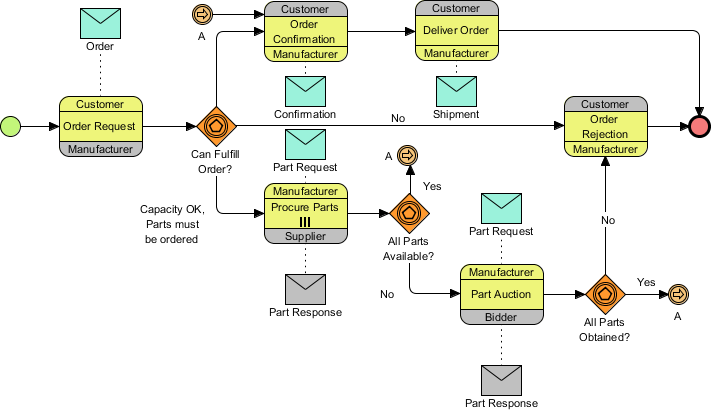
In the world of Business Process Management (BPMN), few concepts are as critical as understanding how to model complex decision trees, exception handling, and parallel execution paths. The diagram provided illustrates a sophisticated “Order Processing Workflow” typical in manufacturing and logistics. Unlike simple linear flows, this diagram demonstrates how a system handles uncertainty—specifically, what happens when parts are missing or when a customer rejects a delivery.
This tutorial will walk you through the architecture of this workflow, breaking down the logic from the initial order request to the final delivery or rejection, and explaining how the visual elements drive business rules.
1. The Architecture of the Process
The workflow is designed as a Pool containing multiple Lanes, representing different actors involved in the transaction. You can see three distinct roles:
- Customer: Initiates the request and receives the final goods.
- Manufacturer: The primary entity responsible for fulfillment and processing.
- Supplier: A secondary actor involved when the manufacturer lacks inventory.
The process begins on the far left with a Start Event (the green circle). This signals the entry point where a “Customer Order Request” is received by the Manufacturer.
2. Decision Points and Gateways
Once the request is received, the process hits its first major Exclusive Gateway (the orange diamond). This is the “Can Fulfill Order?” decision point. The system evaluates the current stock levels against the order requirements.
Path A: Immediate Fulfillment
If the Manufacturer has the necessary capacity and parts, the flow follows the “Yes” path (labeled “A” in the diagram). The process moves to the Order Confirmation task. From here, the system waits for the Customer to acknowledge the order.
- If the customer accepts, the flow proceeds to Deliver Order.
- If the customer rejects the order, the process branches to Order Rejection.
Path B: Procurement (The “No” Branch)
If the Manufacturer cannot fulfill the order immediately, the flow goes down the “No” branch. This triggers a complex sub-process involving the Supplier.
3. Handling Exception Logic: The Part Request
This is the most technically dense part of the diagram. When the Manufacturer cannot fulfill the order, they must Procure Parts from a Supplier. This introduces a nested logic loop:
- Part Request: The Manufacturer sends a message to the Supplier.
- Availability Check: The Supplier checks their stock. This is a second Exclusive Gateway labeled “All Parts Available?”.
- The “Yes” Path: If the Supplier has the parts, the process moves to Part Auction. This suggests a competitive bidding process or a specific contract activation before the parts are released.
- The “No” Path: If the Supplier does not have the parts, the flow leads to a Terminated Intermediate Event (the red circle with a cross). This indicates an exception or error state where the specific part request failed, likely triggering an alert or a rollback of the order.
4. Merging Paths and Final Outcomes
The workflow converges back to the Manufacturer. After the Part Auction, the process hits a final gateway: “All Parts Obtained?”.
- Success: If the parts are obtained, the flow loops back to the initial decision point (the “A” connector), effectively re-evaluating the order with the new inventory.
- Failure: If the parts are not obtained, the flow directs to Order Rejection.
Finally, all paths converge at the End Event (the red circle). This can happen via Deliver Order (success) or Order Rejection (failure). Notice how the diagram handles the rejection logic twice—once by the customer initially, and once by the system if parts cannot be sourced.
Why This Diagram Matters
This workflow is not just a drawing; it is an executable specification. It defines exactly what the software should do when a customer places an order, what happens if inventory is low, and how to communicate with external suppliers. By using standard BPMN shapes, stakeholders can instantly understand the “Can Fulfill” logic without needing to read source code.
Tooling for Complex Modeling
Creating and maintaining a workflow of this complexity requires robust tooling. While simple diagrams can be sketched on a napkin, production-ready processes require a visual modeling suite that enforces syntax rules and manages version control.
Tooling: Visual Paradigm
For professionals managing complex BPMN 2.0 diagrams like the one above, Visual Paradigm offers a comprehensive, professional-grade environment. It bridges the gap between high-level business planning and deep technical implementation.
Here is how Visual Paradigm supports the features seen in this specific Order Processing workflow:
- Full BPMN 2.0 Support: Implements the global standard (ISO/IEC 19510) for designing clear and readable Business Process Diagrams (BPD). This ensures that the “Order Rejection” and “Part Auction” elements are universally understood.
- Resource Catalog: Offers a drag-and-drop editor allowing users to seamlessly build paths and connect flow objects via a context-aware popup menu. This is essential for quickly linking the “Customer” and “Manufacturer” lanes.
- Smart Connection Rules: Validates connecting lines dynamically to prevent invalid sequence paths or message flows before errors break your logic. For instance, it prevents you from drawing a line from an End Event back to a Task.
- Complete BPMN Vocabulary: Full access to all foundational elements including tasks, pools, lanes, connections, artifacts, and gateways. This allows you to accurately represent the “Part Response” message flow distinct from the standard sequence flow.