
Mastering BPMN Compensation Sub-Processes with Visual Paradigm
In the complex world of Business Process Model and Notation (BPMN), managing exceptions and ensuring data integrity is critical. While standard error handling deals with stopping a process, sometimes a process needs to “undo” actions that have already been completed. This is where the Compensation Sub-Process comes into play. This tutorial explores the architecture of this advanced modeling concept using Visual Paradigm, the industry-standard BPMN tool.
What is a Compensation Sub-Process?
A Compensation Sub-Process is a specialized container used to define the logic for compensating (reversing or remedying) a previous activity or transaction. Unlike a standard sub-process, which is executed forward, a compensation sub-process is triggered after a specific event fails or a transaction is rolled back.
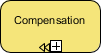
In the diagram above, you are looking at the specific marker used in Visual Paradigm to identify this functionality. It is characterized by:
- A standard sub-process shape (rounded rectangle).
- A distinct icon at the bottom center: a left-pointing arrow next to a plus sign (
←+). - The label “Compensation” clearly identifying its purpose.
Understanding the Architecture
When modeling a system in Visual Paradigm, it is essential to understand the relationship between the Process (the main flow) and the Compensation Sub-Process.
1. The Trigger Mechanism
Compensation events do not run in the normal flow of time. They are asynchronous or triggered by a specific boundary condition. In BPMN, a standard activity (like “Process Order”) can have an attached Compensation Boundary Event. If that activity is interrupted, the engine looks for the compensation sub-process to execute the “undo” logic.
2. The Visual Paradigm Implementation
Visual Paradigm simplifies this complex architecture. Instead of manually drawing a separate diagram for the compensation logic, you can define it inline.
- Create the Activity: Start by creating a standard Task or Sub-Process in your main flow.
- Add Compensation: In the properties panel, or by dragging a Compensation Sub-Process element from the palette, you define the cleanup steps.
- Link the Logic: Visual Paradigm automatically establishes the link between the main activity and its cleanup routine.
Step-by-Step Modeling Guide
Follow this procedure to implement a robust compensation flow in your BPMN diagrams.
Step 1: Define the Business Activity
First, model the primary task that might require reversal. For example, “Approve Loan Application”.
Step 2: Attach the Compensation Marker
To enable compensation, you must attach a specific marker to the task. In Visual Paradigm, this is often done by setting the Compensation Event property or using the dedicated Compensation Sub-Process element.
Configuration Snippet (Visual Paradigm Logic):
Step 3: Design the Cleanup Logic
Inside the compensation sub-process, you define the reverse actions. These are typically the exact opposite of the main task. If the main task “Deduct Funds,” the compensation task “Refund Funds.”
Why Use Compensation Sub-Processes?
In long-running processes (BPMN 2.0), transactions are not always instantaneous. If a process takes hours or days to complete, you cannot simply “roll back” a database transaction in the traditional sense. You must explicitly program the steps to return the system to a consistent state. This is the primary use case for the Compensation Sub-Process.
By utilizing the tooling in Visual Paradigm, you ensure that your diagrams are not just visual representations, but executable specifications that handle business exceptions gracefully.
Conclusion
Mastering the Compensation Sub-Process is a hallmark of advanced BPMN expertise. It allows your process models to handle real-world failures and transaction rollbacks with precision. By leveraging Visual Paradigm’s dedicated markers and modeling capabilities, you can build resilient, enterprise-grade workflows that maintain data integrity even when things go wrong.