
Organizations today face a complex challenge. The digital infrastructure built over decades often resembles a patchwork quilt rather than a cohesive system. This state is known as IT landscape fragmentation. It occurs when systems operate in isolation, data flows are inconsistent, and technology standards vary wildly across departments. The result is inefficiency, inflated costs, and an inability to respond quickly to market changes.
This article details a comprehensive approach to resolving these issues. We will explore how strategic planning in Enterprise Architecture can unify disparate systems. The focus remains on methodology, governance, and structural alignment rather than specific vendor tools. By examining a real-world scenario, we can understand the mechanics of modernization.
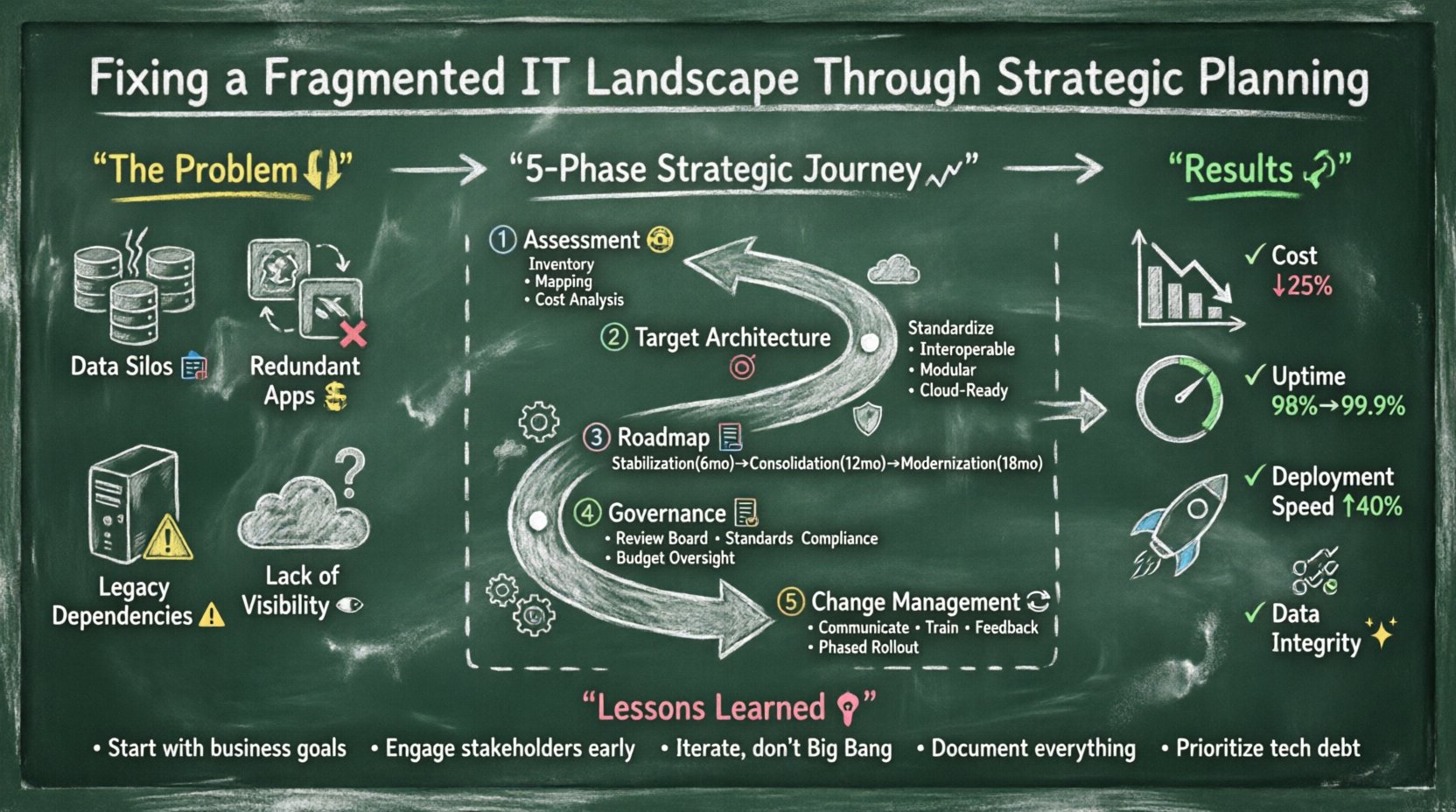
The Current State: Symptoms of Fragmentation 📉
Before any repair begins, a clear diagnosis is required. In the scenario below, a mid-sized global enterprise faced significant operational hurdles. The IT department struggled to maintain the infrastructure, which had grown organically without a central blueprint.
- Data Silos: Customer information existed in three different repositories. Sales, support, and logistics could not access a single source of truth.
- Redundant Applications: Multiple departments purchased similar tools independently. This led to duplicate licensing costs and conflicting data entry requirements.
- Legacy Dependencies: Critical business processes relied on systems that were no longer supported by vendors. Security patches were difficult to apply.
- Lack of Visibility: Leadership could not get a clear view of IT spending or asset utilization.
These symptoms are common in mature organizations. They do not happen overnight. They accumulate as business units grow and acquire new capabilities without consulting central architecture teams.
Phase 1: Comprehensive Assessment 🧐
The first step in the strategic plan was a deep-dive audit. This phase focuses on understanding the as-is state. It is not enough to list hardware or software. The goal is to map data flows, integration points, and business capabilities.
Key Activities in Assessment
- Inventory Creation: Catalog every application, database, and server. Include ownership details and lifecycle status.
- Integration Mapping: Identify how systems talk to each other. Are APIs used? Is data copied manually? Are there hard-coded dependencies?
- Capability Mapping: Align technology assets to business functions. Does the current tech support the strategic goals of the company?
- Cost Analysis: Calculate the total cost of ownership. Include maintenance, licensing, energy, and personnel time.
This data forms the foundation of the roadmap. Without accurate information, planning is merely guessing. The assessment revealed that 40% of the application portfolio was redundant or obsolete.
Phase 2: Defining the Target Architecture 🎯
Once the current state is understood, the to-be state must be defined. This is where strategic planning becomes critical. The objective is to design a landscape that is agile, scalable, and secure.
Principles of the Target State
- Standardization: Limit the number of approved technologies. Only use platforms that meet security and support criteria.
- Interoperability: Ensure all systems can exchange data seamlessly. Use open standards and well-documented interfaces.
- Modularity: Break large monolithic systems into smaller, manageable services. This allows independent updates and scaling.
- Cloud Readiness: Design infrastructure that can leverage cloud environments for elasticity and cost efficiency.
The target architecture is not just a technical drawing. It is a blueprint for business agility. It ensures that new business requirements can be met without rebuilding the entire foundation.
Phase 3: Developing the Roadmap 🗺️
A roadmap translates the vision into actionable steps. It must balance immediate needs with long-term goals. Rushing the transition can disrupt business operations. Moving too slowly allows technical debt to compound.
Strategic Phasing
The roadmap was divided into three distinct phases. Each phase had specific milestones and success criteria.
| Phase | Focus Area | Duration | Key Deliverables |
|---|---|---|---|
| Phase 1: Stabilization | Security & Compliance | 6 Months | End-of-life systems retired, Critical patches applied |
| Phase 2: Consolidation | Application Rationalization | 12 Months | Redundant tools merged, Data silos broken |
| Phase 3: Modernization | Architecture Optimization | 18 Months | API-driven integrations, Cloud migration complete |
This structured approach ensures that resources are allocated efficiently. It prevents the team from trying to fix everything at once, which often leads to burnout and failure.
Phase 4: Governance and Standards 📋
Without governance, fragmentation returns. A new system will eventually be bought without consultation. To prevent this, a governance model was established. This model defines who has the authority to make decisions regarding technology.
Core Governance Pillars
- Architecture Review Board: A group of senior leaders who review all new technology proposals. They ensure alignment with the target architecture.
- Standards Policy: A documented list of approved technologies and protocols. Deviations require executive approval.
- Compliance Monitoring: Regular audits to ensure systems adhere to security and data privacy regulations.
- Financial Oversight: Tracking IT spend against the budget. Identifying waste and optimizing resource usage.
This structure empowers the architecture team to act as a strategic partner rather than an administrative hurdle. It creates a culture of accountability.
Phase 5: Change Management and Adoption 🔄
Technical changes are only half the battle. The people using the systems must adapt. Resistance to change is a common barrier in large organizations. Staff may fear that new processes will increase their workload or make their skills obsolete.
Strategies for Successful Adoption
- Communication: Clearly explain the why behind the changes. Show how the new landscape benefits the user.
- Training: Provide comprehensive training programs. Ensure users feel confident in the new tools.
- Feedback Loops: Create channels for users to report issues or suggest improvements. This builds trust.
- Phased Rollout: Introduce new systems to small groups first. Gather feedback before expanding to the whole organization.
Ignoring the human element often causes projects to fail. The best technology cannot save a project where the workforce feels alienated.
Outcomes and Metrics 📊
After 30 months, the organization saw measurable improvements. The strategic plan yielded tangible results in cost, performance, and agility.
Key Performance Indicators
- Cost Reduction: Licensing costs dropped by 25% due to the elimination of redundant tools.
- System Availability: Uptime increased from 98% to 99.9% after modernizing legacy dependencies.
- Deployment Speed: Time to deploy new features decreased by 40% due to modular architecture.
- Data Integrity: Errors related to data entry dropped significantly as silos were merged.
These metrics demonstrate the value of a structured approach. They provide evidence for continued investment in enterprise architecture.
Risk Management in IT Transformation ⚠️
Every transformation carries risk. The strategic plan included a specific section on risk assessment. This ensured that potential pitfalls were identified and mitigated before they became problems.
Common Risks and Mitigation Strategies
| Risk Category | Potential Impact | Mitigation Strategy |
|---|---|---|
| Data Loss | Permanent loss of critical business records | Full backups and validation tests prior to migration |
| Service Disruption | Business operations halt during transition | Parallel running of old and new systems during cutover |
| Budget Overrun | Financial strain on the organization | Regular financial reviews and contingency fund allocation |
| Security Breach | Compromise of sensitive data | Security audits at every phase of the roadmap |
Proactive risk management allows the organization to navigate the transformation with confidence. It reduces the likelihood of catastrophic failure.
Lessons Learned 💡
Looking back at the project, several key lessons emerged. These insights are valuable for any organization facing similar challenges.
- Start with Business Goals: Technology should serve the business, not the other way around. Align every architectural decision with a business outcome.
- Engage Stakeholders Early: Involve department heads from the beginning. Their buy-in is crucial for adoption.
- Iterate, Don’t Big Bang: Avoid massive, all-at-once changes. Small, incremental improvements reduce risk and build momentum.
- Document Everything: Maintain up-to-date documentation. It serves as the source of truth for the architecture.
- Prioritize Technical Debt: Do not ignore debt. Address it systematically as part of the roadmap.
Conclusion on Strategic Alignment 🤝
Fixing a fragmented IT landscape is not a one-time event. It is an ongoing discipline. The strategic planning process outlined here provides a framework for continuous improvement. By focusing on assessment, vision, roadmapping, and governance, organizations can build resilient systems.
The journey requires commitment from leadership and collaboration across teams. It demands patience and discipline. However, the payoff is a technology environment that supports innovation and growth. Organizations that master this alignment gain a competitive advantage in the digital economy.
The path forward involves continuous monitoring and adaptation. As business needs evolve, the architecture must evolve with them. This flexibility is the hallmark of a mature enterprise architecture function.