
Enterprise Architecture (EA) serves as the blueprint for an organization’s structure, processes, and technology. Over time, this blueprint can drift from the intended strategy, leading to inefficiencies, technical debt, and misalignment with business goals. An audit provides the necessary visibility to correct these deviations. This guide outlines a rigorous process for evaluating the current state of your enterprise architecture without relying on specific vendor tools.
An effective audit goes beyond checking boxes. It requires a deep dive into governance, data integrity, application portfolios, and strategic alignment. The following sections detail the critical components required to assess the health of your architecture comprehensively.
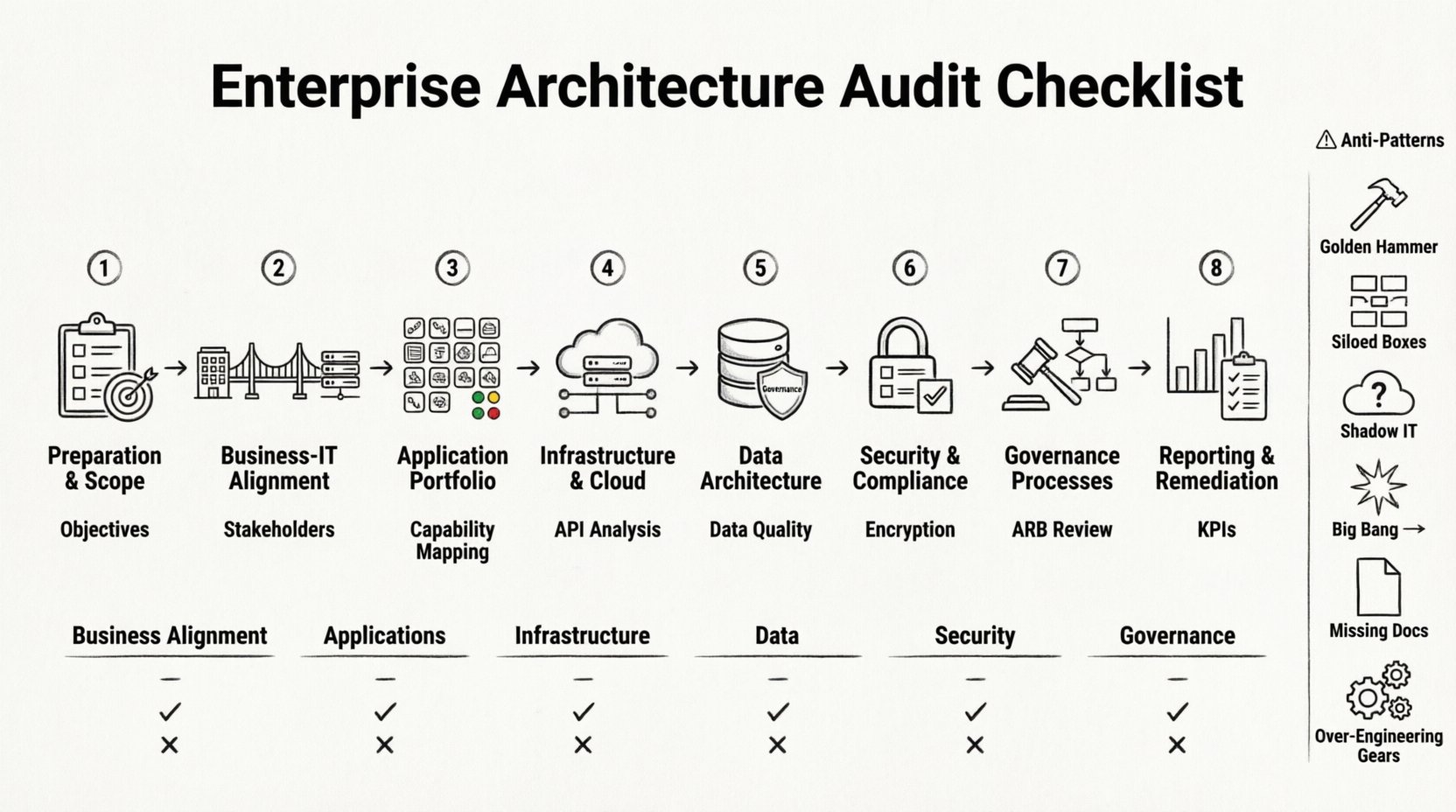
🔍 Phase 1: Preparation and Scope Definition
Before examining the technical details, you must establish the boundaries of the audit. A clear scope prevents scope creep and ensures stakeholders understand the objectives.
1.1 Define Audit Objectives
- Strategic Alignment: Determine if the architecture supports current business strategies.
- Risk Identification: Locate single points of failure or compliance gaps.
- Cost Optimization: Identify redundant systems and unnecessary maintenance costs.
- Modernization Readiness: Assess the feasibility of migrating to newer paradigms.
1.2 Identify Stakeholders
Engage key personnel across the organization to gather diverse perspectives.
- C-Suite: For high-level strategic alignment and budget authority.
- Business Unit Leaders: To understand functional requirements and pain points.
- IT Leadership: CIO, CTO, and architects for technical feasibility.
- End Users: To gather feedback on usability and system performance.
1.3 Establish Data Collection Methods
Utilize a mix of qualitative and quantitative methods to gather evidence.
- Document Review: Analyze existing architecture diagrams, standards, and policies.
- Interviews: Conduct structured sessions with key personnel.
- Surveys: Distribute questionnaires to assess satisfaction and pain points.
- System Logs: Review performance metrics and error logs where available.
🎯 Phase 2: Business and IT Alignment
The primary purpose of Enterprise Architecture is to bridge the gap between business needs and technology capabilities. Misalignment here is the most common cause of project failure.
2.1 Capability Mapping
Map business capabilities against the supporting applications and infrastructure.
- Inventory Capabilities: List all critical business functions (e.g., Order Management, HR, Supply Chain).
- Map Applications: Identify which systems support each capability.
- Identify Gaps: Highlight capabilities without adequate technological support.
- Identify Redundancy: Find capabilities supported by multiple disparate systems.
2.2 Process Architecture Review
Ensure that business processes are optimized and supported by the IT landscape.
- Process Flow Analysis: Trace data flow through business processes.
- Automation Level: Assess the degree of manual intervention required.
- Integration Points: Verify if handoffs between systems are seamless or prone to error.
- Workflow Efficiency: Identify bottlenecks caused by architectural constraints.
2.3 Strategic Roadmap Comparison
Compare the current state against the intended target architecture.
- Timeline Adherence: Check if migration projects are on schedule.
- Feature Parity: Ensure the target state matches business requirements.
- Change Management: Evaluate how well the architecture adapts to change.
💻 Phase 3: Application Portfolio Assessment
The application portfolio is the core of the technical landscape. An audit here focuses on functionality, maintenance, and lifecycle status.
3.1 Application Inventory
Create a complete list of all software assets in use.
- License Count: Track the number of active licenses per application.
- Vendor Status: Note vendor health, support status, and roadmap viability.
- Version Control: Identify applications running on obsolete or unsupported versions.
- Ownership: Assign clear ownership for each application.
3.2 Application Health Metrics
Evaluate the technical health of the software stack.
- Uptime: Review availability statistics over the last 12 months.
- Performance: Analyze response times and throughput metrics.
- Defect Rates: Count reported bugs and unresolved issues.
- Technical Debt: Estimate the effort required to refactor legacy code.
3.3 Interdependency Analysis
Understand how applications interact with one another.
- API Usage: Map all API endpoints and their consumers.
- Data Flow: Trace data movement between systems.
- Failure Propagation: Simulate outages to see which systems are impacted.
- Shared Dependencies: Identify shared databases or services creating bottlenecks.
🏛️ Phase 4: Infrastructure and Cloud Landscape
Infrastructure provides the foundation for applications. This section evaluates the physical and virtual resources supporting the business.
4.1 Resource Utilization
Assess the efficiency of compute, storage, and network resources.
- CPU Usage: Monitor peak and average utilization rates.
- Storage Growth: Analyze data growth trends and capacity planning.
- Network Latency: Measure latency between critical nodes.
- Provisioning: Review the speed and accuracy of resource provisioning.
4.2 Cloud Strategy
If cloud services are used, evaluate the strategy behind their adoption.
- Hybrid vs. Public: Determine the balance between on-premise and cloud resources.
- Cost Management: Review cloud billing and identify wasteful spend.
- Portability: Assess the risk of vendor lock-in.
- Resilience: Check for multi-region or multi-cloud redundancy.
4.3 Environment Management
Ensure consistency across development, testing, and production environments.
- Environment Parity: Verify that test environments match production.
- Configuration Management: Check for standardized configuration baselines.
- Deployment Pipelines: Evaluate the automation of build and release processes.
- Access Control: Review permissions for environment access.
📊 Phase 5: Data Architecture and Governance
Data is a critical asset. The audit must ensure data is accurate, accessible, and secure.
5.1 Data Quality
Assess the reliability of data across the organization.
- Completeness: Check for missing mandatory fields.
- Accuracy: Validate data against known truth sources.
- Consistency: Ensure data is uniform across different systems.
- Timeliness: Evaluate how current the data is at the time of access.
5.2 Data Governance
Review the policies and processes managing data.
- Ownership: Define clear data stewards for key domains.
- Standards: Verify adherence to naming conventions and formats.
- Retention Policies: Check compliance with legal and operational retention rules.
- Access Management: Review who has access to sensitive data.
5.3 Data Integration
Examine how data moves between silos.
- Integration Patterns: Identify if point-to-point or hub-and-spoke models are used.
- Real-time vs. Batch: Assess if the integration mode meets business needs.
- Error Handling: Review mechanisms for handling integration failures.
- Master Data Management: Evaluate the effectiveness of MDM solutions.
🔒 Phase 6: Security and Compliance
Security must be embedded within the architecture, not added as an afterthought.
6.1 Identity and Access Management
Review how users and services authenticate and authorize.
- Authentication Methods: Assess the strength of authentication mechanisms.
- Authorization Models: Check for role-based or attribute-based access control.
- Privilege Escalation: Review controls preventing unauthorized access.
- Session Management: Evaluate timeout and session security.
6.2 Data Protection
Ensure data is protected at rest and in transit.
- Encryption: Verify encryption standards for databases and storage.
- Transmission: Ensure protocols like TLS are enforced.
- Key Management: Review the process for generating and rotating keys.
- Backups: Test restoration procedures regularly.
6.3 Regulatory Compliance
Ensure the architecture meets legal and industry requirements.
- Industry Standards: Check alignment with ISO, NIST, or other frameworks.
- Data Privacy: Verify compliance with GDPR, CCPA, or similar regulations.
- Audit Trails: Ensure logs capture necessary security events.
- Reporting: Assess the ability to generate compliance reports.
🛡️ Phase 7: Governance and Processes
Architecture governance ensures that the architecture evolves in a controlled manner.
7.1 Architecture Review Board (ARB)
Evaluate the effectiveness of the decision-making body.
- Composition: Ensure diverse representation from business and IT.
- Meeting Cadence: Check if reviews happen frequently enough.
- Decision Tracking: Verify that decisions are documented and followed.
- Enforcement: Assess the authority to reject non-compliant designs.
7.2 Standards and Principles
Review the existence and adoption of architectural standards.
- Documentation: Ensure standards are written and accessible.
- Adoption Rate: Measure how often standards are followed.
- Evolution: Check if standards are updated regularly.
- Enforcement Tools: Identify automated checks where possible.
7.3 Change Management
Analyze the process for implementing architectural changes.
- Impact Analysis: Review the rigor of change impact assessments.
- Approval Workflow: Ensure appropriate levels of approval are required.
- Communication: Check if stakeholders are informed of changes.
- Rollback Plans: Verify that rollback procedures are defined.
📝 Phase 8: Reporting and Remediation
The audit is only valuable if the findings lead to action.
8.1 Finding Categorization
Group findings by severity and impact.
- Critical: Immediate action required (e.g., security breach).
- High: Significant risk or inefficiency.
- Medium: Moderate risk or technical debt.
- Low: Minor improvements or best practice suggestions.
8.2 Remediation Planning
Develop a plan to address the identified issues.
- Priority Matrix: Rank fixes based on business value and effort.
- Resource Allocation: Assign teams to specific remediation tasks.
- Timeline: Set realistic deadlines for each phase.
- Metrics: Define success criteria for the remediation.
8.3 Continuous Monitoring
Establish a feedback loop to prevent future drift.
- KPIs: Define key performance indicators for architecture health.
- Automated Alerts: Set up notifications for compliance violations.
- Regular Reviews: Schedule periodic architecture health checks.
- Feedback Channels: Create a mechanism for users to report issues.
📋 Summary Checklist
| Category | Key Question | Status |
|---|---|---|
| Business Alignment | Does IT support current business goals? | Pending |
| Application Portfolio | Are all applications documented and licensed? | Pending |
| Infrastructure | Is resource utilization optimized? | Pending |
| Data Architecture | Is data quality maintained across systems? | Pending |
| Security | Are compliance requirements met? | Pending |
| Governance | Is the ARB effective and enforced? | Pending |
⚠️ Common Anti-Patterns to Detect
During the audit, be on the lookout for these common architectural failures.
- Golden Hammer: Over-reliance on a single technology for all problems.
- Siloed Systems: Applications that do not communicate effectively.
- Shadow IT: Unsponsored systems deployed by business units.
- Big Bang Migration: Attempting to replace everything at once.
- Lack of Documentation: Systems where knowledge exists only in people’s heads.
- Over-Engineering: Designing solutions that are more complex than required.
🚀 Moving Forward
An architecture audit is not a one-time event. It is a cycle of assessment, planning, and improvement. By following this checklist, organizations can ensure their technical landscape remains robust, agile, and aligned with strategic objectives. The goal is not perfection, but continuous improvement and risk reduction.
Start with the preparation phase, gather your stakeholders, and begin the systematic evaluation of your enterprise architecture. The insights gained will form the foundation for a more resilient and efficient future state.
Remember, the value of an audit lies in the actions taken afterward. Use the findings to drive investment, refine processes, and enhance the overall capability of the organization. A healthy architecture is a strategic asset that drives innovation and operational excellence.
Ensure that the remediation plans are tracked rigorously. Without follow-through, the audit becomes a theoretical exercise with no practical impact. Integrate the lessons learned into the standard operating procedures of the IT organization. This embeds the culture of architecture into the daily work of the teams.
Finally, maintain transparency with the business. Explain the findings in terms of business value and risk. When business leaders understand the architectural state, they can make better decisions regarding investment and priorities. This alignment ensures that technology continues to serve as a catalyst for growth rather than a barrier.