
Software architecture is the backbone of any complex system. When multiple teams collaborate on the same ecosystem, the risk of fragmentation increases significantly. Without a unified approach, documentation becomes a collection of disparate artifacts that no one can fully navigate. This guide addresses the critical need for standardization using the C4 model, ensuring clarity, maintainability, and shared understanding across the organization.
The goal is not merely to create diagrams, but to establish a common language. When every engineer, product manager, and stakeholder speaks the same visual language, communication costs drop, and decision-making accelerates. We will explore the structural requirements, governance models, and practical workflows necessary to sustain consistency without stifling innovation.
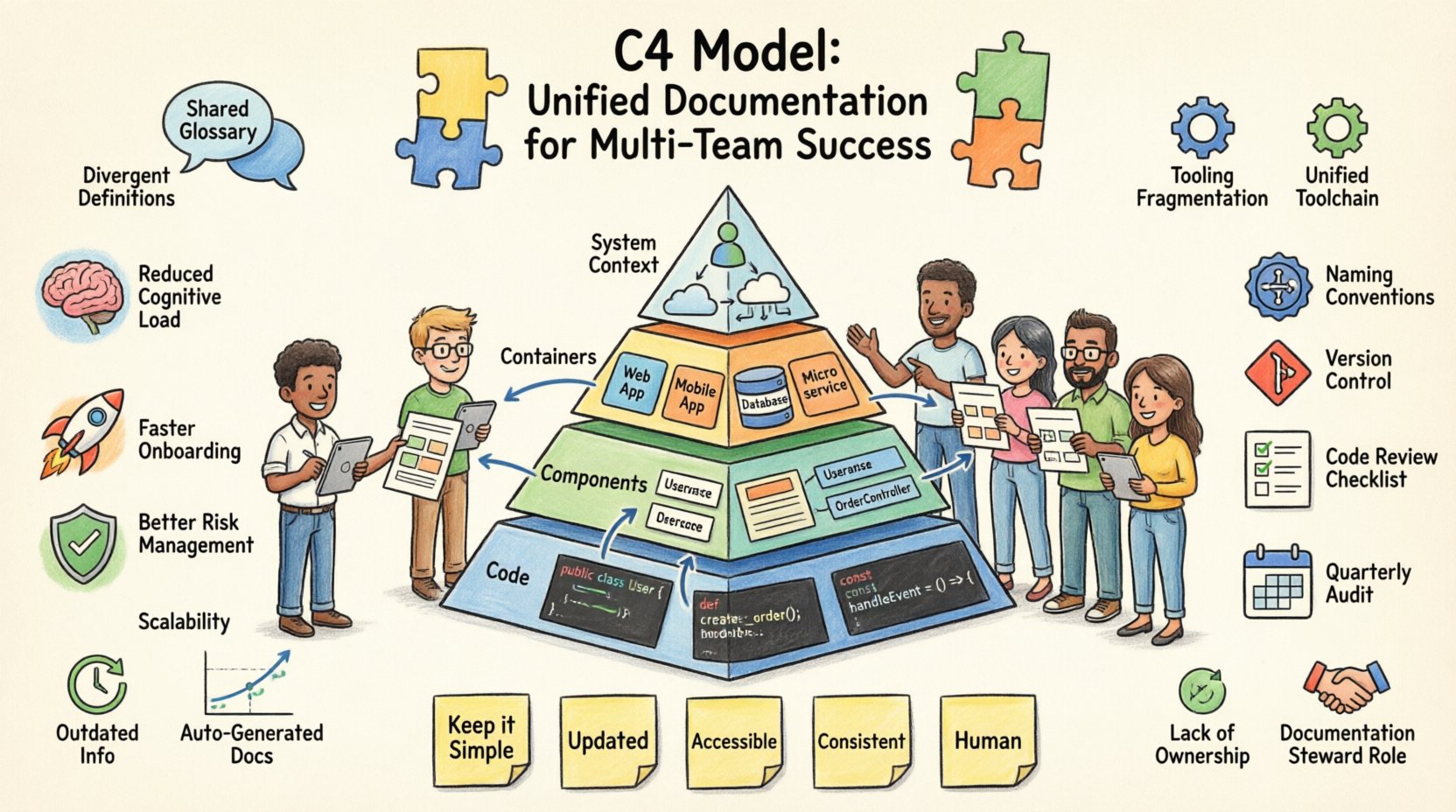
📊 Why Consistency Matters in Distributed Teams
In a monolithic structure, documentation is often a single source of truth. In a distributed environment, silos form naturally. Team A might define a service differently than Team B. These discrepancies lead to integration failures, security vulnerabilities, and increased onboarding time for new hires.
Consistency provides the following benefits:
- Reduced Cognitive Load: Engineers spend less time deciphering unique notations and more time solving problems.
- Faster Onboarding: New team members can understand the landscape without needing constant clarification from senior staff.
- Better Risk Management: Inconsistent documentation often hides architectural debt. Uniformity exposes these issues early.
- Scalability: As the organization grows, the documentation scales with the architecture, rather than becoming a bottleneck.
Achieving this requires a deliberate shift from ad-hoc creation to standardized governance. It is a cultural change as much as a technical one.
🧩 Understanding the C4 Model Context
The C4 model provides a hierarchical approach to software architecture documentation. It breaks down complexity into four distinct levels of abstraction. Using this model ensures that documentation remains relevant to the audience at every stage.
Adopting C4 across multiple teams means agreeing on what belongs at each level. Without this agreement, one team might create a high-level Context diagram while another creates a detailed Component diagram for the same system, causing confusion.
Level 1: System Context
This diagram shows the system as a single box. It focuses on external users and other systems that interact with it. It answers the question: “What is this system, and who uses it?”
- Focus: Business value and external boundaries.
- Audience: Stakeholders, architects, and new hires.
- Key Elements: People, software systems, and relationships.
Level 2: Containers
Here, the system box breaks down into the major building blocks. A container is a distinct unit of deployment, such as a web application, mobile app, database, or microservice.
- Focus: Technology stack and high-level data flow.
- Audience: Developers and architects.
- Key Elements: Containers and the protocols they use (HTTP, gRPC, etc.).
Level 3: Components
This level dives inside a single container. It breaks down the container into its internal logical parts. This is where the code structure begins to emerge visually.
- Focus: Internal logic and data storage.
- Audience: Developers implementing the specific feature.
- Key Elements: Classes, modules, and interfaces.
Level 4: Code
This level maps the components directly to code. It is rarely maintained as a standalone diagram but serves as a reference for understanding specific implementation details.
- Focus: Implementation specifics.
- Audience: Core developers.
- Key Elements: Methods, classes, and database schemas.
🚧 Common Challenges in Multi-Team Documentation
Implementing a standard is difficult when teams operate autonomously. The following obstacles are common in large organizations:
1. Divergent Definitions
Team A might refer to a “Service” as a microservice, while Team B uses the term for a monolithic backend. The C4 model standardizes these terms, but teams must agree to adopt them strictly.
2. Tooling Fragmentation
Different teams often choose different tools to create diagrams. One team uses tool X, another uses tool Y. This makes aggregating documentation difficult. The focus should be on the output format, not the specific software used.
3. Outdated Information
Documentation often lags behind code. When a team refactors a container without updating the diagram, trust in the documentation erodes. This is known as “documentation rot.”
4. Lack of Ownership
If everyone is responsible for documentation, no one is. Clear ownership is required for every diagram and section of the knowledge base.
🛠️ Establishing Standards and Governance
To overcome these challenges, a set of rules must be established. These rules should be documented and accessible to all teams.
Standardizing Naming Conventions
Consistent naming reduces ambiguity. Every container and component should follow a predictable pattern.
- Containers: Use descriptive names (e.g., “Order Service” instead of “App1”).
- Components: Use domain-driven names (e.g., “PaymentProcessor” instead of “LogicModule”).
- Relationships: Use active verbs (e.g., “Sends Request To,” “Stores Data In”).
Defining Abstraction Levels
Teams must agree on when to stop detailing a diagram. A common rule is to stop at the Component level unless a specific code issue requires deeper explanation. This prevents diagrams from becoming too large to manage.
Version Control for Diagrams
Diagrams should be treated as code. They must be stored in the same repository as the source code they describe. This ensures that diagram updates are reviewed in the same pull requests as code changes.
👥 Roles and Responsibilities Matrix
Clarity on who does what is essential. The following table outlines the typical responsibilities for maintaining consistency.
| Role | Responsibility | Frequency |
|---|---|---|
| Architect | Define the C4 standard and review high-level diagrams. | Per Release |
| Team Lead | Ensure team diagrams align with the C4 standard. | Weekly |
| Developer | Create and update component diagrams during development. | Per Feature |
| Technical Writer | Verify text descriptions and ensure clarity for non-technical readers. | Monthly |
🔄 Maintenance and Workflow
Creating documentation is one thing; keeping it accurate is another. A robust workflow ensures that diagrams evolve with the system.
1. The Code Review Link
Documentation changes should be part of the code review process. If a developer changes an API contract, they must update the Container diagram. The reviewer verifies this update before merging.
2. Scheduled Audits
Even with automated checks, human review is necessary. Schedule quarterly audits where a rotating team checks a subset of diagrams for accuracy and compliance with the standard.
3. Deprecation Policies
Old diagrams must be archived. If a container is retired, the diagram should be marked as “Deprecated” and moved to an archive folder. This prevents users from referencing non-existent systems.
📈 Measuring Success
How do you know if the documentation strategy is working? Use the following metrics to gauge effectiveness.
- Adoption Rate: Percentage of projects that have up-to-date C4 diagrams.
- Search Efficiency: Time taken for a new hire to find system information.
- Feedback Loop: Number of tickets or comments regarding documentation inaccuracies.
- Update Latency: Time between a code change and the corresponding documentation update.
🌐 Technology Agnostic Approach
The C4 model is a conceptual framework, not a software requirement. You do not need a specific platform to implement it. The focus must remain on the content, not the tool.
File Formats
Use open file formats for storage. This ensures that diagrams remain accessible even if the original creation tool is no longer available.
- SVG: For vector-based diagrams that scale well.
- PlantUML: For text-based diagram definitions that live in code.
- Markdown: For embedding diagrams directly in documentation pages.
Integration with Knowledge Bases
Link diagrams directly to the relevant documentation pages. Avoid forcing users to navigate away to view an image. Context is key to understanding.
🧠 Cultural Considerations
Tools and processes only work if the culture supports them. Engineers often view documentation as a chore. Leadership must shift this perception.
1. Documentation as Code
Treat documentation with the same rigor as source code. It requires versioning, testing (via review), and ownership. This signals that it is a first-class citizen.
2. Incentivize Contribution
Recognize teams that maintain excellent documentation. Highlight success stories where documentation prevented a major incident or sped up onboarding.
3. Reduce Friction
If creating a diagram is too difficult, people will not do it. Provide templates and presets. Make it easy to create a C4 diagram quickly so the focus remains on the content.
🔗 Cross-Team Dependencies
When multiple teams own different parts of the same system, dependency management is critical. The C4 model excels here by showing boundaries clearly.
Interface Contracts
Every interaction between containers must be documented. This includes input data, output data, and error handling. Teams should agree on these contracts before development begins.
Shared Responsibilities
Sometimes a component spans multiple teams. Define who owns the documentation for that component. A single point of contact prevents conflicting updates.
🔍 Handling Legacy Systems
Not all systems are built with the C4 model in mind. Legacy systems present a unique challenge.
1. Reverse Engineering
Start with the existing system. Create the Context diagram first to understand the boundaries. Then work inward to Containers and Components.
2. Incremental Updates
Do not attempt to document the entire legacy system at once. Prioritize high-risk or high-change areas. Update documentation as changes are made to the system.
3. Gap Analysis
Compare the existing system state with the desired C4 state. Identify where the current documentation fails to meet the standard and create a plan to close the gap.
📝 Summary of Best Practices
To ensure long-term success, keep these principles at the forefront of your documentation strategy.
- Keep it Simple: Avoid over-detailing. Focus on the audience’s needs.
- Keep it Updated: Tie documentation updates to code changes.
- Keep it Accessible: Store diagrams where developers expect to find them.
- Keep it Consistent: Enforce naming and abstraction standards.
- Keep it Human: Write for people, not machines. Clarity trumps technical perfection.
🚀 Moving Forward
Consistency in documentation is a journey, not a destination. It requires ongoing effort and commitment from leadership and engineering teams alike. By adopting the C4 model as a standard, organizations can build a shared understanding of their architecture that scales with their growth.
The investment in consistent documentation pays dividends in reduced bugs, faster development cycles, and a healthier engineering culture. Start small, enforce standards gradually, and measure the impact. With discipline and the right framework, your documentation will become a trusted asset rather than a liability.
Remember, the value of documentation lies in its ability to facilitate communication. If it does not help teams work together better, it is not serving its purpose. Align your processes with this goal, and you will see tangible improvements in your software delivery capabilities.