
Moving from a legacy architecture to a modern infrastructure is a complex undertaking that requires precision, clarity, and a deep understanding of existing dependencies. Many organizations struggle because they attempt to refactor without a clear map of the terrain. This is where structured documentation becomes critical. By leveraging the C4 model, teams can visualize the system landscape at multiple levels of abstraction, ensuring that migration paths are logical, safe, and maintainable. This guide explores how to use C4 Context Views to document and execute legacy system transitions effectively.
📋 Why Documentation Matters in Migration
Legacy systems often accumulate technical debt over years of operation. Codebases become intertwined, and knowledge about the system resides in the minds of a few key individuals. When a migration begins, the risk of breaking business logic is high. Proper documentation mitigates this risk by providing a single source of truth. It allows stakeholders to understand:
- What exists: The current state of applications and services.
- How they interact: The data flows and dependencies between components.
- What must change: The specific areas targeted for refactoring or replacement.
- What remains: The stable core that does not require immediate intervention.
Without these visual aids, migration teams often rely on guesswork. Guesswork leads to downtime, data loss, and extended timelines. A structured approach using the C4 model ensures that the migration path is documented alongside the codebase, making the process transparent and auditable.
🏗️ The C4 Model in a Migration Context
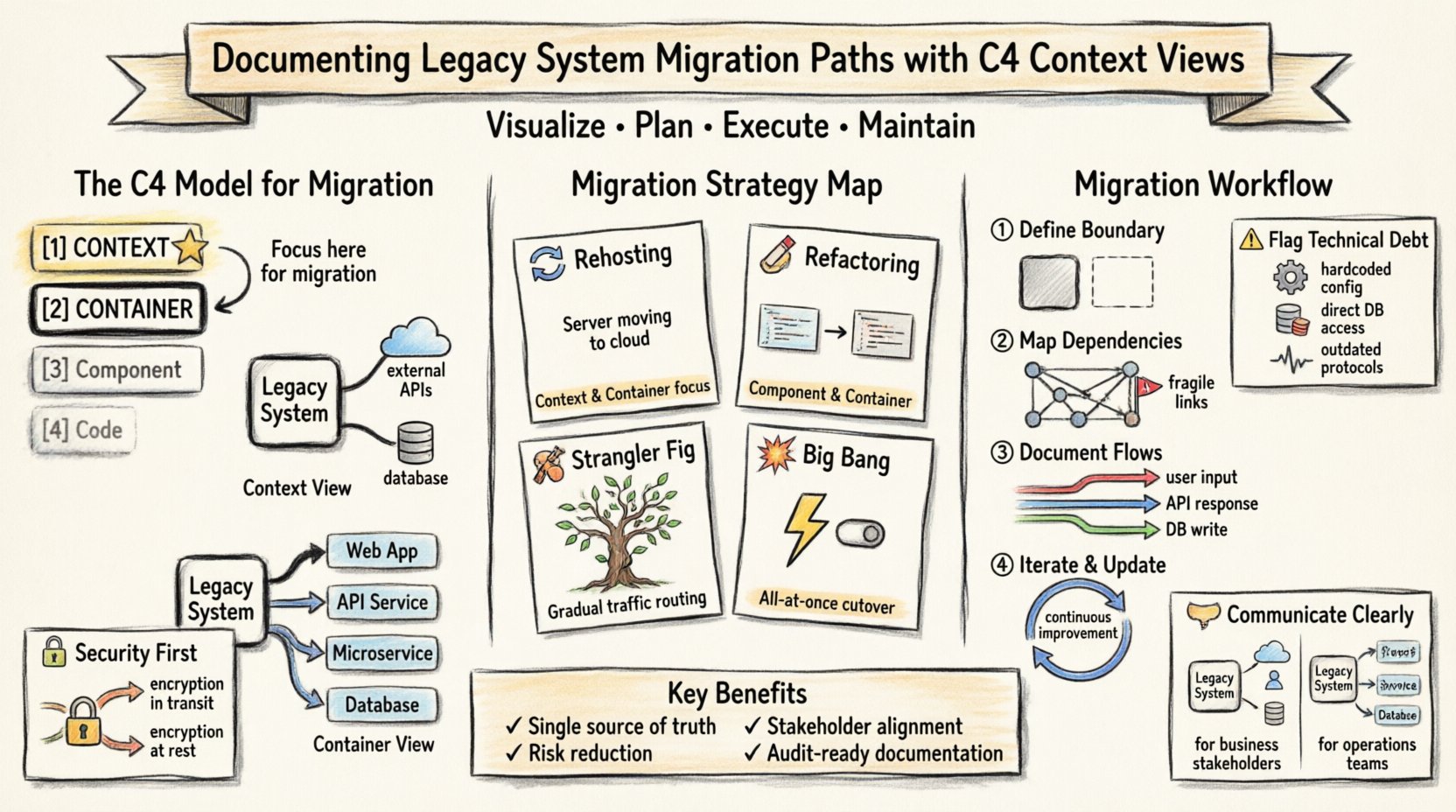
The C4 model is a hierarchy of diagrams used to describe software architecture. It consists of four levels: Context, Container, Component, and Code. For migration projects, the first two levels are particularly valuable. They provide a high-level view without getting bogged down in implementation details too early.
1. The Context View (Level 1)
The Context view shows the system as a single box within a larger ecosystem. It identifies:
- The system being migrated.
- Users and external systems that interact with it.
- The primary data flows between the system and its surroundings.
During migration, this view answers the question: “Who and what relies on this system?” It helps define the boundary of the migration effort. If an external system relies on an API that is being retired, the Context view highlights this dependency immediately.
2. The Container View (Level 2)
The Container view breaks the system into distinct runtime processes. These might be web applications, mobile apps, microservices, or databases. This level is crucial for understanding the deployment topology. In a legacy context, containers might represent monolithic applications that are being split into smaller services.
Key questions addressed at this level include:
- Which processes hold the data?
- Which processes handle the user interface?
- How does data move between containers?
🗺️ Mapping Legacy Systems to C4
When starting a legacy migration, the existing documentation is often sparse or outdated. Rebuilding the C4 diagrams is the first step in the migration plan. This process acts as a discovery phase, forcing the team to interview stakeholders and analyze code to understand the true architecture.
Step 1: Identify the System Boundary
Start by defining the scope. Is the entire legacy suite moving, or just a specific module? The Context view clarifies this. Draw a box representing the legacy system. Identify the actors (users, automated scripts, third-party APIs) that touch this box. This creates the baseline for the migration boundary.
Step 2: Map External Dependencies
Legacy systems often depend on outdated libraries or older infrastructure. Map these relationships in the diagram. If the system talks to a legacy database, that relationship must be documented. If it calls an external payment gateway, that connection must be noted. This prevents accidental disconnections during the move.
Step 3: Define Data Flows
Arrows in the diagram represent data flow. In migration, data integrity is paramount. Documenting the flow ensures that data is migrated correctly. For example, if a legacy system sends reports to a marketing tool, that pipeline must be replicated or replaced in the new environment.
🔄 Migration Strategies and C4 Alignment
Different migration strategies require different documentation depths. The C4 model adapts well to various approaches. Below is a comparison of common strategies and how they align with C4 levels.
| Migration Strategy | C4 Level Focus | Key Documentation Goal |
|---|---|---|
| Rehosting (Lift and Shift) | Context & Container | Ensure network connectivity and hardware compatibility remain intact. |
| Refactoring (Code Modernization) | Component & Container | Map internal logic changes without altering external interfaces. |
| Strangler Fig Pattern | Context & Container | Gradually route traffic from old containers to new containers. |
| Big Bang Cutover | Context | Verify all external dependencies are ready for simultaneous switch. |
For instance, the Strangler Fig pattern is popular for legacy migration. It involves building a new system around the edges of the old one and gradually migrating functionality. The Context view is vital here. It shows the old system as a black box while the new components are added as neighbors. Over time, the new components replace the old ones. The diagram evolves to reflect this transition.
🛠️ Handling Technical Debt in Documentation
Technical debt often hides in the gaps between diagrams. When documenting legacy systems, it is important to mark areas that are known to be fragile. Use annotations or specific styling to indicate:
- Hardcoded values: Configuration that should be externalized.
- Direct database access: Bypassing the application layer.
- Outdated protocols: HTTP/1.1 or unencrypted connections.
By flagging these elements in the diagrams, the migration team can prioritize them. They become part of the migration backlog. This ensures that the new system does not inherit the same fragilities as the old one.
📉 Component Level Details for Logic Migration
While the Context and Container views are high-level, the Component view dives into the internal logic. This is necessary when refactoring business rules. For example, if a legacy monolith contains billing logic, this logic needs to be extracted into a specific service.
The Component view helps by:
- Identifying cohesive groups of functionality.
- Showing how classes and methods interact.
- Highlighting complex dependencies between modules.
When planning the migration, teams can use this view to decide which components to move together. If Component A depends heavily on Component B, moving them separately creates risk. Grouping them ensures that the migration path preserves the integrity of the business logic.
🔗 Managing Dependencies and Interfaces
One of the biggest risks in migration is breaking an interface that another system relies on. The C4 model forces you to document interfaces explicitly. Every arrow in a diagram represents a contract.
Interface Contracts
Document the API endpoints, message formats, and data schemas used by the system. When moving to a new environment, these contracts must be preserved or versioned. If a change is made, it must be communicated to all dependent systems. The diagram serves as the reference point for these changes.
Dependency Mapping
Legacy systems often have circular dependencies. This means System A calls System B, and System B calls System A. This is difficult to migrate. The C4 diagrams help visualize these loops. Teams can then plan a decoupling strategy before the migration begins. Breaking circular dependencies is often a prerequisite for a successful move to microservices.
👥 Stakeholder Communication
Documentation is not just for developers. It is a communication tool for business stakeholders, project managers, and operations teams. The Context view is particularly effective for non-technical audiences because it uses simple boxes and arrows.
- For Business Leaders: The Context view shows how the system supports business goals. It highlights where value is created and where risks lie.
- For Operations: The Container view shows deployment topology. It helps plan infrastructure needs and monitoring requirements.
- For Developers: The Component view provides the roadmap for code refactoring.
Using a consistent notation across these groups reduces friction. Everyone understands what the diagram represents. This alignment is essential for managing expectations during a long migration project.
⚠️ Common Pitfalls in Migration Documentation
Even with a solid model, teams can make mistakes. Being aware of common pitfalls helps avoid delays and rework.
1. Outdated Diagrams
If the diagram does not match the code, it is useless. Documentation must be treated as code. It should be updated whenever the system changes. In a migration, this means updating the diagram after every major milestone. This keeps the team aligned on the current state.
2. Ignoring Non-Functional Requirements
Diagrams often focus on functionality. However, migration also involves performance, security, and availability. These should be noted on the diagram. For example, label a database container with its capacity limits or security protocols. This ensures the new environment meets the same standards.
3. Over-Engineering
Do not try to diagram every single class. The C4 model has four levels, but for migration, the top three are usually sufficient. Focus on the boundaries and the flows. Too much detail obscures the big picture. Keep the diagrams clean and readable.
🔄 Maintaining the Migration Path
Migration is a journey, not a destination. The documentation should evolve as the system changes. Here is a suggested workflow for maintaining the documentation:
- Initial State: Create the Context and Container views of the legacy system.
- Target State: Draft the desired architecture for the new system.
- Gap Analysis: Compare the two diagrams to identify missing pieces.
- Phased Updates: Update the diagrams as each phase of migration is completed.
This iterative approach ensures that the documentation remains accurate. It also provides a historical record of how the system evolved. This is valuable for future maintenance and troubleshooting.
🛡️ Security Considerations in Diagrams
Security is a critical aspect of migration. The C4 model allows teams to annotate security controls. You can label containers with encryption methods or authentication protocols. This makes security a visible part of the architecture rather than an afterthought.
When migrating legacy data, ensure that the data flows are secure. Document the transition of data from the old system to the new one. This helps security teams audit the process. It also ensures compliance with regulations regarding data handling.
🧩 Integration with Existing Tools
Documentation should integrate with the tools teams already use. While the C4 model is independent of specific software, it can be visualized using various tools. The key is to ensure the output is accessible to the team. Export diagrams to formats that can be easily shared, such as images or PDFs.
Version control is also important. Store the diagram files in the same repository as the code. This ensures that the architecture evolves with the codebase. It allows for code review processes to include architectural changes.
📊 Measuring Documentation Success
How do you know if the documentation is helping? Look for specific indicators during the migration:
- Reduced Onboarding Time: New team members understand the system faster.
- Fewer Production Incidents: Dependencies are managed better, reducing breakages.
- Clearer Decisions: Architecture decisions are documented and referenced.
- Accurate Estimates: Migration timelines are more predictable.
If these metrics improve, the documentation strategy is working. If not, revisit the level of detail and the frequency of updates.
🎯 Final Considerations
Documenting legacy system migration paths is not a one-time task. It is an ongoing process that requires discipline and commitment. The C4 model provides a robust framework for this work. It balances high-level overview with necessary detail, allowing teams to navigate complex transitions with confidence.
By focusing on Context and Container views, teams can map the landscape before diving into code. By maintaining these diagrams throughout the process, they ensure that the migration path remains visible and understood. This approach reduces risk and builds a stronger foundation for the future.
Remember that the goal is not just to move code. It is to move understanding. When the team understands the architecture, they can build better systems. Start with the Context view. Define the boundaries. Map the flows. Then, proceed with the migration. With clear documentation, the path forward becomes much clearer.