
Software architecture is fundamentally about managing complexity. As systems grow, the need for clear mental models becomes critical for engineering teams. The C4 model provides a structured approach to visualizing software architecture through a hierarchy of abstractions. Within this hierarchy, two specific levels often cause confusion: Containers and Components. Understanding the distinction between these two is essential for effective communication, scalable design, and maintainable documentation.
This guide explores the nuances of containers and components within the context of the C4 model. We will examine their definitions, responsibilities, boundaries, and how they interact within a broader system design. By clarifying these concepts, teams can create diagrams that truly serve their purpose: communication.
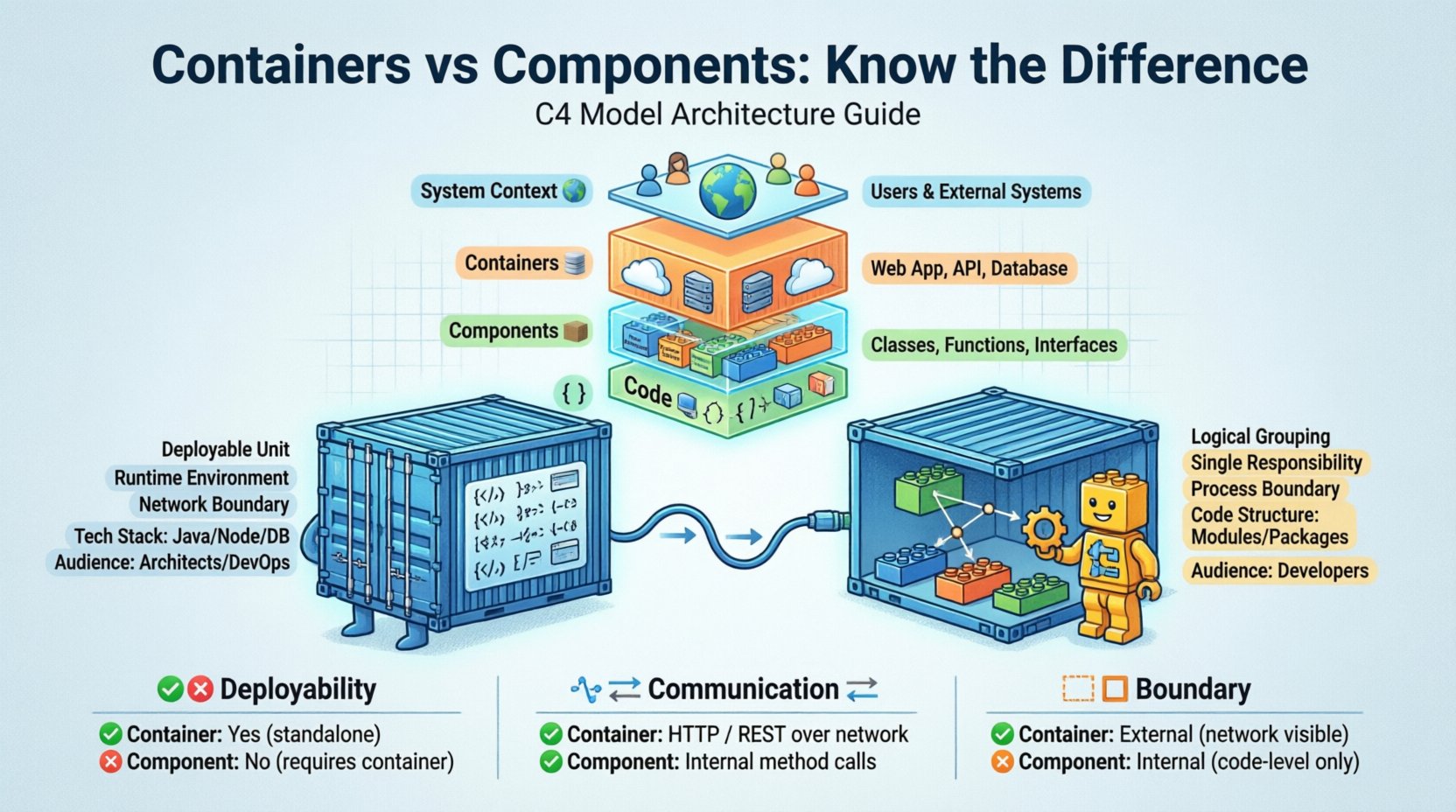
Understanding the C4 Model Hierarchy 📊
Before diving into the specific differences between containers and components, it is necessary to understand where they fit within the C4 model. The model is designed to be a layered approach, allowing architects and developers to zoom in and out of system details as needed.
- Level 1: System Context 🌍 – Shows the system as a whole and how it relates to users and other systems.
- Level 2: Containers 📦 – Depicts the high-level building blocks of the system, such as web applications, mobile apps, or databases.
- Level 3: Components 🧱 – Breaks down containers into smaller, cohesive units of functionality.
- Level 4: Code 💻 – Details the internal structure of components, including classes and interfaces.
The transition from Level 2 to Level 3 is where the distinction between containers and components becomes most significant. While both represent structural elements, they serve different audiences and address different questions regarding the system’s organization.
Defining the Container Level 📦
A container is a deployable unit of software. It represents a distinct runtime environment where code executes. Containers are the physical or logical boundaries where a system actually lives. They are the things you deploy to a server, a cloud platform, or a device.
Characteristics of a Container
- Deployable: A container is a discrete unit that can be installed and run independently.
- Runtime Environment: It provides the necessary infrastructure (like a JVM, a browser, or an OS) to execute code.
- Technology Stack: Containers often imply a specific technology choice, such as a Java application, a Node.js server, or a PostgreSQL database.
- Boundary: Communication between containers happens over the network or through defined protocols.
Common Examples
When modeling at the container level, you might identify the following elements:
- A web server application (e.g., a React app running in a browser).
- A backend microservice (e.g., an API running in a Docker container).
- A mobile application installed on a user’s phone.
- A database server storing persistent data.
- A message queue broker handling asynchronous communication.
The key question at this level is: How is the system physically or logically separated? Containers define the boundaries of deployment and the boundaries of technology stacks.
Defining the Component Level 🧱
Once you enter a container, the architecture becomes more granular. Components are the internal building blocks that make up a container. They are not deployable units on their own; rather, they are logical groupings of functionality within a single deployment unit.
Characteristics of a Component
- Logical Grouping: A component groups related functionality together. It is a conceptual boundary, not necessarily a physical one.
- Single Responsibility: Ideally, a component performs one specific task or a tightly related set of tasks.
- Internal Structure: Components hide their internal implementation details. They communicate with other components through defined interfaces.
- Non-Deployable: You do not deploy a component independently. You deploy the container that holds it.
Common Examples
Inside a backend container, you might find components such as:
- An authentication module responsible for logging users in.
- A reporting engine that generates PDF documents.
- A search index manager that handles data indexing.
- A caching layer that stores temporary data for performance.
The key question at this level is: How is the functionality organized within the deployment unit? Components define the internal structure and separation of concerns.
Key Differences Between Containers and Components 📋
Confusion often arises because both terms describe structure. However, the distinction lies in deployment, technology, and scope. The table below outlines the primary differences.
| Feature | Container (Level 2) | Component (Level 3) |
|---|---|---|
| Deployability | Yes, it is a deployable unit. | No, it is part of a deployable unit. |
| Communication | Over the network (HTTP, TCP, etc.). | Within the same process (method calls, internal APIs). |
| Technology | Defines the runtime (e.g., JVM, Browser). | Defines the code structure (e.g., Modules, Packages). |
| Boundary | System boundary (External). | Internal boundary (Within the container). |
| Audience | Stakeholders, Architects, DevOps. | Developers, Engineers. |
Granularity and Boundaries 🔍
The difference in granularity is the most practical aspect of this distinction. A container represents a boundary that is expensive to cross. Moving data between containers requires network calls, serialization, and handling potential latency or failures. A component represents a boundary that is cheap to cross. Data passing between components happens within the memory of the same process.
The Network Boundary
When you design a container, you are making a decision about network topology. You are deciding where the network call happens. For example, if you have a monolith, you might have one container. If you split it into microservices, you now have multiple containers. This is a significant architectural decision.
The Process Boundary
When you design a component, you are making a decision about code organization. You are deciding how to structure the codebase to keep it maintainable. Components allow you to isolate logic. If you change the logic in one component, it should not break the logic in another, provided the interface remains stable.
Implications for Documentation 📝
Creating accurate diagrams requires knowing which level you are drawing. Mixing containers and components in the same diagram can lead to ambiguity. It obscures the deployment topology and confuses the internal logic.
Best Practices for Diagramming
- Keep Levels Separate: Do not mix containers and components in a single view unless you are explicitly showing a hierarchy. Use separate diagrams for different levels.
- Focus on Audience: Use the Container diagram for technical leadership and infrastructure planning. Use the Component diagram for development teams and code reviews.
- Label Clearly: Ensure every box is labeled as either a container or a component to avoid confusion.
- Define Interfaces: At the component level, focus on the interfaces. At the container level, focus on the protocols (HTTP, gRPC, etc.).
Common Mistakes and Pitfalls 🚫
Even experienced engineers can struggle with this distinction. Here are some common pitfalls to avoid when modeling architecture.
1. Treating Every Module as a Component
It is tempting to break every small module into a component box. However, components should represent significant units of functionality. If a component has only one class, it is likely too small to be a component. It should be grouped with others.
2. Treating Every Service as a Container
Not every service needs its own container. In some architectures, multiple services run within the same container to reduce overhead. The decision to create a new container should be driven by deployment needs, not just logical grouping.
3. Ignoring the Network
When drawing containers, people often forget to draw the lines representing network traffic. The communication between containers is the most critical part of the architecture. Ensure you show how data flows between them.
4. Over-Complicating the Component Diagram
Component diagrams can become cluttered quickly. If you have too many components, you are likely modeling at the wrong level. Consider grouping components into larger logical units if the diagram becomes unreadable.
Evolving Architectures 🔄
Architectures are not static. They evolve over time. A component might grow into a container, or a container might shrink into multiple components.
From Monolith to Microservices
In a monolithic architecture, you might have one container and many components. As the system grows, you might decide to split the container. The components that were once internal might now become external containers. This transition requires careful planning to ensure data integrity and service contracts remain stable.
From Microservices to Serverless
In serverless architectures, the concept of a container changes. You might have many small functions acting as containers. The component level remains relevant for organizing code within those functions. The distinction remains valid, even if the underlying infrastructure changes.
Communication and Collaboration 🤝
The primary value of the C4 model is communication. Different stakeholders need different views of the system. The distinction between containers and components facilitates this.
For Business Stakeholders
Business stakeholders usually care about the System Context. They want to know how the system fits into the business ecosystem. They rarely need to see containers, but if they do, it helps to understand the high-level structure.
For DevOps and Infrastructure Teams
These teams focus heavily on Containers. They need to know what to deploy, where to deploy it, and how it communicates. The container diagram is their blueprint.
For Developers
Developers live at the Component level. They need to know how to organize their code, how to write tests, and how to implement features. The component diagram guides their daily work.
Technical Implementation Considerations 🛠️
Understanding the difference impacts how you write code. It influences how you structure your repositories and how you manage dependencies.
Repository Structure
Each container often corresponds to a separate repository or a distinct deployment pipeline. Components within a container share the same repository and deployment pipeline. This separation allows for independent versioning and deployment of containers.
Dependency Management
Components within a container can have tight dependencies on each other. They can share libraries and memory. Containers must have loose dependencies. They communicate via APIs. This separation encourages loose coupling between containers and tighter cohesion within components.
Summary of Value 💡
Clarity in architecture leads to better software. By clearly differentiating between containers and components, teams can avoid ambiguity in their documentation and design. The C4 model provides the framework, but the discipline lies in applying the correct level of abstraction.
- Containers define the deployment boundary and the runtime environment.
- Components define the logical organization and functionality within that boundary.
When you draw your next diagram, pause to ask: Am I showing where the code runs, or how the code is organized? If you can answer that question, you are likely using the correct level of the C4 model.
This distinction supports scalable growth. As your system expands, your diagrams will evolve. You will add more containers as you split services. You will add more components as you refactor logic. Keeping these concepts distinct ensures your documentation remains accurate throughout the lifecycle of the project.
Ultimately, the goal is not perfection. The goal is understanding. Whether you are onboarding a new developer or planning a major refactor, a clear distinction between containers and components saves time and reduces errors. It turns abstract architecture into actionable plans.
By adhering to these principles, you build systems that are easier to understand, easier to maintain, and easier to scale. The effort invested in accurate modeling pays dividends in long-term productivity.