
Enterprise architecture requires precise modeling to manage complexity. When moving operations to the cloud, the abstraction layers increase significantly. This shift demands a robust framework for visualization and planning. ArchiMate provides the necessary structure for this task. Specifically, the Technology Layer offers a standardized way to define the physical and logical hardware and software resources that support business functions. This guide explores how to leverage Technology Nodes for cloud infrastructure design.
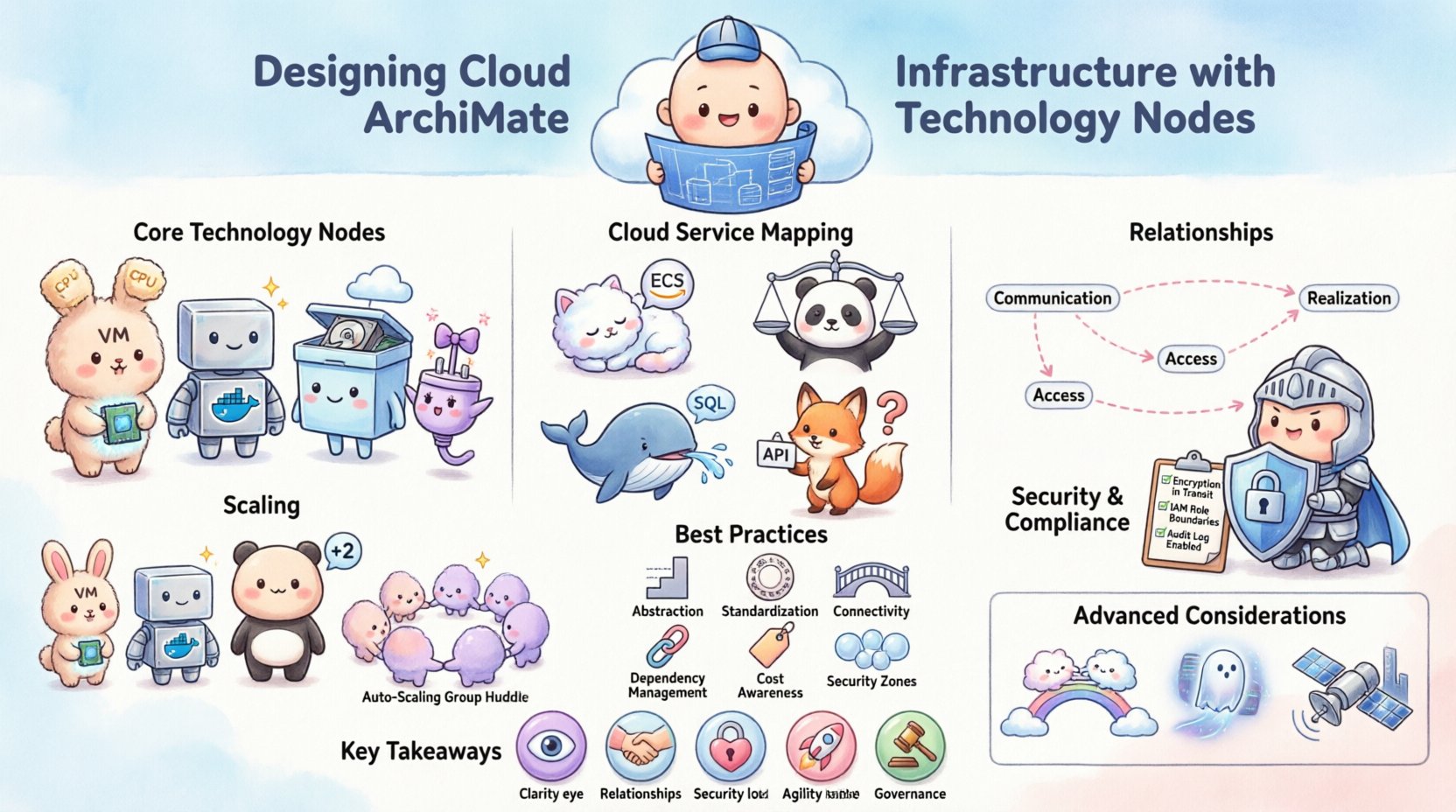
📐 Understanding the Architecture Context
Cloud computing introduces distributed resources that are often ephemeral and dynamic. Traditional on-premise models relied on fixed racks and physical boundaries. Cloud environments rely on logical groupings, virtualization, and service boundaries. To maintain clarity, architects must map these logical services back to tangible infrastructure elements. ArchiMate Technology Nodes serve this purpose.
By defining nodes, you create a baseline for capacity planning, security assessment, and dependency management. Without this modeling, cloud sprawl can lead to unmanaged costs and security gaps. The following sections detail the specific nodes and relationships required for effective design.
🧱 Core ArchiMate Technology Nodes
The Technology Layer consists of specific object types. In a cloud context, these objects represent the compute, storage, and network resources. It is crucial to distinguish between the logical representation and the physical implementation.
1. Technology Node
A Technology Node represents a computational resource. In cloud terms, this is often a virtual machine, a container host, or a serverless function runtime. It is the primary processing unit within the infrastructure.
Capabilities: Executes applications and services.
Characteristics: CPU, memory, and OS configurations.
Cloud Equivalent: Compute instances (e.g., EC2, VMs).
2. Technology Service
A Technology Service represents a resource that provides functionality to the Application Layer. In cloud infrastructure, this includes load balancers, firewalls, and DNS services. These are often consumed rather than owned directly.
Capabilities: Routing, security enforcement, name resolution.
Characteristics: Latency, throughput, availability SLA.
Cloud Equivalent: Managed services (e.g., Load Balancers, WAF).
3. Technology Device
While less common in pure cloud models, devices can represent physical gateways or edge computing units. If an architecture involves hybrid cloud setups, physical devices remain relevant for connectivity.
Capabilities: Physical connectivity, protocol conversion.
Characteristics: Location, physical security.
Cloud Equivalent: Edge routers, on-premise bridges.
4. Technology Interface
This defines the point where a service is accessed. In cloud infrastructure, interfaces are critical for defining how applications communicate with the underlying nodes.
Capabilities: API endpoints, connection ports.
Characteristics: Protocols (HTTP, HTTPS, TCP), authentication methods.
🔄 Mapping Cloud Services to Nodes
Translating cloud capabilities into ArchiMate models requires careful categorization. The table below outlines how common cloud concepts map to standard ArchiMate Technology Layer objects.
Cloud Concept | ArchiMate Node Type | Description |
|---|---|---|
Virtual Machine | Technology Node | Computational resource hosting an OS |
Container Cluster | Technology Node | Grouped nodes managing containerized apps |
Load Balancer | Technology Service | Distributes traffic across nodes |
Object Storage | Technology Node | Storage resource for unstructured data |
Database Instance | Technology Node | Managed data storage and processing |
API Gateway | Technology Service | Manages API access and security |
Firewall | Technology Service | Network security control point |
🔗 Establishing Relationships
Nodes alone do not constitute an architecture. Relationships define how data and control flow between elements. In cloud design, these relationships determine performance characteristics and failure modes.
Communication Path
This relationship indicates that a Technology Node uses a Technology Service. For example, a virtual machine (Node) accesses a database (Service) via a network path. This is vital for tracing data lineage.
Usage: Defines dependency chains.
Impact: Service downtime affects Node availability.
Access
Access relationships show that a Technology Node has access to a Technology Service. This often implies permission or network routing rules.
Usage: Defines network segmentation.
Impact: Security boundary enforcement.
Realization
While more common in the Application Layer, Realization in the Technology Layer connects the Service to the Node that implements it. A managed database service is realized by a cluster of nodes.
Usage: Links logical service to physical implementation.
Impact: Infrastructure provisioning requirements.
🛡️ Security and Governance Implications
Security is a cross-cutting concern in cloud architecture. ArchiMate allows for the modeling of security controls alongside infrastructure nodes. This ensures that security is not an afterthought but a foundational element.
1. Threat Modeling Integration
By mapping nodes to security services, architects can identify single points of failure. If a specific firewall node is removed, which applications lose protection? This visibility supports risk assessment.
Identify critical nodes for redundancy.
Map encryption services to data storage nodes.
Trace authentication flows across service boundaries.
2. Compliance Tracking
Regulatory requirements often dictate where data resides. Technology Nodes can be tagged with location metadata. This supports compliance reporting for data sovereignty laws.
Assign geographic tags to nodes.
Model cross-border data flows explicitly.
Document encryption standards for storage nodes.
3. Access Control Modeling
Access relationships should reflect Identity and Access Management (IAM) policies. Nodes should only access services they are authorized to use.
Define roles for each node type.
Model least privilege access paths.
Document administrative access channels.
🚀 Scaling and Elasticity Design
One of the primary benefits of cloud infrastructure is elasticity. ArchiMate models must reflect this dynamic nature. Static models fail to capture the behavior of auto-scaling groups.
1. Auto-Scaling Groups
When designing nodes, consider them as members of a group rather than individual entities. A single node representation might not suffice for a cluster.
Model the group as a Technology Node.
Link individual instances to the group via aggregation.
Define trigger conditions for scaling events.
2. State Management
Ephemeral nodes lose state upon termination. Persistent state must be externalized. This distinction is critical for disaster recovery planning.
Separate compute nodes from storage nodes.
Model data replication paths explicitly.
Define recovery time objectives for storage nodes.
📊 Maintenance and Evolution
Cloud infrastructure is not a one-time design task. It evolves continuously. The ArchiMate model must be treated as a living document.
1. Version Control
Changes to the infrastructure should be tracked. Versioning the architecture model allows teams to see how the infrastructure has changed over time.
Tag models with release dates.
Document major infrastructure shifts.
Maintain a history of deprecated nodes.
2. Drift Detection
Automated tools can compare the live environment against the ArchiMate model. This process identifies configuration drift.
Sync model with infrastructure-as-code scripts.
Alert on unauthorized node additions.
Review access relationships quarterly.
3. Lifecycle Stages
Nodes move through stages from development to production. The model should reflect these statuses.
Define states: Design, Provisioning, Active, Deprecated.
Track resource consumption per stage.
Plan retirement schedules for legacy nodes.
💡 Best Practices for Cloud Modeling
To ensure the architecture remains useful, adhere to these guidelines when building your cloud infrastructure models.
Abstraction Levels: Do not model every single virtual CPU. Focus on logical nodes that represent functional capacity.
Standardization: Use consistent naming conventions for all nodes and services across the enterprise.
Connectivity: Explicitly model network boundaries. Do not assume connectivity exists without a path.
Dependency Mapping: Link Application Services to Technology Nodes clearly. This helps in impact analysis.
Cost Attribution: Tag nodes with cost centers. This helps in financial operations (FinOps).
Security Zones: Group nodes into security zones (e.g., DMZ, Internal, Restricted) to visualize exposure.
🔍 Advanced Considerations
As architectures become more complex, standard nodes may need refinement. Consider these advanced modeling techniques.
Multi-Cloud Strategies
When using multiple cloud providers, the Technology Layer must distinguish between environments. Use distinct node types or properties to indicate the provider.
Define a property for “Provider”.
Model inter-cloud connectivity paths.
Identify vendor lock-in risks in node definitions.
Serverless Architectures
Serverless functions remove the concept of persistent nodes. However, the runtime environment is still a resource. Model the function invocation as a service interaction.
Model the Function as a Service.
Model the Execution Environment as a Node.
Focus on event triggers rather than uptime.
Edge Computing
Edge nodes introduce latency challenges. Model the physical distance between edge nodes and central cloud nodes.
Include latency metrics in relationships.
Map data synchronization flows.
Consider offline capabilities in node definitions.
📝 Summary of Key Takeaways
Designing cloud infrastructure using ArchiMate Technology Nodes requires a balance between logical abstraction and physical reality. The framework provides the vocabulary to describe resources without being tied to specific vendors.
Clarity: Use nodes to visualize the compute and storage landscape.
Relationships: Define communication paths to understand dependencies.
Security: Integrate security services directly into the infrastructure model.
Agility: Model elasticity and lifecycle stages to support change.
Governance: Maintain the model as a source of truth for audits and planning.
By following these structured approaches, architects can create robust cloud designs. The result is an infrastructure that is resilient, secure, and aligned with business goals. The technology layer serves as the foundation upon which all application capabilities rest. Treat it with the same rigor as the business layer itself.