
Enterprise architecture requires a structured approach to understanding how an organization operates. The ArchiMate framework provides a standardized language for modeling these operations. Focusing on the Business Layer allows stakeholders to visualize the core activities that drive value without getting bogged down in technical implementation details. This guide explores the principles, elements, and best practices for designing robust business process models.
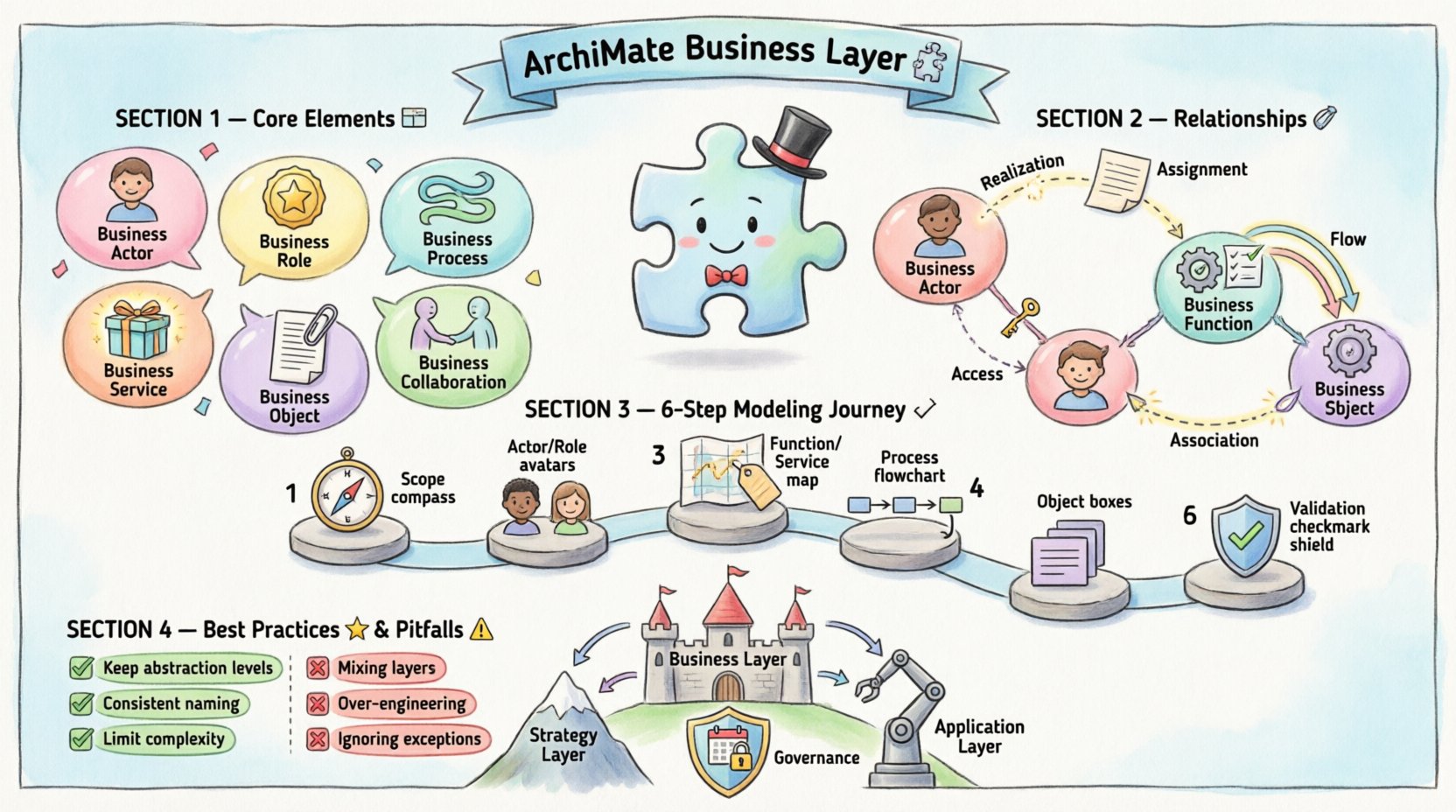
Understanding the Business Layer Context 🧩
The Business Layer serves as the foundation for enterprise architecture. It represents the business strategy, governance, organization, and processes. When modeling here, the goal is clarity and alignment with business goals. It acts as the bridge between strategic objectives and the capabilities required to achieve them.
Effective modeling in this layer ensures that:
- Processes are clearly defined and repeatable.
- Responsibilities are assigned to specific roles.
- Information flow is understood across departments.
- Services are aligned with customer needs.
Core Elements of the Business Layer 🧱
To construct accurate models, one must understand the fundamental building blocks. Each element serves a specific purpose within the ecosystem.
Business Actor and Business Role
A Business Actor represents an entity capable of performing activities. This could be a person, a department, or an external organization. They initiate business processes.
A Business Role represents a collection of responsibilities and tasks. It defines what is done rather than who does it. A single Business Actor can fulfill multiple Business Roles, and multiple Actors can fulfill a single Role.
- Actor: The “Who” (e.g., Customer, Employee).
- Role: The “Function” (e.g., Administrator, Seller).
Business Process and Business Function
A Business Process is a set of activities that produce a result. It is time-based and event-driven. It is the primary unit of work in the model.
A Business Function is a set of responsibilities or capabilities. It is stable and does not change frequently. Functions group processes by capability rather than by flow.
| Element | Nature | Focus |
|---|---|---|
| Business Process | Dynamic | Flow of activities |
| Business Function | Static | Capabilities & Skills |
Business Service and Business Interface
A Business Service is a behavior provided by a Business Function. It is what the business offers to its clients. It is the external view of a function.
A Business Interface represents the point of contact. It defines how a Business Service is accessed or consumed by an Actor.
Business Object
A Business Object represents information or physical entities used by the business. It can be created, modified, or used by processes. Examples include Orders, Contracts, or Invoices.
Business Collaboration
A Business Collaboration represents the interaction between Business Roles. It is used when modeling communication or coordination between different actors within the organization.
Defining Relationships and Connections 🔗
Elements alone do not form a model. Relationships define how they interact. Understanding these connections is critical for valid process modeling.
- Realization: One element realizes another. For example, a Process realizes a Service.
- Assignment: An Actor or Role is assigned to an Object, Function, or Process.
- Access: An Object is accessed by a Process or Interface.
- Flow: Defines the order of execution between processes or objects.
- Association: A generic link between elements without a specific directional flow.
The Flow Relationship
The Flow relationship is vital for process modeling. It indicates the order in which activities occur. It connects:
- Business Process to Business Process.
- Business Process to Business Object (as input or output).
- Business Event to Business Process.
When mapping flows, ensure that every input has a corresponding output. Gaps in flow indicate missing steps in the operational model.
Step-by-Step Modeling Approach 📝
Creating a model requires a disciplined method. Follow these steps to ensure consistency and accuracy.
1. Define Scope and Context
Identify the boundaries of the model. Determine which business units are included. Decide the level of detail required. High-level models show major functions, while detailed models show specific activities.
2. Identify Business Actors and Roles
List all external and internal actors. Define the roles they play. Ensure that responsibilities do not overlap unnecessarily. This establishes who is involved in the workflow.
3. Map Business Functions and Services
Define the capabilities the organization possesses. Map these to the services they deliver. This creates the backbone of the architecture.
4. Design Business Processes
Break down functions into processes. Define the sequence of activities. Identify triggers and outcomes. Ensure each process delivers a specific value to a stakeholder.
5. Assign Business Objects
Identify the data or physical items involved. Map them to the processes that create or consume them. This clarifies information flow.
6. Validate Relationships
Check all connections. Ensure that flows are logical. Verify that actors are assigned to appropriate roles. Validate that services are realized by the correct processes.
Best Practices for Process Modeling 🌟
Adhering to standards ensures that models remain useful over time.
- Maintain Abstraction Levels: Do not mix high-level strategy with low-level task execution in the same diagram. Keep diagrams focused.
- Use Consistent Naming: Follow a naming convention for elements. Use active verbs for processes and nouns for objects.
- Limit Diagram Complexity: If a diagram has too many elements, split it into sub-processes. Use delegation to manage complexity.
- Document Assumptions: Clearly state the assumptions made during modeling. This helps future reviewers understand the context.
- Version Control: Treat models as living documents. Track changes and maintain a history of evolution.
Common Challenges and Pitfalls ⚠️
Even experienced modelers encounter difficulties. Recognizing these pitfalls helps in avoiding errors.
1. Mixing Layers
A common mistake is including technology or application details in the Business Layer. Keep the Business Layer focused on business logic. If technical implementation is needed, use the Application or Technology Layer.
2. Over-Engineering
Creating a model that is too detailed can be counterproductive. If a process has hundreds of steps, consider breaking it down. Focus on the value chain rather than every minor click.
3. Ignoring Exceptions
Standard models often show the happy path. Real business includes exceptions. Document exception flows where they significantly impact the process outcome.
4. Inconsistent Granularity
Ensure that all processes in a diagram are at the same level of detail. Do not mix a high-level function with a detailed activity.
Integration with Other Layers 🔗
The Business Layer does not exist in isolation. It interacts with the Strategy and Motivation Layer and the Application Layer.
Connection to Strategy Layer
Business processes must support Business Drivers and Goals. Use the Realization relationship to link Processes to Goals. This ensures that every activity contributes to the strategic intent.
Connection to Application Layer
Business Processes often rely on Application Services. Use the Assignment relationship to link a Process to an Application Component. This highlights where automation is required.
Documentation and Governance 📚
Once the model is created, it must be managed. Governance ensures that the model remains accurate as the organization changes.
- Review Cycles: Schedule regular reviews of the models. Update them when business rules change.
- Access Control: Define who can edit the models. Protect critical definitions from unauthorized changes.
- Export Capabilities: Ensure the modeling environment allows exporting reports. Stakeholders often need static views for presentations.
Visualizing Complexity 🎨
Effective visualization aids understanding. Use the following tips for clear diagrams.
- Grouping: Use Groups to organize elements by department or function.
- Annotations: Add text boxes to explain complex relationships.
- Color Coding: Use color to differentiate between types of elements (e.g., Process vs. Object).
- Hierarchy: Use zooming techniques to drill down into specific processes without cluttering the main view.
Conclusion Summary 📝
Designing business process models using the ArchiMate Business Layer requires a clear understanding of the framework elements and their relationships. By focusing on Actors, Roles, Processes, and Services, organizations can create a transparent view of their operations. Adhering to best practices and avoiding common pitfalls ensures the model remains a valuable asset. Continuous governance and alignment with strategy complete the lifecycle of the architecture.
Remember that the goal is clarity. A model that is too complex fails its purpose. A model that is accurate and consistent empowers decision-making. Invest time in the design phase to save effort during implementation and maintenance.