
In the modern digital landscape, data is the lifeblood of operations, yet it carries significant weight regarding security and privacy obligations. Organizations must understand where information originates, how it moves, and where it resides to satisfy regulatory requirements. Data Flow Diagrams (DFDs) provide a visual blueprint for this complexity. They are not merely technical sketches; they are essential documents for privacy governance.
This guide explores the critical relationship between Data Flow Diagrams and privacy compliance. We will examine how visualizing data paths aids in meeting legal standards, identifying risks, and maintaining trust with users. Understanding these mechanics is vital for data protection officers, architects, and compliance teams navigating the intricate web of global regulations.
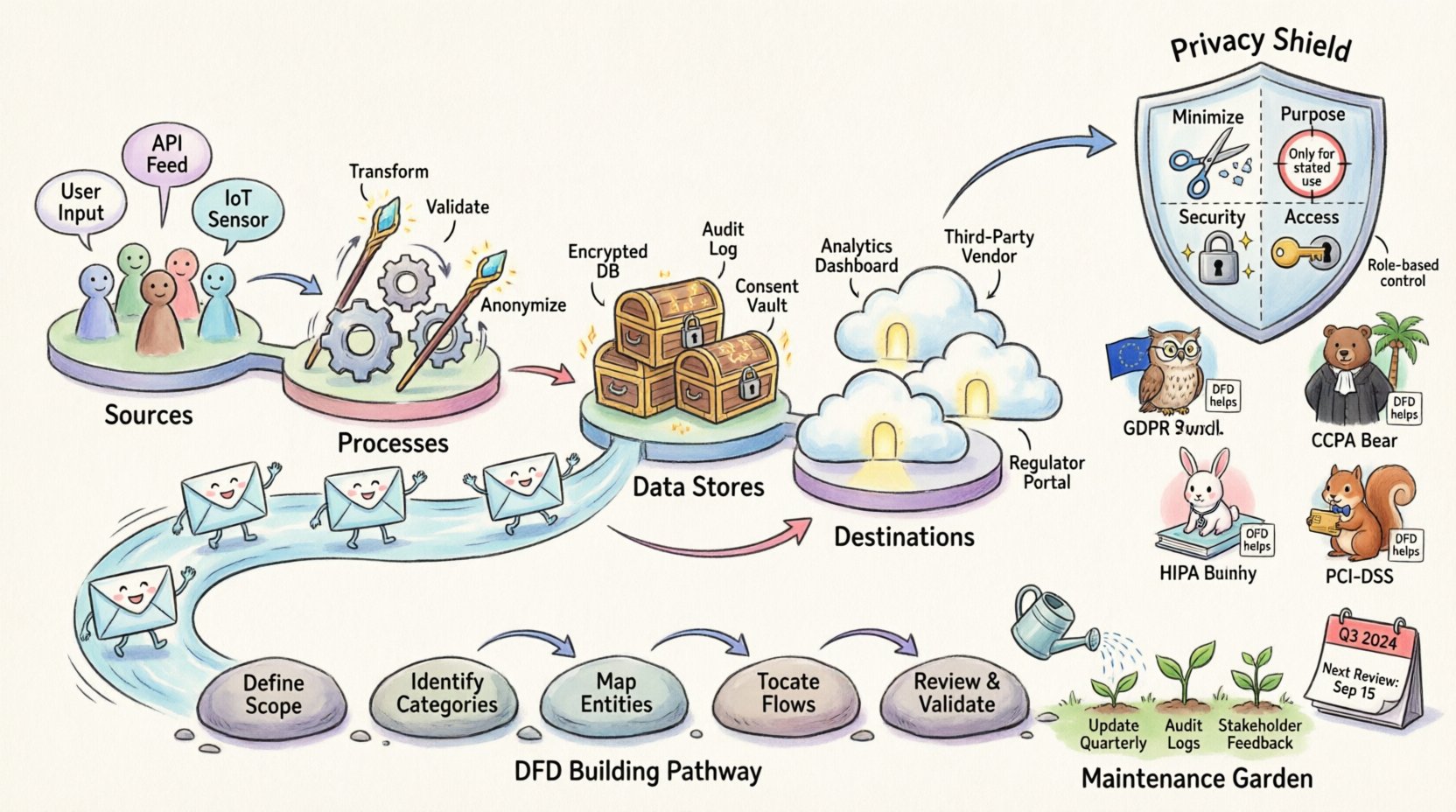
📊 Understanding Data Flow Diagrams
A Data Flow Diagram is a graphical representation of the flow of data through an information system. It focuses on how data enters, moves through, and exits the system. Unlike a flowchart, which depicts logic and decision-making steps, a DFD focuses strictly on the movement of information assets.
For privacy purposes, these diagrams serve as a map of Personal Identifiable Information (PII) and sensitive data. They answer fundamental questions:
- Where does the data come from? (Sources)
- Who processes the data? (Functions)
- Where is the data stored? (Data Stores)
- Who receives the data? (Destinations)
- Is the data encrypted during transit?
DFDs typically consist of four primary components:
- External Entities: People, organizations, or systems that interact with the system (e.g., users, third-party vendors).
- Processes: Transformations that change data from one form to another (e.g., validation, encryption, calculation).
- Data Stores: Locations where data rests (e.g., databases, file systems, cloud buckets).
- Data Flows: The paths data travels between the above components.
When applied to privacy, these components must be annotated with data classification labels. A data flow moving customer names requires different scrutiny than a flow moving system logs. This granularity allows compliance teams to pinpoint exactly where sensitive information resides and travels.
⚖️ The Intersection of DFDs and Privacy Laws
Privacy regulations often mandate transparency and accountability. They require organizations to know what data they hold and why. Data Flow Diagrams are practical tools to demonstrate this knowledge. They support the principle of Data Mapping, which is a foundational requirement in many frameworks.
Key Privacy Principles Supported by DFDs
- Data Minimization: By visualizing flows, teams can identify unnecessary data collection points. If a data store is filled but not used, it can be removed.
- Purpose Limitation: DFDs clarify if data collected for one function is being moved to another function for which consent was not granted.
- Security: They highlight weak points in transit. If data flows over an unencrypted channel, the risk is immediately visible.
- Access Control: They show which external entities receive data, allowing for targeted access reviews.
📜 Key Regulatory Frameworks and DFD Requirements
Different regions and industries have specific mandates regarding data handling. Below is an overview of how Data Flow Diagrams align with major compliance standards.
| Regulation | Key Requirement | How DFDs Help |
|---|---|---|
| GDPR (General Data Protection Regulation) | Article 30: Records of Processing Activities (RoPA) | Visualizes the processing lifecycle, showing legal bases and storage locations. |
| CCPA (California Consumer Privacy Act) | Right to Know and Right to Delete | Locates all copies of consumer data across systems to fulfill deletion requests. |
| HIPAA (Health Insurance Portability and Accountability Act) | Security and Privacy Rules | Maps Protected Health Information (PHI) flow to ensure proper encryption and access controls. |
| PCI-DSS (Payment Card Industry Data Security Standard) | Data Protection for Cardholders | Identifies where cardholder data enters and exits to enforce network segmentation. |
For instance, under GDPR, organizations must maintain a Record of Processing Activities. While a spreadsheet can technically suffice, a DFD offers a clearer narrative of the data lifecycle. It shows the relationship between the data controller and data processor more intuitively than a list.
🛠️ Step-by-Step Guide to Privacy-Centric DFDs
Creating a DFD for compliance requires a methodical approach. It is not enough to draw a system diagram; the diagram must reflect reality and privacy controls. Follow these steps to build a compliant artifact.
1. Define the Scope
Begin by identifying the boundaries of the system. What systems are included? What third-party integrations are involved? Be precise. Excluding a small vendor integration can lead to compliance gaps.
- List all internal systems involved.
- List all external APIs or partners.
- Define the geographic boundaries (e.g., EU data vs. US data).
2. Identify Data Categories
Not all data is treated equally. Classify the data flowing through the system. Common categories include:
- Personal Identifiable Information (PII)
- Financial Data
- Health Information
- Authentication Credentials
- System Logs (which may contain PII)
Labeling these on the DFD is crucial. A flow of “User Data” is too vague. It should be “Login Credentials” or “Email Address”.
3. Map the External Entities
Identify every source and destination. This includes:
- End-users
- Marketing partners
- Analytics providers
- Cloud storage providers
- Government agencies (if applicable)
Ensure that every entity has a defined legal basis for processing the data. If a data flow goes to a third party, verify the contract exists.
4. Document Data Stores
Where does the data sit? Is it in a relational database, a NoSQL store, or a spreadsheet? Note the encryption status of each store. Compliance often requires knowing if data at rest is encrypted. Label the storage location with its security posture (e.g., “Encrypted at Rest”).
5. Annotate Data Flows
This is the most critical step. Every arrow represents a risk vector. Annotate each flow with:
- Protocol: HTTPS, FTP, API, etc.
- Encryption: TLS 1.2, AES-256, etc.
- Frequency: Real-time, batch, daily.
- Consent: Is user consent required for this specific flow?
6. Review and Validate
Draw the diagram and walk through it with the engineering team. Does it match the code? Often, developers create workarounds that bypass documented flows. Ensure the diagram reflects the actual implementation, not just the intended design.
🛑 Common Challenges and Solutions
Building and maintaining accurate Data Flow Diagrams is difficult. Teams often encounter specific hurdles that can compromise compliance efforts.
- Stale Diagrams: The biggest risk is a diagram that does not match the current system. Software updates, new features, and infrastructure changes often break the visual map. Solution: Integrate DFD updates into the Change Management process.
- Shadow IT: Teams often deploy tools without central approval. These systems appear on the network but not on the official diagram. Solution: Conduct regular network scans and asset discovery.
- Third-Party Complexity: Understanding how a vendor processes data is hard. They often do not provide detailed flow maps. Solution: Request their SOC 2 reports or Privacy Impact Assessments to understand their internal flows.
- Granularity: Diagrams can become too complex or too simple. Solution: Use a multi-level approach. Level 0 for high-level view, Level 1 for specific subsystems.
- Human Error: Manual drawing leads to mistakes. Solution: Use diagramming tools that enforce standards, though avoid naming specific vendors.
🔄 Maintenance and Lifecycle Management
A Data Flow Diagram is a living document. It requires ongoing maintenance to remain a valid compliance artifact. Once a year is insufficient for dynamic environments. Consider the following maintenance strategies.
Trigger-Based Updates
Update the diagram whenever a specific event occurs. Examples include:
- Adding a new software module
- Moving infrastructure to a new cloud region
- Changing a vendor contract
- Introducing a new data field
Regular Audits
Schedule periodic reviews where the diagram is compared against the actual system configuration. This can be part of the internal audit cycle. The audit should verify:
- Are all data stores listed?
- Are all flows encrypted as claimed?
- Are all external parties still authorized?
Integration with Incident Response
When a data breach occurs, speed is essential. A current DFD helps the incident response team understand the blast radius. If a database is compromised, the diagram shows which other systems rely on that data. This accelerates containment and notification processes.
Training and Culture
Ensure that engineers understand the importance of the diagram. When a new developer joins a project, they should be aware of the data flows and privacy constraints. This cultural shift reduces the likelihood of creating undocumented flows in the future.
🔍 Advanced Considerations for Global Compliance
As organizations expand globally, data sovereignty becomes a factor. Data Flow Diagrams help visualize cross-border transfers. If data leaves the European Union, specific safeguards are required. The diagram should clearly mark the boundary between jurisdictions.
Consider the following points for global scenarios:
- Cloud Regions: Ensure the diagram specifies the physical location of data centers.
- Sub-processors: If a vendor uses sub-processors, these must be mapped in the flow.
- Standard Contractual Clauses: Mark flows that require SCCs or other transfer mechanisms.
Furthermore, automated data discovery tools can assist in verifying the diagram. These tools scan networks for sensitive data patterns. The output can be compared against the manual DFD to find discrepancies.
📝 Summary of Best Practices
To ensure your Data Flow Diagrams effectively support privacy compliance, adhere to these principles:
- Accuracy: The diagram must reflect reality, not theory.
- Clarity: Use standard symbols and clear labels.
- Granularity: Include enough detail to identify risks but avoid unnecessary clutter.
- Version Control: Treat the diagram like code. Keep a history of changes.
- Accessibility: Ensure the diagram is available to auditors and legal teams when requested.
- Review: Schedule regular reviews to keep the diagram current.
By treating Data Flow Diagrams as a core component of privacy governance, organizations can reduce risk and demonstrate accountability. They transform abstract compliance requirements into concrete visual evidence of data stewardship.