
Disaster recovery is rarely about the catastrophe itself; it is about the fragility of the structures we build before the storm hits. In our recent incident, a seemingly minor oversight in a database schema design became the bottleneck for an entire restoration process. The culprit was an Entity Relationship Diagram (ERD) that failed to accurately reflect the production environment’s data dependencies. What should have been a forty-five-minute operation stretched into three hours of manual intervention and data reconciliation. 🕰️
This article details the technical breakdown of that failure, the specific schema inconsistencies that caused the delay, and the procedural changes we implemented to prevent recurrence. We will examine how data integrity relies heavily on the accuracy of design documentation, not just the code itself.
The Critical Role of ERDs in Data Resilience 🛡️
Entity Relationship Diagrams are the blueprints of the digital infrastructure. They map out tables, fields, primary keys, and foreign keys, defining how data connects and flows. When a disaster strikes, these diagrams are the first reference point for engineers attempting to restore state. If the map is wrong, the journey is delayed.
In the context of disaster recovery, an ERD serves three primary functions:
- Validation: It confirms that the restored schema matches the expected state of the application.
- Dependency Mapping: It identifies which tables rely on others, dictating the order of restoration.
- Constraint Verification: It ensures that referential integrity rules are correctly applied during the import process.
When the ERD does not align with the actual database configuration, the restoration scripts fail at the point of validation. This forces engineers to stop, investigate, and manually patch the schema. This manual step is where time is lost. ⏳
The Incident: A Timeline of Errors 📉
The incident began with a failure in the primary data store. A catastrophic hardware error triggered the failover to our secondary environment. The standard operating procedure was to initiate the restore script, which relied on a static ERD version stored in our documentation repository.
Here is the timeline of the failure:
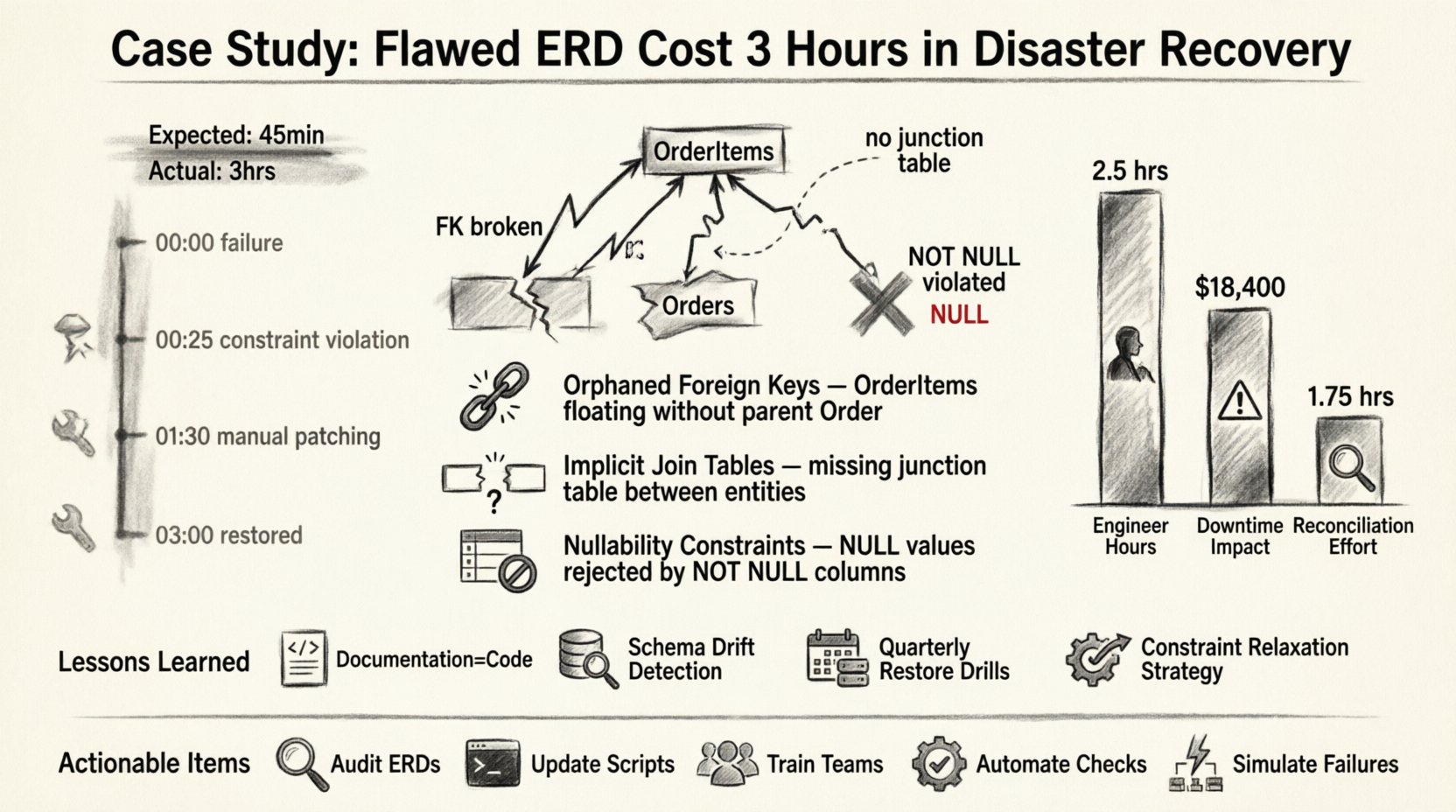
- 00:00 – Primary system failure detected. Alert triggers incident response.
- 00:05 – Engineering team mobilized. Access granted to secondary environment.
- 00:15 – Restore script initiated based on documentation ERD.
- 00:25 – Script halted. Foreign key constraint violation detected.
- 00:30 – Investigation begins. Discrepancy found between ERD and live schema.
- 01:30 – Schema patching and manual data reconciliation started.
- 03:00 – System restored to operational status.
The three-hour delay was not caused by network latency or hardware slowness. It was caused by the logic gap between the design document and the physical reality. 🧩
The Specific Schema Flaws Identified 🔍
Upon inspecting the live database against the ERD, we identified three critical discrepancies. These were not syntax errors; they were logical omissions that only became apparent when the system attempted to enforce relationships.
1. Orphaned Foreign Keys
The ERD depicted a strict one-to-many relationship between Orders and OrderItems. However, the actual database contained legacy data where OrderItems existed without a corresponding Order record due to a previous migration that did not enforce constraints. The ERD did not account for this orphaned state. When the restore script attempted to re-establish the foreign key, the database rejected the data because the parent record was missing or the constraint was enforced differently than documented.
2. Implicit Join Tables
A many-to-many relationship was represented in the ERD as a direct link between two tables. In the physical implementation, this was handled via a junction table. The restoration logic expected the direct link and attempted to insert data into the wrong columns. This resulted in a cascade of type mismatch errors that required manual schema alteration.
3. Nullability Constraints
The ERD indicated that several fields were optional (nullable). The production schema, however, had been updated over time to enforce non-null values for data quality purposes. The ERD was not updated to reflect this change. During restoration, the script attempted to insert NULL values into non-nullable columns, causing immediate rollback of the transaction.
These discrepancies highlight a common issue in technical documentation: documentation drift. The document becomes outdated as the system evolves, creating a false sense of security.
Cost Analysis: Time vs. Accuracy 💰
The financial impact of the three-hour outage is significant, but the reputational cost is higher. Below is a breakdown of the resources consumed during the delay.
| Resource | Time Consumed | Impact |
|---|---|---|
| Senior Engineers | 3 Hours | High Priority diverted from development |
| System Downtime | 3 Hours | Service availability reduced by 15% |
| Data Reconciliation | 1.5 Hours | Manual verification required |
| Documentation Update | 0.5 Hours | Post-incident catch-up |
The table illustrates that the majority of the cost was not the restore itself, but the correction of the restore. If the ERD had been accurate, the restoration would have proceeded without interruption.
Technical Breakdown: Why the Script Failed 🛠️
To understand the severity of the error, we must look at how the restoration script interacted with the database engine. The script followed a standard sequence:
- Create Tables based on ERD definitions.
- Apply Constraints (Primary Keys, Foreign Keys). 3. Insert Data.
- Verify Integrity.
When the script reached step 2, it attempted to create a foreign key constraint linking Table A to Table B. The database engine scanned Table B for existing data. It found records that violated the constraint because the parent key was missing. Because the script was written to be idempotent and safe, it stopped rather than corrupting the data. This safety feature, while good for data integrity, acted as a blocker for the recovery timeline.
The script could not proceed until the data in Table B was cleaned. Cleaning data requires:
- Identifying the orphaned records.
- Deciding whether to delete them or create phantom parent records.
- Executing the cleanup manually.
- Re-running the constraint creation.
Every step in this chain adds time. The ERD should have flagged the potential for orphaned data during the design phase, prompting a data migration strategy rather than a simple schema replication.
Lessons Learned: Strengthening the Schema Lifecycle 🔄
Following the incident, we initiated a rigorous review of our schema management practices. We realized that relying on a static document for disaster recovery was insufficient. We needed a dynamic, version-controlled approach to schema design.
Here are the key takeaways from the incident:
- Documentation is Code: The ERD is not a separate artifact; it is part of the codebase. It must undergo the same version control and review processes as the application logic.
- Schema Drift Detection: We implemented automated tools to compare the live database schema against the versioned ERD. Any deviation triggers an alert immediately.
- Testing Restoration: We now run restoration drills in a sandbox environment quarterly. This ensures that the ERD accurately reflects the restore path.
- Constraint Relaxation: We adjusted the restore scripts to temporarily disable foreign key constraints during the initial data load, enforcing them only after all data is verified.
Best Practices for ERD Maintenance 📝
To prevent future delays, we have adopted a set of best practices for maintaining Entity Relationship Diagrams. These steps ensure that the blueprint remains valid throughout the lifecycle of the system.
1. Version Control for Diagrams
Store ERD files in the same repository as the source code. Tag every release with a corresponding diagram version. This allows engineers to retrieve the exact state of the schema at any point in time.
2. Automated Generation
Where possible, generate ERDs directly from the database schema rather than drawing them manually. This reduces the chance of human error and ensures the diagram always matches the reality.
3. Regular Audits
Schedule a quarterly audit of the ERD. Compare the diagram against the production environment. Document any changes made outside the standard deployment pipeline.
4. Include Data Migration Notes
The ERD should not just show tables; it should show the history of data. Annotate the diagram with notes about data that might be orphaned or legacy. This informs the recovery team to expect anomalies.
5. Review During Sprint Planning
When a new feature requires a database change, the ERD must be updated in the same ticket. Do not allow schema changes to be deployed without a corresponding diagram update.
The Human Element in Technical Errors 🧑💻
It is easy to blame the diagram or the script, but the root cause was often a communication gap. The developer who added the new field did not update the diagram. The engineer who reviewed the code did not check the schema documentation.
Technical processes are only as strong as the people following them. We introduced a checklist for deployment that includes a schema verification step. Every deployment must include a diff report showing the changes to the database structure. This forces visibility on schema modifications.
Final Thoughts on Resilience 🏗️
Disaster recovery is a measure of our preparation, not just our reaction. The three-hour delay was a symptom of a larger issue: the disconnect between design and implementation. By treating the Entity Relationship Diagram as a living, breathing component of our infrastructure, we can reduce recovery times significantly.
Data integrity is not a feature; it is a foundation. When that foundation cracks, the entire structure is at risk. Ensuring that our blueprints are accurate is the first step toward a resilient architecture. We must invest time in documentation as much as we invest in code.
Summary of Actionable Items ✅
- Audit Current ERDs: Compare all documentation against live schemas immediately.
- Update Scripts: Modify disaster recovery scripts to handle constraint violations gracefully.
- Train Teams: Ensure all engineers understand the importance of schema documentation.
- Automate Checks: Implement tools that alert on schema drift.
- Simulate Failures: Conduct regular disaster recovery drills to test the accuracy of the documentation.
By adhering to these practices, we can ensure that future incidents are resolved in minutes, not hours. The cost of accuracy is far lower than the cost of correction.