
Modern software systems are complex. They span multiple services, languages, and teams. Keeping track of how these pieces fit together is a constant challenge. Traditional documentation often becomes outdated the moment it is written. This creates a gap between what is built and what is understood. A self-service architecture knowledge base solves this problem. It empowers engineers to find and update information without waiting for a central team.
The C4 Model provides the structure needed for this effort. It breaks down system design into four distinct levels. By combining the C4 Model with a self-service workflow, organizations can maintain clarity and speed. This guide explores how to implement this approach effectively.
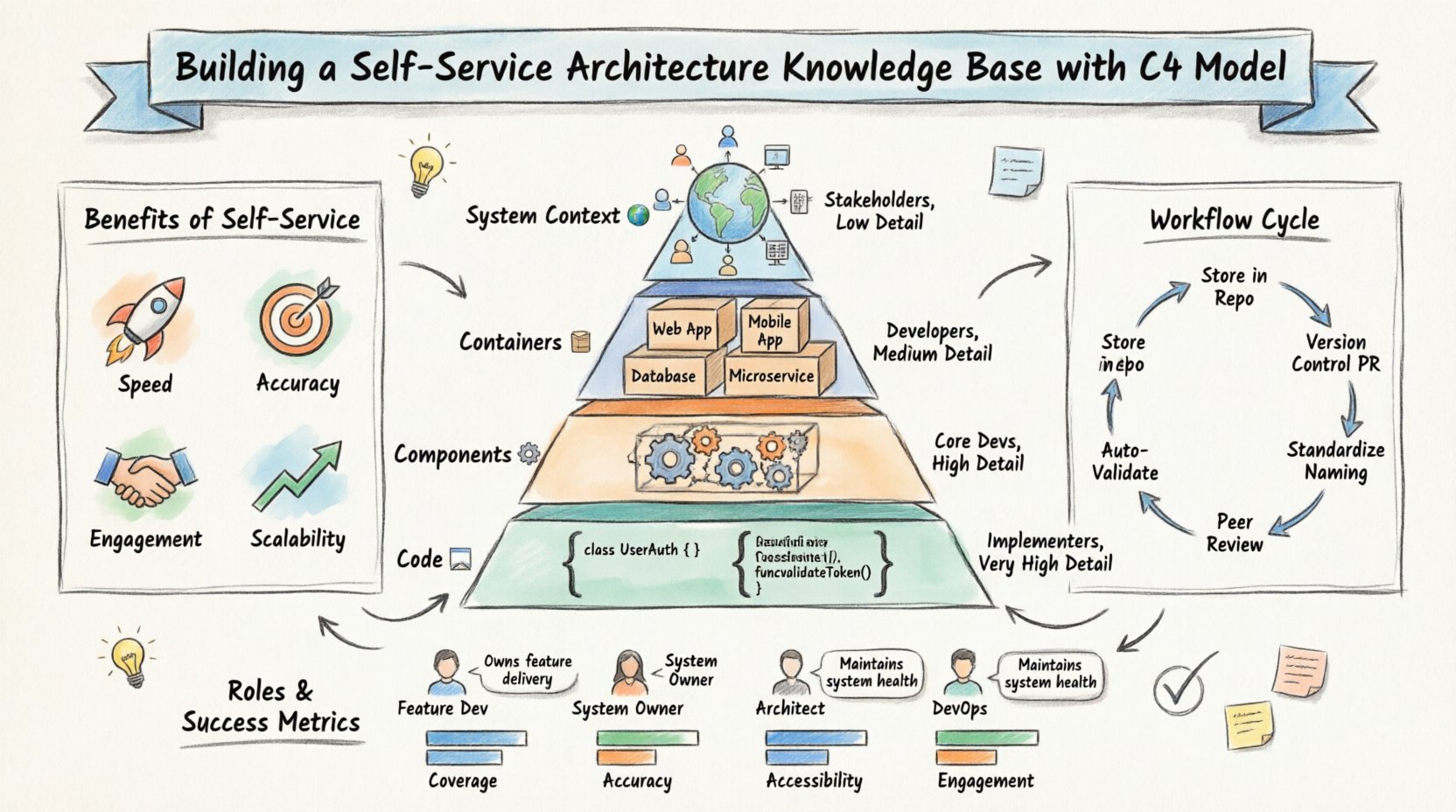
Why Self-Service Architecture Documentation? 🚀
Centralized documentation teams often become bottlenecks. Architects are busy designing. Engineers are busy building. If documentation is the responsibility of a single group, it lags behind development. A self-service approach distributes ownership. This means the people who know the system best are the ones updating it.
Benefits of Distributed Ownership
- Speed: Changes are documented alongside code changes.
- Accuracy: The people writing the code know the implementation details.
- Engagement: Engineers feel more connected to the system design.
- Scalability: As the team grows, documentation grows with it.
However, distributing ownership requires clear standards. Without guidelines, every team will document differently. This leads to confusion. The C4 Model acts as the common language that makes this possible.
Understanding the C4 Model 🧩
The C4 Model is a hierarchy of diagrams. It moves from high-level context to low-level detail. Each level serves a specific audience. Understanding these levels is the first step to building a robust knowledge base.
Level 1: System Context 🌍
The System Context diagram shows the big picture. It depicts the system itself and the people or systems that interact with it. It answers the question: What does this system do and who uses it?
- Scope: Entire application or service.
- Audience: Stakeholders, managers, new joiners.
- Detail: Low. Focuses on boundaries.
In a self-service environment, this diagram should live in the root of the repository. It provides immediate context for anyone viewing the project.
Level 2: Containers 📦
Containers represent the high-level building blocks. These could be web applications, mobile apps, databases, or microservices. This level explains how the system is split into deployable units.
- Scope: Major components of the architecture.
- Audience: Developers, architects, DevOps.
- Detail: Medium. Shows technology choices.
This is often the most useful diagram for day-to-day development. It helps teams understand where their code fits within the larger ecosystem.
Level 3: Components ⚙️
Components break down the containers. A container might hold several components, such as a user interface, a business logic layer, and a data access layer. This level focuses on the internal structure of a single container.
- Scope: Inside a specific container.
- Audience: Developers working on that container.
- Detail: High. Shows relationships between parts.
For self-service, component diagrams should be updated when the internal logic changes significantly. They guide developers on how to extend functionality without breaking dependencies.
Level 4: Code 💻
The Code level maps components to actual code artifacts. It shows classes, functions, and database tables. While this level is often generated automatically, it provides a bridge between design and implementation.
- Scope: Specific code structures.
- Audience: Developers debugging or refactoring.
- Detail: Very High.
In a self-service setup, this level is often dynamic. It should be kept in sync with the codebase to ensure accuracy.
Table: C4 Levels Comparison
| Level | Focus | Audience | Update Frequency |
|---|---|---|---|
| System Context | Boundaries & External Systems | Stakeholders | Low |
| Containers | Technology & Deployment | Developers & Architects | Medium |
| Components | Internal Logic | Core Developers | High |
| Code | Classes & Methods | Implementers | Continuous |
Establishing the Self-Service Workflow 🔄
Creating a knowledge base is not just about drawing diagrams. It is about defining a workflow. How does a change get documented? Who approves it? How is it stored? These processes must be clear to ensure success.
1. Define the Storage Strategy
Documentation should live where the code lives. This ensures that when a feature is moved or refactored, the documentation moves with it. Storing diagrams in the repository allows version control to track changes.
- Location: A dedicated folder within the codebase.
- Format: Use text-based formats that are easy to diff.
- Access: Ensure all team members have read permissions.
2. Integrate with Version Control
Changes to architecture should be treated like code changes. This means using pull requests. A team member creates a branch, updates the diagram, and submits a pull request for review.
- Review Process: Require peer review for diagram changes.
- Automation: Use CI pipelines to validate syntax and consistency.
- Linking: Link diagrams directly to the relevant code sections.
3. Standardize Naming and Structure
Consistency is key for a self-service model. Every team must use the same naming conventions. This makes it easy to search and navigate the knowledge base.
- File Names: Use descriptive names like
architecture-context.mdordiagrams-containers.svg. - Colors: Agree on a color palette for different types of actors or technologies.
- Labels: Use standard labels for relationships, such as “Reads Data” or “Sends Request”.
Governance Without Bottlenecks ⚖️
Self-service does not mean chaos. Governance ensures quality without slowing down progress. The goal is to provide guardrails, not roadblocks.
Architectural Review Boards
Instead of reviewing every diagram, focus on high-level decisions. An architectural review board can meet periodically to discuss major shifts. This keeps the oversight lightweight.
- Trigger: Review only when the System Context or Container level changes.
- Frequency: Bi-weekly or monthly meetings.
- Scope: Focus on cross-team dependencies and security implications.
Automated Checks
Use tools to enforce standards automatically. Scripts can check if diagrams follow the C4 hierarchy. They can ensure that all containers have a corresponding context diagram.
- Syntax Validation: Ensure the diagram code is valid.
- Link Checking: Verify that all references point to valid resources.
- Consistency: Check that technology stacks match the agreed standards.
Table: Roles and Responsibilities
| Role | Responsibility | Frequency |
|---|---|---|
| Feature Developer | Update Component diagrams for their feature. | Per Sprint |
| System Owner | Maintain Container and Context diagrams. | Per Release |
| Architect | Review high-level changes and enforce standards. | Per Major Design |
| DevOps Engineer | Ensure deployment tools match Container diagrams. | Per Infrastructure Change |
Maintaining Accuracy Over Time 📉
Documentation decay is inevitable. Systems evolve, but diagrams often stay the same. A self-service model helps combat this by making updates a natural part of the development process.
The “Code as Documentation” Mindset
Encourage teams to treat documentation as code. If code requires testing, documentation requires validation. This shifts the mindset from “writing docs” to “maintaining truth”.
- Refactoring: When code is refactored, the diagram must be updated.
- Deprecation: Remove old containers from diagrams when services are retired.
- Onboarding: Use the diagrams as the primary guide for new hires.
Regular Audits
Even with self-service, periodic audits are useful. Schedule a session every quarter to review the health of the knowledge base. Look for broken links, outdated technologies, or missing diagrams.
- Identify Gaps: Find systems that lack documentation.
- Update Standards: Adjust the C4 standards if they are not working.
- Celebrate Wins: Highlight teams that keep their docs up to date.
Integrating with the Development Lifecycle 🛠️
Documentation should not be a separate activity. It should be embedded in the development lifecycle. This ensures that architecture updates happen naturally.
Pre-Development
Before coding begins, teams should sketch the necessary C4 diagrams. This clarifies requirements and reduces rework. It forces a discussion about boundaries and interfaces.
- Design Discussions: Use diagrams in team meetings.
- Checklists: Require a diagram update in the ticket checklist.
- Templates: Provide starter templates for each C4 level.
During Development
As features are built, the diagrams should evolve. If a new API is created, the Container diagram must reflect it. If a new database is added, the context diagram must show it.
- Commit Messages: Reference diagram updates in commit logs.
- Code Reviews: Check if code changes align with diagram changes.
- Documentation PRs: Keep diagram updates separate from code PRs if they are large.
Post-Deployment
After deployment, verify that the live system matches the documentation. This closes the loop between design and reality.
- Smoke Tests: Test the endpoints described in the diagrams.
- Feedback Loop: Allow users to report discrepancies.
- Versioning: Tag documentation versions with release versions.
Overcoming Common Challenges 🛑
Implementing a self-service architecture knowledge base comes with hurdles. Anticipating these issues helps in planning a smoother transition.
Challenge 1: Lack of Skill
Not every engineer knows how to draw a good C4 diagram. This can lead to inconsistent quality.
- Solution: Provide training sessions and templates.
- Solution: Create a library of approved shapes and styles.
- Solution: Pair less experienced engineers with architects during reviews.
Challenge 2: Resistance to Change
Engineers may feel that documentation is extra work. They might prioritize features over diagrams.
- Solution: Show the value. Highlight how diagrams saved time in onboarding or debugging.
- Solution: Automate as much as possible so the effort is minimal.
- Solution: Make documentation a requirement for merging code.
Challenge 3: Fragmentation
Different teams might use different tools or formats, making the knowledge base hard to navigate.
- Solution: Enforce a single standard for the entire organization.
- Solution: Create a central portal that aggregates diagrams from all repositories.
- Solution: Regularly audit for consistency.
Measuring Success 📊
To ensure the knowledge base is effective, track specific metrics. This data helps justify the effort and identify areas for improvement.
- Coverage: What percentage of systems have up-to-date diagrams?
- Accuracy: How often do teams report mismatches between docs and code?
- Accessibility: How quickly can a new hire find the architecture?
- Engagement: How often are diagrams updated and reviewed?
Final Thoughts 🎯
Building a self-service architecture knowledge base is a journey. It requires cultural change, clear processes, and consistent standards. The C4 Model provides the structure, but the team provides the effort. By distributing ownership and embedding documentation into the workflow, organizations can maintain clarity at scale.
Start small. Pick one team and one project. Establish the C4 standards. Implement the workflow. Learn from the experience. Then expand. Over time, the knowledge base becomes a living resource that supports innovation rather than hindering it.
Focus on the value. When engineers can understand a system in minutes rather than days, the entire organization moves faster. That is the true goal of architecture documentation.
Commit to the process. Keep the diagrams fresh. Encourage collaboration. With the right approach, your architecture knowledge base will become a cornerstone of your engineering culture.