
In modern software architecture, the database schema is as critical as the application code itself. Yet, it is frequently overlooked in version control strategies. When teams treat Entity Relationship Diagrams (ERDs) as static documents rather than living artifacts, they introduce significant risks regarding data integrity, collaboration friction, and deployment failures. This guide outlines a robust strategy for integrating ERD documentation into version control systems, ensuring that schema evolution remains transparent, traceable, and collaborative.
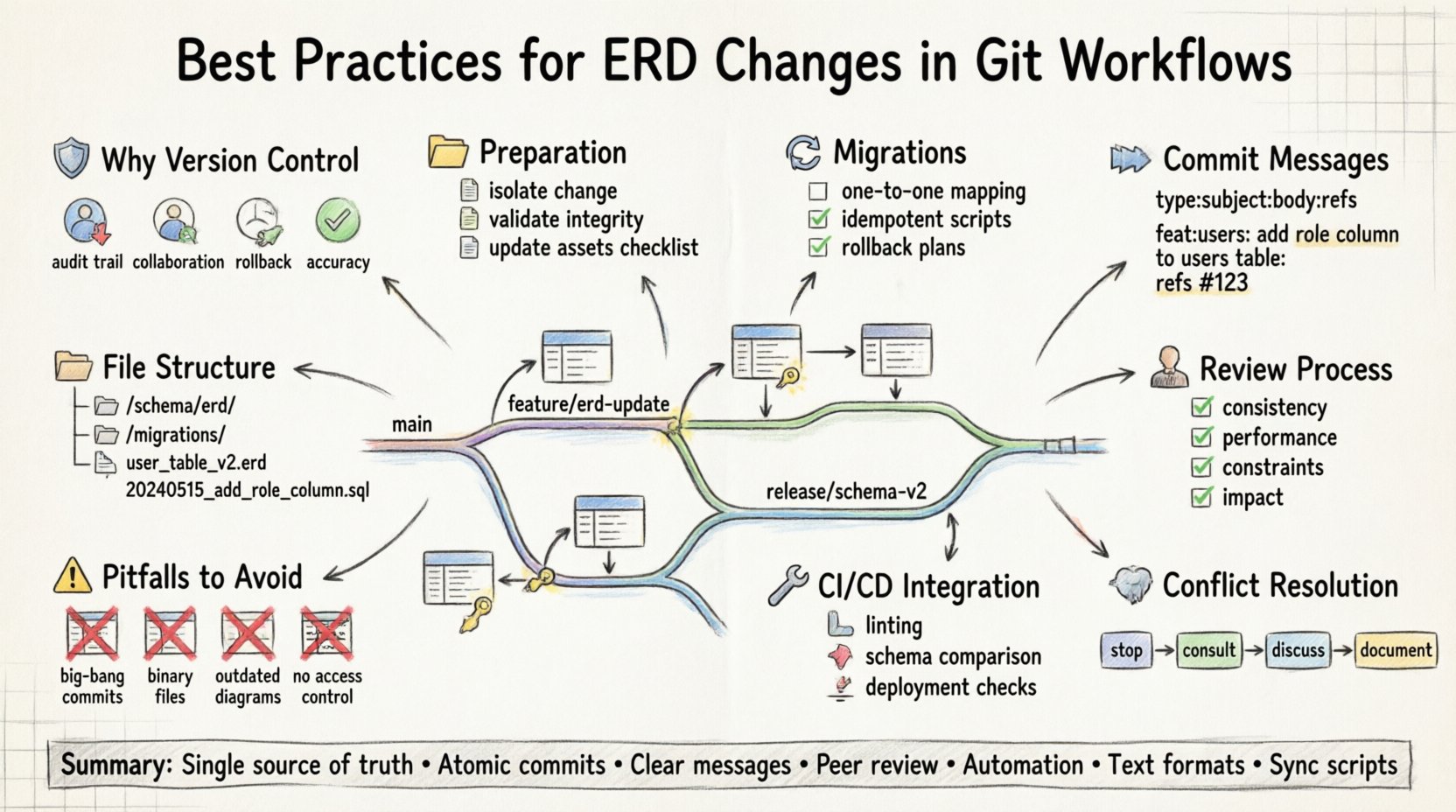
🛡️ Why Version Control for ERDs Matters
Applying version control principles to database modeling transforms the schema from a hidden dependency into a first-class citizen of the project. Without this discipline, changes to data structures often occur in isolation, leading to discrepancies between the documented design and the actual database state.
- Auditability: Every modification to an entity or relationship is timestamped and attributed to a specific contributor. This is vital for compliance and debugging historical data issues.
- Collaboration: Multiple engineers can propose changes simultaneously without overwriting each other’s work, provided the workflow is managed correctly.
- Rollback Capability: If a schema change breaks application logic, the ability to revert to a previous state of the diagram (and subsequent migration scripts) is essential for stability.
- Documentation Accuracy: Keeping the diagram in sync with the codebase ensures that new team members have an accurate map of the data model.
📝 Preparation Before Committing
Before introducing a change to the repository, specific preparatory steps ensure that the commit remains atomic and meaningful. Rushing to push changes without validation often leads to merge conflicts or broken builds.
1. Isolate the Change
Ensure that the diagram modification is distinct from unrelated code changes. Mixing logic updates with schema design changes makes it difficult to isolate the source of a bug. Create a dedicated branch for the schema evolution task.
2. Validate Structural Integrity
Before committing, verify that the proposed entities adhere to normalization standards. Check for redundant data fields, missing foreign keys, and circular dependencies. A clean design reduces technical debt.
3. Update Associated Assets
ERDs are rarely standalone. They usually accompany migration scripts, API definitions, or data dictionaries. Ensure all linked documentation is updated to reflect the new state of the data model.
🗂️ Naming Conventions and File Structure
Consistency in file organization prevents confusion when navigating the repository. A logical structure allows team members to locate the current state of the diagram quickly.
| Component | Recommended Format | Example |
|---|---|---|
| Diagram File | snake_case, descriptive | erd_core_users.vsd |
| Migration Scripts | timestamp_based | 20231027_add_email_index.sql |
| Documentation | markdown, versioned | schema_readme.md |
For diagram files specifically, avoid generic names like diagram_final_v2.png. Instead, use the domain name of the model, such as erd_billing_transactions. This ensures that when searching the repository, the context is immediately clear.
Directory Hierarchy
Organize files by domain rather than by status. Having a draft folder often leads to abandoned work. Instead, use branches for draft work and the main branch for the source of truth.
/schema/erd/: Where the visual models reside./schema/migrations/: Where the executable SQL or NoSQL scripts live./schema/docs/: Where the explanatory text and data dictionaries are stored.
📢 The Commit Message Standard
Commit messages are the primary narrative of your project history. They should explain what changed and why, not just describe the file modification. A vague message like update diagram provides no value to a future reader.
Adopt a structured format for commits related to schema changes:
- Type: Define the scope (e.g.,
schema,model,db). - Subject: Concise summary of the change.
- Body: Detailed explanation of the business logic or technical requirement driving the change.
- Refs: Link to issue trackers or design documents.
Example:
schema: add user profile table- Introduce new table for extended user metadata- Required for upcoming analytics feature- Resolves issue #402
This level of detail allows developers to understand the context of the diagram evolution without needing to open the visual file immediately.
🔄 Handling Migrations and Scripts
A diagram is a plan; migration scripts are the execution. They must remain synchronized. If the diagram shows a column that does not exist in the migration script, the documentation is lying.
One-to-One Mapping
Ensure that every visual entity change corresponds to a migration script file. If you add an entity in the diagram, you must create the create_table script. If you remove a relationship, you must create the alter_table or drop_constraint script.
Idempotency
Scripts should be designed to run safely multiple times. Use conditional logic to check for existence before creating resources. This prevents errors during re-runs or CI/CD pipeline executions.
Rollback Plans
Every migration script should have a corresponding rollback script. This is crucial for emergency situations where a schema change must be reverted quickly. Name these files clearly, such as 001_rollback.sql.
👥 Review and Collaboration
Schema changes are high-risk operations. A peer review process is non-negotiable. Just as application code requires a review, database structure requires scrutiny.
Review Checklist
| Check | Question |
|---|---|
| Consistency | Does the diagram match the migration scripts? |
| Performance | Are indexes defined for frequently queried columns? |
| Constraints | Are foreign keys and not-null constraints properly set? |
| Impact | Will this change break existing applications? |
Visual Comments
Use the diagramming tool’s native comment features to annotate complex logic directly on the canvas. Explain why a specific normalization choice was made. This reduces the need for external documentation.
🔍 Common Pitfalls to Avoid
Even with best practices, teams often fall into traps that compromise the integrity of the data model versioning process.
1. The “Big Bang” Approach
Attempting to document a massive schema overhaul in a single commit makes review impossible. Break large changes into logical, incremental steps. This allows for easier rollback and clearer understanding.
2. Ignoring Visual File Formats
Binary diagram files (like .vsdx or .drawio) are difficult to merge. If a team member modifies the same file, the version control system may flag a conflict that cannot be resolved by text editors.
Solution: Use text-based diagram formats (like Mermaid or PlantUML) if possible. These allow for line-by-line merging, making collaboration significantly smoother.
3. Outdated Diagrams
The most dangerous state is a diagram that looks correct but represents a schema that no longer exists. This happens when migrations are applied but the diagram is not updated.
Solution: Integrate diagram validation into the build pipeline. If the script fails to match the diagram, the build should fail.
4. Lack of Access Control
Allowing all developers to push directly to the main schema branch can lead to chaos. Implement branch protection rules. Only maintainers or senior engineers should be able to merge schema changes into the primary branch.
🛠️ Integration with CI/CD
Automated testing for schema changes ensures that the diagram remains a reliable source of truth.
- Linting: Run schema linters to enforce naming conventions and structural rules before a pull request is accepted.
- Schema Comparison: Compare the diagram against the actual database instance to detect drift. If the diagram says
usershas anemailcolumn, but the database does not, flag this immediately. - Deployment Checks: Ensure that no production database is deployed without a verified migration script accompanying the diagram update.
🧩 Handling Conflicts
When two engineers modify the same diagram file, a merge conflict occurs. Resolving this requires a clear protocol.
- Stop the Merge: Do not force merge. Resolve the conflict manually.
- Consult the Diagram: Open both versions and visually inspect the differences.
- Discuss Logic: Determine if both changes can coexist or if one must be discarded based on the broader architectural plan.
- Update Documentation: Document the resolution in the commit message.
If using text-based diagram formats, the text conflict resolution is usually straightforward. If using binary formats, manual inspection is required, and you may need to choose one version over the other, then re-apply the missing changes.
🗃️ Maintenance and Archiving
Over time, diagrams accumulate deprecated entities. A cluttered diagram obscures the current architecture.
Deprecation Strategy
Do not delete old entities immediately. Mark them as Deprecated in the diagram. This preserves the historical record while signaling to developers that new code should not reference these tables.
Versioning the Diagram
Consider tagging specific versions of the diagram that correspond to major releases. This allows for quick reference if a bug is found in a legacy version of the software.
📋 Summary of Best Practices
To summarize the workflow for maintaining high-quality ERD documentation within a version control system:
- Single Source of Truth: Keep the diagram and scripts in the same repository.
- Atomic Commits: Commit changes in logical units, not all at once.
- Clear Messages: Write commit messages that explain the why.
- Review Process: Require peer review for all schema modifications.
- Automation: Use CI/CD pipelines to validate schema consistency.
- Text Formats: Prefer text-based diagram formats for better diffing capabilities.
- Sync Scripts: Ensure migration scripts match the diagram exactly.
🚀 Moving Forward
Implementing these practices requires discipline, but the payoff is a resilient and understandable data architecture. By treating the Entity Relationship Diagram as code, you empower your team to manage complexity effectively. The goal is not just to document what the database looks like today, but to ensure that the evolution of that database is predictable, safe, and documented for the long term.
Start by auditing your current repository. Check if the diagrams match the migrations. If they do not, prioritize synchronization. Once aligned, enforce the commit standards outlined above. Over time, this discipline becomes ingrained in the workflow, reducing errors and improving team velocity.