
Mastering Visual Design with VPasCode: A Guide to Supported Formats and Modeling Concepts
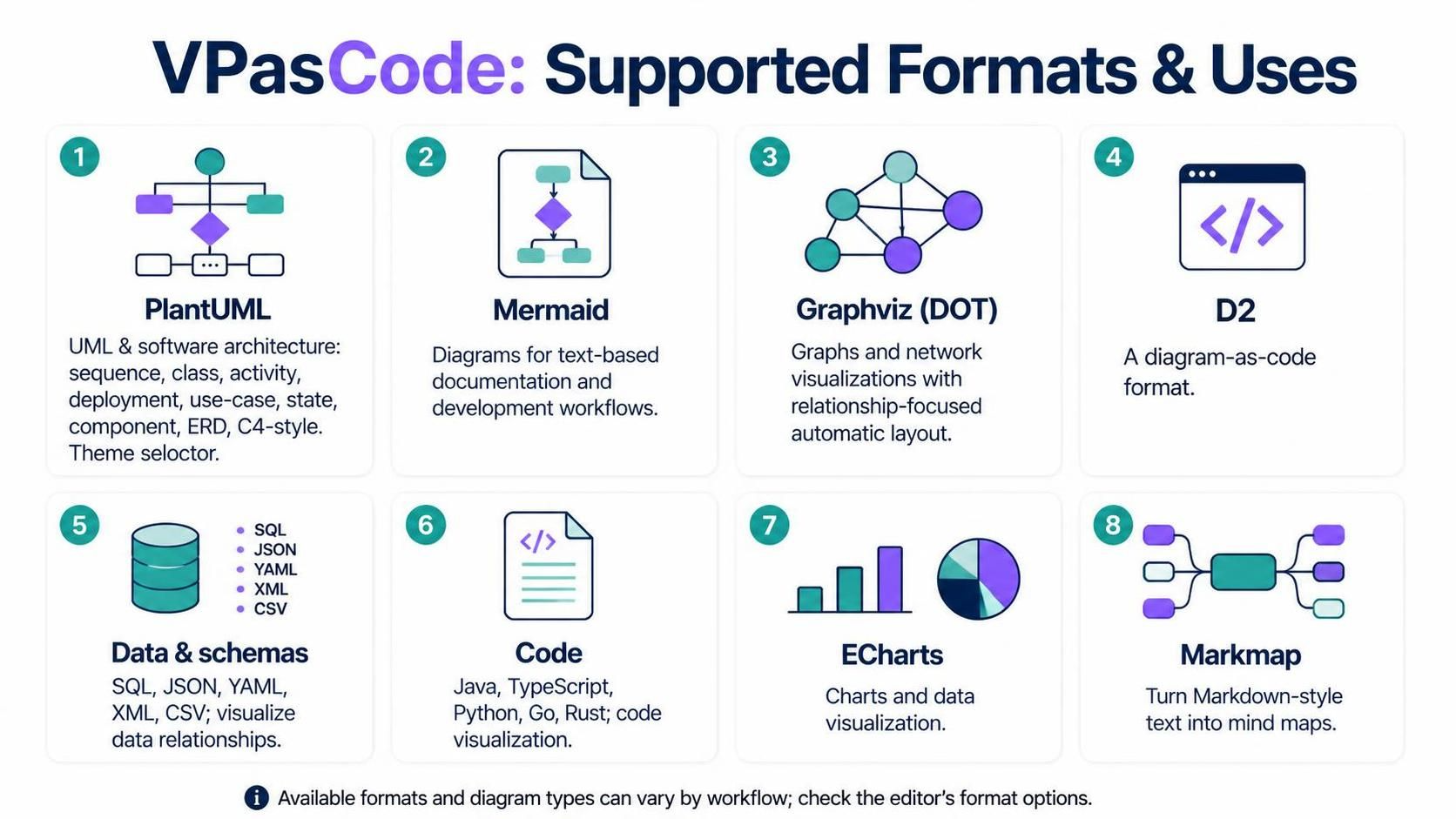
In the modern landscape of software development and system architecture, the ability to translate complex logic into visual representations is invaluable. VPasCode empowers developers and architects to do exactly that by treating diagrams as code. This tutorial explores the diverse ecosystem of formats supported by the VPasCode platform, ranging from industry-standard UML diagrams to data visualization and code syntax highlighting.
Whether you are designing a microservices architecture, visualizing a data schema, or simply documenting a workflow, understanding which tool to use is the first step toward clarity. Below, we break down the eight core pillars of VPasCode’s visual capabilities.
1. The Architecture of Diagramming: PlantUML
At the core of software engineering documentation lies PlantUML. It is the heavy lifter for structural and behavioral modeling. Unlike standard image editors, PlantUML allows you to define the structure of a system using a textual language, which is then rendered into a graphical format.
Its strength lies in its versatility. It supports a wide array of diagram types essential for comprehensive system design:
- Sequence Diagrams: Visualize the flow of messages between objects over time.
- Class Diagrams: Define the static structure of a system, showing classes, attributes, and relationships.
- Activity Diagrams: Model the flow of control or data from activity to activity.
- Deployment Diagrams: Show the physical hardware and software components.
- Use-Case & State Diagrams: Describe how users interact with the system and how the system reacts to events.
- ERD & C4-Style: Relational modeling and high-level component abstraction.
One of the most powerful features of PlantUML in VPasCode is the Theme Selector. Instead of manually tweaking hex codes for every shape, you can apply a cohesive visual style with a single command, ensuring consistency across your documentation.
Example: A Simple Class Diagram
Here is how you might define a basic class structure in PlantUML:
@startuml
class Person {
  -name: String
  +getName() : String
}

class Employee {
  -id: int
  +work() : void
}

Person "1" -- "many" Employee : employs
@enduml
2. Text-Based Workflows: Mermaid
While PlantUML is excellent for pure diagramming, Mermaid shines in its ability to integrate directly into text-based documentation. It is designed to fit naturally into workflows like Markdown files (READMEs, wikis) and Git repositories.
Mermaid uses a simple syntax to generate diagrams that look like they were drawn by hand or in a vector editor, but are generated from text. It is perfect for quick flowcharts, sequence diagrams, and class diagrams that need to live alongside your code documentation.
graph TD
    A[Start] --> B{Is it working?}
    B -- Yes --> C[Great!]
    B -- No --> D[Debug]
3. Network and Relationship Graphs: Graphviz (DOT)
When your visualization needs to focus on the relationships themselves rather than the flow of time or sequence, Graphviz (DOT) is the industry standard. It excels at automatic layout algorithms.
In DOT, you define the nodes (entities) and the edges (relationships). The engine then calculates the optimal position for every node to minimize edge crossings and maximize clarity. This makes it ideal for:
- Dependency graphs
- Network topologies
- File system trees
- Entity relationship maps
digraph G {
  A -> B;
  A -> C;
  B -> D;
  C -> D;
}
4. The Modern Alternative: D2
D2 represents a newer generation of “diagram-as-code” tools. It is often cited as an alternative to Graphviz and PlantUML with a focus on readability and clean syntax. D2 aims to be more intuitive for developers, allowing for complex diagrams with less boilerplate code than its predecessors.
5. Data and Schema Visualization
Software is built on data, and VPasCode supports visualizing data relationships through various schema formats. This is crucial for database architects and backend developers who need to understand how data flows between systems.
Supported formats include:
- SQL: Visualize table structures, keys, and constraints.
- JSON & YAML: Map out nested data structures and configuration hierarchies.
- XML: Represent document structures and schema definitions.
- CSV: Visualize tabular data relationships.
6. Code Visualization and Syntax
VPasCode also serves as a bridge between code and documentation. It supports source files from major programming languages, allowing you to visualize code snippets with syntax highlighting and structure.
Supported languages include:
- Java
- TypeScript
- Python
- Go
- Rust
This is particularly useful for “Code-as-Documentation,” where you can embed visual representations of your logic directly into your architectural diagrams.
7. Data Visualization: ECharts
For analytics and dashboards, ECharts is the tool of choice. It is a powerful library for creating interactive charts and graphs. Whether you need bar charts, line graphs, pie charts, or complex scatter plots, ECharts provides the rendering engine to visualize quantitative data within your VPasCode workflow.
8. Mind Mapping: Markmap
Finally, for non-linear thinking and brainstorming, Markmap allows you to turn Markdown-style text into mind maps. This is perfect for organizing requirements, summarizing documentation, or planning project structures using simple indentation syntax.
- Features
  - Diagramming
  - Data Viz
  - Code View
Conclusion
The versatility of VPasCode lies in its ability to support a wide range of formats tailored to specific needs. From the structural rigor of PlantUML to the relational power of Graphviz and the data-centric approach of ECharts, you have the right tool for every architectural challenge. By mastering these formats, you can create documentation that is not only visually appealing but also maintainable and integrated into your development workflow.