
Mastering UML Object Diagrams in Visual Paradigm: UI Architecture Prototyping
In the realm of software engineering, while Class Diagrams provide the blueprint for your system’s structure, Object Diagrams bring that blueprint to life. They serve as the “snapshots” of a system, illustrating a specific moment in time with actual data instances rather than abstract definitions.
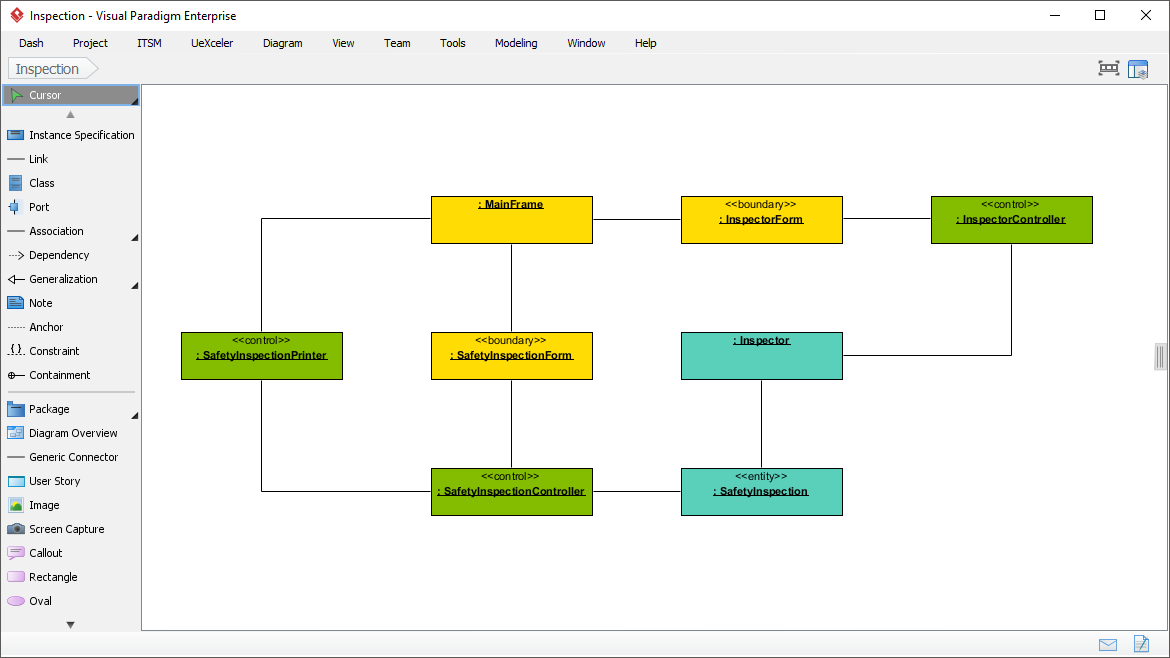
This tutorial explores the architecture depicted in the provided Visual Paradigm screenshot. We will analyze a 3-Tier Architecture for an “Inspection” system, breaking down the relationships between boundary, control, and entity objects. By the end of this guide, you will understand how to model a concrete scenario using the Model-View-Controller (MVC) pattern within Visual Paradigm.
1. The Core Concept: Object vs. Class Diagrams
An object diagram is essentially a graph of instances. If a Class Diagram asks “What are the rules of the game?”, an Object Diagram asks “What is the state of the game right now?”.
- Class Diagrams: Define the generic types (e.g., a class named
Inspector). They show attributes and methods but no data. - Object Diagrams: Show specific instances (e.g.,
:Inspector). They demonstrate how these objects are linked at runtime.
In the screenshot provided, you can see that the objects are denoted by an underscore prefix (e.g., :SafetyInspectionController), which is the standard UML notation for an instance of a class.
2. Analyzing the System Architecture
The diagram illustrates a robust separation of concerns, typical of web or enterprise applications. It relies on the standard Boundary-Control-Entity (BCE) pattern, often associated with Use Case implementation.
A. Boundary Objects (The User Interface)
These objects represent the interaction between the system and the user. In Visual Paradigm, they are often colored yellow to distinguish them from logic.
::MainFrame: The primary container or window of the application.::InspectorForm: A specific form or view used for inspecting data.::SafetyInspectionForm: A specialized form dedicated to safety inspections.
B. Control Objects (The Logic)
Control objects handle the flow of data and the logic required to manipulate the system state. They act as the “glue” between the UI and the data.
::InspectorController: Likely handles general inspection logic.::SafetyInspectionController: Manages the specific business rules for safety data.::SafetyInspectionPrinter: A specialized controller handling the output generation (printing) process.
C. Entity Objects (The Data)
These objects represent the persistent data or domain concepts. They are the “truth” of the system.
::Inspector: Represents a person or a record associated with an inspector.::SafetyInspection: The core data record containing the details of a safety check.
3. Tracing the Relationships (The Flow)
The lines connecting these boxes are not just random; they represent associations and dependencies that define how the system behaves. Let’s trace the flow of a typical user action:
- Initiation: The user interacts with
:SafetyInspectionForm(Boundary). - Processing: This form delegates tasks to
:SafetyInspectionController(Control). - Data Retrieval: The controller interacts with
:SafetyInspection(Entity) to fetch or save data. - Output: If the user requests a report, the logic may route through
:SafetyInspectionPrinter(Control) to generate the final document.
Notice how ::InspectorController is linked to ::Inspector. This suggests a one-to-one or one-to-many relationship where a controller manages the lifecycle of a specific inspector instance.
4. Using Visual Paradigm for Object Modeling
The screenshot displays the Visual Paradigm interface, specifically the Toolbox on the left. To create a similar diagram, you would utilize the following tools:
- Instance Specification: Used to drag and drop specific object instances onto the canvas.
- Association: The solid line tool used to connect the objects, representing a relationship.
- Dependency: A dashed arrow used to show that one object relies on another (e.g., the Controller depending on the Entity).
By organizing these objects into distinct groups (Boundary, Control, Entity), you create a visual map that is invaluable for design reviews. It allows stakeholders to see exactly how data flows through the application without getting lost in abstract class hierarchies.
Conclusion
Object diagrams are the bridge between abstract design and concrete reality. By visualizing instances like :SafetyInspectionController and their connections, developers can validate their architectural decisions before writing a single line of code. This specific diagram demonstrates a clean, decoupled architecture where the UI (Boundary) never directly touches the Database (Entity), ensuring maintainability and scalability.