
Architecting Gov E-Service Workflows with VP OpenDocs and AI
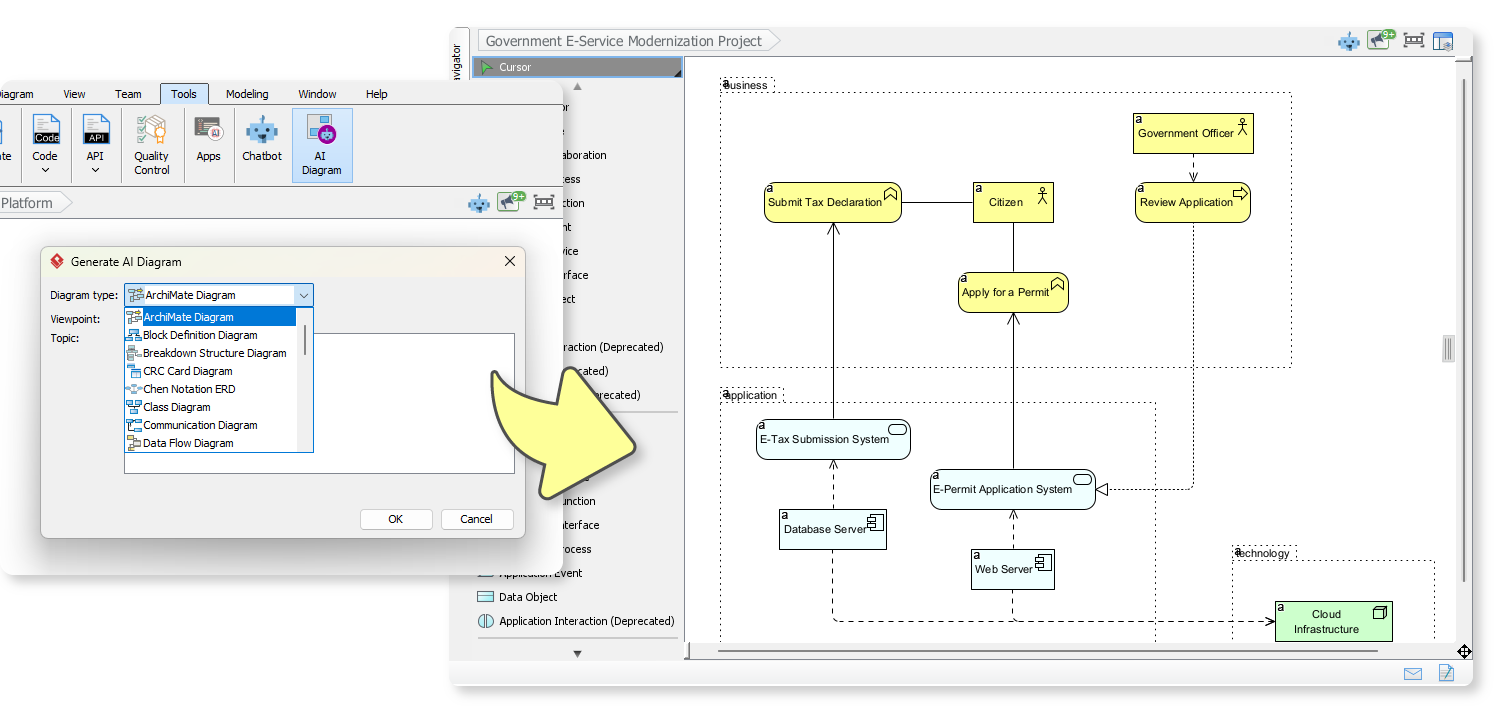
In the realm of enterprise architecture and business analysis, the gap between a high-level concept and a formal architectural model often results in significant time loss. The image provided illustrates a transformative workflow where Visual Paradigm’s AI capabilities bridge this gap instantly. It demonstrates the transition from a simple text prompt to a comprehensive Block Definition Diagram within the context of a Government E-Service Modernization Project.
This tutorial will deconstruct the architecture shown in the diagram, explaining the logical separation of concerns and how AI generation accelerates the modeling of complex system interactions.
Understanding the Diagram Structure
The diagram presented is a sophisticated architectural view that utilizes swimlanes (or partitioned areas) to categorize elements based on their nature. This is a common pattern in Enterprise Architecture (EA) to ensure that the “who,” the “what,” and the “how” are clearly distinguished.
1. The Business Layer (Top Section)
The top partition represents the Business domain. This is where human actors and their high-level goals reside.
- Actors: We see the Citizen and the Government Officer. These are the external entities driving the process.
- Business Activities: The processes Submit Tax Declaration, Apply for a Permit, and Review Application are modeled here. These represent the organizational intent rather than the technical implementation.
2. The Application Layer (Middle Section)
The middle partition details the Application domain. This is the “black box” that delivers the business value defined above.
- Systems: The E-Tax Submission System and E-Permit Application System are the software components responsible for executing the business activities.
- Interactions: The solid arrows indicate that the business activities trigger the application systems. For example, the Apply for a Permit activity triggers the E-Permit Application System.
3. The Technology Layer (Bottom Section)
The bottom partition represents the Technology infrastructure. This is the physical or virtual environment where the applications run.
- Components: We see Database Server, Web Server, and Cloud Infrastructure.
- Deployment: The dashed lines connecting the Application layer to the Technology layer indicate deployment or hosting relationships. For instance, the E-Tax Submission System likely runs on the Web Server and interacts with the Database Server.
Tracing the System Logic
To understand the flow of data and control, let’s trace a specific user journey through this architecture:
- Initiation: The Citizen (Actor) initiates the process by engaging in the Apply for a Permit business activity.
- System Execution: This activity is fulfilled by the E-Permit Application System. The arrow indicates a direct functional dependency.
- Processing: The system likely routes data to the Database Server to store the application and the Web Server to handle the user interface.
- Review: Once the system processes the data, the Government Officer (Actor) engages in the Review Application activity, which is supported by the E-Permit Application System.
This clear separation allows architects to make changes at the technology level (e.g., moving the database to a cloud provider) without necessarily altering the high-level business processes.
The AI Workflow: From Text to Diagram
The image on the left highlights the “Generate AI Diagram” dialog box. This feature is a game-changer for rapid prototyping. Instead of manually dragging and dropping shapes, the workflow is:
- Select Diagram Type: Choose Block Definition Diagram or Archimate Diagram (as seen in the dropdown).
- Define the Topic: Enter a natural language description of the system you want to model. For example:
"A government e-service project involving tax declarations and permit applications, with citizen and officer actors." - Generate: The AI parses the intent and constructs the structural model, including the swimlanes and relationships.
Key Modeling Concepts in this Diagram
- Block Definition Diagram (BDD): This diagram type focuses on defining the static structure of the system. It shows the “blocks” (components) and how they are organized into a hierarchy.
- Partitioning: The dashed lines separating Business, Application, and Technology are known as Swimlanes. In tools like Visual Paradigm, these are critical for maintaining a clean separation of concerns.
- Dependency Relationships: The arrows represent dependencies. A solid arrow usually implies a strong usage or triggering relationship, while dashed lines often imply deployment or physical support.
Conclusion
This diagram exemplifies the power of AI-Assisted Modeling. By automating the initial setup of the structure, the architect can focus on refining the logic and ensuring the business requirements are met. The transition from the “Generate AI Diagram” prompt to the final architectural view demonstrates a seamless integration of natural language understanding and formal system modeling.