
AI-Powered BPMN Diagrams: Mastering VPasCode Text-to-Model Generation
For years, the business process modeling community has been divided between two worlds: the visual world of drag-and-drop tools and the textual world of code-based diagramming. While tools like PlantUML and Mermaid revolutionized the way developers document sequence diagrams and flowcharts, they have historically failed to support BPMN (Business Process Model and Notation) natively. This created a significant gap where developers had to choose between “code-friendly” flowcharts that lacked semantic rigor or “compliant” BPMN diagrams that were difficult to version control.
Visual Paradigm has bridged this gap with VPasCode, the world’s first true BPMN Diagram-as-Code capability. This tutorial explores how VPasCode transforms simple text scripts into fully compliant, enterprise-grade BPMN models, enabling simulation, analysis, and AI-powered generation.
The Architecture of VPasCode
The core philosophy behind VPasCode is to treat process models as source code. Instead of clicking shapes on a canvas, you define the logic, flow, and structure of your process using a concise, readable syntax. This allows the process to be stored in version control systems (like Git), reviewed like software code, and generated into diagrams on demand.
The system architecture typically involves three layers:
- Input Layer: A text file (often with a
.pumlextension) containing the process definition. This file uses a specific syntax to define elements like tasks, gateways, and lanes. - Processing Engine: The VPasCode engine parses the text file. It interprets the logic (e.g.,
if/thenstatements), identifies the participants (swimlanes), and maps the textual instructions to BPMN 2.0 XML standards. - Output Layer: The engine renders the BPMN XML into a visual diagram. This diagram is not just a static image; it is a fully executable model capable of simulation and analysis.
Key Modeling Concepts in VPasCode
To effectively utilize VPasCode, one must understand the mapping between the textual syntax and the visual BPMN elements. The example below demonstrates a standard “Claims Intake” process, broken down by its logical components.
1. Defining the Process Scope
Every BPMN process begins with a defined scope. In VPasCode, this is encapsulated using the
@startuml</code> and <code>@endumldirectives, similar to PlantUML. This tells the parser where the model begins and ends.
@startuml
!theme plain

skinparam packageStyle rectangle
skinparam packageBackgroundColor #ffffff
2. Swimlanes (Pools and Lanes)
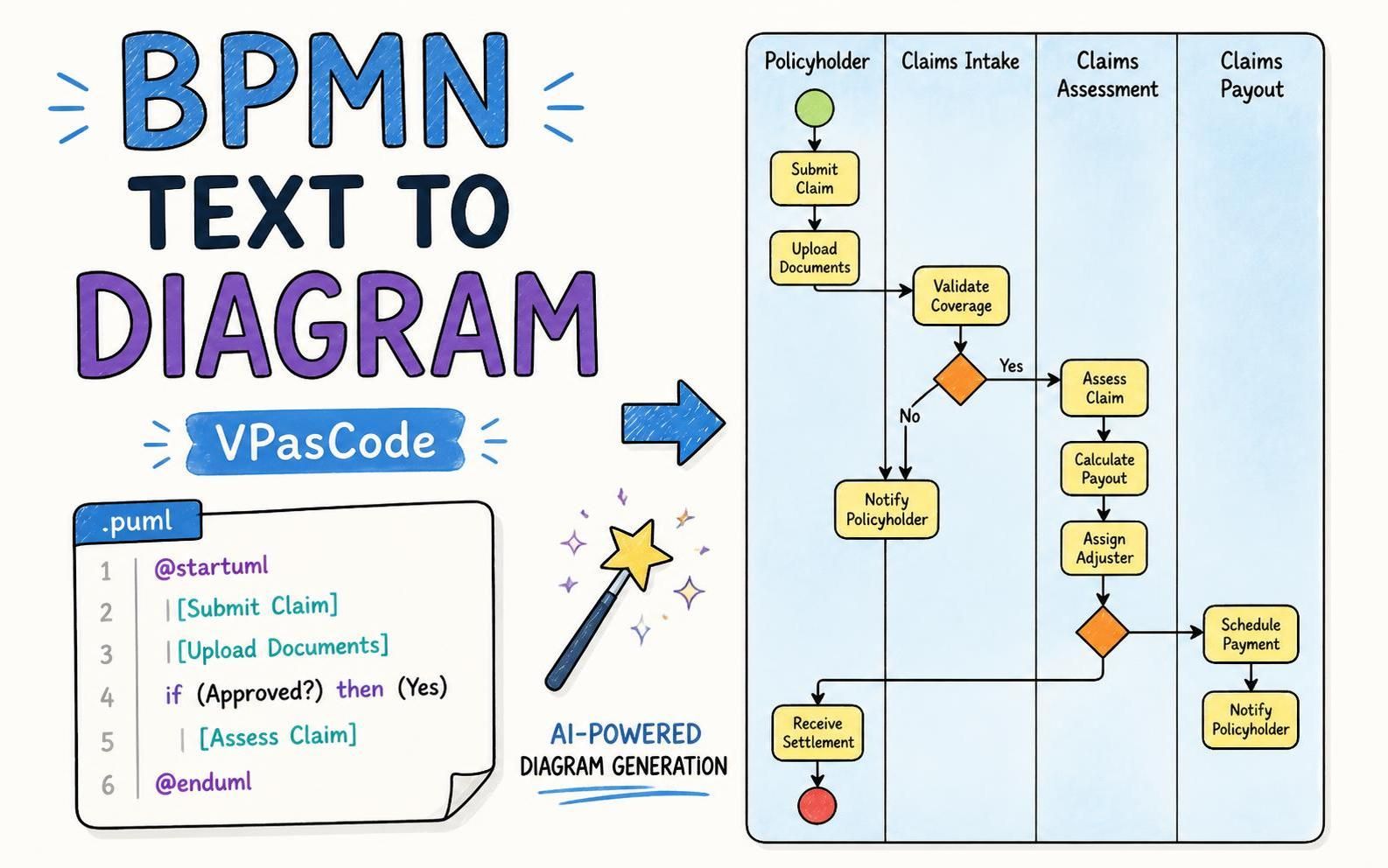
BPMN relies heavily on “swimlanes” to separate responsibilities. In the provided image, we see distinct areas for the Policyholder, Claims Intake, Claims Assessment, and Claims Payout. In VPasCode, these are defined by the structure of the text blocks or specific lane definitions.
3. Tasks and Activities
Tasks represent the actual work being done. In the text snippet, tasks are denoted by square brackets or specific keywords.
| [Submit Claim]
| [Upload Documents]
The vertical pipe symbol | typically indicates that the task belongs to the current swimlane defined in the context.
4. Decision Logic (Gateways)
The most critical part of a process model is handling logic. The image shows a diamond-shaped gateway labeled Validate Coverage. This represents a decision point. In VPasCode, this is handled using conditional logic.
if (Approved?) then (Yes)
    | [Assess Claim]
else (No)
    | [Notify Policyholder]
endif
This syntax allows the modeler to define complex branching paths without drawing arrows manually. The system automatically resolves the “Yes” and “No” flows to the correct downstream tasks.
Step-by-Step Walkthrough: The Claims Process
Let’s deconstruct the visual diagram shown in the context to understand how the code translates to the model.
- Initiation: The process starts with the Policyholder submitting a claim and uploading documents. These are sequential tasks within the first lane.
- Validation: Control flows to the Claims Intake lane. Here, the system performs a Validate Coverage check.
- The Branch:
- If the coverage is No, the process loops back to the policyholder for notification.
- If the coverage is Yes, the process moves to the Claims Assessment lane.
- Assessment & Adjustment: In the Assessment lane, the system Assesses Claim and Calculates Payout. A subsequent decision point (the second diamond) determines if an Adjuster needs to be assigned.
- Payout: The process converges in the Claims Payout lane. The system Schedules Payment and finally Notifies the Policyholder.
- Termination: The process concludes with a red circle (End Event) in the Policyholder lane, indicating the Receive Settlement action.
The Power of AI Integration
The image prominently features an AI Chatbot interacting with VPasCode. This represents the future of process modeling: Natural Language Processing (NLP). Instead of manually typing the syntax shown above, users can now describe a process in plain English (e.g., “Create a claims process where a policyholder submits a claim, and if approved, we calculate payout”). The AI Chatbot translates this natural language into the precise VPasCode syntax, which is then compiled into the BPMN diagram.
Conclusion
VPasCode represents a paradigm shift in business process modeling. By combining the rigor of BPMN with the flexibility of code-based tools, it empowers architects to build, version, and maintain complex enterprise processes with unprecedented efficiency. Whether you are a developer preferring text editors or a business analyst requiring strict compliance, VPasCode offers a unified solution for the modern digital landscape.