
C4 Architecture with VPasCode: Visual Paradigm’s AI-Powered PlantUML Workflow
Modern software architecture requires more than just static images; it demands living documentation that evolves with the codebase. This tutorial explores the power of VPasCode, a cloud-based text-to-diagram editor by Visual Paradigm. We will focus on how to utilize the platform’s ability to render complex C4 Model and object-oriented architecture diagrams using PlantUML, transforming raw text definitions into visual representations of your system’s structure.
Understanding the VPasCode Interface
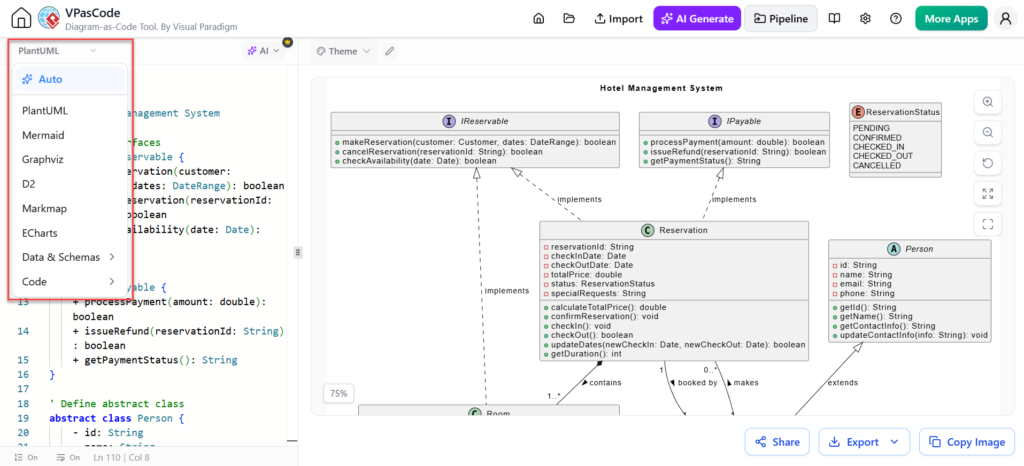
The VPasCode environment is designed for “Diagram as Code” workflows. Unlike traditional drag-and-drop tools, this interface separates the definition logic from the rendering engine. The interface is generally divided into two primary panes:
- The Source Editor (Left Panel): This is where you write the diagram definition. It supports various syntaxes, including PlantUML, Mermaid, and Graphviz. This is your source of truth.
- The Canvas (Right Panel): This area displays the rendered diagram in real-time. As you type in the editor, the visual representation updates instantly.
The screenshot provided illustrates the “Auto” generation feature within the VPasCode editor. The dropdown menu allows users to switch between different diagramming engines, highlighting the platform’s versatility.
Modeling Concepts: From Text to Class Diagrams
One of the most effective uses of VPasCode is defining Object-Oriented (OO) systems. This approach ensures that your diagrams remain synchronized with your actual codebase. The image demonstrates a Class Diagram representing a “Hotel Management System.”
1. Defining Interfaces and Abstract Classes
In the provided example, the system uses interfaces (denoted by the “I” icon) to define contracts. The IPayable and IReservable interfaces establish rules that concrete classes must follow.
@startuml
interface IPayable {
  + processPayment(amount: double): boolean
  + issueRefund(reservationId: String): boolean
  + checkAvailability(date: Date): boolean
}

interface IReservable {
  + makeReservation(customer: Customer, dates: DateRange): boolean
  + cancelReservation(reservationId: String): boolean
}
@enduml
2. Implementing Relationships (Inheritance)
The diagram shows the Reservation class implementing both IPayable and IReservable. In PlantUML syntax, this is typically represented using the “implements” keyword or the specific line style. VPasCode renders this as a dashed line with a hollow triangle arrow pointing to the interface.
class Reservation {
  # reservationId: String
  # checkInDate: Date
  # checkOutDate: Date
  # totalPrice: double
  # status: ReservationStatus

  + calculateTotalPrice(): double
  + confirmReservation(): boolean
  + checkIn(): void
  + checkOut(): void
}

Reservation "implements" --> IReservable
Reservation "implements" --> IPayable
3. Handling Enums and Constants
State management is crucial in a hotel system. The ReservationStatus is defined as an enumeration (Enum) containing states like PENDING, CONFIRMED, and CANCELLED. This is rendered as a distinct box with a list of constants.
enum ReservationStatus {
  PENDING
  CONFIRMED
  CHECKED_IN
  CHECKED_OUT
  CANCELLED
}
4. Defining Relationships: Composition and Association
The diagram illustrates the relationship between Person and Room, and how they relate to Reservation. The lines connecting these classes represent associations. The numbers (e.g., 1..*) indicate cardinality.
class Person {
  # id: String
  # name: String
  # email: String
  # phone: String

  + getId(): String
  + getName(): String
  + getEmailInfo(): String
  + getContactInfo(info: String): String
}

class Room {
  # roomId: String
  # roomType: String
  # capacity: int
  # price: double
}

Person "1" -- "0..*" Room : stays in
Room "1" -- "0..*" Reservation : booked by
Workflow Best Practices
To effectively use VPasCode for architectural modeling, follow this iterative workflow:
- Define the Schema: Start by listing your core entities (Classes, Interfaces, Enums) in the left-hand editor.
- Establish Connections: Draw the relationships between these entities using standard PlantUML syntax (e.g.,
--for associations,--|>for inheritance). - Review and Refine: Observe the rendered diagram on the right. If the layout is cluttered, you can add layout directives (like
left to right direction) to the code. - Export: Once satisfied, use the “Export” or “Copy Image” buttons to integrate the diagram into your documentation.
Conclusion
VPasCode bridges the gap between text-based development and visual architecture. By treating diagrams as code, teams can version control their system designs alongside their application code, ensuring that the documentation never becomes obsolete. Whether you are designing a simple flowchart or a complex C4 architecture model, the “Diagram as Code” philosophy offers a robust and scalable solution.