
Mastering AI-Assisted Sequence Diagrams with VPasCode and PlantUML
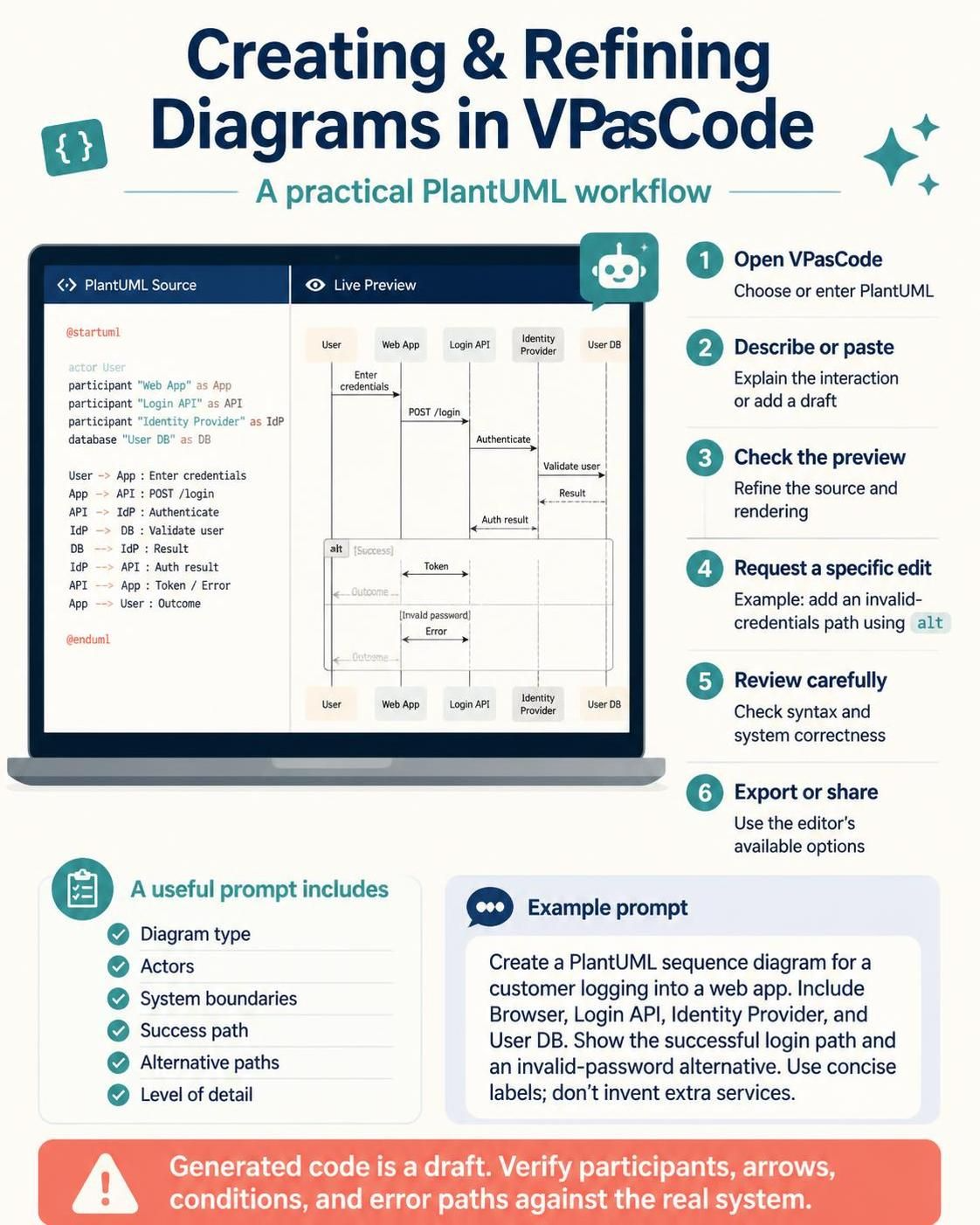
In modern software architecture, visualizing system interactions is just as critical as writing the code itself. Sequence diagrams, which map out the chronological flow of messages between actors and system components, are essential for understanding complex logics like authentication, data processing, and error handling. This tutorial guides you through the workflow of creating, refining, and validating these diagrams using the VPasCode editor, leveraging the power of PlantUML syntax and AI assistance.
The VPasCode Workflow: From Concept to Render
VPasCode transforms the traditional diagramming process by merging code-based syntax with live rendering. Instead of dragging and dropping boxes manually, you define the system behavior using text, which the AI and the engine render instantly. Here is the step-by-step workflow for building a robust sequence diagram.
Step 1: Initialization and Context Setting
The process begins by opening the VPasCode editor. You should immediately establish the context by selecting PlantUML as your source language. This allows you to utilize a highly expressive, human-readable syntax that is specifically designed for UML diagrams.
Step 2: Describing or Pasting the Draft
You can either paste an existing PlantUML draft or use the AI assistant to generate one from a natural language description. A successful prompt acts as the blueprint for your diagram. It should clearly define:
- Diagram Type: Specifying a sequence diagram ensures the timeline and vertical lifelines are set up correctly.
- Actors & Boundaries: Identifying who (User, Browser) and what (Web App, API) are involved.
- Success & Alternative Paths: Outlining the happy path (successful login) and edge cases (invalid credentials).
Step 3: Refining with AI Assistance
One of the most powerful features of VPasCode is the ability to request specific logic changes. For example, if you need to handle an error state, you can ask the AI to “add an invalid-credentials path using alt.” The AI will then modify the source code to introduce the necessary conditional logic blocks.
Step 4: Live Preview and Syntax Correction
As you refine the source code, the editor provides a live preview. This immediate feedback loop allows you to spot layout issues or missing connections instantly. If the AI generates a syntax error, VPasCode’s correction tools can often fix the formatting automatically.
Deep Dive: The PlantUML Sequence Diagram Structure
To truly understand the system architecture, it helps to look under the hood at the code being generated. In a standard authentication flow, we define participants (lifelines) and the messages exchanged between them.
Consider the following code structure for a login system involving a Web App, a Login API, an Identity Provider (IdP), and a User Database:
@startuml
actor User
participant "Web App" as App
participant "Login API" as API
participant "Identity Provider" as IdP
database "User DB" as DB

' The Happy Path
User -> App : Enter credentials
App -> API : POST /login
API -> IdP : Authenticate
IdP -> DB : Validate user
DB --> IdP : Result
IdP --> API : Auth result
API --> App : Token / Error
App --> User : Outcome

' The Alternative Path (Invalid Password)
alt [Invalid Password]
    IdP --> API : Error
    API --> App : Token / Error
    App --> User : Error Message
end

@enduml
Key Concepts in the Code:
participant/database: These define the vertical lines (lifelines) that represent the system components.User-> App: A solid arrow with a label represents a synchronous message (a request that expects a response).--> API: A dashed arrow represents a return message.alt: This block groups conditional logic. Anything inside thealtblock only happens if the condition (e.g., [Invalid Password]) is met.
Best Practices: Validating System Correctness
While AI tools are incredibly efficient at generating plausible code, the “Generated code is a draft” warning in the VPasCode interface is not to be ignored. AI models are trained on vast datasets of plausible logic, but they do not know your specific business rules.
Always review the generated diagram against the actual system requirements. Ensure that:
- Participants are accurate: Does the diagram match the actual microservices or modules you have?
- Arrows represent the right protocol: Are you using synchronous calls where asynchronous callbacks are actually required?
- Error paths are comprehensive: Did the diagram cover the specific failure mode you intended to test?
Conclusion
By combining the flexibility of VPasCode with the precision of PlantUML, you can rapidly prototype system interactions. Whether you are documenting a legacy system or designing a new architecture, this AI-assisted workflow ensures that your diagrams remain up-to-date, accurate, and syntactically correct.