
Mastering Healthcare Workflows: Hospital Flowcharts with Visual Paradigm
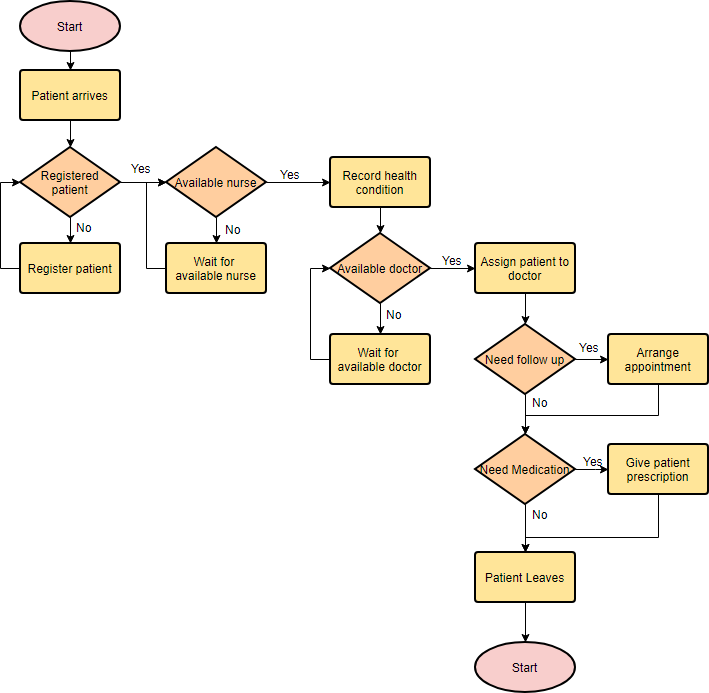
In the complex ecosystem of modern healthcare, efficiency is not just a goal—it is a critical component of patient safety. The image provided depicts a standard yet vital Hospital Service Flowchart. This diagram maps out the logical journey of a patient from the moment they arrive at the clinic until they leave, highlighting the critical decision points that determine the quality of care.
As a technical tutor, I will walk you through the architecture of this diagram, breaking down the specific modeling symbols used, the logic flow, and how tools like Visual Paradigm can be utilized to design, simulate, and optimize these complex processes.
1. Decoding the Symbols: The Anatomy of the Diagram
Before analyzing the flow, we must understand the grammar of the diagram. This flowchart utilizes the standard ANSI/ISO symbols for flowcharting. Let’s break down the components visible in the hospital process:
- Terminators (Pink Ovals): Representing the Start and End points. In this diagram, the “Start” oval initiates the flow, while the final “Start” (which functions as a Stop) marks the patient leaving.
- Process Steps (Yellow Rectangles): These represent specific actions or operations. Examples include “Patient arrives,” “Register patient,” and “Give patient prescription.” These are the tangible tasks performed by the hospital staff.
- Decision Points (Orange Diamonds): These are the heart of the logic. A decision diamond asks a question (e.g., “Registered patient?”) and directs the flow based on the answer. In this diagram, you will notice the distinct Yes and No paths branching out from these shapes.
2. Tracing the Logic: The Patient Journey
Let’s trace the path of a patient through this system architecture. The flow is linear but introduces several branching scenarios based on real-world conditions.
Step A: Intake and Triage
The process begins when the Patient arrives. The first logical gate is the “Registered patient” decision.
- If No: The flow loops to the “Register patient” process. This is a common pattern in system design known as a loop-back, ensuring data integrity before proceeding.
- If Yes: The process advances to check nurse availability.
Step B: Resource Allocation
The flowchart introduces a resource check with the “Available nurse” diamond. This represents a constraint in the system.
- If No: The system enters a wait state (“Wait for available nurse”). This models the queuing logic essential for understanding bottlenecks in healthcare.
- If Yes: The nurse records the health condition, and the patient moves to the doctor’s queue (“Available doctor”).
Step C: Diagnosis and Treatment
Once the patient sees a doctor, the flow splits into post-visit protocols:
- Follow-up Logic: The “Need follow up” decision determines if an appointment must be arranged. If yes, the appointment is set, and the flow merges back with the discharge path.
- Medication Logic: The “Need Medication” decision determines if a prescription is required. If yes, the doctor writes the prescription; if no, the patient proceeds directly to leave.
3. Technical Implementation: Modeling with Visual Paradigm
Creating a flowchart like this manually is time-consuming and prone to layout errors. In professional software engineering and business process management, we use Visual Paradigm (VP) to handle this modeling. VP allows for automatic layout algorithms, which is crucial when dealing with complex logic like the loops found in the “Register patient” or “Wait for available nurse” sections.
When designing this in Visual Paradigm, you would typically use the “Flowchart” diagram type. The tool enforces the syntax rules of the chosen notation (e.g., BPMN or Standard Flowchart), ensuring that every diamond has exactly two outgoing paths (Yes/No) and that all processes are connected correctly.
To simulate this process in VP, you can use the VPasCode feature or the built-in simulator. This allows you to “run” the diagram to see how long a patient might wait in the “Wait for available nurse” queue, providing data-driven insights for hospital management.
Conclusion
This flowchart is more than just a picture; it is a blueprint for operational efficiency. By understanding the decision logic—specifically how the system handles “No” paths through loops and waits—we can identify where the hospital process might break down. Whether you are a developer, a business analyst, or a healthcare administrator, mastering these modeling concepts using tools like Visual Paradigm is essential for optimizing system performance.