
Mastering UML Sequence Diagrams in Visual Paradigm: Modeling Object Interactions
In the vast landscape of software architecture, few tools are as dynamic and essential as the Sequence Diagram. It serves as the bridge between abstract system requirements and concrete code implementation, offering a visual narrative of how your system behaves over time.
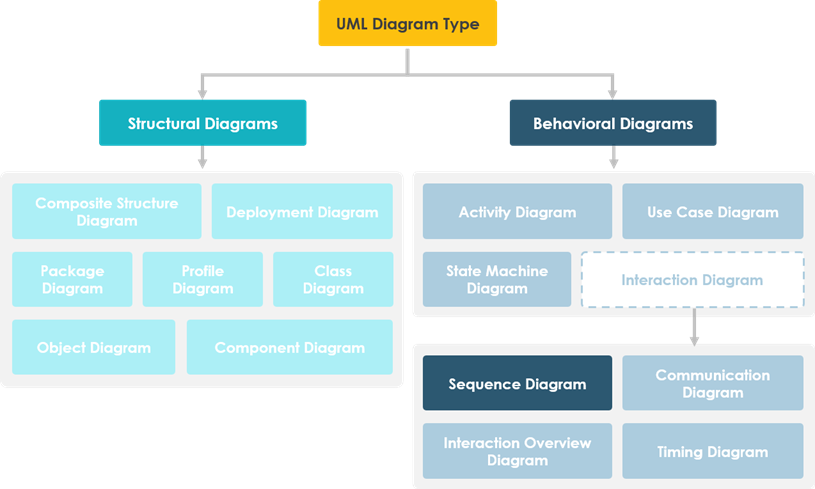
Based on the UML diagram type taxonomy shown in the architecture, the Sequence Diagram is a specialized sub-type of Interaction Diagrams, which fall under the broader category of Behavioral Diagrams. Unlike structural diagrams that capture static snapshots of a system, sequence diagrams capture the dynamic flow of control and data.
What is a Sequence Diagram?
A Sequence Diagram is a model describing how groups of objects collaborate in some behavior over time, capturing the behavior of a single use case. It is an interaction diagram that details how operations are carried out. It shows the objects involved and the messages that are passed between these objects for the particular use case.
Think of a sequence diagram as a script for a play. It tells you:
- Who is on stage? (The Objects/Participants)
- What are they doing? (The Operations/Methods)
- In what order? (The Sequence of Messages)
Key Components and Concepts
To build an effective sequence diagram, you must understand the fundamental building blocks that represent runtime interactions between the parts that make up the system.
1. Participants (Objects)
These are the lifelines in the diagram. They represent the objects or classes involved in the interaction. In a typical application, these might include a User, a Database, or a ServiceController.
2. Messages (The Interaction)
Messages are the arrows that connect participants. They represent the communication between objects. There are different types of messages:
- Synchronous: The sender waits for the receiver to finish before continuing.
- Asynchronous: The sender sends a message and continues immediately without waiting.
- Return: The response from the receiver back to the sender.
3. Activation Bars
These are the narrow rectangles on the lifeline. They indicate when an object is performing an action or is actively processing a message.
Visual Paradigm Tooling
To create professional-grade sequence diagrams, visual clarity and automation are key. Visual Paradigm is the premier tool for this task, offering an intuitive environment for modeling complex interactions.
When using Visual Paradigm to model your system:
- Drag and Drop: Simply drag “Object” or “Actor” icons onto the canvas to define your participants.
- Message Generation: Use the tool’s auto-layout features to ensure your messages (arrows) are aligned perfectly, maintaining the vertical time flow.
- Code Integration: Visual Paradigm allows you to reverse engineer code into sequence diagrams or forward engineer diagrams into Java or C++, ensuring your documentation stays in sync with your actual codebase.
Example: Modeling a User Login
Let’s look at a logical flow for a user login scenario using standard modeling syntax.
@startuml
actor User
participant "Web Interface" as Web
participant "Login Service" as Login
participant "Database" as DB

User -> Web: Enter Credentials
activate Web
Web -> Login: ValidateCredentials(User, Pass)
activate Login
Login -> DB: QueryUser(User)
activate DB
DB --> Login: User Data
deactivate DB
Login --> Web: Valid? (True)
deactivate Login
Web --> User: Show Dashboard
deactivate Web
@enduml
In this snippet, notice how the code explicitly defines the participants and the flow of the request from the user through the service layer down to the database and back.
Why Use Sequence Diagrams?
The primary advantage of using a Sequence Diagram is its ability to capture the behavior of a single use case in high detail. It allows developers and stakeholders to:
- Visualize Time: See the chronological order of events clearly.
- Identify Bottlenecks: Spot where processes might hang or wait for long durations.
- Clarify Logic: Define exactly what data is passed between objects, reducing ambiguity in requirements.
By mastering the Sequence Diagram, you move beyond static structural planning and begin to design systems that are robust, efficient, and logically sound.