
Mastering BPMN 2.0 Swimlanes and Gateways: A Visual Paradigm Tutorial
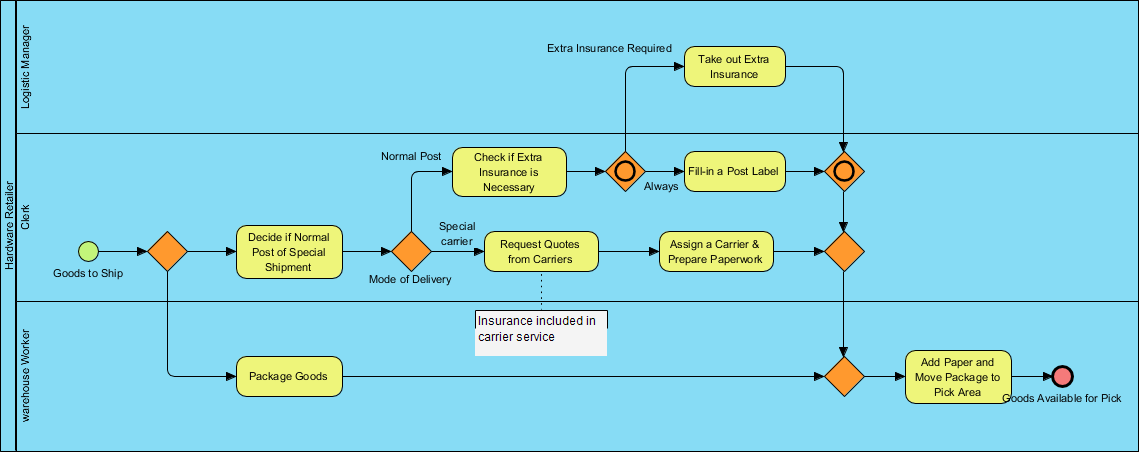
Business Process Model and Notation (BPMN) is the industry standard for visualizing business processes. It acts as a universal language, bridging the gap between business stakeholders and technical teams. In this tutorial, we will dissect a complex “Order Fulfillment” scenario to understand how to model parallel workstreams, decision logic, and synchronization using the Swimlane pattern.
The Power of Swimlanes
The most fundamental structural element in a BPMN diagram is the Swimlane. Swimlanes represent the organizational structure or the specific role responsible for executing a task. By visually segregating activities, we clarify exactly “who” does “what.”
In our example scenario, we have three distinct participants, each occupying their own lane:
- Warehouse Worker: Responsible for the physical handling of the goods.
- Hardware Retailer Clerk: The operational hub that manages shipping logistics and carrier selection.
- Logistic Manager: Oversees high-value shipping requirements and insurance.
This separation allows the process to flow logically from one department to another without confusion regarding responsibilities.
Step-by-Step: Modeling the Process Flow
1. Initiation and Parallel Splitting
The process begins when a “Goods to Ship” event is triggered. Immediately, the flow encounters an Inclusive Gateway (the diamond shape with the ‘X’ inside). This gateway acts as a decision point. It splits the flow into two parallel paths:
- Path A (Clerk): The clerk begins the logistics planning by deciding if the shipment is “Normal Post” or “Special Shipment.”
- Path B (Warehouse): Simultaneously, the Warehouse Worker is notified and begins the task “Package Goods.”
2. Decision Logic and Routing
Inside the Clerk’s lane, the process navigates through a series of gateways. The first decision (in the Hardware Retailer Clerk lane) asks: “Decide if Normal Post or Special Shipment”.
This is a critical junction where the path diverges based on the “Mode of Delivery”:
- Special Carrier: If the delivery is special, the flow branches to “Request Quotes from Carriers” and then “Assign a Carrier & Prepare Paperwork”.
- Normal Post: If it is standard post, the flow branches to “Check if Extra Insurance is Necessary”.
3. Handling Complex Conditions (Insurance)
The “Check if Extra Insurance is Necessary” task leads to another Inclusive Gateway. This gateway evaluates the condition:
- If Extra Insurance Required: The flow moves up to the Logistic Manager‘s lane to “Take out Extra Insurance”.
- If Always (meaning no extra insurance needed): The flow proceeds directly to “Fill-in a Post Label”.
4. Parallel Synchronization (Joining the Lanes)
The most challenging part of BPMN is ensuring that parallel tasks complete before the process continues. In our diagram, we see multiple Parallel Gateways (diamonds with a plus sign or cross, depending on the specific notation version, but functionally acting as a synchronization point).
The process must wait for three specific streams to converge before proceeding:
- The completion of the “Package Goods” task by the Warehouse Worker.
- The completion of the “Assign a Carrier & Prepare Paperwork” task.
- The completion of the “Fill-in a Post Label” task (which itself waited for the insurance decision).
Once these three streams meet at the final synchronization gateway, the process is ready for the final step.
5. Final Execution and Termination
With all parallel tasks synchronized, the flow moves to the final task: “Add Paper and Move Package to Pick Area”. This task is likely a hand-off where the paperwork and the physical package are combined. The process concludes with a End Event (red circle), signaling that the goods are “Available for Pick”.
Tooling: Visual Paradigm
To create and manage complex diagrams like the one above, you need robust modeling software. Visual Paradigm is the industry-leading tool for BPMN 2.0 design.
- Drag-and-Drop Interface: Easily create Swimlanes by dragging a “Pool” onto the canvas and adding “Lanes” for each role (Warehouse, Clerk, Manager).
- Smart Connecting: Visual Paradigm automatically detects valid connections. If you try to connect a Task to a Gateway without a flow object, it will warn you.
- Gateway Configuration: Double-click any gateway to define the specific conditions (e.g., setting the “Normal Post” condition to “true” and the “Special Carrier” condition to “false”).
- Validation: Use the “Process Validator” feature to ensure your diagram is syntactically correct and that all paths have a valid start and end.
By leveraging Visual Paradigm, you can transform the logic described above into a professional-grade BPMN diagram ready for execution.