


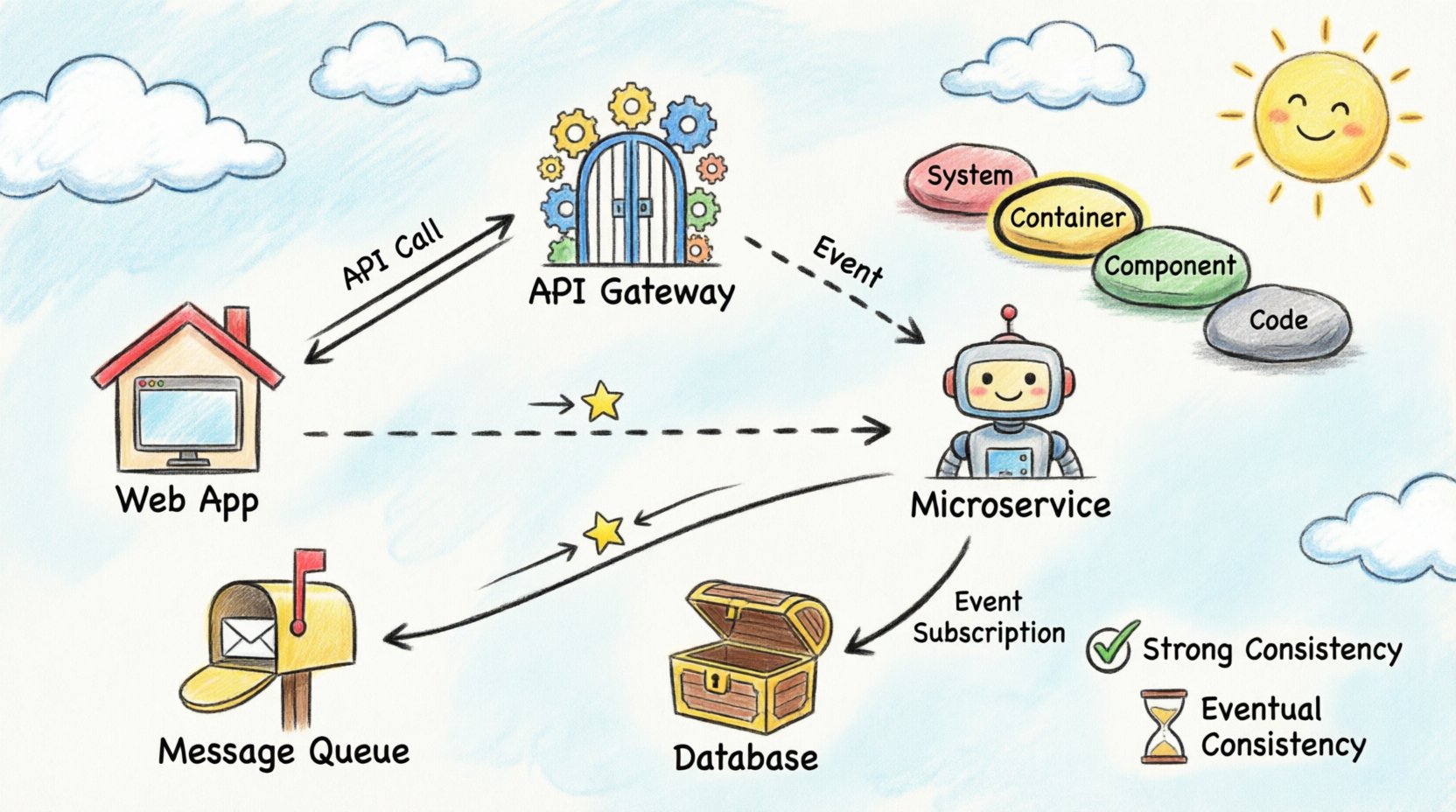
Introduction
In modern software engineering, systems rarely exist as monolithic entities. They are composed of multiple services, processes, and storage units that interact across network boundaries. Understanding how information moves between these distinct units is critical for maintaining system integrity, diagnosing failures, and planning for scalability.
This comprehensive guide explores the process of mapping and visualizing data flow within distributed architectures, specifically utilizing the C4 model as a structural framework. Without clear documentation, distributed systems quickly become black boxes. Engineers struggle to trace requests, identify bottlenecks, or understand the impact of changes. Visualizing the movement of data provides clarity, transforming abstract logic into concrete diagrams that stakeholders can interpret.
With the advent of AI-powered tools like Visual Paradigm’s C4 Studio, creating and maintaining these critical architectural diagrams has become more accessible and efficient than ever before. This guide will walk you through both the theoretical foundations and practical implementation strategies for effective distributed system visualization.
The Architecture Landscape 🌍
Distributed systems introduce complexity that monolithic applications do not face. When a single process handles all logic, data flow is internal and linear. When multiple containers or services are involved, data traverses networks, passes through firewalls, and crosses trust boundaries. Each hop introduces latency and potential points of failure.
The Need for Standardization
Visualizing this landscape requires a standardized approach. Ad-hoc diagrams often lead to inconsistency. One engineer might draw a database as a cylinder, while another uses a box. Standardization ensures that when a diagram is viewed, its meaning is immediately understood. The C4 model provides this standardization by defining specific levels of abstraction.
Key Challenges in Distributed Visualization
When mapping distributed systems, engineers must address several critical challenges:
-
Network Latency: Visualizing where data waits in queues or networks
-
Data Consistency: Showing how state is synchronized across nodes
-
Failure Domains: Identifying what happens if one container stops responding
-
Security Boundaries: Marking where data encryption or authentication is required
These challenges require careful consideration during the diagramming process to ensure the visualization accurately represents system behavior under various conditions.
Understanding the C4 Model 📐
The C4 model is a hierarchy of diagrams used to describe software architecture. It consists of four levels, each serving a different audience and purpose. For data flow visualization across containers, the Container and Component levels are the most relevant.
Level 1: System Context
This high-level view shows the system as a single block and its interactions with external users and systems. It answers the question: “What does this system do, and who uses it?”
While useful for providing context to non-technical stakeholders, this level does not show internal data flow between containers. It’s ideal for executive summaries and project overviews.
Level 2: Containers
This is the core of distributed visualization. A container represents a distinct unit of deployment. Examples include:
-
Web applications
-
Mobile apps
-
Microservices
-
Data stores
This level illustrates how data flows between these units. It is the ideal place to map:
-
API calls
-
Message queues
-
Direct database connections
-
Service-to-service communication
Level 3: Components
Within a container, components represent distinct parts of the software. This level dives deeper into the logic, showing:
-
Internal class interactions
-
Module dependencies
-
Component relationships
While important for development teams, this level is often too detailed for high-level data flow analysis and architectural reviews.
Level 4: Code
This level maps to specific classes and methods. It is generally unnecessary for architectural flow documentation and is better suited for developer-specific reference materials and code navigation tools.
Defining Container Boundaries 🚧
Before drawing data flow lines, you must define what constitutes a container. A container is a deployable unit with a lifecycle independent of other containers. It may run on the same physical server or be distributed across different regions.
Common Container Types
| Container Type | Description | Examples |
|---|---|---|
| Web Applications | Frontend interfaces accessed via browsers | React apps, Angular SPAs |
| Microservices | Backend services handling specific business logic | Order service, User service |
| API Gateways | Entry points that route traffic to internal services | Kong, AWS API Gateway |
| Data Stores | Databases, caches, or file systems | PostgreSQL, Redis, S3 |
| Batch Processes | Scheduled jobs that process data asynchronously | ETL jobs, Report generators |
Deployment Strategy Considerations
When defining boundaries, consider the deployment strategy:
-
Coupled Deployment: If two services are always deployed together and share memory, they may be part of a single container
-
Independent Scaling: If services can be scaled independently, they should be separate containers
This decision directly impacts how data flow is visualized and understood. Clear boundaries prevent confusion about service responsibilities and deployment characteristics.
Mapping Data Flow Patterns 📡
Data flow is not merely a line connecting two boxes. It represents a specific interaction pattern. Understanding the pattern is crucial for accurate visualization.
Common Data Flow Patterns
| Pattern | Direction | Visibility | Use Case |
|---|---|---|---|
| Synchronous Request/Response | Two-way (Client → Server → Client) | Immediate | API calls, Form submissions |
| Asynchronous Fire-and-Forget | One-way (Client → Server) | Deferred | Logging, Analytics events |
| Pull-Based Processing | One-way (Worker ← Queue) | On Demand | Background jobs, Data ingestion |
| Event Subscription | One-way (Publisher → Subscriber) | Event Triggered | Notifications, State changes |
Synchronous Communication
In synchronous flows, the sender waits for a response. This is common in API interactions.
Visualization Guidelines:
-
Use solid lines with arrowheads
-
Indicate both request and response directions
-
Label the protocol used (HTTP, gRPC, GraphQL)
-
This helps engineers understand the blocking nature of the interaction
Example: A web application making a REST API call to a user service would show a solid bidirectional arrow labeled “HTTPS/JSON”.
Asynchronous Communication
Asynchronous flows decouple the sender from the receiver. The sender places a message in a queue and continues. The receiver processes the message later.
Visualization Guidelines:
-
Use dashed lines or distinct icons
-
Represent the message broker explicitly
-
Indicate the queue name to distinguish between different data streams
-
Show direction clearly with unidirectional arrows
Example: An order service publishing to a message queue would show a dashed arrow to a queue icon labeled “orders.events”.
Managing Synchronization and Consistency ⚖️
One of the most difficult aspects of distributed data flow is state management. When data is written to one container, does it immediately reflect in another? Visualization must capture these consistency requirements.
Strong Consistency
Some systems require that all nodes see the same data at the same time. This often implies:
-
A single source of truth
-
Synchronous replication
-
Transaction coordination
Diagram Notation:
-
Mark connections with labels indicating “Strong Consistency” or “ACID”
-
This alerts stakeholders that downtime in one part of the system may affect others
-
Use solid, prominent lines to indicate critical consistency requirements
Eventual Consistency
Many distributed systems prioritize availability over immediate consistency. Data may take seconds or minutes to propagate.
Diagram Notation:
-
Add a time indicator or “Sync” label with delay notation
-
Example: “Sync < 5min” or “Eventual (Δt ≈ 30s)”
-
This manages expectations regarding when users will see updated information
Stateless vs. Stateful Containers
Understanding container state characteristics is essential for accurate data flow mapping:
Stateless Containers:
-
Do not store data locally
-
Rely on external databases or caches
-
Can be scaled horizontally without data migration
-
Flow lines should point to external storage
Stateful Containers:
-
Hold data within their own storage
-
Require careful consideration for scaling and failover
-
Flow lines should point to storage icons within or attached to the container
When mapping flow, ensure external storage is clearly separated from the container. If a container stores data, the flow line should point to a storage icon within or attached to that container.
Documentation Maintenance Strategies 📝
A diagram is only useful if it is accurate. Over time, code changes, new services are added, and deprecated services are removed. Static diagrams become obsolete quickly. A strategy for maintenance is required.
Best Practices for Keeping Documentation Current
1. Automated Generation
Where possible, generate diagrams from:
-
Code annotations
-
Configuration files
-
Infrastructure-as-code definitions
Benefits:
-
Reduces manual effort
-
Prevents drift between code and documentation
-
Ensures consistency across the system
Tools to Consider:
-
Structurizr
-
PlantUML
-
Mermaid.js with CI/CD integration
2. Review Cycles
Include diagram updates in the definition of done for pull requests:
-
If a service interface changes, the diagram must change
-
Require diagram review alongside code review
-
Assign documentation ownership to specific team members
3. Versioning
Treat architecture diagrams as code:
-
Store them in version control systems (Git)
-
Track history and enable rollback if a change is incorrect
-
Use meaningful commit messages for diagram changes
-
Tag releases with corresponding diagram versions
4. Tooling Standards
Use a consistent tooling stack across teams:
-
Avoid switching between different diagramming platforms
-
Establish organization-wide standards
-
Provide training and templates
-
Create a central repository for all architecture diagrams
Common Pitfalls and How to Avoid Them 🛑
Even with a structured approach, errors can occur during the visualization process. Being aware of common mistakes helps maintain high-quality documentation.
Pitfall 1: Over-Abstraction
The Problem:
It is tempting to simplify diagrams too much. If you group ten services into a single box labeled “Backend”, you lose the ability to trace specific data paths.
The Solution:
-
Maintain the granularity of the Container level
-
Do not merge distinct deployment units unless they share the exact same lifecycle
-
Ask: “Can this be deployed independently?” If yes, it deserves its own box
Pitfall 2: Ignoring Failure Paths
The Problem:
Most diagrams show the happy path where everything works.
The Solution:
A robust visualization also indicates failure modes:
-
Where does the flow go if a service times out?
-
Is there a fallback service?
-
Is there a dead-letter queue?
-
Add these paths to make the diagram a tool for resilience planning
Notation Suggestions:
-
Use different colors for failure paths (red or orange)
-
Label retry mechanisms and circuit breakers
-
Show fallback destinations clearly
Pitfall 3: Inconsistent Naming
The Problem:
Using different terminology for services in the diagram versus the codebase creates confusion during debugging sessions.
The Solution:
-
Use the exact same terminology for services in the diagram as in the codebase
-
If a service is called “Order-Service” in the code, do not label it “Orders API” in the diagram
-
Create a naming convention document and enforce it
Pitfall 4: Missing Data Types
The Problem:
A line between two containers tells you that data moves, but not what data moves.
The Solution:
Annotate the lines with the data payload type:
-
“JSON Payload”
-
“Binary Image”
-
“CSV Batch”
-
“Protobuf Messages”
This informs engineers about the complexity of processing required at the receiving end and helps identify serialization/deserialization overhead.
Best Practices for Scalable Documentation 📈
As the system grows, the diagram can become cluttered. Managing complexity is an ongoing task.
Strategy 1: Layering
Use different layers for different concerns:
-
Layer 1: Security boundaries and authentication flows
-
Layer 2: Data flow and service interactions
-
Layer 3: Deployment topology and infrastructure
Avoid drawing all of these on a single page. Provide separate views for different audiences and purposes.
Strategy 2: Links to Details
If a container is complex:
-
Create a separate sub-diagram for it
-
Link the main diagram to the detailed view
-
Avoid drawing every component on the overview page
-
Use a drill-down approach: Context → Containers → Components → Code
Strategy 3: Color Coding
Use color to indicate status or criticality:
| Color | Meaning |
|---|---|
| Red | Critical paths, high-priority flows |
| Blue | Standard flows, normal operations |
| Grey | Deprecated connections, legacy systems |
| Green | New or recently updated flows |
| Orange | Warning areas, potential bottlenecks |
This allows for quick visual scanning of the system health and priorities.
Strategy 4: Metadata
Include essential metadata in every diagram:
-
Version number of the diagram
-
Date of last review
-
Owner/maintainer name or team
-
Status (Draft, Review, Approved, Deprecated)
Place this information in the footer of the document to provide context for how current the information is.
Integrating with Observability Platforms 🔍
Static diagrams are static. Real systems are dynamic. Modern architectures integrate diagrams with observability platforms. This means the diagram is not just a picture, but a live interface.
Connecting Diagrams to Monitoring Data
When visualizing data flow, consider how the diagram relates to monitoring data:
The Challenge:
If you see high latency on a specific connection in the monitoring tool, the diagram should clearly show that connection.
The Solution:
-
Ensure linkage helps in root cause analysis
-
Engineers should be able to click a line on the diagram and see current metrics for that link
-
Integrate with tools like Prometheus, Grafana, Datadog, or New Relic
Implementation Approaches
-
Interactive Diagrams:
-
Use tools that support clickable elements
-
Embed monitoring widgets directly in diagrams
-
Link diagram elements to dashboards
-
-
API-Driven Updates:
-
Fetch real-time metrics from observability platforms
-
Update diagram annotations automatically
-
Highlight problematic paths based on alert thresholds
-
-
Hybrid Approach:
-
Maintain static structure for stability
-
Overlay dynamic metrics for current state
-
Use color coding to indicate health status
-
Requirements for Integration
This integration requires that:
-
The diagram format supports embedding or linking to external data sources
-
The chosen diagramming method allows for flexibility without requiring manual updates every time a metric changes
-
Authentication and access controls are properly configured
-
Performance impact is minimized
Leveraging Visual Paradigm’s AI-Powered C4 Tools 🤖
Visual Paradigm has revolutionized the way teams approach software architecture documentation through its comprehensive suite of AI-powered C4 modeling tools. These tools address many of the traditional challenges associated with creating and maintaining architecture diagrams.
Visual Paradigm’s C4 Diagram Tool
Visual Paradigm’s dedicated C4 Diagram Tool provides a specialized environment for creating clear, scalable, and maintainable system diagrams. The tool supports all four levels of the C4 model natively, allowing teams to seamlessly navigate between different levels of abstraction.
Key Features:
-
Native C4 Support: Built-in shapes and notations specifically designed for C4 modeling
-
Multi-Level Navigation: Easy drilling down from Context to Code level
-
Consistency Enforcement: Automatic validation of C4 modeling rules
-
Export Flexibility: Multiple output formats including PDF, PNG, and interactive HTML
AI-Powered C4 PlantUML Studio
One of Visual Paradigm’s most powerful offerings is the AI-powered C4 PlantUML Studio, which combines the flexibility of PlantUML’s text-based diagramming with artificial intelligence capabilities.
How It Works:
-
Natural Language Input: Describe your architecture in plain English
-
AI Processing: The AI interprets your description and understands the relationships
-
Automatic Generation: C4 diagrams are generated automatically in PlantUML format
-
Iterative Refinement: Use conversational AI to modify and refine diagrams
Benefits:
-
Speed: Generate complex diagrams in minutes instead of hours
-
Accessibility: No need to learn complex diagramming syntax
-
Consistency: AI ensures consistent application of C4 modeling principles
-
Version Control Friendly: Text-based PlantUML files work seamlessly with Git
AI Chatbot for Diagram Generation and Modification
Visual Paradigm’s AI chatbot takes architecture documentation to the next level by providing an interactive, conversational interface for creating and modifying C4 diagrams.
Use Cases:
-
Initial Diagram Creation: “Create a C4 container diagram for an e-commerce system with microservices”
-
Incremental Updates: “Add a payment service container that communicates with the order service”
-
Refactoring Support: “Split the monolithic user service into authentication and profile services”
-
Documentation Enhancement: “Add data flow labels showing JSON payloads between services”
Real-World Application:
Teams can integrate the AI chatbot into their development workflow, allowing architects and developers to maintain documentation as naturally as they write code. The chatbot understands context and can make intelligent suggestions about container boundaries, data flow patterns, and consistency models.
Automating the C4 Modeling Lifecycle
Visual Paradigm’s AI tools enable automation across the entire C4 modeling lifecycle:
1. Discovery Phase:
-
AI analyzes existing codebases and infrastructure configurations
-
Suggests initial container boundaries based on deployment patterns
-
Identifies potential microservices from monolithic applications
2. Design Phase:
-
Generates diagrams from architectural decision records
-
Validates design patterns against best practices
-
Suggests improvements for scalability and resilience
3. Implementation Phase:
-
Syncs diagrams with Infrastructure-as-Code files
-
Updates diagrams automatically when services are added or removed
-
Maintains consistency between code and documentation
4. Maintenance Phase:
-
Detects drift between diagrams and actual system architecture
-
Suggests updates when new dependencies are introduced
-
Provides impact analysis for proposed architectural changes
Integration with DevOps and Cloud Teams
For DevOps and cloud-native teams, Visual Paradigm’s AI-powered C4 tools provide specific advantages:
Cloud Architecture Visualization:
-
Automatic generation of diagrams from cloud provider configurations (AWS, Azure, GCP)
-
Visualization of serverless architectures and container orchestration
-
Mapping of cloud services to C4 containers
CI/CD Pipeline Integration:
-
Automated diagram generation as part of build pipelines
-
Documentation validation gates in deployment workflows
-
Automatic updates when infrastructure changes are deployed
Team Collaboration:
-
Real-time collaboration on architecture diagrams
-
Comment and review workflows integrated with diagram elements
-
Role-based access control for different stakeholder groups
Getting Started with Visual Paradigm’s AI C4 Tools
Step 1: Assessment
-
Evaluate your current documentation practices
-
Identify pain points in maintaining architecture diagrams
-
Determine which C4 levels are most critical for your organization
Step 2: Tool Selection
-
Choose between the full Visual Paradigm suite or specific C4 tools
-
Decide on PlantUML integration based on team preferences
-
Consider AI chatbot access for rapid prototyping
Step 3: Pilot Project
-
Select a representative system for initial modeling
-
Create baseline diagrams at Context and Container levels
-
Train team members on AI-assisted diagram creation
Step 4: Integration
-
Connect diagrams to version control systems
-
Establish review processes for diagram changes
-
Integrate with existing documentation platforms
Step 5: Scaling
-
Expand to additional systems and services
-
Develop organization-wide templates and standards
-
Measure improvements in documentation quality and maintenance effort
Key Takeaways ✅
Visualizing data flow in distributed systems is a discipline that balances technical accuracy with readability. By adhering to the C4 model and leveraging modern AI-powered tools like Visual Paradigm’s C4 Studio, teams can create a consistent language for architecture that evolves with their systems.
Essential Principles
-
Define Boundaries Clearly
-
Ensure containers align with deployment units
-
Each independently deployable service gets its own container
-
Use AI tools to validate boundary decisions
-
-
Map Patterns Explicitly
-
Distinguish between synchronous and asynchronous flows
-
Use appropriate line styles and annotations
-
Show direction and protocol clearly
-
Leverage AI to suggest optimal patterns
-
-
Document Consistency Models
-
Indicate how state is managed across boundaries
-
Specify strong vs. eventual consistency
-
Note synchronization delays where applicable
-
-
Maintain Rigorously with AI Assistance
-
Treat diagrams as living documents that evolve with the code
-
Automate where possible using Visual Paradigm’s AI tools
-
Include in code review processes
-
Use conversational AI for rapid updates
-
-
Focus on Clarity
-
Prioritize accuracy over aesthetics
-
Avoid hype and marketing language
-
Serve the engineering team first
-
Use AI to generate clear, consistent documentation
-
The Power of AI-Enhanced Documentation
The integration of AI tools like Visual Paradigm’s C4 PlantUML Studio and AI Chatbot transforms architecture documentation from a burdensome chore into a seamless part of the development process. Teams can:
-
Reduce Time-to-Documentation: Generate comprehensive diagrams in minutes
-
Improve Accuracy: AI validates consistency and completeness
-
Enhance Collaboration: Natural language interfaces make documentation accessible to all stakeholders
-
Ensure Currency: Automated updates keep diagrams synchronized with code
The Ultimate Goal
The goal is not just to draw lines, but to build a shared understanding of how the system works. Effective data flow visualization, enhanced by AI-powered tools:
-
Reduces cognitive load for engineers
-
Accelerates onboarding for new team members
-
Improves the overall reliability of distributed infrastructure
-
Enables better decision-making during incidents
-
Facilitates architectural discussions and planning
-
Ensures documentation keeps pace with rapid development cycles
By following these principles and leveraging Visual Paradigm’s AI-powered C4 modeling capabilities, engineering teams can transform complex distributed systems into understandable, maintainable, and scalable architectures that stand the test of time.
References
- Visualizing Data Flow Across Distributed System Containers with C4 Model: Educational infographic illustrating data flow patterns, communication styles, and consistency models in distributed architectures using the C4 model framework with child’s drawing style visualization.
- C4 Diagram Tool by Visual Paradigm – Visualize Software Architecture with Ease: This resource highlights a tool that enables software architects to create clear, scalable, and maintainable system diagrams using the C4 modeling technique.
- Ultimate Guide to C4 Model Visualization Using Visual Paradigm’s AI Tools: This guide explains how to leverage artificial intelligence to automate and enhance the visualization of the C4 model for smarter architecture design.
- Leveraging Visual Paradigm’s AI C4 Studio for Streamlined Architecture Documentation: An exploration of the AI-enhanced C4 Studio, which allows teams to create clean, scalable, and highly maintainable software architecture documentation.
- Beginner’s Guide to C4 Model Diagrams: A step-by-step tutorial designed to help beginners create C4 model diagrams across all four levels of abstraction: Context, Containers, Components, and Code.
- The Ultimate Guide to C4-PlantUML Studio: Revolutionizing Software Architecture Design: This article discusses the integration of AI-driven automation with PlantUML’s flexibility to streamline the software architecture design process.
- A Comprehensive Guide to Visual Paradigm’s AI-Powered C4 PlantUML Studio: A detailed guide explaining how this specialized studio transforms natural language into accurate, layered C4 diagrams.
- C4-PlantUML Studio: AI-Powered C4 Diagram Generator: This feature overview describes an AI tool that automatically generates C4 software architecture diagrams directly from simple text descriptions.
- Comprehensive Tutorial: Generating and Modifying C4 Component Diagrams with AI Chatbot: A hands-on tutorial demonstrating how to use an AI-powered chatbot to generate and refine C4 component diagrams through a real-world case study.
- Visual Paradigm Full C4 Model Support Release: An official announcement regarding the inclusion of comprehensive C4 model support for managing architecture diagrams at multiple abstraction levels within the platform.
- C4 Model AI Generator: Automating Diagrams for DevOps and Cloud Teams: This article discusses how conversational AI prompts automate the full C4 modeling lifecycle, ensuring consistency and speed for technical teams.
Related posts:
 Agile Affinity Mapping Planner Review: The Ultimate Tool for Structured Workshop Preparation
Review: Streamlining Software Architecture with the AI-Powered C4 PlantUML Studio
Streamlining Sprint Reviews: A Deep Dive into the Agile Demonstration Session Planner
Review: Streamlining Market Research with the AI-Powered Competitive Analysis Tool
Agile Affinity Mapping Planner Review: The Ultimate Tool for Structured Workshop Preparation
Review: Streamlining Software Architecture with the AI-Powered C4 PlantUML Studio
Streamlining Sprint Reviews: A Deep Dive into the Agile Demonstration Session Planner
Review: Streamlining Market Research with the AI-Powered Competitive Analysis Tool